
This is part of my series on Microsoft Entra ID:
- Entra ID – Deep Dive – The Basics – Part 1
- Entra ID – Deep Dive – Protocol Primer – Part 2
- Entra ID – Deep Dive – Entra ID Authentication – Part 3
- Entra ID – Deep Dive – Workload Identity Federation – Bonus
Hello again!
I’ve been on an identity kick lately given all the chatter around IAM (identity access management) that has popped up as the industry tries to figure out how the hell they’re going to handle the disruption to existing IAM systems with the introduction of AI agents in the enterprise. This has raised more conversation within my customer base, with cross cloud identity being a hot topic. Recently, a customer asked me about Entra ID’s Workload Identity Federation feature. I hadn’t mucked with the feature much beyond reading a bit of the documentation, but given the increase in cross-cloud conversations and the customer ask, it seemed like the perfect time to do it! Hence this blog post!
Let’s get to it, shall we?
What is the problem this feature solves?
It’s this old dude’s take that the high-level question Entra ID WIF (workload identity federation) seeks to answer is, “How do we effectively allow two systems in different organizational or trust boundaries to communicate while allowing each boundary to retain control of its identity system?” This is not a new problem. If you’ve been around the block for a few decades, you’ve likely built federated solutions like Windows Active Directory trusts or federated trusts with SAML (security assertion markup language). Each of those solutions had similar goals which included things like:
- Simplify security by letting each organization be the authority over its human and non-human identities.
- Make it easier for the user by not saddling them with 100 identities and passwords to remember.
- Reduce costs by keeping avoiding having to build complex systems to maintain all those duplicate identities and the support personnel to manage them.
So yeah, the obvious stuff, right?
As cloud was adopted the problem grew in scale as organizations integrated with CSPs (cloud service providers) and demand around B2B collaboration drastically increased. SAML and OIDC made the human identity problem a small bit easier (notice I said bit, so don’t flame me!) to solve, but the non-human, or the machine, identity problem caused bloat in identities. Systems needed to interact and sometimes these systems were in different boundaries. This could be on-premises, sometimes in AWS, GCP, or Azure. You might have a AWS Lambda pulling data from a Microsoft Cloud API, GCP BigQuery grabbing data from both clouds, Kubernetes cluster pulling data from an Azure Storage Account, or an Azure Data Factory ripping data down from an Amazon S3 bucket. All this cross cloud hoopla meant lots of machine identities and credentials floating around.
The classic way to solve this problem for the AWS to Azure looked something like this:

Here, the Lambda would obtain a temporary credential from the AWS STS based on an IAM role it was assigned, pass that credential to AWS Secrets Manager to grab a secret which contain a Entra ID service principal client secret. It would then use that secret to authenticate to Entra ID as the service principal to obtain an access token issued by Entra ID which it would pass to access a blob in Azure Storage.
The above pattern is still incredibly common in enterprises today. It works no doubt, but there is that credential you gotta manage. Its usage has to be monitored, its lifecycle has to be tracked, it has to be rotated in Entra ID and updated in AWS Secrets Manager, it could get compromised by an attacker and used to exfiltrate data from Azure Storage, etc etc. Now scale this by multiple clouds and thousands of applications and you quickly see the challenge.
Years ago some smart folks across the industry came up with the concept of WIF to help address this problem.
You’re on Matt Felton’s blog so you’ll suffer with a Matt Felton explanation. WIF is all about eliminating that static secret and letting the workload provide some type of token issued by a trusted party (identity provider) to prove its identity to the trusting party (relying party). If you’re familiar with federation for user identities this should sound very familiar. Elimination of that static secret is where the money is at. No more operational overhead of managing thousands of secrets which be expire or be compromised.
All of this likely makes sense to you. Let’s take a look at how Microsoft implemented it.
How does Entra ID Workload Identity Federation work?
Before we get into the guts of how this works, it’s important to understand some core Entra ID concepts.
In Entra ID there are three main categories of identity: user identities, device identities, and workload identities. Given the feature is called WIF, you can probably figure out that last category is what we’re concerned with. These are identities that will be associated to some application, script, container, agent, etc. In the Entra world all of these things are represented by the core object class of a service principal. There are many types of service principals in Entra, but the two most relevant to our conversation are the application and managed identity types.
Service principals of type application are machine identities associated with an application resource. If you’re unfamiliar with the differences between a service principal and application resource take a read through my first post in my Entra series for the gory details. The main thing to understand is the application is the “template” representation of an application across all of Entra ID while the service principal is the identity of the application in a specific Entra ID tenant. The application resource (you’ll almost always hear it referred to as the application registration) is responsible for authentication of the application to Entra while the service principal is the associated identity that is granted permissions to do stuff within the tenant.
A service principal of type managed identity is the identity associated with an Azure managed identity. Managed identities are Azure’s version of an AWS IAM Role. Like an AWS IAM Role, the credential for the identity is managed by the CSP (in this case Microsoft) and workloads associated with a managed identity obtain temporary credentials (called access tokens in the Azure world) to access Azure resources.
Entra WIF can be enabled for either of the application resource or the managed identity. My personal take is if your use case is to simply consume Azure resources, create a managed identity representing your app in the other cloud. This way you can slap it in a resource group in some Azure subscription alongside the resources it is consuming or other resources that may be pieces of that application in Azure. If your use case is consuming Azure in addition to other APIs (such as the MS Graph API) that are protected by Entra use an application resource. Using an application resource will give you more visibility across all of Entra that you have some application that is consuming multiple pieces of the Microsoft cloud. You can technically grant access to something like the MS Graph API to a managed identity, but it’s not as intuitive or visible.
Once you determine whether you’re going to use an application resource or managed identity you’ll need to configure Entra ID to trust the external IdP (identity provider) so that when it receives tokens from your workload that were issued by the external IdP it can validate them and issue an access token from Entra. The high level flow looks like the below.

The process works in the following way. The workload obtain an access token from its IdP. For example, this could be the AWS STS, GCP’s authorization server, or another IdP using the SPIFFE (Secure Production Identity Framework for Everyone) standard. Once the token is issued, the workload sends that token to Entra ID which verifies it cryptographically using keys pulled from an endpoint exposed by the IdP. Once verified, Entra ID issues an access token to the workload which it can use to call the Azure service.
If you’re like me, you probably want to see an example. Well lucky for you, I got one!
Entra ID Workload Identity Federation in Action
To demonstrate this feature I’m going to use a managed identity for my workload instead of an application resource because it’s a quicker setup. My use case is I have an EC2 instance in AWS that needs to pull data from a storage account in Azure. My architecture is super basic and pictured below.

The first step in is to setup AWS outbound federation for my AWS account. This will activate the STS’s capability of issuing tokens to external relying parties.

Next, I’ll need to create an AWS IAM Policy which will grant permissions to obtain tokens from the STS for a specific relying party. For that, I crafted the super basic IAM policy below. This policy grants permission to the security principal the policy is associated with to request tokens from the STS with an audience of my Entra tenant. You’ll need the audience set as api://AzureADTokenExchange. For mine, I added my tenant ID to the path to further constrain it. While not required, I slapped some requirements around the token duration and signing algorithm. There are a number of condition keys you can choose from to further constrain the permissions.
{ "Version": "2012-10-17", "Statement": [ { "Effect": "Allow", "Action": "sts:GetWebIdentityToken", "Resource": "*", "Condition": { "ForAllValues:StringEquals": { "sts:IdentityTokenAudience": "api://AzureADTokenExchange/6c80de31-d5e4-4029-XXXX-XXXXXXXXXXXX" }, "NumericLessThanEquals": { "sts:DurationSeconds": 300 }, "StringEquals": { "sts:SigningAlgorithm": "RS256" } } } ]}
I then associated this IAM Policy to the IAM role used by my EC2 instance. Once complete, at this stage the AWS account is setup for outbound federation and my EC2 instance has permissions to request a token destined for the my Entra ID tenant.
On the Azure side I created a resource group, storage account with a sample blob, and an UMI (user-assigned managed identity).
The UMI needs to be configured with a federated credential like you see below.
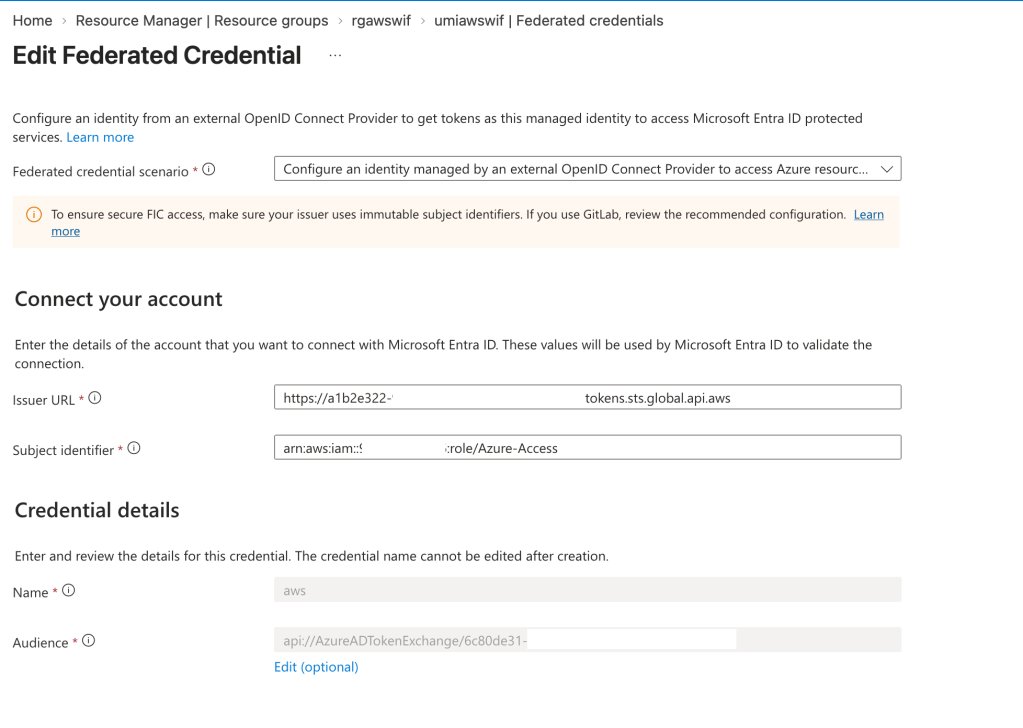
In the issuer URL I put my AWS account STS identifier I got when I setup the outbound federation. The subject identifier I set to the ARN of my IAM role and the audience I matched to the audience I put in the IAM policy.
One thing to note is that there are a maximum of 20 federated credentials per application resource or managed identity. If you have multiple workloads using the same identity on the Azure side, scale issues can come into play. There is a feature called flexible federated identity credentials which allow you to create an expression to match the incoming subject vs the specific subject itself. If you have those scale issues, you’ll want to look at this feature. It’s in preview as of the date of this blog.
Alright, at this point the plumbing is setup and now I need to toss together some code to make the magic happen.
For this I threw together a very basic Python snippet that requests an token from the AWS STS, exchanges it for an access token from Entra, and writes out the content of a blob stored in Azure Storage.
import boto3import osimport base64import jsonimport loggingimport sysfrom dotenv import load_dotenvfrom azure.identity import ClientAssertionCredentialfrom azure.storage.blob import BlobServiceClientload_dotenv(override=True)TENANT_ID = os.getenv("ENTRA_TENANT_ID")UMI_CLIENT_ID = os.getenv("AZURE_UMI_CLIENT_ID")BLOB_ACCOUNT_URL = os.getenv("AZURE_BLOB_ACCOUNT_URL")BLOB_CONTAINER_NAME = os.getenv("AZURE_BLOB_CONTAINER_NAME")BLOB_NAME = os.getenv("AZURE_BLOB_NAME")logging.basicConfig( level=logging.DEBUG, stream=sys.stdout, format="%(asctime)s - %(name)s - %(levelname)s - %(message)s",)logger = logging.getLogger(__name__)def print_jwt_claims(jwt: str) -> None: print('Parsing AWS STS access token') payload = jwt.split(".")[1] payload += "=" * (-len(payload) % 4) claims = json.loads(base64.urlsafe_b64decode(payload)) print(json.dumps(claims, indent=2))def get_aws_sts_token() -> str: print('Obtaining access token from AWS STS...') sts_client = boto3.client('sts', region_name='us-east-1') response = sts_client.get_web_identity_token( Audience=[f"api://AzureADTokenExchange/{TENANT_ID}"], DurationSeconds=300, SigningAlgorithm='RS256' ) token = response["WebIdentityToken"] print_jwt_claims(token) return tokentry: credential = ClientAssertionCredential( tenant_id = TENANT_ID, client_id = UMI_CLIENT_ID, func = get_aws_sts_token ) print(f"Contacting storage account {BLOB_ACCOUNT_URL}") blob_service_client = BlobServiceClient(account_url=BLOB_ACCOUNT_URL,credential=credential) blob_client = blob_service_client.get_blob_client(container=BLOB_CONTAINER_NAME,blob=BLOB_NAME) blob_data = blob_client.download_blob().readall() print(blob_data.decode("utf-8"))except Exception as e: print(f"Script failed: {e}")
Looking at the printed output of the script we first see the token generated by the AWS STS.
{ "aud": "api://AzureADTokenExchange/6c80de31-d5e4-4029-XXXX-XXXXXXXXXXXX", "sub": "arn:aws:iam::XXXXXXXXXXXX:role/Azure-Access", "https://sts.amazonaws.com/": { "ec2_instance_source_vpc": "vpc-0a84fd0130401fcf9", "ec2_role_delivery": "2.0", "aws_account": "XXXXXXXXXXXX", "original_session_exp": "2026-08-17T02:39:52Z", "source_region": "us-east-1", "ec2_source_instance_arn": "arn:aws:ec2:us-east-1:XXXXXXXXXXXX:instance/i-034a6ea7b8b83cba5", "principal_id": "arn:aws:iam::XXXXXXXXXXXX:role/Azure-Access", "ec2_instance_source_private_ipv4": "XX.XX.XX.XX" }, "iss": "https://a1b2e322-9556-4319-XXXX-XXXXXXXXXXXX.tokens.sts.global.api.aws", "exp": 1786912687, "iat": 1786912387, "jti": "7d6c05a6-10e8-46ab-8f15-6d4c595b55f0"}
Here we see the audience set to my Entra tenant and the subject set to the ARN of the role associated to the EC2 instance.
The result of the exchange shows the content of the blob proving cross cloud authentication with no static secrets!

End to end the flow went something like this:

I covered the free pieces of WIF for this post. There are some pretty awesome Premium features that require licensing but extend Entra ID functionality like conditional access, identity protection, and privileged access review. The premium features will come with a cost per workload identity per month. My take is that functionality should be reserved for your high risk workloads unless you got cash to burn.
With those lessons learned, it’s a good time to review whether you’ve adopted WIF for your cross-cloud use cases. Less credentials = less pain. In the world that is tech today, I think we are all looking for a little less pain.
See you next post!

