This is part of my series on Network Security Perimeters:
- Network Security Perimeters – Part 1 – The Problem They Solve
- Network Security Perimeters – Part 2- NSP Components
- Network Security Perimeters – Part 3- NSPs in Action – Key Vault Example
- Network Security Perimeters – Part 4 – NSPs in Action – AI Workload Example
- Network Security Perimeters – Part 5 – NSPs for Troubleshooting
- Network Security Perimeters – Part 6 – NSP Perimeter Links
Hello once again fellow geek. In this post I will be continuing my series of NSPs (Network Security Perimeters). Over the past few posts in this series I’ve explained the problem NSPs solve, the components that make up an NSP, demonstrated NSPs through a Key Vault use case and an AI workload use case, and even shown how they can used to troubleshoot the dreaded Private Endpoints and forward web proxy problem we all run into. After reading those posts you are probably wondering why you aren’t seeing them more talked about in the Azure world. Besides the fact it’s not called “Frontier Network Agentic Security AI Perimeter”, the reason NSPs haven’t been getting the love they should is due to a technical gap that is finally in the process of being lifted.
The Challenge
As I’ve covered throughout this series, NSPs exist to control inbound and outbound traffic through the public IP of a supported PaaS service. They have nothing to do nor do they care about (although they will log) inbound traffic through a Private Endpoint. They seek to standardize and modernize the old school PaaS service firewall that (depending on the service) supported limited IP whitelisting, service whitelisting, and resource whitelisting. Where NSPs really shine is egress control. The challenge with that shine is they shine a bit too bright in that space such that when you enforce NSPs it blocks all outbound traffic, including diagnostic log traffic being delivered to a Log Analytics Workspace, Storage Account, or Event Hub.
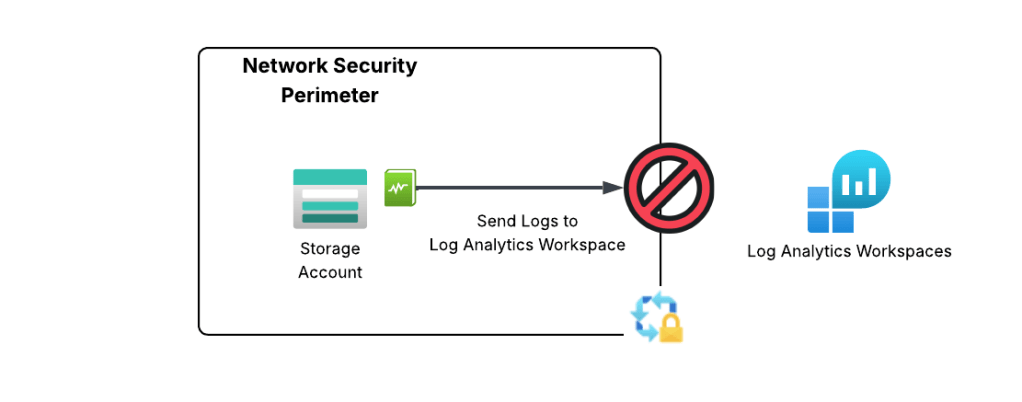
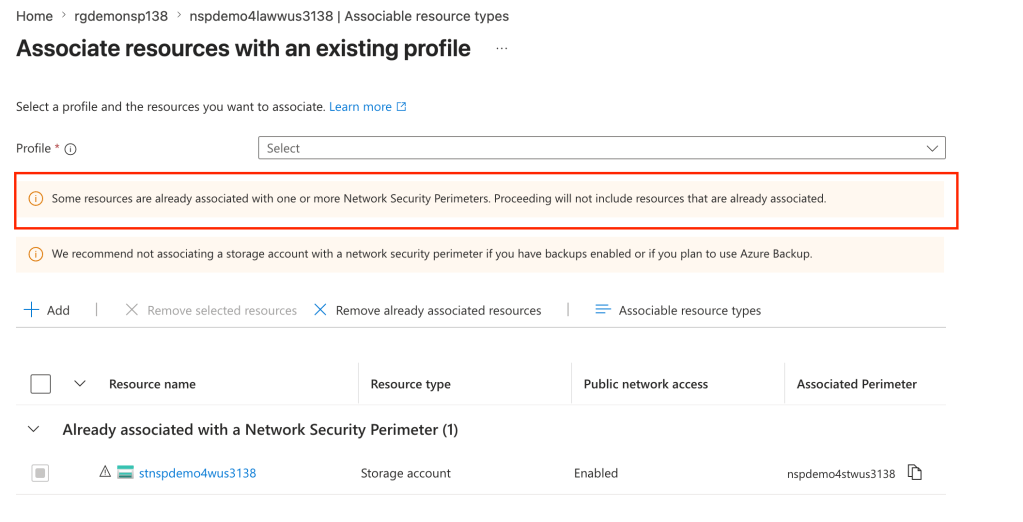
The only way to work around this limitation is to place the delivery destination (LAW, storage account, event hub) in the same NSP. While this sounds like a simple solution, a given resource can only belong to a single NSP. If you attempt to add a resource to an NSP when it’s already associated to another NSP it will fail as seen below.
If you’ve ever done logging as scale in Azure, you already see the problem with this limitation. When logging at scale in Azure, it’s very common to send logs to a centralized Log Analytics Workspace, Event Hub, or Storage Account. There are a number of benefits to doing this beyond the scope of this post which you can read about in the CAF (Cloud Adoption Framework) documentation. These resource are typically managed by a security team or a platform team and live in subscriptions controlled by those teams.
If you’re like, your first instinct is to create an outbound rule to allow the access to the Log Analytics Workspace. Good instinct, but not possible because today NSPs only support outbound rules of type FQDN and there is no FQDN for platform diagnostic logs that Microsoft provide today. A service tag would be the best bet, but sadly it is not yet supported for NSP outbound rules.
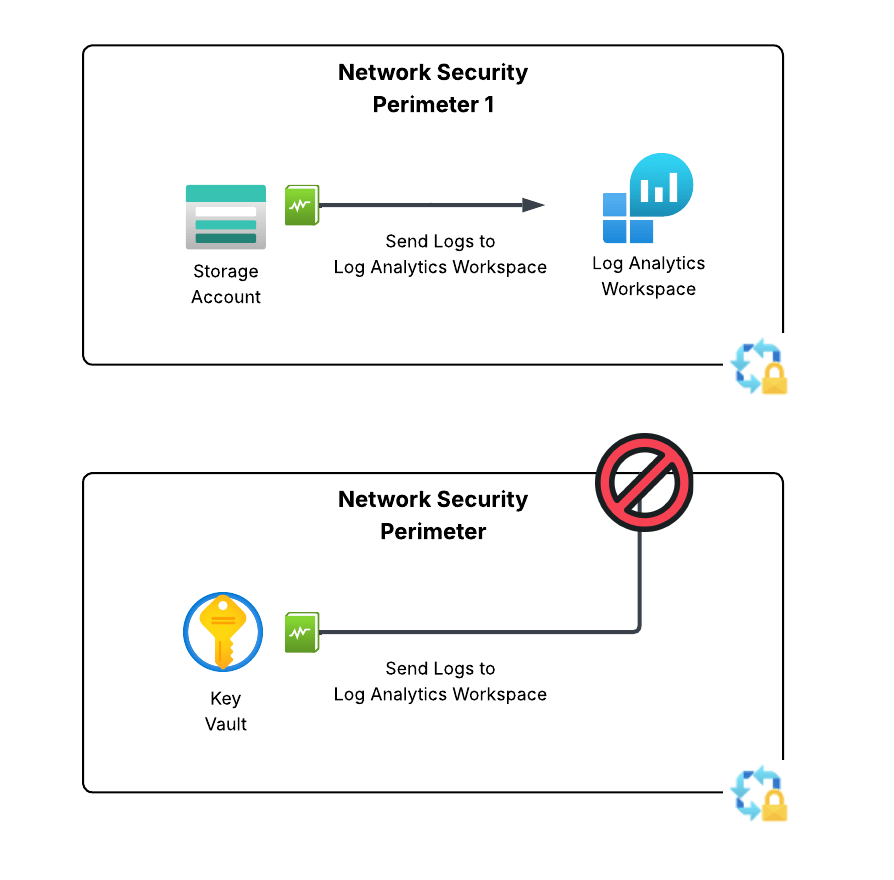
Up until very recently, NSPs in enforcement mode have been pretty much a non-starter for enterprise customers due to this limitation. Notice I say “enforcement”. If you aren’t using NSPs in learning (or transition mode) you are losing out on insanely valuable egress visibility you can’t get using any other means as I describe in my troubleshooting post.
The PG (Product Group) for NSPs is one of those amazing product groups who listens to the customer, wants to see their product adopted, and works their butt off. Just a few weeks ago they introduced a new feature into public preview that begins to address this technical limitation
The Solution
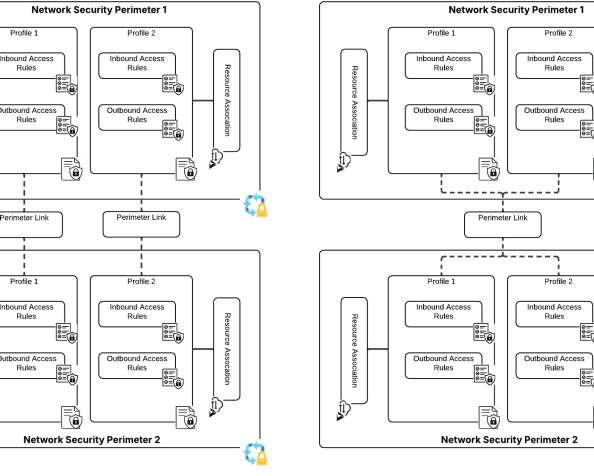
The solution for this technical problem is perimeter links. In the ARM (Azure Resource Manager) API, these are referred to as links and are a child resource of the Network Security Perimeter. Perimeter links allow traffic to flow between NSPs either per profile or for all profiles. This means we can slap a perimeter link between the NSP containing our resources that need to deliver our logs and the NSP containing the resource we’re delivering the logs to!
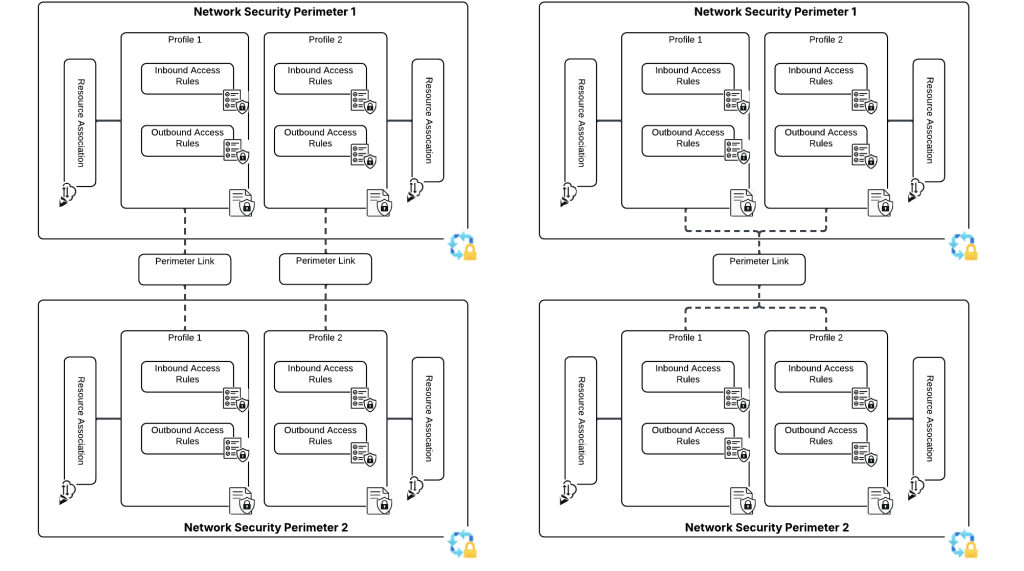
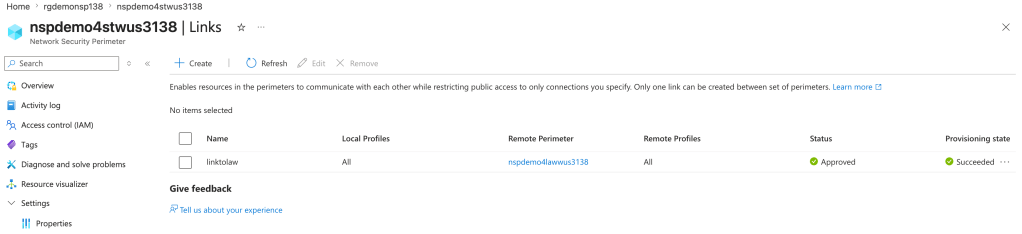
In the image below I’ve created a perimeter link between an NSP containing a storage account the NSP containing the log analytics workspace the storage account diagnostic log setting has been configured to deliver logs to. This link enables the traffic to flow freely between the two NSPs.
Once the perimeter link is created, new inbound and outbound access rules are created in each profile allowing the two NSPs to communicate with each other.
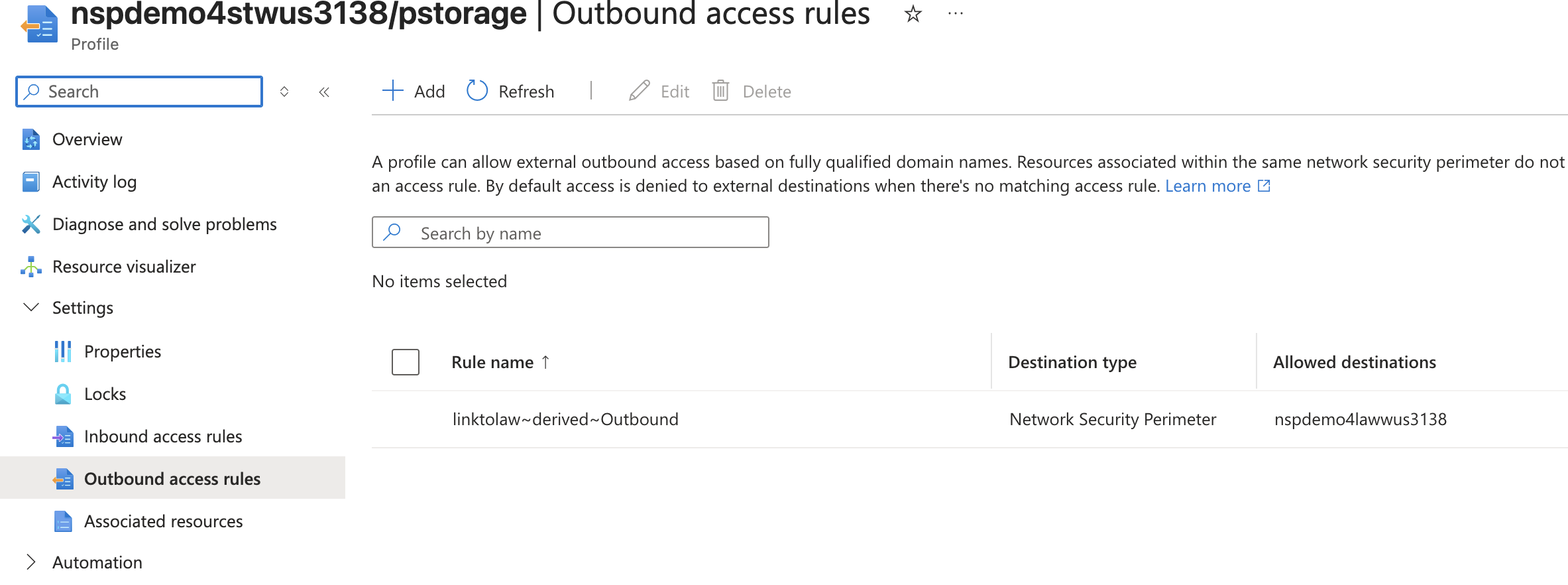
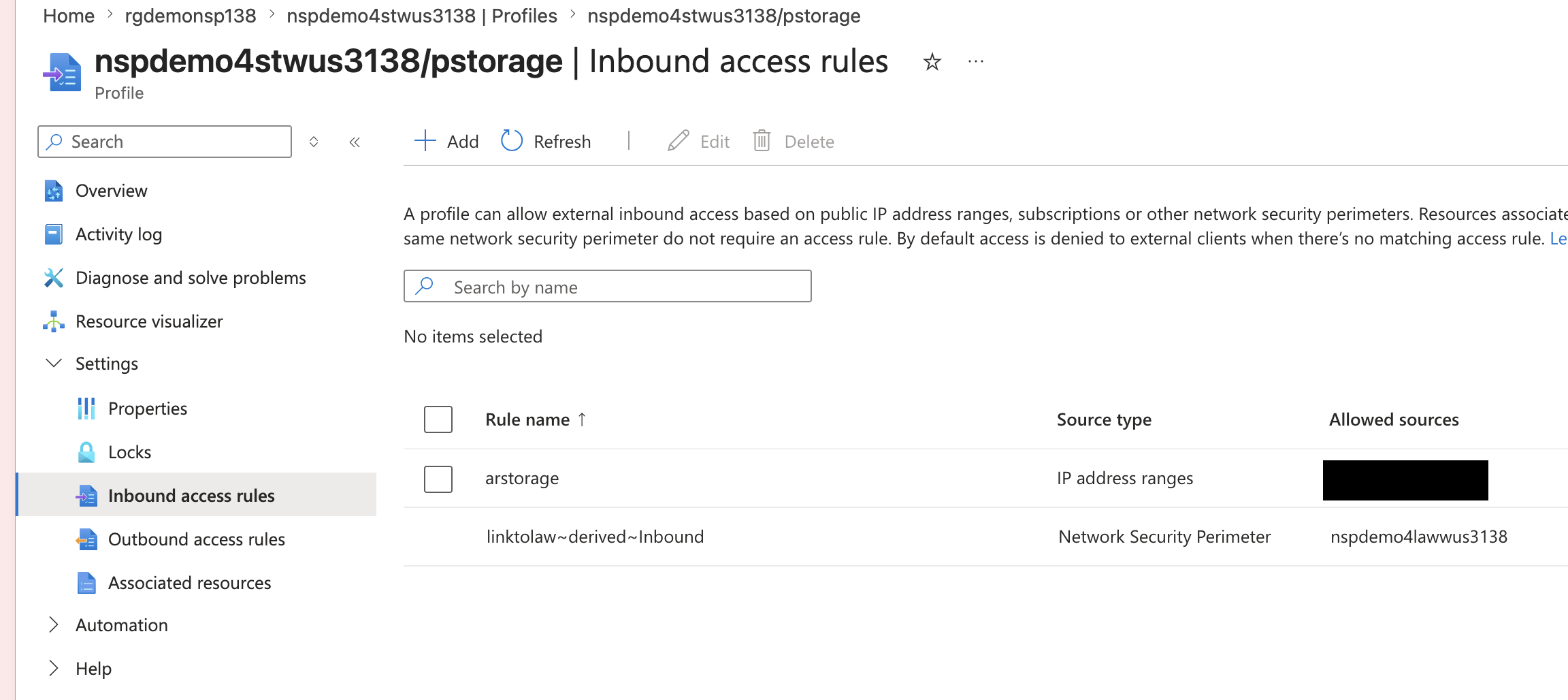
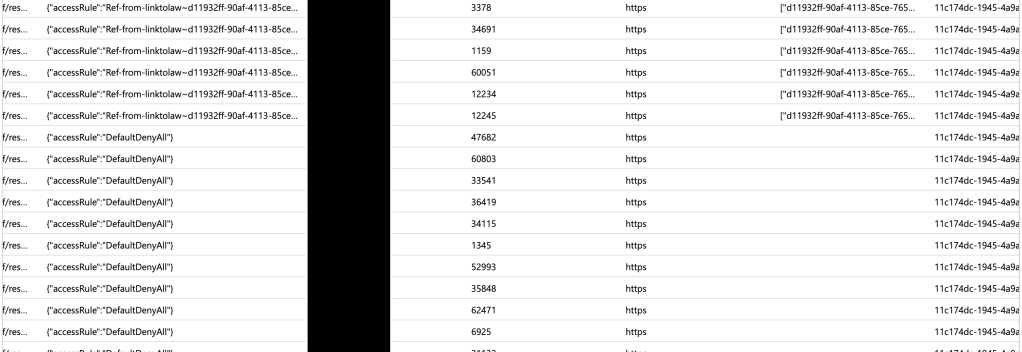
In the example above, once the perimeter link is in place and rules have been automatically created and taken affect (takes about 10-15 seconds) the spice will flow! Alright, logs will flow but I’ve been re-reading Dune so leave me alone in my nerdy world. In the screenshot below you can see the logs being blocked initially and then being allowed after the perimeter and its automatically created rules take affect.
The good and gotchas of perimeter links
So first some of the good things about perimeter links:
- You can now do cross perimeter communication.
- In my testing, terraform state doesn’t get botched up when the perimeter link triggers the automatic creation of the access rule. A reapply after didn’t complain and didn’t overwrite them.
- Perimeter links work across subscriptions. Note there is a (as there should be) to make that work.
As I mentioned in the beginning of this post, perimeter links are in public preview as of the date of this post (I’ll remove this when they go GA) so you’ll need to enable the preview feature in your subscription to muck around with them. Perimeter links also only affect a specific subset of resources (fewer than are supported for NSPs all up).
The biggest pain point of them right now is the maximum amount of perimeter links per NSP is 10. Obviously, this is no where near the scale needed for the centralized logging use case. However, this is still preview and I’m confident the PG will increase that limit (hopefully a shit ton) prior to GA.
Well folks, let me leave you with a few recommendations:
- If you’re not using NSPs as a detective control for data exfiltration you are missing out. You need to make this a priority, if only for the visibility into egress.
- This is preview, so muck around with it, but don’t go rolling this to prod.
Have a great night!

