This is part of my series on Microsoft Entra ID:
- Entra ID – Deep Dive – The Basics – Part 1
- Entra ID – Deep Dive – Protocol Primer – Part 2
- Entra ID – Deep Dive – Entra ID Authentication – Part 3
- Entra ID – Deep Dive – Workload Identity Federation – Bonus
Yeah… You read that right. I’m finally biting the bullet and doing a series on Entra ID. There are some cobwebs there, but once upon a time I was a half-baked “identity guy”. Nah, I’m not returning to that place, but I have had to visit it more frequently over the past few months. With the growing use of agents, identity has one again become of those things that apparently everyone is a so called “expert in”. I aint no expert, but I have been digging into the chatter around the implications of agents into the identity world. Given my employer, that has been spending some time in the Entra ID Agent Identity space.
Digging into that demanded I go back to some of the basics of Entra ID such as the purpose of an application registration versus a service principal and the request flow when authenticating a user to an application using OIDC (OpenID Connect) or executing an on-behalf-of flow in OAuth. I had conceptual knowledge of the above, but it was too ivory tower. I needed to eat the dog food and do it. After spending a few weeks reading through the documentation, reviewing captured requests and responses, reviewing RFCs, and poorly coding some applications to exercise on the concepts I figured it was time to brain dump what I learned before I get distracted with some new shiny widget and forget 60% of it.
So yeah… that’s where this series is coming from. Hopefully some folks out there draw some value out of it beyond serving as a refresher for my neural pathways.
With that rambling out of the way, let’s get to it.
WTF is Entra ID?
Many years ago when Microsoft first introduced Azure Active Directory my peers and I scratched our heads with this question. Given the name, the initial assumption was it was the Windows Active Directory “killer” (stop trying to make that happen, it aint gonna happen). That seems to have been a pretty common assumption given what I’ve heard from customers over the years as I sat in the vendor space and is likely why the name was shifted a few years back to Entra ID. Either that or marketing needed to justify their existence with another product rename.
If you want the professional explanation as to what Entra ID is you can read the public documentation and bask in the marketing mumbo jumbo. Since you’re here, you’re going to get the less fancy and quick and dirty Matt Felton explanation. My take is that Entra ID does a lot of shit, but at its core it is:
- An identity store for the identities of human and non-human security principals, their attributes, and their credentials.
- An authentication service which can act as an OAuth Authorization Server, OIDC identity provider, SAML IdP / SP, and even Kerberos / LDAP provider (gross)
- A data store for resources that represent applications that can be used for OAuth and OIDC
It provides these core services to Microsoft’s cloud services such as M365, Azure, Dynamics 365, and whatever other clouds Microsoft has that I’m missing. It can be extended to provide these services to other applications by integrating with it via one of the supported protocols like we’ll see in further posts in this series.
Entra ID is divided into separate tenants which represent unique identity boundaries. Services for a given customer (such as an Azure subscription) are associated to an Entra ID tenant which acts as the identity boundary for those resources. Tenants can trust other tenants to facilitate cross tenant accessing of resources through features like Entra ID External ID.
The identity and data store pieces of the Entra ID service are where users, groups, many types of service principals, applications, and device resources are stored. For us old people, similar to an LDAP, each of these resources is similar to an object in LDAP that has a schema with specific properties that are consumed by native Microsoft and third-party services.
That should be enough context to give you a very general idea of what Entra ID is. Like I mentioned above, it does a lot of shit (conditional access, privileged identity management, etc) that isn’t relevant to the point of this series and that I’m not going to discuss. If you can hammer it in your head those two core functions, it will be enough to get you through this series.
Human Resources in Entra
Within Entra ID human accounts will be represented by user resources. User resources have a selection of properties you’ll be familiar with if you’ve ever worked with an LDAP or Windows Active Directory. These include properties like givenName, surname, mail, and userPrincipalName. These user resources can be created directly in Entra to create “cloud users”, created through the Entra ID External ID, or created by a synchronization process like Entra Connect Sync or a third-party solution like Okta. Humans will use these user accounts (resources) to authenticate to Entra ID to access integrated services. A typical user account looks like the below:
  {
    "businessPhones": [
      "555-555-5503"
    ],
    "displayName": "John Smith",
    "givenName": "John",
    "id": "b44b0442-d7e8-48f9-5555-5bfe1a4dabbc",
    "jobTitle": "Accountant",
    "mail": "john.smith@sometenant.com",
    "mobilePhone": "555-555-5503",
    "officeLocation": "Oz",
    "preferredLanguage": null,
    "surname": "Smith",
    "userPrincipalName": "john.smith@sometenant.com"
  }
Users can be organized into group resources. Like Windows Active Directory, these groups can be used to grant access to resource or used as distribution groups for email. Entra has multiple types of groups including Microsoft 365 Groups (Unified, your mail-enabled security groups for the modern age), Security Groups (for providing access to Entra-integrated resources), and mail-enabled security groups and distribution groups synchronized from Windows Active Directory. You’ll likely use a mix and there are benefits and considerations of both paths. A typical Microsoft 365 group looks like the below:
 {
    "classification": null,
    "createdDateTime": "2024-07-03T18:20:02Z",
    "creationOptions": [
      "ExchangeProvisioningFlags:3552",
      "Team"
    ],
    "deletedDateTime": null,
    "description": null,
    "displayName": "Fabrikam Employees",
    "expirationDateTime": null,
    "groupTypes": [
      "Unified"
    ],
    "id": "dedf1a66-103d-46c1-5555-c62439776bfc",
    "infoCatalogs": [],
    "isAssignableToRole": null,
    "mail": "fabrikam_employees@fabrikam.com",
    "mailEnabled": true,
    "mailNickname": "fabrikam_employees",
    "membershipRule": null,
    "membershipRuleProcessingState": null,
    "onPremisesDomainName": null,
    "onPremisesLastSyncDateTime": null,
    "onPremisesNetBiosName": null,
    "onPremisesProvisioningErrors": [],
    "onPremisesSamAccountName": null,
    "onPremisesSecurityIdentifier": null,
    "onPremisesSyncEnabled": null,
    "preferredDataLocation": null,
    "preferredLanguage": null,
    "proxyAddresses": [
      "SMTP:fabrikam_employees@fabrikam.com"
    ],
    "renewedDateTime": "2024-07-03T18:20:02Z",
    "resourceBehaviorOptions": [
      "WelcomeEmailDisabled",
      "SubscribeMembersToCalendarEventsDisabled",
      "HideGroupInOutlook"
    ],
    "resourceProvisioningOptions": [
      "Team"
    ],
    "securityEnabled": false,
    "securityIdentifier": "S-1-12-1-3739163238-1187057725-555555555-4234901305",
    "serviceProvisioningErrors": [],
    "theme": null,
    "uniqueName": null,
    "visibility": "Public"
  }
That’s all I’m going to say about humans, since the primary purpose of this series is the non-human side of the fence.
Non-Human Resources
For non-human identities our main resources are applications and service principals. There are others such as device identities, but I won’t be getting into that.
First, there is the application resource. You’ll see this referred to as the application registration or app registration in Microsoft documentation and Microsoft GUI-based experiences like the Azure Portal. The application resource (or app registration) is the globally unique representation of an application across all of Entra ID and exists only within the Entra ID tenant it was registered in. It’s easiest to think of an application resource as an OAuth client registration, because OAuth and OIDC are likely why this type of resource exists anyway (I’ll cover this a bit more in some upcoming posts). An application resource can have a credential which is used to authenticate it to Entra ID (OAuth confidential client) and this credential can be a secret, certificate (very cool and under used), or a federated credential (basis of workload identity). This resource will include properties required for OAuth flows such as the client id (appId), the audience (identifierUris), any scopes it exposes (oauth2PermissionScopes), and redirectUris (when using interactive OAuth flows). Below is an example of an application resource associated with an application that authenticates users with Entra ID.
{ "id": "55555555-5555-5555-5555-555555555555", "deletedDateTime": null, "appId": "11111111-1111-1111-1111-111111111111", "applicationTemplateId": null, "disabledByMicrosoftStatus": null, "createdByAppId": "88888888-8888-8888-8888-888888888888", "createdDateTime": "2026-07-15T02:13:57Z", "displayName": "Demo Entra ID application - Frontend", "description": "This application is the frontend for my demo Entra ID application", "groupMembershipClaims": "ApplicationGroup", "identifierUris": [], "isDeviceOnlyAuthSupported": null, "isDisabled": null, "isFallbackPublicClient": false, "nativeAuthenticationApisEnabled": null, "notes": null, "publisherDomain": "sometenant.onmicrosoft.com", "serviceManagementReference": "business_unit1@sometenant.onmicrosoft.com", "signInAudience": "AzureADMultipleOrgs", "tags": [], "tokenEncryptionKeyId": null, "uniqueName": null, "samlMetadataUrl": null, "defaultRedirectUri": null, "certification": null, "requestSignatureVerification": null, "addIns": [], "api": { "acceptMappedClaims": null, "knownClientApplications": [], "requestedAccessTokenVersion": null, "oauth2PermissionScopes": [], "preAuthorizedApplications": [] }, "appRoles": [], "info": { "logoUrl": null, "marketingUrl": null, "privacyStatementUrl": null, "supportUrl": null, "termsOfServiceUrl": null }, "keyCredentials": [], "optionalClaims": { "accessToken": [], "idToken": [ { "additionalProperties": [], "essential": false, "name": "groups", "source": null } ], "saml2Token": [] }, "parentalControlSettings": { "countriesBlockedForMinors": [], "legalAgeGroupRule": "Allow" }, "passwordCredentials": [ { "customKeyIdentifier": null, "displayName": null, "endDateTime": "2028-07-15T02:14:07.273797Z", "hint": "8pV", "keyId": "eea9ef15-ec2f-4cbc-9e6d-2e1dc8ffba30", "secretText": null, "startDateTime": "2026-07-15T02:14:07.273797Z" } ], "publicClient": { "redirectUris": [] }, "requiredResourceAccess": [ { "resourceAppId": "55555555-5555-5555-5555-555555555555", "resourceAccess": [ { "id": "00000000-0000-0000-0000-000000000001", "type": "Scope" } ] }, { "resourceAppId": "00000003-0000-0000-c000-000000000000", "resourceAccess": [ { "id": "e1fe6dd8-ba31-4d61-89e7-88639da4683d", "type": "Scope" }, { "id": "98830695-27a2-44f7-8c18-0c3ebc9698f6", "type": "Role" } ] } ], "verifiedPublisher": { "displayName": null, "verifiedPublisherId": null, "addedDateTime": null }, "web": { "homePageUrl": null, "logoutUrl": null, "redirectUris": [ "http://localhost:8100/callback" ], "implicitGrantSettings": { "enableAccessTokenIssuance": false, "enableIdTokenIssuance": false }, "redirectUriSettings": [ { "uri": "http://localhost:8100/callback", "index": null } ] }, "servicePrincipalLockConfiguration": { "isEnabled": true, "allProperties": true, "credentialsWithUsageVerify": null, "credentialsWithUsageSign": null, "identifierUris": null, "tokenEncryptionKeyId": null }, "spa": { "redirectUris": [] }}
The service principal resource is the other major non-human resource to be aware of. A service principal represents an instance of an application resource in an Entra ID tenant. While you’ll only ever have a single application resource in the registered Entra ID tenant to represent an application, that application might have multiple service principals in multiple Entra ID tenants if it was built as a multi-tenant application. When permissions are granted to an application to access a resource secured with Entra ID, it will use the permissions associated to the service principal. The Microsoft GUI-experience will call a service principal an Enterprise Application.
As you’ll see below, a service principal looks a lot like the application resource its providing an identity for. The appId property is the property used to directly map it back to the application resource. The service principal type in this scenario is Application. There are a variety of service principal types that provide a non-human identity for different use cases like for managed identities, agent identity blueprints, and agent identities.
{ "id": "44444444-4444-4444-4444-444444444444", "deletedDateTime": null, "accountEnabled": true, "alternativeNames": [], "appDisplayName": "Demo Entra ID application - Frontend", "appDescription": "This application is the frontend for my demo Entra ID application", "appId": "11111111-1111-1111-1111-111111111111", "applicationTemplateId": null, "appOwnerOrganizationId": "88888888-8888-8888-8888-888888888888", "appRoleAssignmentRequired": false, "createdByAppId": "88888888-8888-8888-8888-888888888888", "createdDateTime": "2026-07-15T02:14:16Z", "description": null, "disabledByMicrosoftStatus": null, "displayName": "Demo Entra ID application - Frontend", "homepage": null, "isDisabled": null, "loginUrl": null, "logoutUrl": null, "notes": null, "notificationEmailAddresses": [], "preferredSingleSignOnMode": null, "preferredTokenSigningKeyThumbprint": null, "replyUrls": [ "http://localhost:8100/callback" ], "servicePrincipalNames": [ "611111111-1111-1111-1111-111111111111" ], "servicePrincipalType": "Application", "signInAudience": "AzureADMultipleOrgs", "tags": [], "tokenEncryptionKeyId": null, "samlSingleSignOnSettings": null, "addIns": [], "appRoles": [], "info": { "logoUrl": null, "marketingUrl": null, "privacyStatementUrl": null, "supportUrl": null, "termsOfServiceUrl": null }, "keyCredentials": [], "oauth2PermissionScopes": [], "passwordCredentials": [], "resourceSpecificApplicationPermissions": [], "verifiedPublisher": { "displayName": null, "verifiedPublisherId": null, "addedDateTime": null }}
The official documentation likes to refer to the application object as the template for the application and the service principal as the security principal. I think that’s a pretty damn good single sentence explanation.
What are we going to build?
Now that you have the bare bones basics of Entra, you likely want to understand how an application would go about using it for authentication and authorization. While you might not be doing this now and it may not seem relevant, it will become very relevant to you if you begin building agents in Microsoft’s clouds through Microsoft Foundry, CoPilot Studio, or the 18 other random services Microsoft allows agents to be built. This will also be relevant to you if you’re going to consume Microsoft resources (such as Azure) from other clouds through an application or an agent. So yeah, you should understand what this looks like to do. The whole Entra ID Agent Identity feature builds on these foundational pieces.
To see these concepts in action I’m going to walk through a very simplistic solution with a frontend website and backend API in Python. The frontend website is built using the Flask Framework and the backend API is built with fastapi.
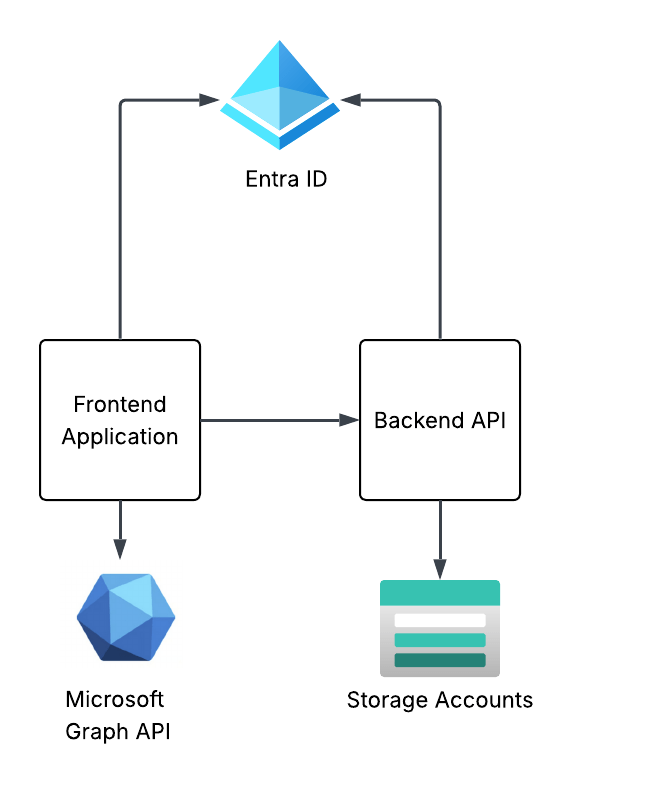
The frontend website will use Entra ID to authenticate the user and will be issued an OIDC id token to identify the user. The frontend will get some information from the user from the id token and access token it receives from Entra and will make additional calls to the Microsoft Graph API using the client credentials flow to grab other attributes of the user’s identity. I’ll also show how to include the user’s Entra ID group information in the id or access token and how to handle nested group membership.
The frontend will have some pages that call functions within the backend API. One example is the story endpoint will pull a pre-built AI generated story about the user which has been uploaded to blob storage in an Azure Storage Account. The backend API will use the on-behalf-of flow to access the storage account as the user to pull the user’s specific story.
This will demonstrate some of the most common flows including authentication, OAuth client credentials flow, and OAuth on-behalf-of (or jwt bearer). I’ll show you how the id tokens and access tokens look in different scenarios pointing out the relevant claims and how they’re used upstream. I’ll even share some process flows so you understand what does what in a given flow.
My primary goal here is give you the basics so you can walk away with a more solid understanding of what’s happening under the hood and how Entra ID has decided to implement OIDC and OAuth. I can’t stress how helpful this will be for you once you start diving into the agent identity space (which I’ll be covering after this series).
Summing it up
Ok, so you know what you’re in for. This series is gonna be relatively deep in the weeds so bring your favorite caffeinated beverage for future posts. I’m doing everything direct with the REST APIs because I want to show you the gory details. No pretty SDKs for you. If you’ve had a “conceptual” idea of how this works without the implementation specifics (like I did before I went down this rabbit hole) this series should help to fill those gaps.
In the next post I’ll walk through setting up Entra for the frontend website, authenticating a user, and exploring the id token and access token. The post following that will walk through using the application’s identity context to get more information about the user from the Microsoft Graph API such as nested group membership, then I’ll finish up the series by walking through the on-behalf-of flow with the backend API to show you how to carry the user’s identity context through the application to the destination resource down the line.
See you next post!

