Happy New Year! Over the last few months of 2024, I was buried in AI Foundry (FKA Azure AI Studio. Hey marketing needs to do something a few times a year.) proof-of-concepts with my best buddy Jose. The product is very new, very powerful, but also very complex to get up and running in a regulated environment. Through many hours labbing scenarios out and troubleshooting with customers, I figured it was time to share some of what I learned.
So what is AI Foundry? If you want the Microsoft explanation of what it is, read the documentation. Here you’ll get the Matt Felton opinion on what it is (god help you). AI Foundry is a toolset intended to help AI Engineers build Generative AI applications. It allows them to interact with the LLMs (large language models) and build complex workflows (via Prompt Flows) in a no code (like Chat Playground) or low code (prompt flow interface) environment. As you can imagine, this is an attractive tool to get the people who know Generative AI quick access to the LLMs so use cases can be validated before expensive development cycles are spent building the pretty front-end and code required to make it a real application.
Before we get into the guts of the use cases Jose and I have run into, I want to start with the basics of how the hell this service is setup. This will likely require a post or two, so grab your coffee and get ready for a crash course.
AI Foundry is built on top of AML (Azure Machine Learning). If you’re ever built out a locked down AML instance, you have some understanding of the many services that work together to provide the service. AI Foundry inherits these components and provides a sleek user interface on top and typically requires additional resources like Azure OpenAI and AI Search (for RAG use cases). Like AML there are lots and lots of pieces that you need to think about, plan for, and implement in the correct manner to make the secured instance of AI Foundry work.
One specific feature of AML plays an important role within AI Foundry and that is the concept of a hub workspace. A hub is an AML workspace that centrally manages the security, networking, compute resources, and quota for children AML workspaces. These child AML workspaces are referred to as projects. The whole goal of the hub is to make it easier for your various business units to do the stuff they need to do with AML/AI Foundry without having to manage the complex pieces like the security and networking. My guidance would be to think about giving each business unit a Foundry Hub that they can group projects of similar environment (prod or non-prod) and data sensitivity.
General relationship between AI Foundry Hub and AI Foundry Projects
Ok, so you get the basic gist of this. When you deploy an AI Foundry instance, behind the scenes an AML workspace designated as a hub is created. Each project you create is a “child” AML workspace of the hub workspace and will inherit some resources from the hub. Now that you’re grounded in that basic piece, let’s talk about the individual components.
The many resources involved with a secured AI Foundry instance
As you can see in the above image, there are a lot of components of this solution that you will likely use if you want to deploy an AI Foundry instance that has the necessary security and networking controls. Let me give you a quick and dirty explanation of each component. I’ll dive deeper into the identity, authorization, and networking aspects of these components in future posts.
Managed identities
There are lots of managed identities in use with this product. There is a managed identity for the hub, a managed identity for the project, and managed identities for the various compute. One of the challenges of AI Foundry is knowing which managed identity (and if not a managed identity, the user’s identity) is being used to access a specific resource.
Azure Storage Account
Just like in AML, there is a default storage account associated with the workspace. Unlike with a traditional AML workspace you may be familiar with, the hub feature allows all project workspaces to leverage the same storage account. The storage account is used by the workspaces to store artifacts like logs in blob storage and artifacts like prompt flows in file storage. The hub and projects isolate their data to specific containers (for blob) and folders (for file) with Azure ABAC (holy f*ck a use case for this feature finally) setup such that the managed identities for the workspaces can only access containers/folders for data related to their specific workspace.
Azure Key Vault
The Azure Key Vault will store any keys used for connections created from within the AI Foundry project. This could be keys for the default storage account or keys used for API access to models you deploy from the model catalog.
Azure Container Registry
While this is deemed optional, I’d recommend you plan on deploying it. When deploy a prompt flow there uses certain functionality to the managed compute, the container image used isn’t the default runtime and an ACR instance will be spun up automatically without all the security controls you’ll likely want.
Azure OpenAI Service
This is used for deployment of OpenAI and some Microsoft chat and embedding models
Azure AI Service
This can be used as an alternative to the Azure OpenAI Service. It has some additional functionality beyond just hosting the models such as speed and the like.
Azure AI Search
This will be used for anything RAG related. Most likely you’ll see it used with the Chat With Your Data feature of the Chat Playground.
Managed Network
This is used to host the compute instances, serverless endpoints and managed online endpoints spun up for compute operations within AI Foundry. I’ll do a deep dive into networking within the service in a future post.
Azure Firewall
If building a secured instance, you’re going to use a managed virtual network that is locked down to all Internet access via outbound rules. Under the hood an Azure Firewall instance (standard for almost all use cases) will be spun up in the managed virtual network. You interact with it through the creation of the outbound rules and can’t directly administer it. However, you will be paying for it.
Role Assignments
So so so many role assignments. I’ll cover these in a future post.
Azure Private DNS
Used heavily for interacting with the AI Foundry instance and models/endpoints you deploy. I’ll cover this in an upcoming post.
Are you frightened yet? If not you should be! Don’t worry though, over this series I’ll walk you through the pain points of getting this service up and running. Once you get past the complex configuration, it’s a crazy valuable service that you’ll have a high demand for from your business units.
In the next post I’ll walk through the complexities of authorization within AI Foundry.
7/30/2025 – Updated blog to reflect feature is now generally available
Hello folks! I wanted to get at least one blog post in before 2025 so today I’m going to bring the conversation back to DNS once again. I’m going to be hitting on an advanced topic today, so if you’re unfamiliar with DNS in Azure, read up on my prior posts. I’m going to be skipping through much of the basics.
Today we’re going to talk about one of the challenges that tends to pop up when customers begin to heavily use PrivateLink Private Endpoints and Azure Private DNS. You will likely run into this challenge at some point (if you haven’t already) when you attempt to collaborate with another organization using Azure, when using services like Azure Fabric where one BU (business unit) manages Azure and another manages Azure Fabric, or when working across multiple Entra ID tenants.
Brew your coffee, we’re about to dive into the weeds!
As I’ve covered in past posts, Microsoft provides you out-of-the-box DNS resolution for each VNet (virtual network) via the Azure-provided DNS service (I’m going to refer to it as the WireServer for the rest of this post). The WireServer can be reached at 168.63.129.16 from endpoints deployed to the virtual network and will route DNS queries to either Microsoft public DNS resolvers or to Private DNS zones. Private DNS Zones allow customers to host internally-facing DNS namespaces and are very commonly used with PrivateLink Private Endpoints for Microsoft PaaS (platform-as-a-service) services due automatic lifecycle management of the A records for the Private Endpoints. Thus our challenge begins to peek its ugly head.
Example DNS Resolution for Private Endpoints when using Private DNS
Alrighty, I get it. You know all this and it’s boring you. Let’s get to the good stuff.
What if you need to collaborate with another organization and they also use Private Endpoints? How might this cause some issues?
Let’s take a scenario where Bob works for Contoso and Alice works for Fabrikam. Alice over at Fabrikam produces a daily dump of data from a financial system to an Azure Storage Account as a blob. Bob over at Contoso pulls that data down into his environment for analysis by employees of Contoso. Alice provides this dump to over a hundred customers. Due to this large volume of customers, she has opted to provide it over a public endpoint only.
Bob living the good life with resolution working as he expects
This process has been working flawlessly for years and Bob’s life has been good. One day, Bob’s life isn’t good and his automation fails. After lots of troubleshooting involving both Contoso and Fabrikam, it’s determined that DNS resolution is failing when trying to resolve the name of the storage account.
As it turns out, Alice’s Information Security team made it a standard to use Private Endpoints and she turned on a Private Endpoint for the storage account. The creation of the Private Endpoint creates a CNAME for the storage account in public DNS for fabrikam.privatelink.blob.core.windows.net. Since Contoso has this Private DNS Zone configured in its environment, Bob’s query gets redirect to Contoso’s Private DNS Zone which doesn’t have the record and instead returns an NXDOMAIN.
Bob having a bad day with the DNS resolution failing due to Fabrikam turning on a Private Endpoint for the storage account
Historically, this has been a pain to deal with. Customers have had to work around it by creating local host records (yuck), defining the FQDN (fully-qualified domain name) for the storage account as a zone, or creating conditional forwarders for specific FQDNs in their on-premises DNS service. While both will work, it can become a real headache at scale and can make troubleshooting resolution a complete nightmare. Yes, there is always the option of the 3rd party injecting a Private Endpoint into your virtual network, but I rarely see this occur across my customer base in situations where 3rd parties are servicing a large number of customers. Likely due to complexity and cost (yes Private Endpoints and the data transferring through them do have costs and can add up with large amounts of data).
Microsoft introduced a new feature in 2024 called “Fallback to Internet for Private DNS” which seeks to address this problem once and for all. With this feature customers can configure whether resolution should fallback to public DNS on a per virtual network link basis for each Private DNS Zone. This means you can pick which Private DNS Zones fallback to public DNS. Maybe you want to do it for privatelink.blob.core.windows not, but privatelink.database.windows.net. If you use different resolution paths (meaning separate virtual network links) for production and non-production, you can choose to fallback only for non-production while keeping today’s behavior for production. This gives you a ton of flexibility in how you handle resolution.
In the Azure Portal you will see an option in a virtual network link called Enable fallback to Internet. When you enable this option Azure DNS will fallback to public DNS resolution if it can’t find a record in a Private DNS Zone. With fallback off it’s set to the value of Default and if fallback is on it’s set to the value of NxDomainRedirect.
New option in Azure Portal to enable DNS fallback
If we revisit Bob’s challenge. He can now resolve this by enabling fallback on the virtual network link used by his endpoint’s resolution path for the privatelink.blob.core.windows.net. When the WireServer receives back an NXDOMAIN, it will then try to resolve it via public DNS yielding the public endpoint IP Bob needs for Fabrikam’s storage account.
DNS resolution with fallback in place
This feature makes dealing with the scenario way more straightforward. I haven’t heard a good reason to not enable this by default. If you have one in mind, definitely post in the comments.
So your key takeaways:
The usage of Private Endpoints across organizations can create split-brain DNS-like scenarios that require lots of DNS record management overhead.
This feature will help to address those scenarios. You should use it where it makes sense, but it shouldn’t be your default.
10/29/2024 – Microsoft has announced a deployment option referred to as a data zone (https://azure.microsoft.com/en-us/blog/accelerate-scale-with-azure-openai-service-provisioned-offering/). Data zones can be thought of as data sovereignty boundaries incorporated into the existing global deployment option. This will significantly ease load balancing so you will no longer need to deploy individual regional instances and can instead deploy a single instance with a data zone deployment within a single subscription. As you hit the cap for TPM/RPM within that subscription, you can then repeat the process with a new subscription and load balance across the two. This will result in fewer backends and a more simple load balancing setup.
Welcome back folks!
Today I’m back again talking load balancing in AOAI (Azure OpenAI Service). This is an area which has seen a ton of innovation over the past year. From what began as a very basic APIM (API Management) policy snippet providing randomized load balancing was matured to add more intelligence by a great crew out of Microsoft via the “Smart” Load Balancing Policy. Innovative Microsoft folk threw together a solution called PowerProxy which provides load balancing and other functionality without the need for APIM. Simon Kurtz even put together a new Python library to provide load balancing at the SDK-level without the need for additional infrastructure. Lots of great ideas put into action.
The Product Group for APIM over at Microsoft was obviously paying attention to the focus in this area and have introduced native functionality which makes addressing this need cake. With the introduction of the load balancer and circuit breaker feature in APIM, you can now perform complex load balancing without needing a complex APIM policy. This dropped with a bunch of other Generative AI Gateway (told you this would become an industry term!) features for APIM that were announced this week. These other features include throttling based on tokens consumed (highly sought after feature!), emitting token counts to App Insights, caching completions for optimization of token usage, and a simpler way to onboard AOAI into APIM. Very cool stuff of which I’ll be covering over the next few weeks. For this post I’m going to focus on the new load balancing and circuit breaker feature.
Before I dive into the new feature I want to do a quick review of why scaling across AOAI instances is so important. For each model you have a limited amount of requests and tokens you can pass to the service within a given subscription within a region. These limits vary on a per model basis. If you’re consuming a lot of prompts or making a lot of requests it’s fairly easy to hit these limits. I’ve seen a customer hit the limits within a region with one document processing application. I had another customer who deployed a single Chat Bot in a simple RAG (retrieval augmented generation) that was being used by large swath of their help desk staff and limits were quickly a problem. The point I’m making here is you will hit these limits and you will need to add figure out how to solve it. Solving it is going to require additional instances in different Azure regions likely spread across multiple subscriptions. This means you’ll need to figure out a way to spread applications across these instances to mitigate the amount of throttling your applications have to deal with.
Load Balancing Azure OpenAI Service
As I covered earlier, there are a lot of ways you can load balancing this service. You could do it at the local application using Simon’s Python library if you need to get something up and running quickly for an application or two. If you have an existing deployed API Gateway like an Apigee or Mulesoft, you could do it there if you can get the logic right to support it. If you want to custom build something from scratch or customize a community offering like PowerProxy you could do that as well if you’re comfortable owning support for the solution. Finally, you have the native option of using Azure APIM. I’m a fan of the APIM option over the Python library because it’s scalable to support hundreds of applications with a GenAI (generative AI) need. I also like it more than custom building something because the reality is most customers don’t have the people with the necessary skill sets to build something and are even less likely to have the bodies to support yet another custom tool. Another benefit of using APIM include the backend infrastructure powering the solution (load balancers, virtual machines, and the like) are Microsoft’s responsibility to run and maintain. Beyond load balancing, it’s clear that Microsoft is investing in other “Generative AI Gateway” types of functionality that make it a strategic choice to move forward with. These other features are very important from a security and operations perspective as I’ve covered in past posts. No, there was not someone from Microsoft holding me hostage forcing me to recommend APIM. It is a good solution for this use case for most customers today.
Ok, back to the new load balancing and circuit breaker feature. This new feature allows you to use new native APIM functionality to create a load balancing and circuit breaker policy around your APIM backends. Historically to do this you’d need a complex policy like the “smart” load balancing policy seen below to accomplish this feature set.
<policies>
    <inbound>
        <base />
        <!-- Getting the main variable where we keep the list of backends -->
        <cache-lookup-value key="listBackends" variable-name="listBackends" />
        <!-- If we can't find the variable, initialize it -->
        <choose>
            <when condition="@(context.Variables.ContainsKey("listBackends") == false)">
                <set-variable name="listBackends" value="@{
                    // -------------------------------------------------
                    // ------- Explanation of backend properties -------
                    // -------------------------------------------------
                    // "url":          Your backend url
                    // "priority":     Lower value means higher priority over other backends.
                    //                 If you have more one or more Priority 1 backends, they will always be used instead
                    //                 of Priority 2 or higher. Higher values backends will only be used if your lower values (top priority) are all throttling.
                    // "isThrottling": Indicates if this endpoint is returning 429 (Too many requests) currently
                    // "retryAfter":   We use it to know when to mark this endpoint as healthy again after we received a 429 response

                    JArray backends = new JArray();
                    backends.Add(new JObject()
                    {
                        { "url", "https://andre-openai-eastus.openai.azure.com/" },
                        { "priority", 1},
                        { "isThrottling", false },
                        { "retryAfter", DateTime.MinValue }
                    });

                    backends.Add(new JObject()
                    {
                        { "url", "https://andre-openai-eastus-2.openai.azure.com/" },
                        { "priority", 1},
                        { "isThrottling", false },
                        { "retryAfter", DateTime.MinValue }
                    });

                    backends.Add(new JObject()
                    {
                        { "url", "https://andre-openai-northcentralus.openai.azure.com/" },
                        { "priority", 1},
                        { "isThrottling", false },
                        { "retryAfter", DateTime.MinValue }
                    });

                    backends.Add(new JObject()
                    {
                        { "url", "https://andre-openai-canadaeast.openai.azure.com/" },
                        { "priority", 2},
                        { "isThrottling", false },
                        { "retryAfter", DateTime.MinValue }
                    });

                    backends.Add(new JObject()
                    {
                        { "url", "https://andre-openai-francecentral.openai.azure.com/" },
                        { "priority", 3},
                        { "isThrottling", false },
                        { "retryAfter", DateTime.MinValue }
                    });

                    backends.Add(new JObject()
                    {
                        { "url", "https://andre-openai-uksouth.openai.azure.com/" },
                        { "priority", 3},
                        { "isThrottling", false },
                        { "retryAfter", DateTime.MinValue }
                    });

                    backends.Add(new JObject()
                    {
                        { "url", "https://andre-openai-westeurope.openai.azure.com/" },
                        { "priority", 3},
                        { "isThrottling", false },
                        { "retryAfter", DateTime.MinValue }
                    });

                    backends.Add(new JObject()
                    {
                        { "url", "https://andre-openai-australia.openai.azure.com/" },
                        { "priority", 4},
                        { "isThrottling", false },
                        { "retryAfter", DateTime.MinValue }
                    });

                    return backends;
                }" />
                <!-- And store the variable into cache again -->
                <cache-store-value key="listBackends" value="@((JArray)context.Variables["listBackends"])" duration="60" />
            </when>
        </choose>
        <authentication-managed-identity resource="https://cognitiveservices.azure.com" output-token-variable-name="msi-access-token" ignore-error="false" />
        <set-header name="Authorization" exists-action="override">
            <value>@("Bearer " + (string)context.Variables["msi-access-token"])</value>
        </set-header>
        <set-variable name="backendIndex" value="-1" />
        <set-variable name="remainingBackends" value="1" />
    </inbound>
    <backend>
        <retry condition="@(context.Response != null && (context.Response.StatusCode == 429 || context.Response.StatusCode >= 500) && ((Int32)context.Variables["remainingBackends"]) > 0)" count="50" interval="0">
            <!-- Before picking the backend, let's verify if there is any that should be set to not throttling anymore -->
            <set-variable name="listBackends" value="@{
                JArray backends = (JArray)context.Variables["listBackends"];

                for (int i = 0; i < backends.Count; i++)
                {
                    JObject backend = (JObject)backends[i];

                    if (backend.Value<bool>("isThrottling") && DateTime.Now >= backend.Value<DateTime>("retryAfter"))
                    {
                        backend["isThrottling"] = false;
                        backend["retryAfter"] = DateTime.MinValue;
                    }
                }

                return backends;
            }" />
            <cache-store-value key="listBackends" value="@((JArray)context.Variables["listBackends"])" duration="60" />
            <!-- This is the main logic to pick the backend to be used -->
            <set-variable name="backendIndex" value="@{
                JArray backends = (JArray)context.Variables["listBackends"];

                int selectedPriority = Int32.MaxValue;
                List<int> availableBackends = new List<int>();

                for (int i = 0; i < backends.Count; i++)
                {
                    JObject backend = (JObject)backends[i];

                    if (!backend.Value<bool>("isThrottling"))
                    {
                        int backendPriority = backend.Value<int>("priority");

                        if (backendPriority < selectedPriority)
                        {
                            selectedPriority = backendPriority;
                            availableBackends.Clear();
                            availableBackends.Add(i);
                        }
                        else if (backendPriority == selectedPriority)
                        {
                            availableBackends.Add(i);
                        }
                    }
                }

                if (availableBackends.Count == 1)
                {
                    return availableBackends[0];
                }

                if (availableBackends.Count > 0)
                {
                    //Returns a random backend from the list if we have more than one available with the same priority
                    return availableBackends[new Random().Next(0, availableBackends.Count)];
                }
                else
                {
                    //If there are no available backends, the request will be sent to the first one
                    return 0;
                }
                }" />
            <set-variable name="backendUrl" value="@(((JObject)((JArray)context.Variables["listBackends"])[(Int32)context.Variables["backendIndex"]]).Value<string>("url") + "/openai")" />
            <set-backend-service base-url="@((string)context.Variables["backendUrl"])" />
            <forward-request buffer-request-body="true" />
            <choose>
                <!-- In case we got 429 or 5xx from a backend, update the list with its status -->
                <when condition="@(context.Response != null && (context.Response.StatusCode == 429 || context.Response.StatusCode >= 500) )">
                    <cache-lookup-value key="listBackends" variable-name="listBackends" />
                    <set-variable name="listBackends" value="@{
                        JArray backends = (JArray)context.Variables["listBackends"];
                        int currentBackendIndex = context.Variables.GetValueOrDefault<int>("backendIndex");
                        int retryAfter = Convert.ToInt32(context.Response.Headers.GetValueOrDefault("Retry-After", "-1"));

                        if (retryAfter == -1)
                        {
                            retryAfter = Convert.ToInt32(context.Response.Headers.GetValueOrDefault("x-ratelimit-reset-requests", "-1"));
                        }

                        if (retryAfter == -1)
                        {
                            retryAfter = Convert.ToInt32(context.Response.Headers.GetValueOrDefault("x-ratelimit-reset-tokens", "10"));
                        }

                        JObject backend = (JObject)backends[currentBackendIndex];
                        backend["isThrottling"] = true;
                        backend["retryAfter"] = DateTime.Now.AddSeconds(retryAfter);

                        return backends;
                    }" />
                    <cache-store-value key="listBackends" value="@((JArray)context.Variables["listBackends"])" duration="60" />
                    <set-variable name="remainingBackends" value="@{
                        JArray backends = (JArray)context.Variables["listBackends"];

                        int remainingBackends = 0;

                        for (int i = 0; i < backends.Count; i++)
                        {
                            JObject backend = (JObject)backends[i];

                            if (!backend.Value<bool>("isThrottling"))
                            {
                                remainingBackends++;
                            }
                        }

                        return remainingBackends;
                    }" />
                </when>
            </choose>
        </retry>
    </backend>
    <outbound>
        <base />
        <!-- This will return the used backend URL in the HTTP header response. Remove it if you don't want to expose this data -->
        <set-header name="x-openai-backendurl" exists-action="override">
            <value>@(context.Variables.GetValueOrDefault<string>("backendUrl", "none"))</value>
        </set-header>
    </outbound>
    <on-error>
        <base />
    </on-error>
</policies>
Complex policies like the above are difficult to maintain and easy to break (I know, I break my policies all of time). Compare that with a policy that does something very similar with the new load balancing and circuit breaker feature.
<policies>
    <!-- Throttle, authorize, validate, cache, or transform the requests -->
    <inbound>
        <set-backend-service backend-id="backend_pool_aoai" />
        <base />
    </inbound>
    <!-- Control if and how the requests are forwarded to services  -->
    <backend>
        <base />
    </backend>
    <!-- Customize the responses -->
    <outbound>
        <base />
    </outbound>
    <!-- Handle exceptions and customize error responses  -->
    <on-error>
        <base />
    </on-error>
</policies>
A bit simpler eh? With the new feature you establish a new APIM backend of a “pool” type. In this backend you configure your load balancing and circuit breaker logic. In the Terraform template below, I’ve created a load balanced pool that includes three existing APIM backends which are each an individual AOAI instance. I’ve divided the three backends into two priority groups such that the APIM so that APIM will concentrate the requests to the first priority group until a circuit break rule is triggered. I configured a circuit breaker rule that will hold sending additional requests for 1 minute (tripDuration) to a backend if that backend returns a single (count) 429 over the course of 1 minute (interval). You’ll likely want to play with the tripDuration and interval to figure out what works for you.
Priority group 2 will only be used if all the backends in priority group 1 have circuit breaker rules tripped. The use case here might be that your priority group 1 instance is a AOAI instance setup for PTU (provisioned throughput units) and you want overflow to dump down into instances deployed at the standard tier (basically consumption based).
resource "azapi_resource" "symbolicname" {
  type = "Microsoft.ApiManagement/service/backends@2023-05-01-preview"
  name = "string"
  parent_id = "string"
  body = jsonencode({
    properties = {
      circuitBreaker = {
        rules = [
          {
            failureCondition = {
              count = 1
              errorReasons = [
                "Backend service is throttling"
              ]
              interval = "PT1M"
              statusCodeRanges = [
                {
                  max = 429
                  min = 429
                }
              ]
            }
            name = "breakThrottling "
            tripDuration = "PT1M",
            acceptRetryAfter = true
          }
        ]
      }
      description = "This is the load balanced backend"
      pool = {
        services = [
          {
            id = "/subscriptions/XXXXXXXX-XXXX-XXXX-XXXX-XXXXXXXXXXXX/resourceGroups/rg-demo-aoai/providers/Microsoft.ApiManagement/service/apim-demo-aoai-jog/backends/openai-3",
            priority = 1
          },
          {
            id = "/subscriptions/XXXXXXXX-XXXX-XXXX-XXXX-XXXXXXXXXXXX/resourceGroups/rg-demo-aoai/providers/Microsoft.ApiManagement/service/apim-demo-aoai-jog/backends/openai-1",
            priority = 2
          },
          {
            id = "/subscriptions/XXXXXXXX-XXXX-XXXX-XXXX-XXXXXXXXXXXX/resourceGroups/rg-demo-aoai/providers/Microsoft.ApiManagement/service/apim-demo-aoai-jog/backends/openai-2",
            priority = 2
          }
        ]
      }
    }
  })
}
Very cool right? This makes for way simpler APIM policy which means troubleshooting APIM policy that much easier. You could also establish different pools for different categories of applications. Maybe you have a pool with a PTU and standard tier instances for mission-critical production apps and another pool of only standard instances for non-production applications. You could then direct specific applications (based on their Entra ID service principal id) to different pools. This feature gives you a ton of flexibility in how you handle load balancing without a to of APIM policy overhead.
With the introduction of this feature into APIM, it makes APIM that much more of an appealing solution for this use case. No longer do you need a complex policy and in-depth APIM policy troubleshooting skills to make this work. Tack on the additional GenAI features Microsoft introduced that I mentioned earlier, as well as its existing features and capabilities available in APIM policy, you have a damn fine tool for your Generative AI Gateway use case.
Well folks that wraps up this post. I hope this overview gave you some insight into why load balancing is important with AOAI, what the historical challenges have been doing it within APIM, and how those challenges have been largely removed with the added bonus of additional new GenAI-based features make this a tool worth checking out.
In this post I’ll be continuing my series on Azure Private Link and DNS with my 5th entry into the DNS series. In my last post I gave some background into Private Link, how it came to be, and what it offers. For this post I’ll be covering how the DNS integration works for Azure native PaaS services behind Private Link Private Endpoints.
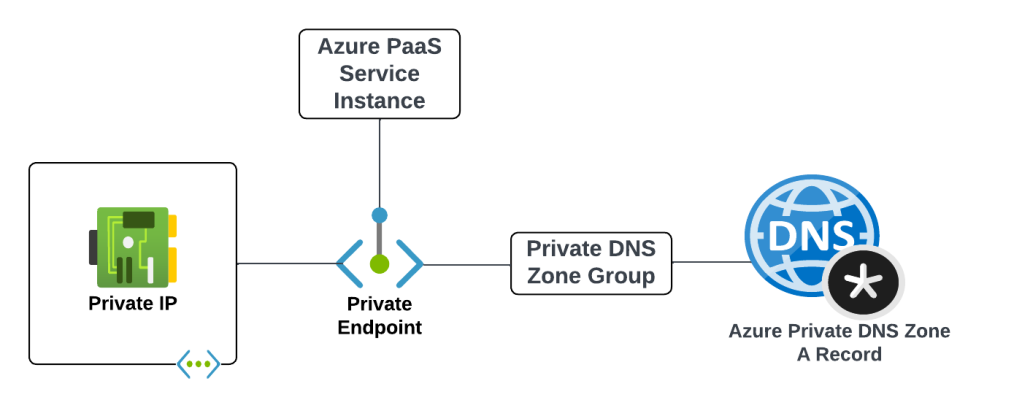
Before we get into the details of how it all works let’s first look at the components that make up an Azure Private Endpoint created for an Azure native service that is integrated with Azure Private DNS. These components include (going from left to right):
Virtual Network Interface – The virtual network interface (VNI) is deployed into the customer’s virtual network and reserves a private IP address that is used as the path to the Private Endpoint.
Private Endpoint – The Azure resource that represents the private connectivity to the resource establishes the relationships to the other resources.
Azure PaaS Service Instance – This could be a customer’s instance of an Azure SQL Server, blob endpoint for a storage account, and any other Microsoft PaaS that supports private endpoints. The key thing to understand is the Private Endpoint facilitates connectivity to a single instance of the service.
Private DNS Zone Group – The Private DNS Zone Group resource establishes a relationship between the Private Endpoint and an Azure Private DNS Zone automating the lifecycle of the A record(s) registered within the zone. You may not be familiar with this resource if you’ve only used the Azure Portal.
Azure Private Endpoint and DNS integration components
An example of the components involved with a Private Endpoint for the blob endpoint for an Azure Storage Account would be similar to what pictured below.
Example of components for blob endpoint of Azure Storage Account
I’ll now walk through some scenarios to understand how these components work together.
Scenario 1 – Default DNS Pattern Without Private Link Endpoint with a single virtual network
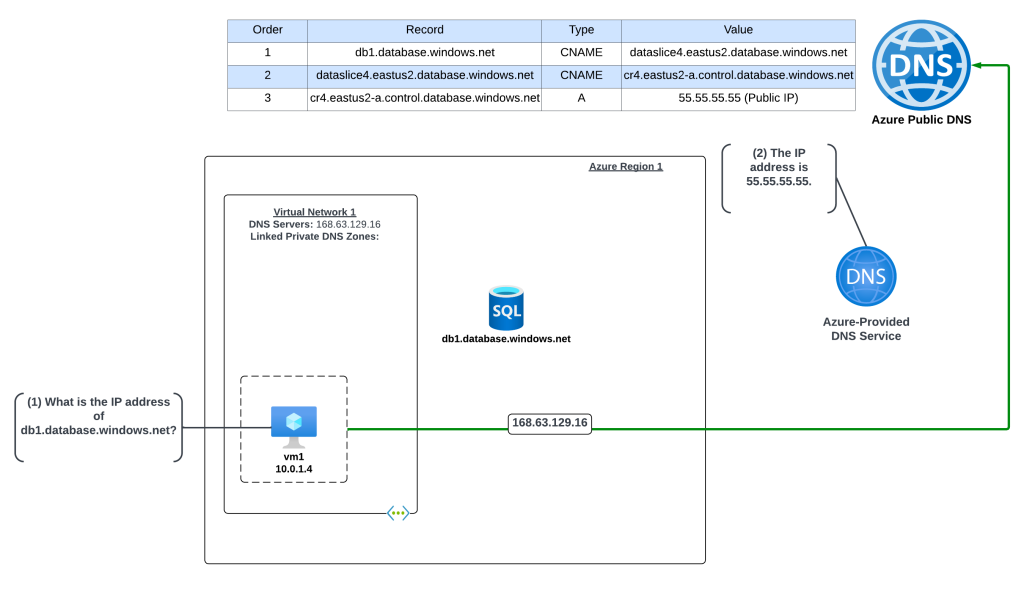
DNS resolution without a Private Endpoint
In this example an Azure virtual machine needs to resolve the name of an Azure SQL instance named db1.database.windows.net. No Private Endpoint has been configured for the Azure SQL instance and the VNet is configured to use the 168.63.129.16 virtual IP and Azure-provided DNS.
The query resolution is as follows:
VM1 creates a DNS query for db1.database.windows.net. VM1 does not have a cached entry for it so the query is passed on to the DNS Server configured for the operating system. The virtual network DNS Server settings has be set to to the default of the virtual IP of 168.63.129.16 and pushed to the VNI by the Azure DHCP Service . The recursive query is sent to the virtual IP and passed on to the Azure-provided DNS service.
The Azure-provided DNS services checks to see if there is an Azure Private DNS Zone named database.windows.net linked to the virtual network. Once it validates it does not, the recursive query is resolved against the public DNS namespace and the public IP 55.55.55.55 of the Azure SQL instance is returned.
Scenario 2 – DNS Pattern with Private Link Endpoint with a single virtual network
DNS Resolution with a Private Endpoint
In this example an Azure virtual machine needs to resolve the name of an Azure SQL instance named db1.database.windows.net. A Private Endpoint has been configured for the Azure SQL instance and the VNet is configured to use the 168.63.129.16 virtual IP which will use Azure-provided DNS. An Azure Private DNS Zone named privatelink.database.windows.net has been created and linked to the machine’s virtual network. Notice that a new CNAME has been created in public DNS named db1.privatelink.database.windows.net.
The query resolution is as follows:
VM1 creates a DNS query for db1.database.windows.net. VM1 does not have a cached entry for it so the query is passed on to the DNS Server configured for the operating system. The virtual network DNS Server settings has be set to to the default of the virtual IP of 168.63.129.16 and pushed to the VNI by the Azure DHCP Service . The recursive query is sent to the virtual IP and passed on to the Azure-provided DNS service.
The Azure-provided DNS services checks to see if there is an Azure Private DNS Zone named database.windows.net linked to the virtual network. Once it validates it does not, the recursive query is resolved against the public DNS namespace. During resolution the CNAME of privatelink.database.windows.net is returned. The Azure-provided DNS service checks to see if there is an Azure Private DNS Zone named privatelink.database.windows.net linked to the virtual network and determines there is. The query is resolved to the private IP address of 10.0.2.4 of the Private Endpoint.
Scenario 2 Key Takeaway
The key takeaway from this scenario is the Azure-provided DNS service is able to resolve the query to the private IP address because the virtual network zone link is established between the virtual network and the Azure Private DNS Zone. The virtual network link MUST be created between the Azure Private DNS Zone and the virtual network where the query is passed to the 168.63.129.16 virtual IP. If that link does not exist, or the query hits the Azure-provided DNS service through another virtual network, the query will resolve to the public IP of the Azure PaaS instance.
Great, you understand the basics. Let’s apply that knowledge to enterprise scenarios.
Scenario 3 – Azure-to-Azure resolution of Azure Private Endpoints
First up I will cover resolution of Private Endpoints within Azure when it is one Azure service talking to another in a typical enterprise Azure environment with a centralized DNS service.
Scenario 3a- Azure-to-Azure resolution of Azure Private Endpoints with a customer-managed DNS service
Azure resolution of Azure Private Endpoints using customer-managed DNS service
First I will cover how to handle this resolution using a customer-managed DNS service running in Azure. Customers may choose to do this over the Private DNS Resolver pattern because they have an existing 3rd-party DNS service (InfoBlox, BlueCat, etc) they already have experience on.
In this scenario the Azure environment has a traditional hub and spoke where there is a transit network such as a VWAN Hub or a traditional virtual network with some type of network virtual appliance handling transitive routing. The customer-managed DNS service is deployed to a virtual network peered with the transit network. The customer-managed DNS service virtual network has a virtual network link to the Private DNS Zone for privatelink.database.windows.net namespace. An Azure SQL instance named db1.database.windows.net has been deployed with a Private Endpoint in a spoke virtual network. An Azure VM has been deployed to another spoke virtual network and the DNS server settings of the virtual network has been configured with the IP address of the customer-managed DNS service.
Here, the VM running in the spoke is resolving the IP address of the Azure SQL instance private endpoint.
The query resolution path is as follows:
VM1 creates a DNS query for db1.database.windows.net. VM1 does not have a cached entry for it so the query is passed on to the DNS Server configured for the operating system. The virtual network DNS Server settings has be set to 10.1.0.4 which is the IP address of the customer-managed DNS service and pushed to the virtual network interface by the Azure DHCP Service . The recursive query is passed to the customer-managed DNS service over the virtual network peerings.
The customer-managed DNS service receives the query, validates it does not have a cached entry and that it is not authoritative for the database.windows.net namepsace. It then forwards the query to its standard forwarder which has been configured to the be the 168.63.129.16 virtual IP address for the virtual network in order to pass the query to the Azure-provided DNS service.
The Azure-provided DNS services checks to see if there is an Azure Private DNS Zone named database.windows.net linked to the virtual network. Once it validates it does not, the recursive query is resolved against the public DNS namespace. During resolution the CNAME of privatelink.database.windows.net is returned. The Azure-provided DNS service checks to see if there is an Azure Private DNS Zone named privatelink.database.windows.net linked to the virtual network and determines there is. The query is resolved to the private IP address of 10.0.2.4 of the Private Endpoint.
Scenario 3b – Azure-to-Azure resolution of Azure Private Endpoints with the Azure Private DNS Resolver
Azure resolution of Azure Private Endpoints using Azure Private DNS Resolver
In this scenario the Azure environment has a traditional hub and spoke where there is a transit network such as a VWAN Hub or a traditional virtual network with some type of network virtual appliance handling transitive routing. An Azure Private DNS Resolver inbound and outbound endpoint has been deployed into a shared services virtual network that is peered with the transit network. The shared services virtual network has a virtual network link to the Private DNS Zone for privatelink.database.windows.net namespace. An Azure SQL instance named db1.database.windows.net has been deployed with a Private Endpoint in a spoke virtual network. An Azure VM has been deployed to another spoke virtual network and the DNS server settings of the virtual network has been configured with the IP address of the Azure Private DNS Resolver inbound endpoint IP.
Here, the VM running in the spoke is resolving the IP address of the Azure SQL instance private endpoint.
VM1 creates a DNS query for db1.database.windows.net. VM1 does not have a cached entry for it so the query is passed on to the DNS Server configured for the operating system. The virtual network DNS Server settings has be set to 10.1.0.4 which is the IP address of the Azure Private DNS Resolver Inbound Endpoint IP and pushed to the virtual network interface by the Azure DHCP Service . The recursive query is passed to the Azure Private DNS Resolver Inbound Endpoint via the virtual network peerings.
The inbound endpoint receives the query and passes it into the virtual network through the outbound endpoint which passes it on to the Azure-provided DNS service through the 168.63.129.16 virtual IP.
The Azure-provided DNS services checks to see if there is an Azure Private DNS Zone named database.windows.net linked to the virtual network. Once it validates it does not, the recursive query is resolved against the public DNS namespace. During resolution the CNAME of privatelink.database.windows.net is returned. The Azure-provided DNS service checks to see if there is an Azure Private DNS Zone named privatelink.database.windows.net linked to the virtual network and determines there is. The query is resolved to the private IP address of 10.0.2.4 of the Private Endpoint.
Scenario 3 Key Takeaways
When using the Azure Private DNS Resolver, there are a number of architectural patterns for both the centralized model outlined here and a distributed model. You can reference this post for those details.
It’s not necessary to link the Azure Private DNS Zone to each spoke virtual network as long as you have configured the DNS Server settings of the virtual network to the IP address of your centralized DNS service which should be running in a virtual network which has virtual network links to all of the Azure Private DNS Zones used for PrivateLink.
Scenario 4 – On-premises resolution of Azure Private Endpoints
Let’s now take a look at DNS resolution of Azure Private Endpoints from on-premises machines. As I’ve covered in past posts Azure Private DNS Zones are only resolvable using the Azure-provided DNS service which is only accessible through the 168.63.129.16 virtual IP which is not reachable outside the virtual network. To solve this challenge you will need an endpoint within Azure to proxy the DNS queries to the Azure-provided DNS service and connectivity from-premises into Azure using Azure ExpressRoute or a VPN.
Today you have two options for the DNS proxy which include bringing your own DNS service or using the Azure Private DNS Resolver. I’ll cover both for this scenario.
Scenario 4a – On-premises resolution of Azure Private Endpoints using a customer-managed DNS Service
On-premises resolution of Azure Private Endpoints using customer-managed DNS service
In this scenario the Azure environment has a traditional hub and spoke where there is a transit network such as a VWAN Hub or a traditional virtual network with some type of network virtual appliance handling transitive routing. The customer-managed DNS service is deployed to a virtual network peered with the transit network. The customer-managed DNS service virtual network has a virtual network link to the Private DNS Zone for privatelink.database.windows.net namespace. An Azure SQL instance named db1.database.windows.net has been deployed with a Private Endpoint in a spoke virtual network.
An on-premises environment is connected to Azure using an ExpressRoute or VPN. The on-premises DNS service has been configured with a conditional forwarder for database.windows.net which points to the customer-managed DNS service running in Azure.
The query resolution path is as follows:
The on-premises machine creates a DNS query for db1.database.windows.net. After validating it does not have a cached entry it sends the DNS query to the on-premises DNS server which is configured as its DNS server.
The on-premises DNS server receives the query, validates it does not have a cached entry and that it is not authoritative for the database.windows.net namespace. It determines it has a conditional forwarder for database.windows.net pointing to 10.1.0.4 which is the IP address of the customer-managed DNS service running in Azure. The query is recursively passed on to the customer-managed DNS service via the ExpressRoute or Site-to-Site VPN connection
The customer-managed DNS service receives the query, validates it does not have a cached entry and that it is not authoritative for the database.windows.net namepsace. It then forwards the query to its standard forwarder which has been configured to the be the 168.63.129.16 virtual IP address for the virtual network in order to pass the query to the Azure-provided DNS service.
The Azure-provided DNS services checks to see if there is an Azure Private DNS Zone named database.windows.net linked to the virtual network. Once it validates it does not, the recursive query is resolved against the public DNS namespace. During resolution the CNAME of privatelink.database.windows.net is returned. The Azure-provided DNS service checks to see if there is an Azure Private DNS Zone named privatelink.database.windows.net linked to the virtual network and determines there is. The query is resolved to the private IP address of 10.0.2.4 of the Private Endpoint.
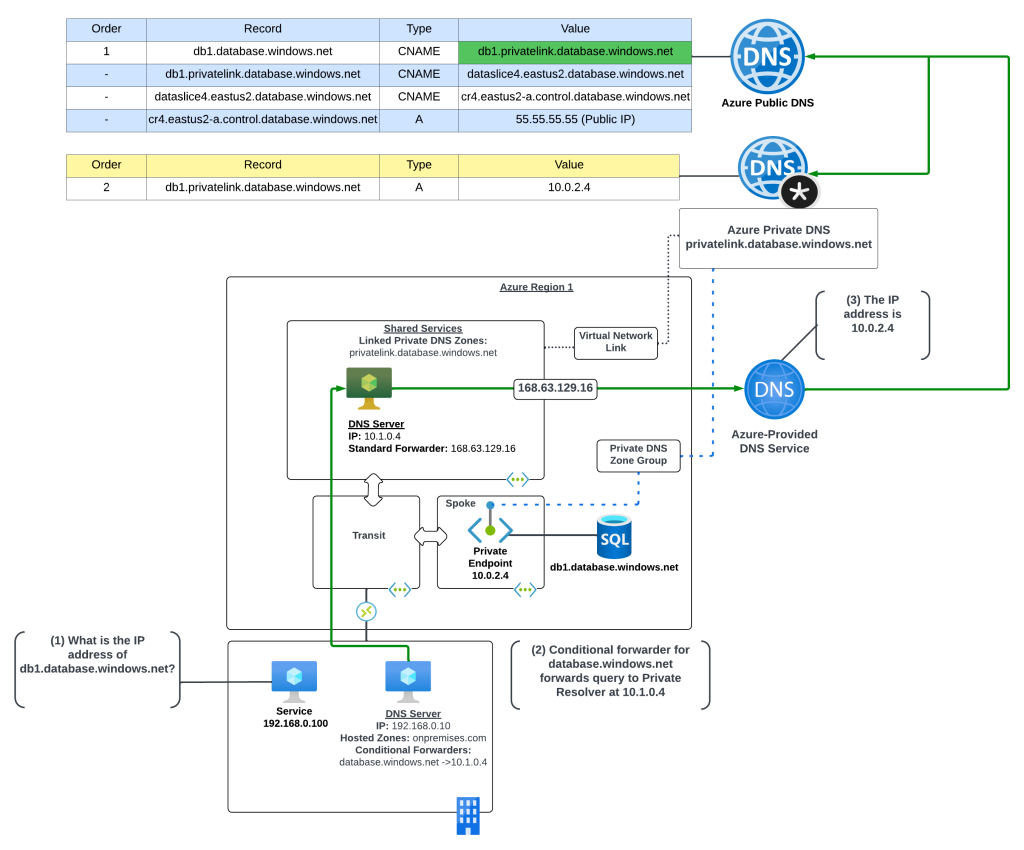
Scenario 4b – On-premises resolution of Azure Private Endpoints using Azure Private DNS Resolver
On-premises resolution of Azure Private Endpoints using Azure Private DNS Resolver
Now let me cover this pattern when using the Azure Private DNS Resolver. I’m going to assume you have some basic knowledge of how the Azure Private DNS Resolver works and I’m going to focus on the centralized model. If you don’t have baseline knowledge of the Azure Private DNS Resolver or you’re interested in the distributed mode and the pluses and minuses of it, you can reference this post.
In this scenario the Azure environment has a traditional hub and spoke where there is a transit network such as a VWAN Hub or a traditional virtual network with some type of network virtual appliance handling transitive routing. The Private DNS Resolver is deployed to a virtual network peered with the transit network. The Private DNS Resolver virtual network has a virtual network link to the Private DNS Zone for privatelink.database.windows.net namespace. An Azure SQL instance named db1.database.windows.net has been deployed with a Private Endpoint in a spoke virtual network.
An on-premises environment is connected to Azure using an ExpressRoute or VPN. The on-premises DNS service has been configured with a conditional forwarder for database.windows.net which points to the Private DNS Resolver inbound endpoint.
The query resolution path is as follows:
The on-premises machine creates a DNS query for db1.database.windows.net. After validating it does not have a cached entry it sends the DNS query to the on-premises DNS server which is configured as its DNS server.
The on-premises DNS server receives the query, validates it does not have a cached entry and that it is not authoritative for the database.windows.net namespace. It determines it has a conditional forwarder for database.windows.net pointing to 10.1.0.4 which is the IP address of the inbound endpoint for the Azure Private DNS Resolver running in Azure. The query is recursively passed on to the inbound endpoint over the ExpressRoute or Site-to-Site VPN connection
The inbound endpoint receives the query and passes it into the virtual network through the outbound endpoint which passes it on to the Azure-provided DNS service through the 168.63.129.16 virtual IP.
The Azure-provided DNS services checks to see if there is an Azure Private DNS Zone named database.windows.net linked to the virtual network. Once it validates it does not, the recursive query is resolved against the public DNS namespace. During resolution the CNAME of privatelink.database.windows.net is returned. The Azure-provided DNS service checks to see if there is an Azure Private DNS Zone named privatelink.database.windows.net linked to the virtual network and determines there is. The query is resolved to the private IP address of 10.0.2.4 of the Private Endpoint.
Scenario 4 Key Takeaways
The key takeaways from this scenario are:
You must setup a conditional forwarder on the on-premises DNS server for the PUBLIC namespace of the service. While using the privatelink namespace may work with your specific DNS service based on how the vendor has implemented, Microsoft recommends using the public namespace.
Understand the risk you’re accepting with this setup. All DNS resolution for the public namespace will now be sent up to the Azure Private DNS Resolver or customer-managed DNS service. If your connectivity to Azure goes down, or those DNS components are unavailable, your on-premises endpoints may start having failures accessing websites that are using Azure services (think images being pulled from an Azure storage account).
If your on-premises DNS servers use non-RFC1918 address space, you will not be able to use scenario 3b. The Azure Private DNS Resolver inbound endpoint DOES NOT support traffic received from non-RFC1918 address space.
Other Gotchas
Throughout these scenarios you have likely observed me using the public namespace when referencing the resources behind a Private Endpoint (example: using db1.database.windows.net versus using db1.privatelink.database.windows.net). The reason for doing this is because the certificates for Azure PaaS services does not include the privatelink namespace in the certificate provisioned to the instance of the service. There are exceptions for this, but they are few and far between. You should always use the public namespace when referencing a Private Endpoint unless the documentation specifically tells you not to.
Let me take a moment to demonstrate what occurs when an application tries to access a service behind a Private Endpoint using the PrivateLink namespace. In this scenario there is a virtual machine which has been configured with proper resolution to resolve Private Endpoints to the appropriate Azure Private DNS Zone.
Resolution of Private Endpoint to private IP address
Now I’ll attempt to make an HTTPS connection to the Azure Key Vault instance using the PrivateLink namespace of privatelink.vaultcore.azure.net. In the image below you can see the error returned states the PrivateLink namespace is not included in the subject alternate name field of the certificate presented by the Azure Key Vault instance. What this means is the client can’t verify the identity of the server because the identities presented in the certificate doesn’t match the identity that was requested. You’ll often see this error as a certificate name mismatch in most browsers or SDKs.
Certificate name mismatch error
Final Thoughts
There are some key takeaways for you with this post:
Know your DNS resolution path. This is absolutely critical when troubleshooting Private Endpoint DNS resolution.
Always check your zone links. 99% of the time you’re going to be used the centralized model for DNS described in this post. After you verify your DNS resolution path, validate that you’ve linked the Private DNS Zone to your DNS Server / Azure Private DNS Resolver virtual network.
Create your on-premises conditional forwarders for the PUBLIC namespaces for Azure PaaS services, not the Private Link namespace.
Call your services behind Private Endpoints using the public hostname not the Private Link hostname. Using the Private Link hostname will result in certificate mismatches when trying to establish secure sessions.
Don’t go and link your Private DNS Zone to every single virtual network. You don’t need to do this if you’re using the centralized model. There are very rare instances where the zone must be linked to the virtual network for some deployment check the product group has instituted, but that is rare.
Centralize your Azure Private DNS Zones in a single subscription and use a single zone for each PrivateLink service across your environments (prod, non-prod, test, etc). If you try to do different zones for different environments you’re going to run into challenges when providing on-premises resolution to those zones because you now have two authorities for the same namespace.
Before I close out I want to plug a few other blog posts I’ve assembled for Private Endpoints which are helpful in understanding the interesting way they work.
This post walks through the interesting routes Private Endpoints inject in subnet route tables. This one is important if you have a requirement to inspect traffic headed toward a service behind a Private Endpoint.
This post covers how Network Security Groups work with Private Endpoints and some of the routing improvements that were recently released to help with inspection requirements around Private Endpoints.








 Journey Of The Geek