Hello once again fellow geek. In this post I will be continuing my series of NSPs (Network Security Perimeters). Over the past few posts in this series I’ve explained the problem NSPs solve, the components that make up an NSP, demonstrated NSPs through a Key Vault use case and an AI workload use case, and even shown how they can used to troubleshoot the dreaded Private Endpoints and forward web proxy problem we all run into. After reading those posts you are probably wondering why you aren’t seeing them more talked about in the Azure world. Besides the fact it’s not called “Frontier Network Agentic Security AI Perimeter”, the reason NSPs haven’t been getting the love they should is due to a technical gap that is finally in the process of being lifted.
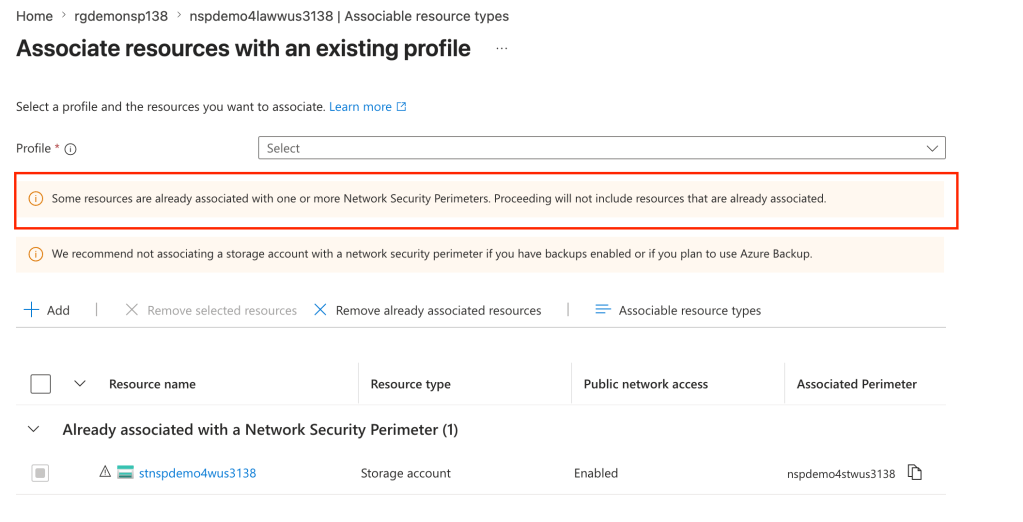
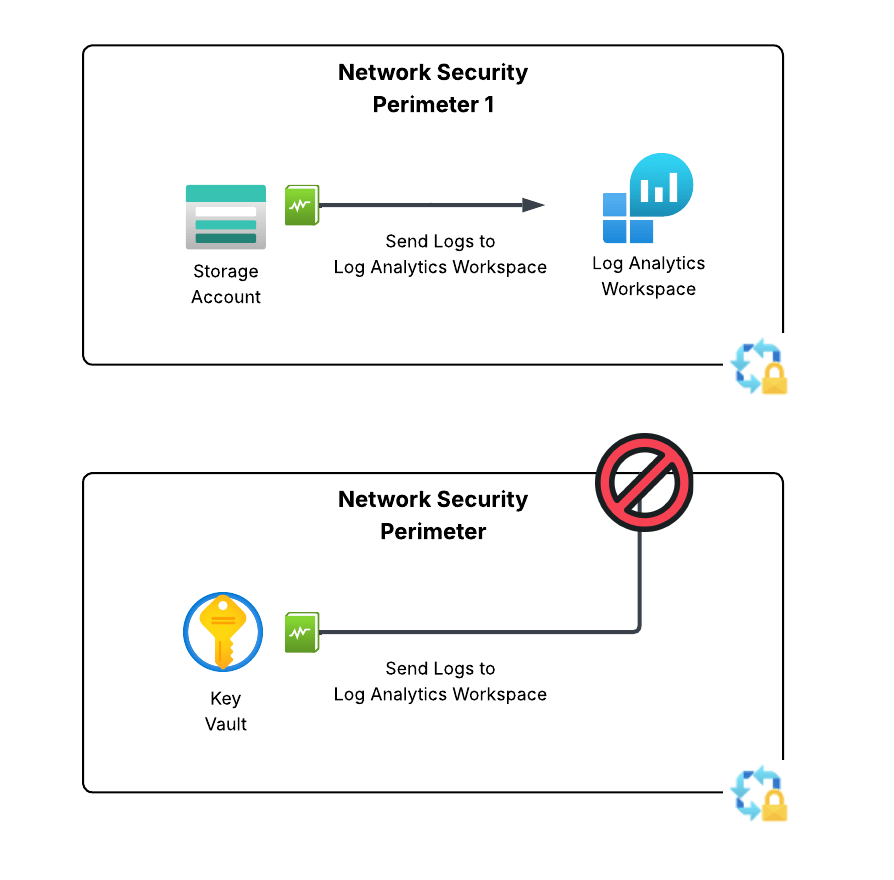
The only way to work around this limitation is to place the delivery destination (LAW, storage account, event hub) in the same NSP. While this sounds like a simple solution, a given resource can only belong to a single NSP. If you attempt to add a resource to an NSP when it’s already associated to another NSP it will fail as seen below.
Resources can only be associated to a single NSP
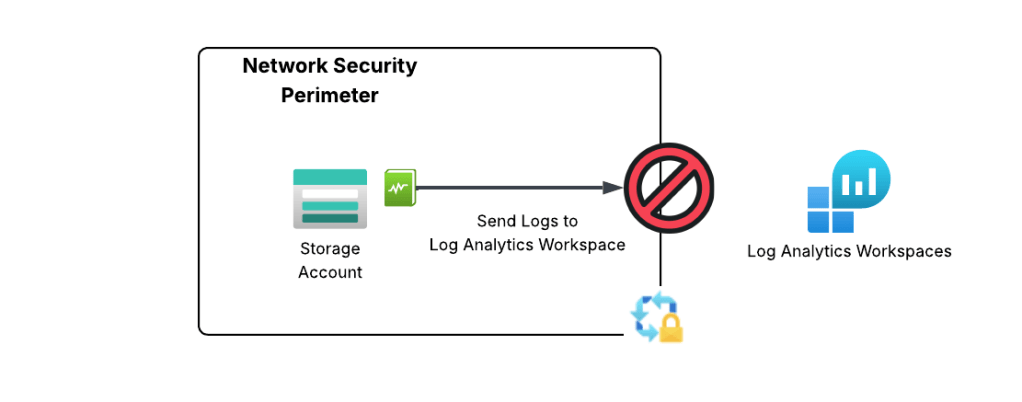
If you’ve ever done logging as scale in Azure, you already see the problem with this limitation. When logging at scale in Azure, it’s very common to send logs to a centralized Log Analytics Workspace, Event Hub, or Storage Account. There are a number of benefits to doing this beyond the scope of this post which you can read about in the CAF (Cloud Adoption Framework) documentation. These resource are typically managed by a security team or a platform team and live in subscriptions controlled by those teams.
If you’re like, your first instinct is to create an outbound rule to allow the access to the Log Analytics Workspace. Good instinct, but not possible because today NSPs only support outbound rules of type FQDN and there is no FQDN for platform diagnostic logs that Microsoft provide today. A service tag would be the best bet, but sadly it is not yet supported for NSP outbound rules.
Centralized logging problem with NSPs
Up until very recently, NSPs in enforcement mode have been pretty much a non-starter for enterprise customers due to this limitation. Notice I say “enforcement”. If you aren’t using NSPs in learning (or transition mode) you are losing out on insanely valuable egress visibility you can’t get using any other means as I describe in my troubleshooting post.
The PG (Product Group) for NSPs is one of those amazing product groups who listens to the customer, wants to see their product adopted, and works their butt off. Just a few weeks ago they introduced a new feature into public preview that begins to address this technical limitation
The Solution
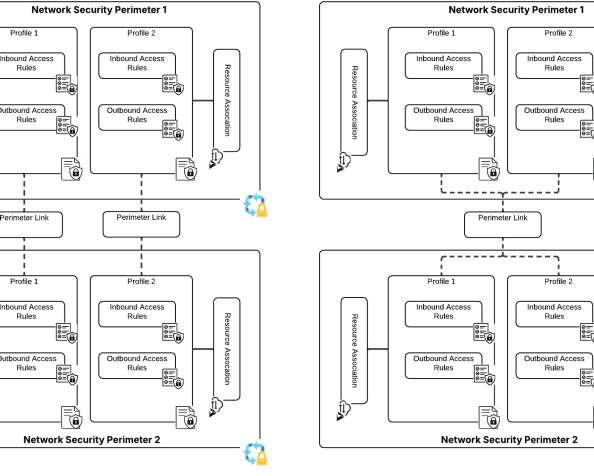
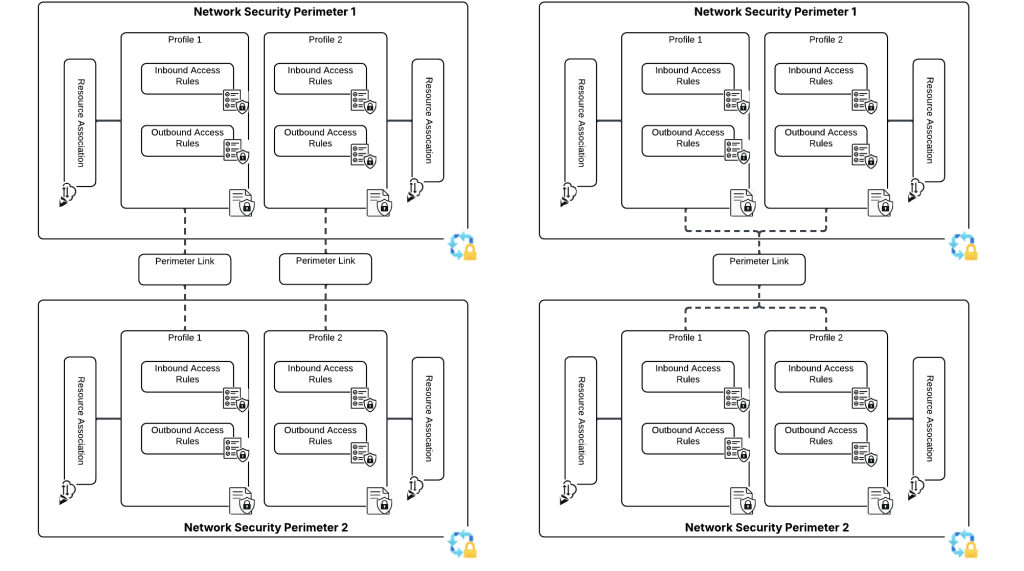
The solution for this technical problem is perimeter links. In the ARM (Azure Resource Manager) API, these are referred to as links and are a child resource of the Network Security Perimeter. Perimeter links allow traffic to flow between NSPs either per profile or for all profiles. This means we can slap a perimeter link between the NSP containing our resources that need to deliver our logs and the NSP containing the resource we’re delivering the logs to!
Perimeter links can be across a single profile or all profiles within an NSP
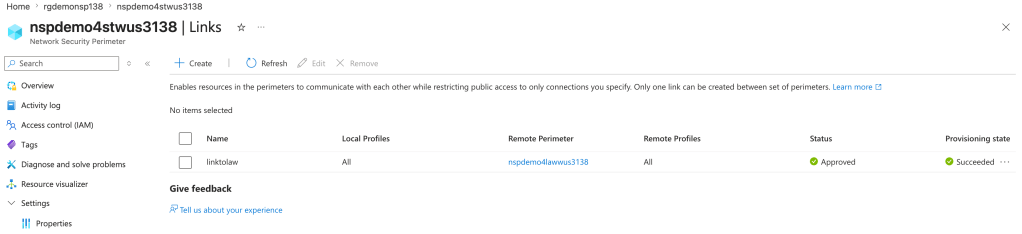
In the image below I’ve created a perimeter link between an NSP containing a storage account the NSP containing the log analytics workspace the storage account diagnostic log setting has been configured to deliver logs to. This link enables the traffic to flow freely between the two NSPs.
Perimeter link example
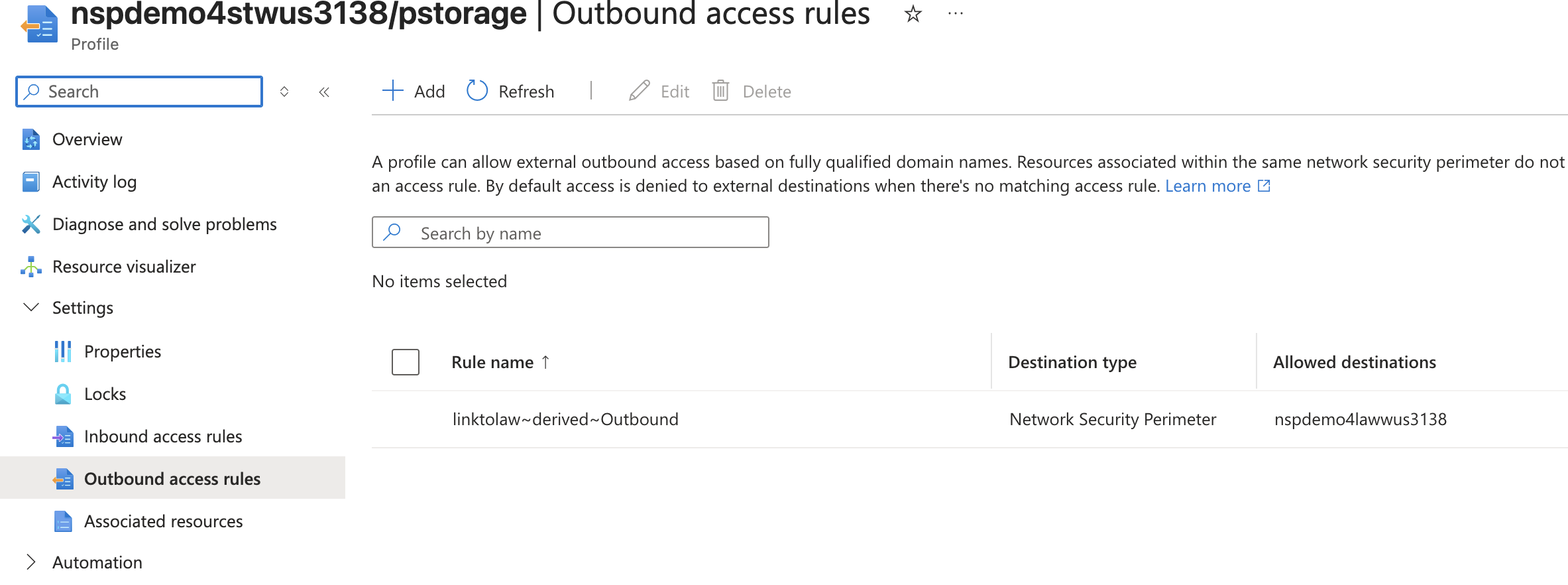
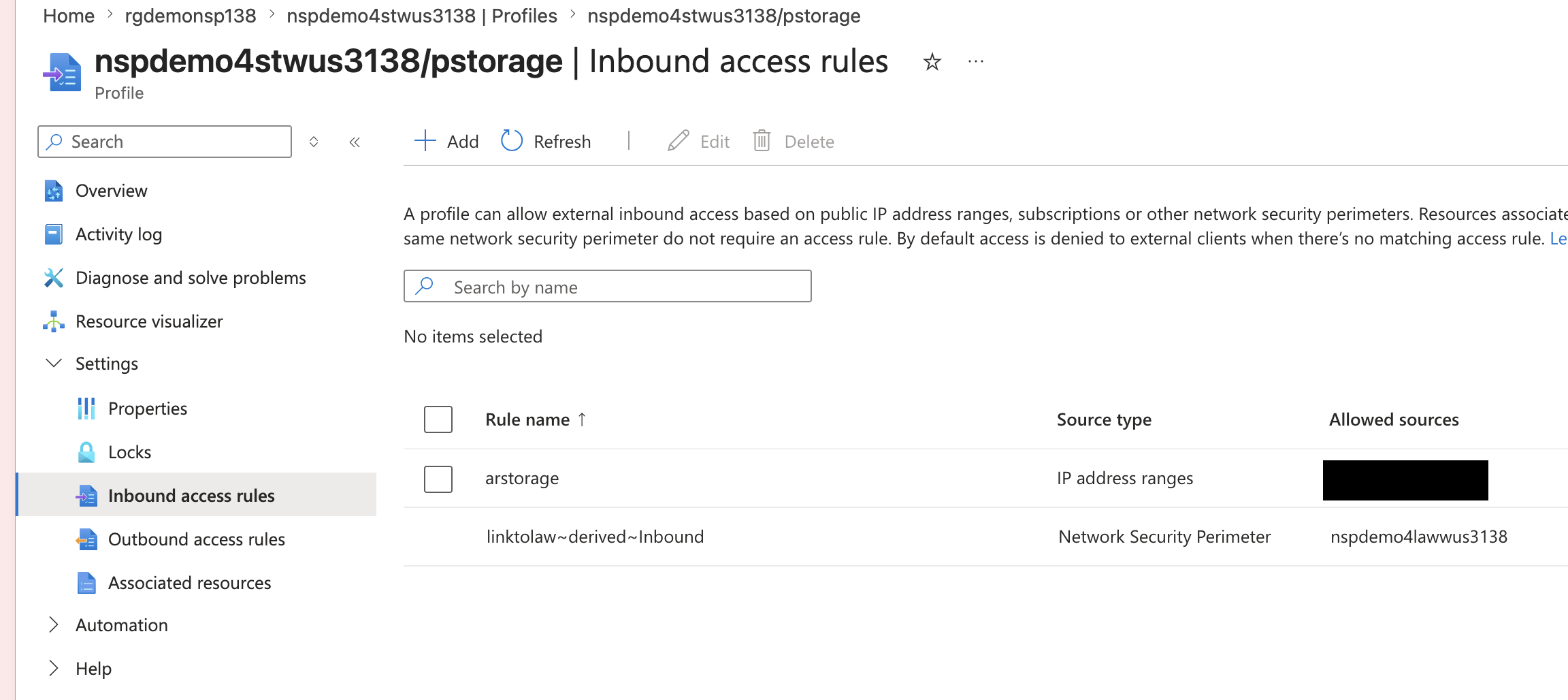
Once the perimeter link is created, new inbound and outbound access rules are created in each profile allowing the two NSPs to communicate with each other.
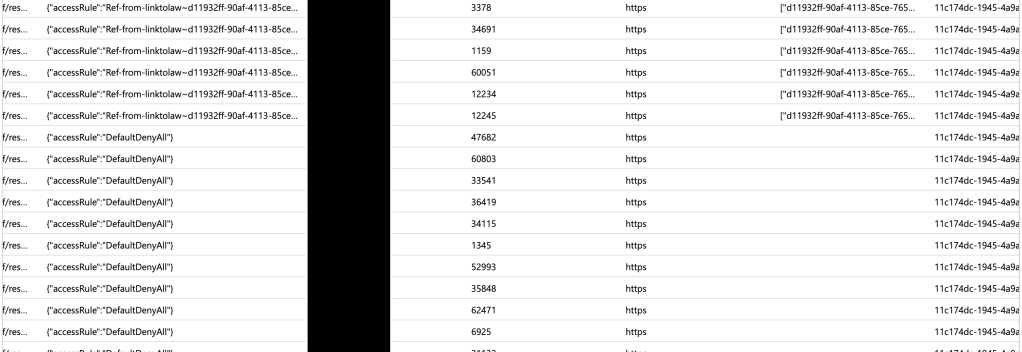
In the example above, once the perimeter link is in place and rules have been automatically created and taken affect (takes about 10-15 seconds) the spice will flow! Alright, logs will flow but I’ve been re-reading Dune so leave me alone in my nerdy world. In the screenshot below you can see the logs being blocked initially and then being allowed after the perimeter and its automatically created rules take affect.
The spice will flow!
The good and gotchas of perimeter links
So first some of the good things about perimeter links:
You can now do cross perimeter communication.
In my testing, terraform state doesn’t get botched up when the perimeter link triggers the automatic creation of the access rule. A reapply after didn’t complain and didn’t overwrite them.
Perimeter links work across subscriptions. Note there is a (as there should be) to make that work.
The biggest pain point of them right now is the maximum amount of perimeter links per NSP is 10. Obviously, this is no where near the scale needed for the centralized logging use case. However, this is still preview and I’m confident the PG will increase that limit (hopefully a shit ton) prior to GA.
Well folks, let me leave you with a few recommendations:
If you’re not using NSPs as a detective control for data exfiltration you are missing out. You need to make this a priority, if only for the visibility into egress.
This is preview, so muck around with it, but don’t go rolling this to prod.
Back for more are ya? Today we’re gonna chat about how you could add Entra ID authentication into your custom-built web application. I’ll be digging into the Entra ID application registration process and examining the requests and responses for the whole authentication process via a local proxy using HTTP Toolkit. The goal here is not to give you coding best practices (god save you if you use any of my code in production) but instead to help you understand how all this stuff works and how products are (and are not) exercising the OIDC and OAuth protocols under the hood.
If you haven’t read my first and second post in the series, stop what you’re doing right now and read them. I’m going into this post assuming you have and thus assuming knowledge and understanding basic Entra ID concepts like applications vs service principals and a foundational understanding of OIDC and OAuth.
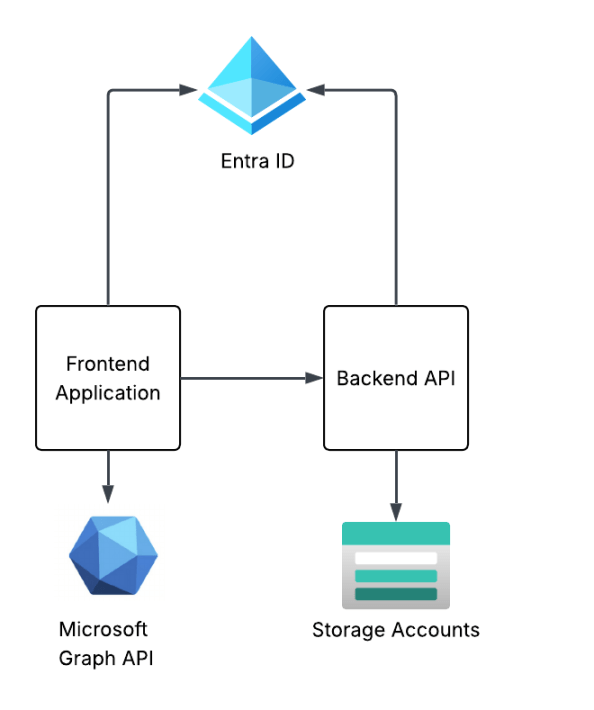
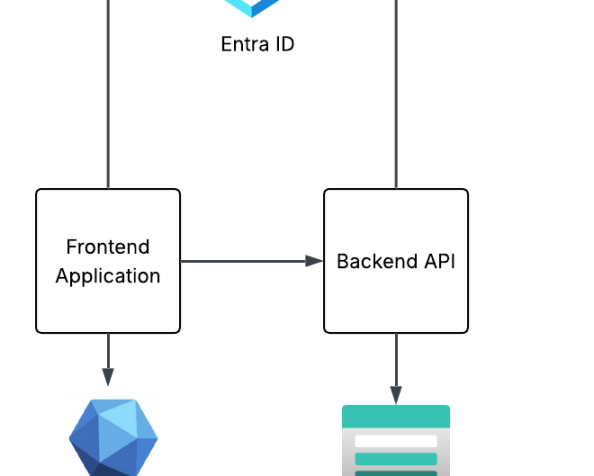
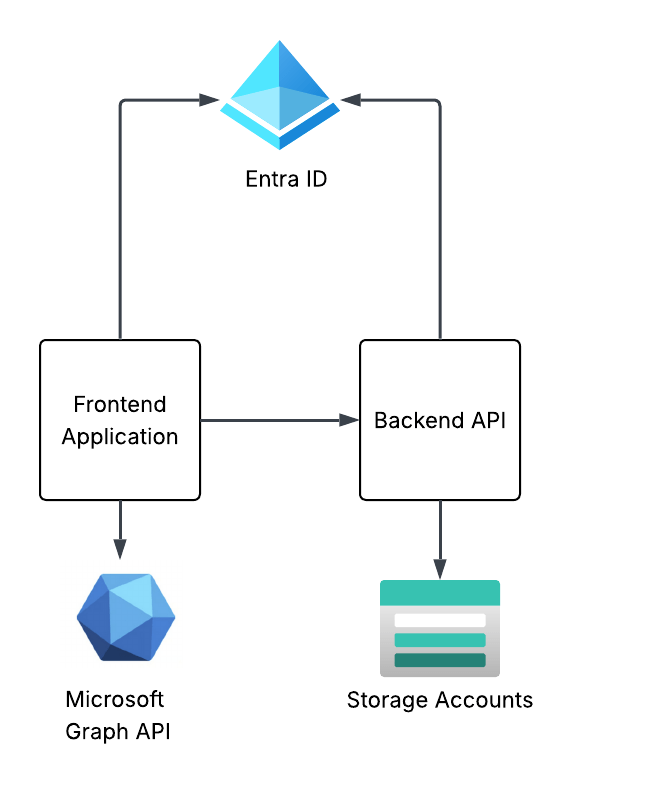
The solution design I’m building towards this in this series of posts is a simple frontend web application and backend API that are using Entra ID for authentication and authorization. The end design will look something like the below. This post will focus on the frontend web application.
Series solution design
Creating the frontend application registration
As I covered in my first post, the application registration (or application resource) is the globally unique representation of the application across Entra ID. There can only be one application registration for an application across all Entra ID tenants. An application registration can be single tenant (used only in your Entra ID tenant) or multi-tenant (can be used across Entra ID tenants). I like to think of the process of creating the application process similar to the manual client registration process mentioned in the OAuth spec. The result is the same as we’ll configure a bunch of information required for OAuth such as the redirect URI, the grant types it supports, and whether the client will be public or confidential client. Once registered, Entra will return a unique client_id and client_secret if a confidential application. There are additional Entra-specific properties we can populate, but the manual client registration explanation makes the most sense in my brain at least.
Creating an application registration can be done through the Portal, CLI/PowerShell, REST, Terraform, etc. I’m going to create it direct through the Microsoft Graph REST API because I want to walk through all the gory properties. To create an app registration, your user account needs to be at least hold the Entra ID Application Developer role. To keep things simple and address my laziness, my user will be setup as a global admin.
# Set the properties for the application
app_display_name = "Demo frontend app for Entra authentication"
description = "This app is used to demonstrate a frontend application where a user authenticates using Entra ID authentication via OIDC"
The application registration I’m creating above is being created as a multi-tenant application instead of a single tenant application and is determined by the signInAudience being set to a value of AzureADMultipleOrgs. I’m doing this because I may do an additional post in this series walking through multi-tenant applications. Most of the application registrations you create will be single tenant and would have this property set to AzureADMyOrg.
Since I’m building a web application, I’m going to be configuring it as a confidential client (which means it will have a credential) and I’m going to use the authorization code flow. I don’t want my application registration to ever support being used as a public client so I set isFallbackPublicClient to false. This will force my client to provide a credential when attempting to obtain a token. If you were building an application that would live direct on the user’s desktop or mobile device, you’d need to set to that true because at that point your application would be a public client.
Under the web property, I’m setting the redirectUri property to the endpoint in my application I want the user redirected to after the user successfully authenticates to Entra ID and consents to whatever scope the application (or OAuth client) is requesting. In this case, my application runs directly on my machine so this is set to localhost.
You’ll also see I’m setting the serviceManagementReference property. Best practice is for you to set this property with a contact within the business unit for that owns the application. This can be helpful if the application registration becomes stale at this point and you detect that during your regular audits (which OF COURSE you’re doing!)
Next up, I want to set an owner. Every application registration should have an owner and this is a child object of the application. Now don’t go willy-nilly throwing any business unit person into that field (the owner cannot be a group as of the date of this post). When a user is an owner of an application registration, they can modify the application registration. The owner should be set to some privileged user account in Entra where access to that privileged account is tightly controlled.
import requests
import json
# Set the owners of the application using their Entra ID user object id
Next up I need to create a client credential for my application. This will act as its client_secret to support its confidential client status. Entra ID supports multiple types of credentials including a basic client secret, client certificate, and federated credential. Of the three, the federated credential is the sweet spot if you can make it work. This is where you can use something like a managed identity which means the actual secret is automatically managed and rotated by Microsoft. Way easier lifecycle. Federated credentials can also use external identity providers, like GCP, GitHub and others neat integrations via the workload identity federation. A client certificate should be your next preferred credential since it has higher assurance and avoids having to worry about secret rotation and leakage. Since I’m lazy, I’ll be using a client secret.
Below I create a client secret that will be valid for a year.
# Create a date one year from now that will be used to expire the app registration credential
Alright, at this point we have an application registration and client credential, which essentially means we have manually registered the application as an OAuth client to the authorization server (Entra ID). I now have a client_id (appId property) and client_secret. What next?
Creating the frontend service principal
I now need a security principal (or identity) to act as an identity for this instance of my application in this Entra ID tenant. In comes the service principal. There are many types of service principals as I mentioned previously, for this use case I’ll be creating an application service principal. Manual creation of this is only required because I’m creating it programmatically through REST. If I created this app registration in Azure Portal a service principal would automatically be created.
Creating the service principal is very straightforward and there’s not much need you to pass beyond the appId (or client id) of the application registration. Most of the properties are synchronized from the application resource the service principal is being created for. You’ll reference the appId of the application resource which handles the mapping back to the application resource.
def create_service_principal(app_id: str):
"""This function creates a service principal for an application registration in Microsoft Graph API if it doesn't already exist
Args:
app_id (str): The application ID of the service principal to create.
Returns:
dict or None: The details of the created service principal if successful, otherwise None.
"""
# Check to see if the service principal already exists
This spits out a new service principal object seen below. If we want the instance of the application to access any resources itself or in a delegated manner, the service principal will be the resource that is granted the permissions.
"displayName": "Demo frontend app for Entra authentication",
"homepage": null,
"isDisabled": null,
"loginUrl": null,
"logoutUrl": null,
"notes": null,
"notificationEmailAddresses": [],
"preferredSingleSignOnMode": null,
"preferredTokenSigningKeyThumbprint": null,
"replyUrls": [
"http://localhost:8100/callback"
],
"servicePrincipalNames": [
"fc815c55-d456-4d38-be76-XXXXXXXXXXX
],
"servicePrincipalType": "Application",
"signInAudience": "AzureADMultipleOrgs",
"tags": [],
"tokenEncryptionKeyId": null,
"samlSingleSignOnSettings": null,
"addIns": [],
"appRoles": [],
"info": {
"logoUrl": null,
"marketingUrl": null,
"privacyStatementUrl": null,
"supportUrl": null,
"termsOfServiceUrl": null
},
"keyCredentials": [],
"oauth2PermissionScopes": [],
"passwordCredentials": [],
"resourceSpecificApplicationPermissions": [],
"verifiedPublisher": {
"displayName": null,
"verifiedPublisherId": null,
"addedDateTime": null
}
}
Document your required permissions!
It’s best practice to document the permission your application will require versus being an asshole and forcing someone to guess, struggle, learn to hate you, and likely over permission. While this isn’t required for delegated permissions, it’s still best practice if possible. It should be possible in almost all instances (with some exceptions for agents if you’re brave enough). Permissions are divided into two categories which include role permissions and scope permissions. Role permissions are going to be the permissions the app exercises using its own identity context (we’ll see some of this in a future post) and scope permissions are going to be delegated permissions it requires. The permissions an application requires can be documented as part of the app registration (or application resource) by setting the requiredResourceAccess property of the application registration. This doesn’t grant any access, but simply informs the administrator what permissions will be required from the application. It doesn’t prohibit the administrator or user granting it additional permissions beyond what is required.
# Get the existing app permissions
def get_app_permissions(id: str):
"""This function retrieves the existing permissions required for an application registration from the Microsoft Graph API.
Args:
id (str): The object ID of the application registration to retrieve permissions for.
Returns:
list: A list of required resource permissions or else an empty list
# Return the current permission set or a blank array if there are no permissions currently set
return response.json().get('requiredResourceAccess') or []
# Add the app permissions to the app registration. This is useful for multi-tenant apps to document required permissions. It does not grant any permissions.
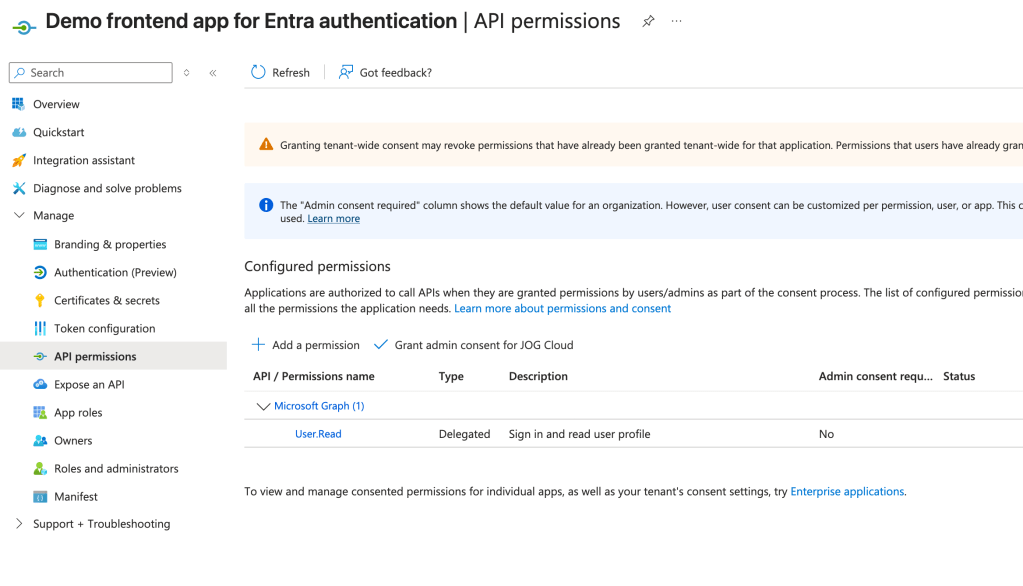
Once those are added they will appear in the API permissions section of the Application Registration inside of the Azure Portal as seen below. For my app I’m documenting that it requires the User.Read delegated permission on the Microsoft Graph API. For some of the built-in applications like the Microsoft Graph, some permissions will require admin consent and some will not like User.Read. Like I covered in my first post, this is determined by the creator of the application resource when they define the scopes. If you add these things programmatically it’s a bit more work because you need to dig up the resource’s appId and object ids of the permission. Something like Microsoft Graph is well documented. For other applications, you’ll need to do some digging via API calls.
Alright, at this point we’re ready to test our app!
Authenticating to the application
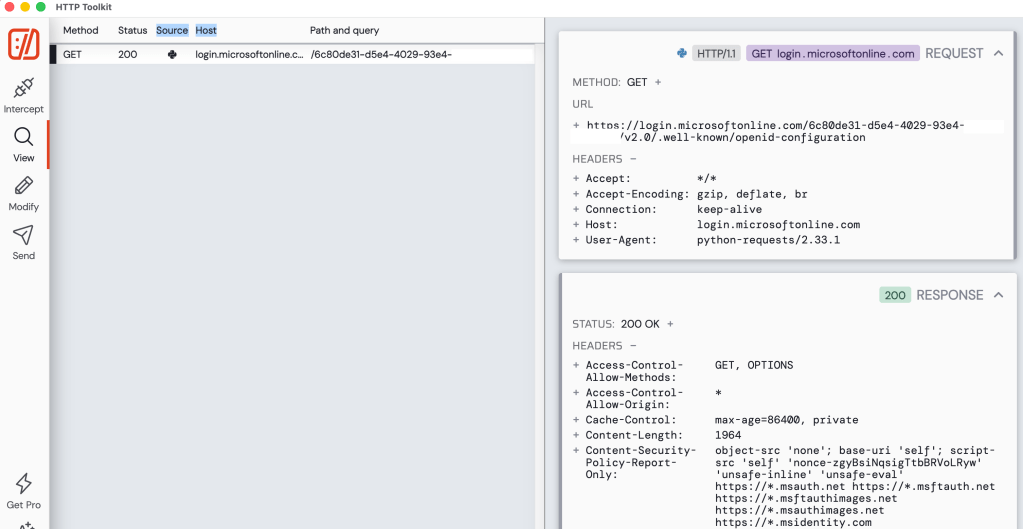
After starting the application I immediately see a lookup to metadata endpoint for the OIDC and OAuth endpoints. This is triggered an MSAL instance is started in the code. These endpoints will be used throughout the login process.
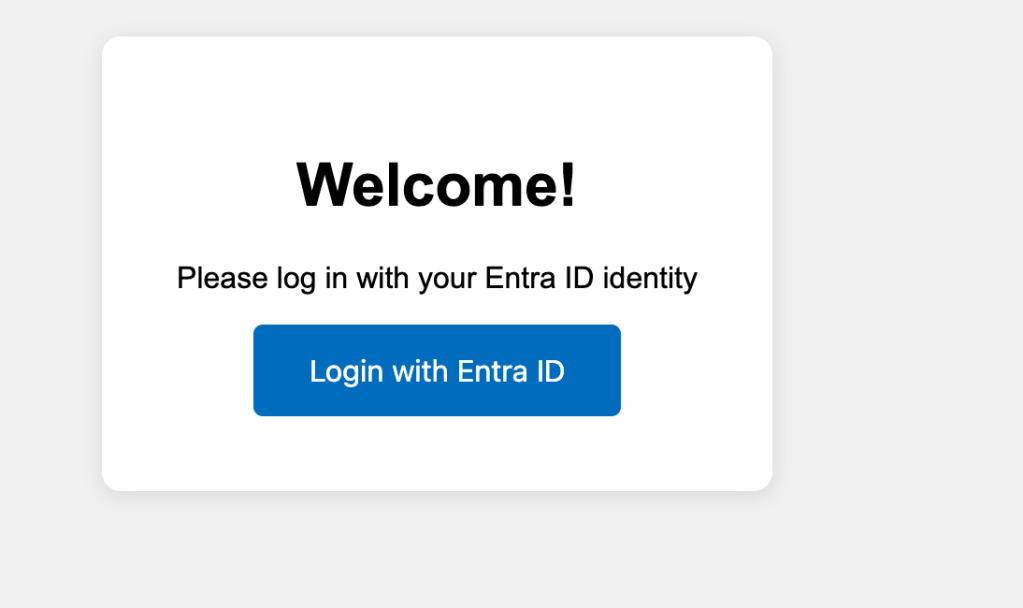
Opening my website I’m faced with a very simple login screen (simple setup for a simple man).
Once I click login with Entra ID, the underlining MSAL library redirects me to the /authorize endpoint of Entra where my user is prompted to authenticate. The request that is generated is below.
In this request we see all the things we covered in the second post for the protocol primer. There is the redirect URI that the user will be redirected to after authenticating to Entra ID, the response_type indicating this is the authorization code grant type, the client id of my application, the state property used to mitigate CSRF attacks, the nonce to prevent replay attacks, and the code challenge and code challenge method for PKCE.
Now one thing to note is you’ll find a lot of samples on the wider Internet for MSAL (and likely generated by LLMs if you’re one of those vibe coders) that will use the acquire_token_for_client method (like this Microsoft sample here). This method WILL NOT use PKCE. If you want to include the code challenge and code verifier for PKCE you will need to use the initiate_auth_code_flow method.
The scopes query perimeter includes the Microsoft Graph User.Read permission, offline_access (for a refresh token), openid (for an id token), and profile (for access to the user’s basic profile for OIDC). The code in my app specifically requests User.Read, the remaining scopes are automatically added by MSAL for each request depending on the method you’re calling. Most documentation out there will tell you that you can’t exclude them, but you actually can using the exclude_scopes property.
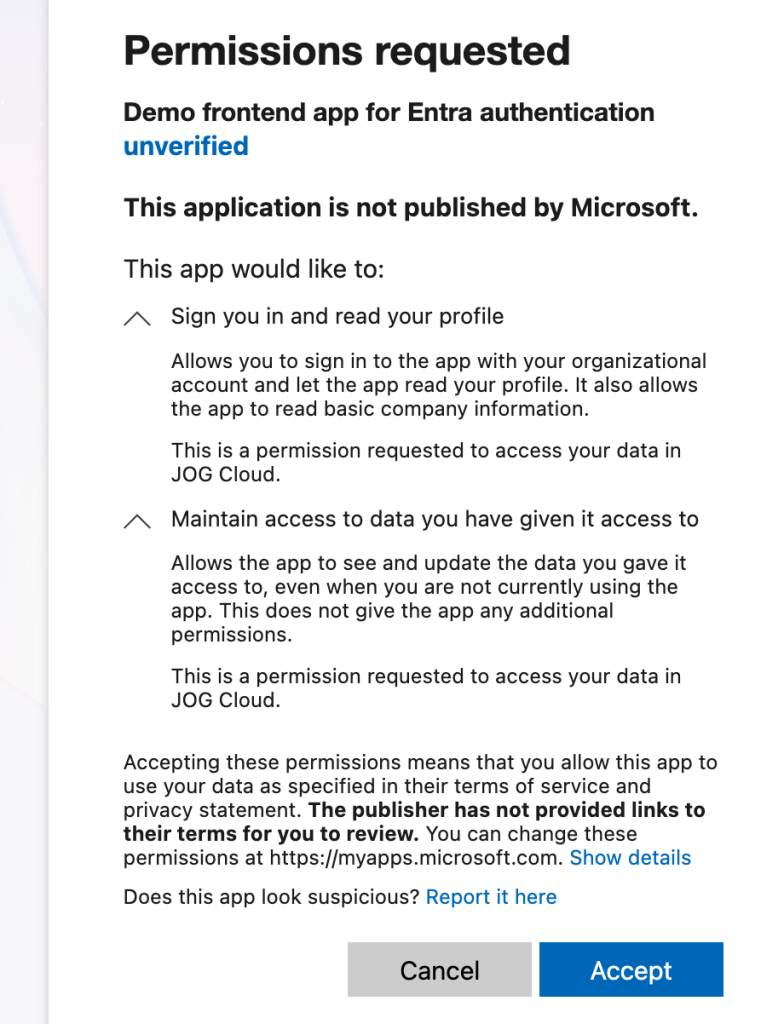
My user completes the authentication process and the user is then prompted to consent to the application’s service principal to be delegated the requested scopes. Once the user accepts, the user’s consent is saved in Entra ID and the user is no longer required to consent moving forward. You’ll notice my application says app is unverified because it’s using localhost. For anything remotely relating to production, you should configure a publishing domain and validate it.
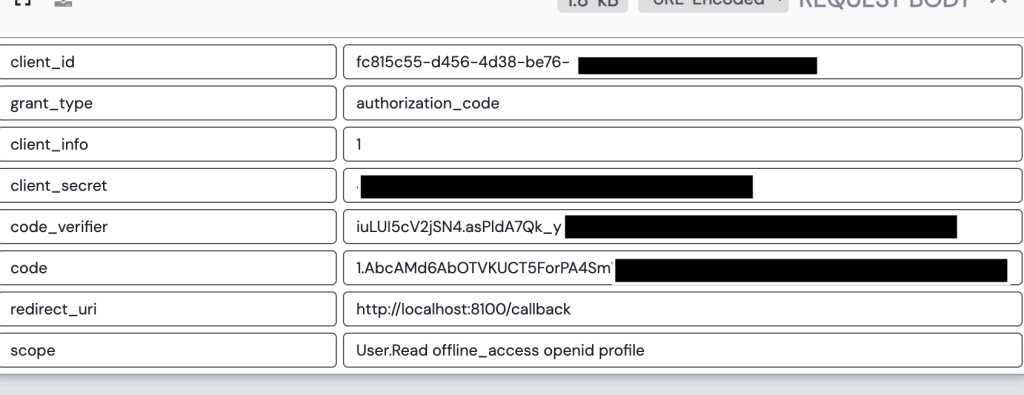
Once the user consents, the user is redirected to the redirect uri registered for the application with an authorization code generated by Entra ID. My application then makes a call to the /oauth2/v2.0/token endpoint in Entra to exchange the authorization code for an access token, identity token, and refresh token. It provides its client secret to authenticate itself to Entra and the code_verifier value allowing Entra to validate this is the original client who requested the access token (PKCE).
Entra validates the client secret and code verifier and if valid returns an access token, refresh token, and id token. My application can use the id token to authenticate the user and grant it access to the application.
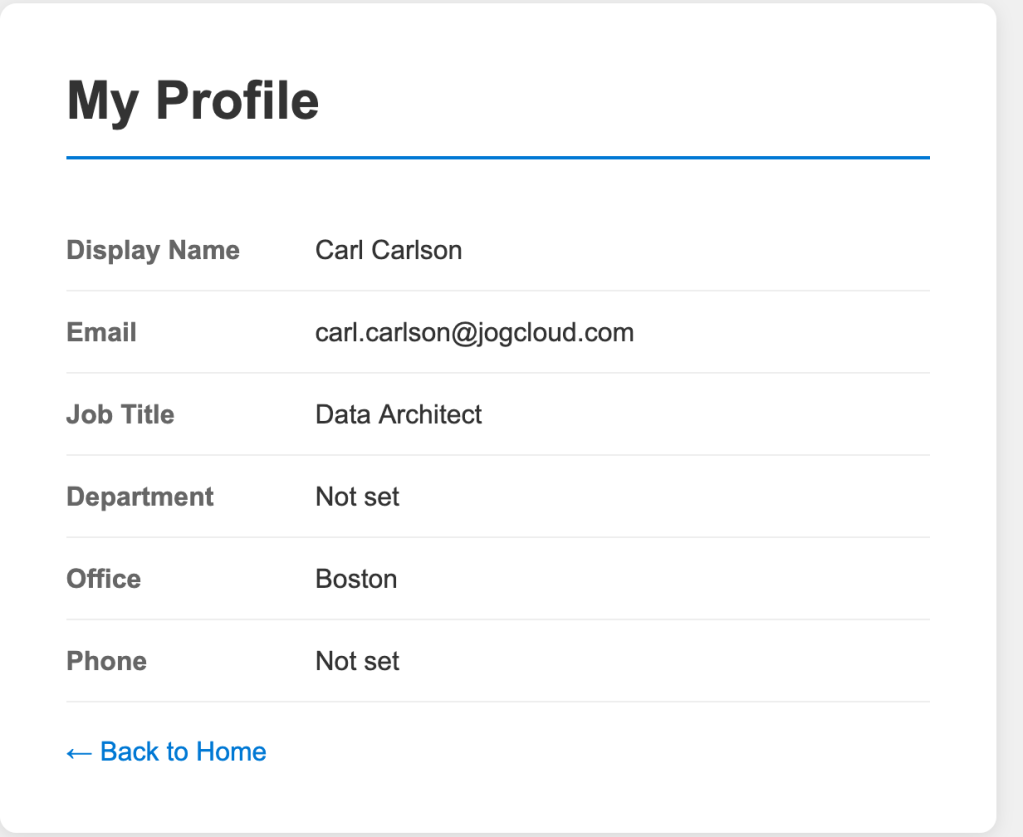
Once logged in, I navigate to the profile page of the application. This page has basic profile information about the user collected from the get user endpoint in the Microsoft Graph.
Navigating to the tokens page of the application displays the decoded access token and id token. In the payload of the id token we can see this id token is intended for the application (which you must validate in your code to ensure someone isn’t trying to pass you some rando token meant for another application) via the aud claim. We also get some basic information about the user. The full schema of the id token is in the official public docs. Some of the helpful properties are the user’s full name and their object id (oid). The object id could be used to pull additional information about the user (which we’ll see next post). We can also stuff additional claims in this id token if we wanted to. I’ll demonstrate this in a future post where I add a user’s group memberships into the id token.
So I’ve authenticated my user to the application using OIDC and gained delegated access to the Microsoft Graph API via OAuth all using Entra. Not too shabby. This is the most basic of basic use cases. In my next post I’ll walk you through how to add group information to the id or access token which you could use within your application to authorize the user within the application.
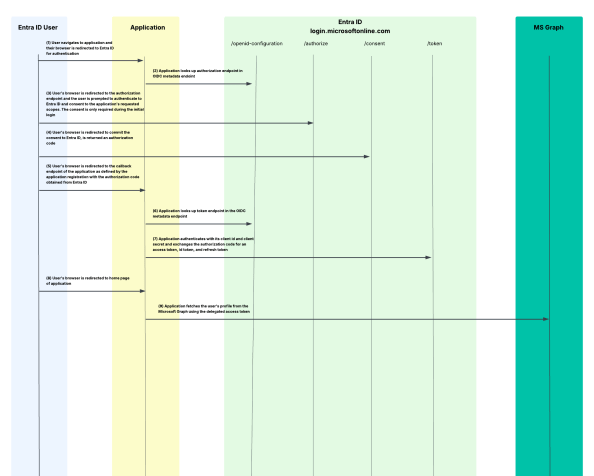
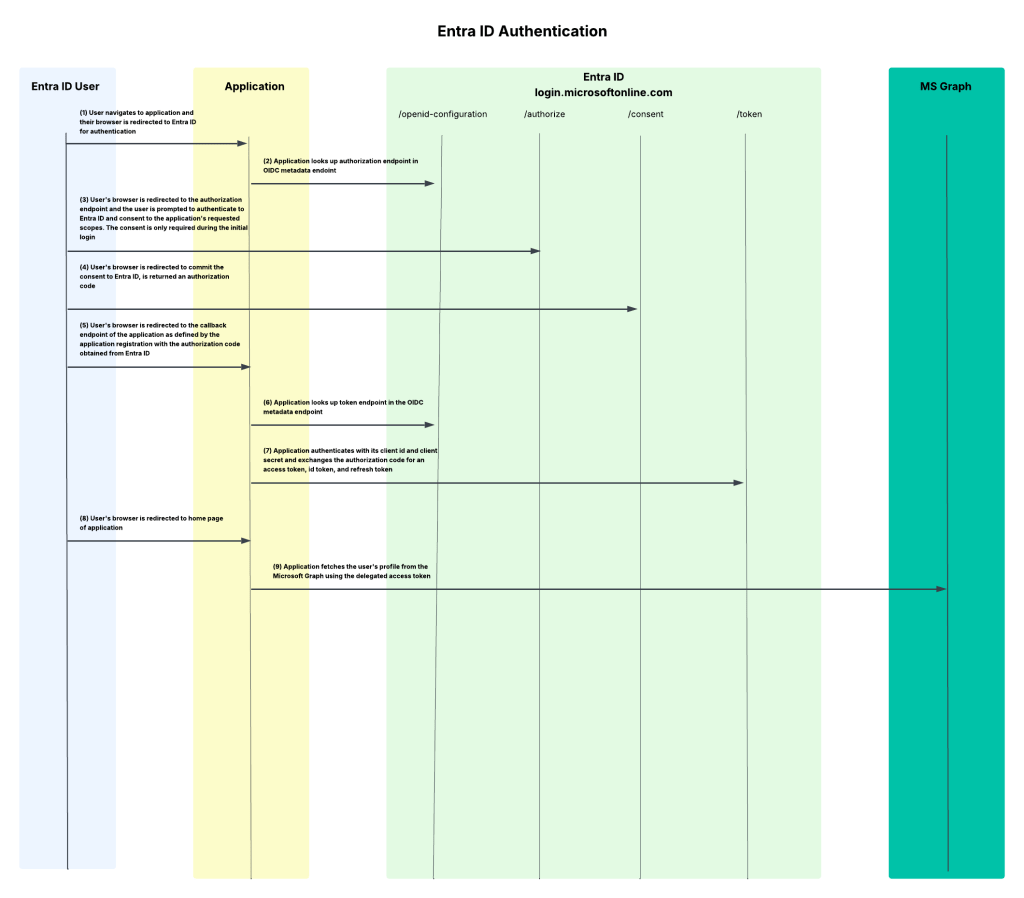
I’m a big fan of old school style protocol flow diagrams, so I threw one together that walks through the end-to-end process I’ve outlined today.
Summing It Up
Yeah, I know that was a lot. If all you take out of this post is a better understanding of what app registrations and service principals do and have a general understanding of how they’re structured, and what the protocol flow looks like when using Entra ID for OIDC/OAuth, that’s a win.
If you want to muck around with this stuff yourself in a personal or test tenant, I’ve published all the code I put together to run through these posts in this repository. It’s a work in progress which I’m fine-tuning as I write these posts but it does have the sample frontend app included in it if you want to take a glance at my application-level code and perhaps want to replicate what I walked through today. Please do not use any of this code in a production app. This is purely intended to demonstrate the concepts. I’m constantly modifying it, so YMMV if it works any given day.
Some key takeaways for you:
Every app registration should have an owner. Just be aware the owner can modify the app registration so don’t go nuts and give this to a non-privileged user.
Set the servericeManagementReference property to some type of BU-level distribution list. This will cover you in case the owners are wiped out through someone accidentally removing them or them leaving the company.
Make sure you’re using the correct methods in the MSAL library if your goal is to use PKCE to align with OAuth 2.1.
If you setup an app registration, be a good human being and document the permissions the app is going to require. You’re not required to, it should be a must for multi-tenant applications especially. It doesn’t limit what users and administrators can grant the application, but can act as minimum set of permissions to function.
When configuring an app registration that will be a confidential client, try to use a federated identity credential. If your app is running in Azure, you can use a managed identity. This will both be more secure and make your app owner’s life a little less miserable having to rotate credentials.
Welcome back folks. Today I’ll be continuing my deep dive series into Entra. In my last post I went over the basics of Entra ID covering what it is at a high level and the important resources you’ll want to understand to grasp how human and non-humans identities are treated within the service. One of the features of Entra ID that I highlighted in that post was that it provides authentication services. It is capable of providing authentication of a human or non-human through older protocols like Kerberos (don’t get me started on this feature or else I’ll spend the whole post ranting) and LDAP (through Entra ID Domain Services, another service I’m no fan of), but also more modern protocols such as SAML and OIDC (OpenID Connect). Before I dive into Microsoft’s implementation of OIDC and the protocol it’s built on top of, OAuth, I figured it was a good time to do a light protocol primer (primarily for my own benefit because I can only re-read the RFC so many times before it stops being fun. Yeah I find it fun to read a good RFC, so what?).
What is OAuth?
You are probably thinking, “Why the hell are we talking about OAuth?” We need to talk about OAuth (Open Authorization) because OIDC is built on top of the OAuth protocol. If you have a basic understanding of OAuth, then OIDC makes a lot more sense. I’m not going to try to make you an expert, because to make you an expert I’d need to expert which I am very far from. Instead, I’m going to give you the basics. If you want a better/smarter explanation, start with the RFC(s) and then take a read through Vittorio Bertocci’s (an industry legend) many articles, ebook, and videos online.
There are a lot of misconceptions out there where folks will talk about OAuth authentication, which is not a real thing. OAuth itself exists as an authorization protocol to provide a framework (lots of SHOULDs/COULDs and not a ton of MUSTs in that RFC) for how applications can get limited access to a user’s data based around the user’s consent using delegation.
The protocol refers to this limited access as a scope. The assignment of a specific scope to an application gives you the ability to do delegation vs impersonation. In impersonation, the application will typically act as you with your full permission set vs with delegation you grant consent for the application to access a subset of your data with a more restricted set of permissions. A good example would be delegating the application the read permission over your email vs the reading, writing new emails, and deleting emails impersonation might give the application.
When it comes to the whole process of a user delegating a scope of access to an application, a number of different roles are involved. These roles include:
Client
Resource Owner
Authorization Server
Resource Server
Client
The client is an application that needs to access some data. Within the protocol it’s important to divide applications into a few different buckets, because the protocol supports them in different ways as I’ll cover in a bit. The standard breaks them into three buckets: web applications, browser-based applications, and native applications. I’m going to keep it simple and consolidate those three buckets into two which will be web applications and non-web applications.
Clients can be either public clients (non-web apps) or confidential clients (web apps). Confidential clients have some type of credential they use to authenticate themselves to the authorization server while public clients do not have a credential (because their code runs on the user’s machine so there is no way to secure the credential). Clients must register with the authorization server either through dynamic registration (which Entra ID does not support today) or through some other type of process. Registration, at a minimum, will include providing the authorization server with a redirectUri, which grant types it will use, and whether it’s a public or confidential client. The client is then issued a unique identifier called a client_id and optionally a client_secret if a confidential client. We’ll see an example of how Entra does it later on this series. Examples of clients could be applications you develop, third-party applications you integrate with, or Microsoft-native applications like Microsoft Teams.
Resource Owner
The resource owner is the user or organization that owns the data the client wants to access and is the entity that is capable of granting access to that data through a consent process. Consent is a major focus in OAuth since it relies on delegation of a specific scope of access to the data. Consent is the process of the resource owner approving that delegation. Resource owners in the Entra ID world are going to be the enterprise at the top layer, business units underneath that layer, and finally its employees which are represented by user objects in Entra. Consent will either be granted for all users within the tenant by an administrator or by individual users to data they have permissions over. In Entra, which consent is required is defined by the type property in the application resource’s permissionScope.
Authorization Server
The authorization server is the role that glues all other roles together. This is the server authenticates the user (OAuth doesn’t care how), gets the user’s consent for the client to access the data, and issues an access token to the client. Entra ID fulfills this role in the Microsoft cloud world.
Resource Server
The resource server hosts the resource owner’s data. It will consume the access token obtained by the client from the authorization server and allow or deny access to the data. Resource servers in the Microsoft world could be your custom built application or the Microsoft Graph API.
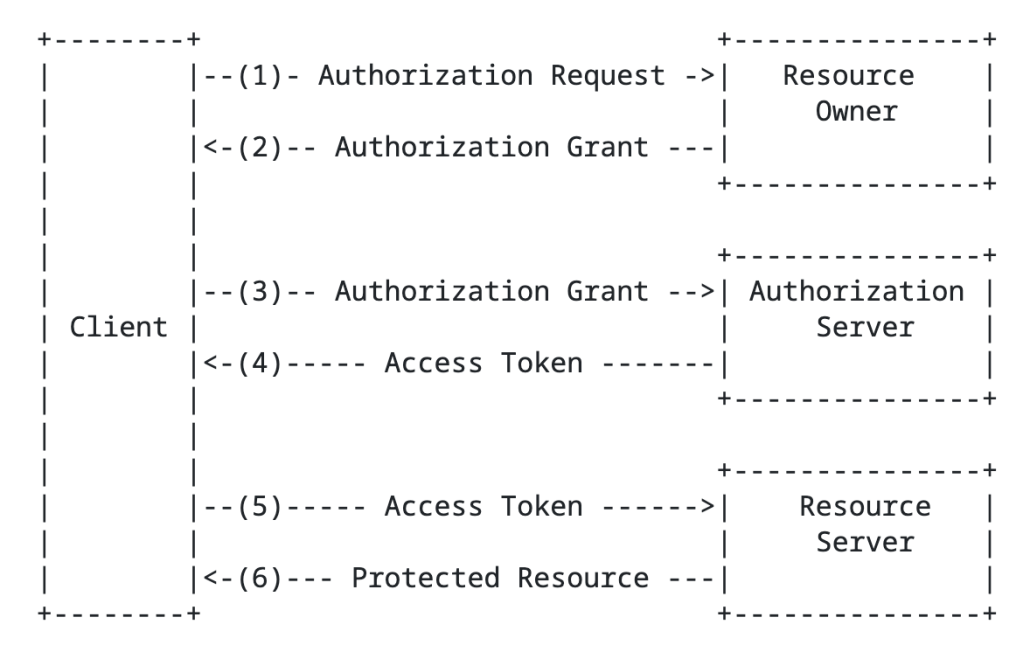
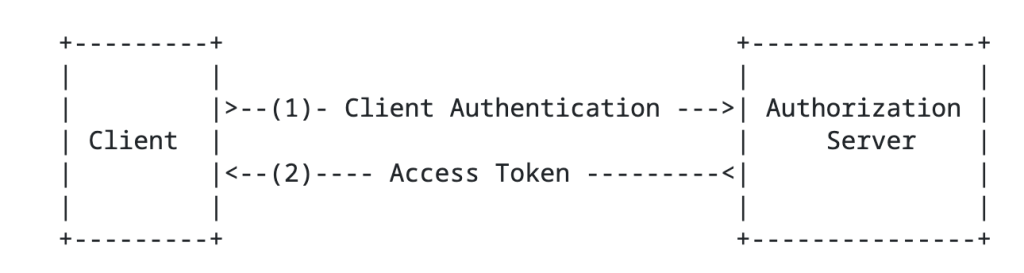
The RFC has a basic diagram which does a good job explaining the flow at a high level.
High level OAuth flow
You’ll notice the the term authorization grant in the above image. An authorization grant represents the resource owner’s authorization (delegation) of a specific scope of access to their data and is used by the client to get an access token which the resource server consumes and approves/denies access. In the base specification for OAuth 2.1, there are three types of grants (there are a ton of extension grants, some of which we’ll cover in this series) which include the authorization code grant, the refresh token grant, and the client credentials grant.
Before I describe the grant types, it’s worth calling out that I’m going to be talking specifically about OAuth 2.1 (which is still a draft RFC right now). OAuth 2.1 seeks to address a lot of the security issues with OAuth 2.0. In OAuth 2.0 there were a bunch more grant types including resource owner credentials flow and the implicit flow there are somewhat of security nightmares. OAuth 2.1 removes those grant types and the official spec sticks to the three I described above while adding an additional requirement for PKCE (Proof-Key for Code Exchange) for both public AND confidential clients. PKCE helps to address authorization code interception attacks. This Okta article does a great job describing the security benefit brings. I’ll demonstrate this with MSAL in a later post. Now back to the authorization grant types.
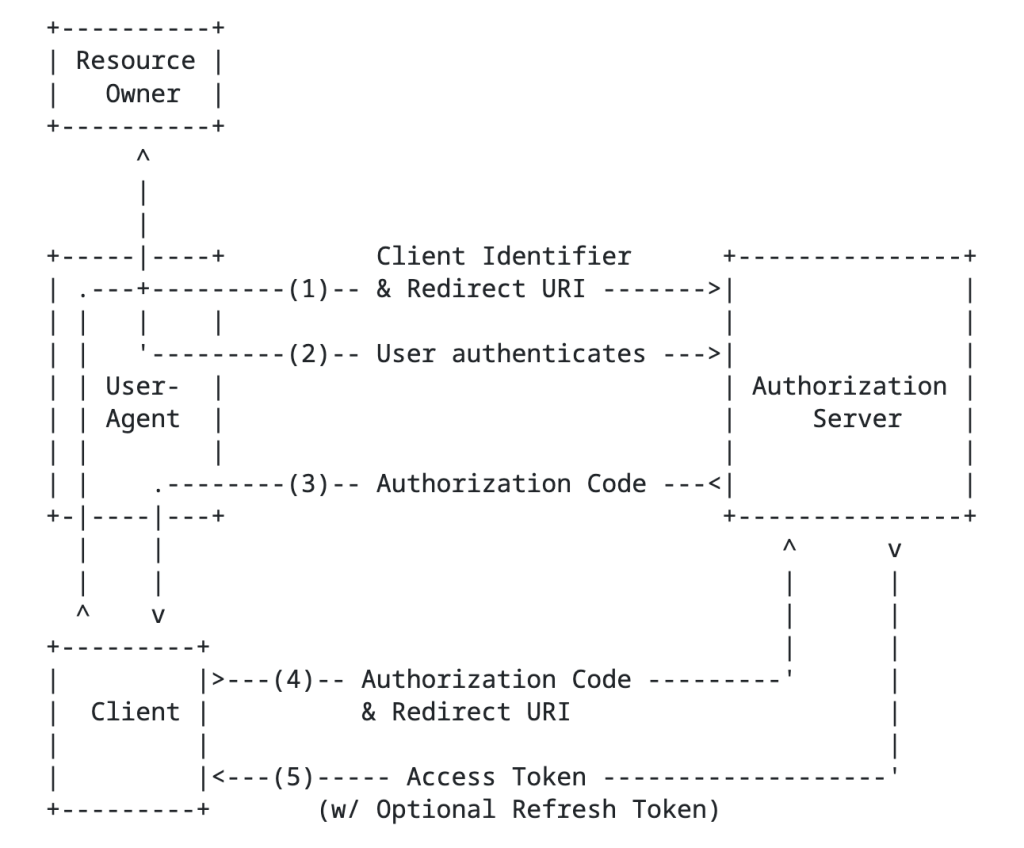
The authorization code grant type involves sending the resource owner to the authorization server to authenticate and consent to the client’s access of their data, returning an authorization code to the client, and the client exchanging that with the authorization server for an access token. This is going to be your go to grant type any delegation use case. An example of this would be an application accessing my data in a storage account that belongs to me.
Authorization Code Flow
Next up is the client credentials flow grant type. In this flow there is no user consent because the data the client is trying to access is under its control. Essentially, the client uses its own identity context to access the data because it’s already been authorized to do so. An example here would be an application pulling Entra ID sign-in logs from the MS Graph API.
Client Credentials Flow
Lastly, we have the refresh token grant. This grant type is used by the client to exchange a refresh token for a fresh access token. Access tokens must be short lived (typically around an hour). Instead of having the resource owner go through the whole authentication and consent process again, the client can exchange its longer living refresh token (if it requested one) for a new access token of the same or lesser scope.
In addition to grant types above there are extension grant types. The one that will be relevant to this series is the jwt bearer type, or more formally the JSON Web Token (JWT) profile. In the Microsoft world, you’ll see this referred to as the on-behalf-of flow. This is the flow that Microsoft will use for any multi-hop OAuth. There is also another newer grant type to be aware of which is the token exchange flow. This has a similar use case as the jwt bearer flow for multi-hop OAuth but isn’t limited to JWTs and provides additional information in the access token which can be very helpful in identifying client (actor) vs the resource owner (subject) in the access token. Entra doesn’t support this flow to my understanding, so you’ll be using jwt-bearer instead for multi-hop flows as we’ll see in a future post.
In an authorization request will look something like the below:
GET /authorize?response_type=code&client_id=s6BhdRkqt3&state=xyz
In the above example we see the client is requesting the authorization code grant type, is specifying its client id and its redirect_uri (which were established during client registration), a code challenge (for PKCE), and the scope of access it is requesting.
Access tokens come in a few flavors which you can read about in the RFC. The most common type of token is a bearer token within Entra’s implementation. The bearer token is exactly what it sounds like, whoever bears the token holds the power! Bearer tokens are typically JWTs (JSON Web Tokens). While RFC doesn’t specifically require the access token to be cryptographically signed, the ones that Entra ID issues are. The public key used to verify the signature can be obtained for Entra ID from a public metadata endpoint we’ll see later.
There are a few important endpoints the client needs to know about for the authorization server. This includes the authorization endpoint (where the resource owner is sent to authenticate and consent) and the token endpoint (where the client obtains an access token). These can be retrieved via a metadata endpoint. This is how Entra ID does it as we’ll see in a future post.
Ok, with that you should now have a high level understanding of OAuth and be aware of its role as an authorization protocol. Key in on that word, authorization. When I perform an OAuth flow I get an access token back to my app that I can use to access a resource owner’s data, but I would still need to authenticate the user to my application and get some basic profile information via another means. In comes OIDC.
What is OpenID Connect?
Like the prior section, my goal is give you a primer. If you want the gory details, take a read through the specification (another tolerable if not enjoyable read). Microsoft and Auth0 have solid one pagers if reading specifications isn’t your style.
The OIDC protocol is built on top of the OAuth (Open Authorization) protocol to provide an identity layer and authentication layer. It gives us the means get some assurance that the user is who they say they are and get some basic information about the user.
Within the OpenID protocol there are three roles that exist. These include:
End User
RP (Relying Party)
OP (OpenID Provider)
Since the protocol is built on top of the OAuth protocol, these roles will map nicely to the OAuth roles as we’ll see.
We first have the end user. The end user is the human participant that will be access our application. They are very often also the resource owner for any data we may want to access about them as we’ll see later.
Next, we have the RP. The RP is the application that is requesting end user authentication and claims (or data/attributes) about the user. This will be an OAuth client application.
Finally we have the OP. The OP is the server capable of authenticating the user and providing claims about the user’s identity. This role is fulfilled by the OAuth authorization server in all instances (I don’t believe their are exceptions, but feel free to correct me) .
The OP will issue a security token referred to as an id token with claims about the authentication of the end user, including claims about the user.
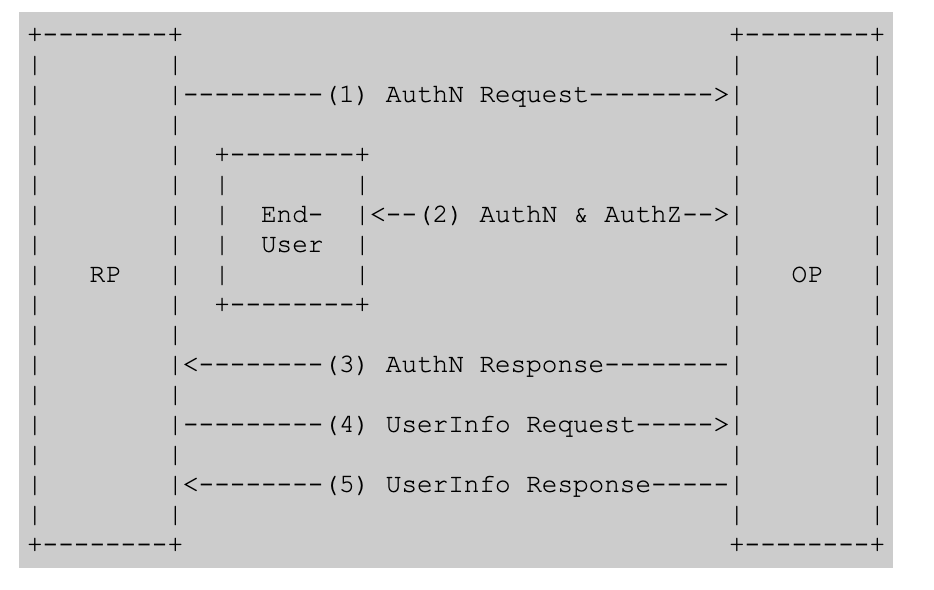
This is another instance where the specification did a great job with a high level flow diagram.
High-level OIDC Flow
The structure of the authentication request is almost identical to the structure of an authorization request in OAuth.
GET /authorize?response_type=code&client_id=s6BhdRkqt3
Notice above that we have an added state and nonce. The state helps to provide CSRF (cross-site request forgery) attacks, such as fooling the victim into accessing an attacker’s account to get them to upload data or perhaps purchase things for the attacker’s account. The nonce helps to mitigate id token replay attacks (app validates the nonce in the id token matches what it expects for the user’s session). Now the major things to pay attention to is the additional scopes. Here we see the openid and profile scopes. The openid scope tells the OP the client is looking for an id token. The profile scope is an optional scope which tells the OP to include additional claims in the id token such as the user’s name, preferred_username, and the like.
Once the RP (client / application) exchanges its authorization code (think authorization code grant) to the OP/authorization server, it returns back the an OIDC id token in addition to the OAuth access token. The application can then use the claims in the id token to identify the user, get information into how the user authenticated, get group information, and anything else you can stuff into the claims. It gives the application context about the user.
Below is an example id token’s payload. ID tokens follow the JWT standard and are cryptographically signed by a private key held by the OP. Clients will need to verify the signature using the OPs public key which is usually published in the OIDC discovery endpoint which looks something like this https://{issuer}/.well-known/openid-configuration. We’ll see an example when we break down Entra’s implementation.
At this point you should have a reasonably decent high level understanding of OAuth/OIDC. If you are already an “expert” you likely snorted milk through you nose reading my shitty explanation. What I mainly want you to take away from this is that OAuth is an authorization protocol with OIDC providing an authentication layer nicely on top. I like to think of OAuth as the cake with OIDC as the frosting. That top layer doesn’t work without the bottom layer (you freaks that eat the frosting right out of the can shall remain silent) and the bottom layer is enriched by the frosting on top. It’s 7PM and I’m craving a sweet, lay off.
In my next post I’ll walk through building out the required components in Entra ID for the frontend application. You’ll read and recognize properties that translate directly back to these two protocols. Other properties may not have the same name, but you’ll understand why they exist.
Yeah… You read that right. I’m finally biting the bullet and doing a series on Entra ID. There are some cobwebs there, but once upon a time I was a half-baked “identity guy”. Nah, I’m not returning to that place, but I have had to visit it more frequently over the past few months. With the growing use of agents, identity has one again become of those things that apparently everyone is a so called “expert in”. I aint no expert, but I have been digging into the chatter around the implications of agents into the identity world. Given my employer, that has been spending some time in the Entra ID Agent Identity space.
Digging into that demanded I go back to some of the basics of Entra ID such as the purpose of an application registration versus a service principal and the request flow when authenticating a user to an application using OIDC (OpenID Connect) or executing an on-behalf-of flow in OAuth. I had conceptual knowledge of the above, but it was too ivory tower. I needed to eat the dog food and do it. After spending a few weeks reading through the documentation, reviewing captured requests and responses, reviewing RFCs, and poorly coding some applications to exercise on the concepts I figured it was time to brain dump what I learned before I get distracted with some new shiny widget and forget 60% of it.
So yeah… that’s where this series is coming from. Hopefully some folks out there draw some value out of it beyond serving as a refresher for my neural pathways.
With that rambling out of the way, let’s get to it.
WTF is Entra ID?
Many years ago when Microsoft first introduced Azure Active Directory my peers and I scratched our heads with this question. Given the name, the initial assumption was it was the Windows Active Directory “killer” (stop trying to make that happen, it aint gonna happen). That seems to have been a pretty common assumption given what I’ve heard from customers over the years as I sat in the vendor space and is likely why the name was shifted a few years back to Entra ID. Either that or marketing needed to justify their existence with another product rename.
If you want the professional explanation as to what Entra ID is you can read the public documentation and bask in the marketing mumbo jumbo. Since you’re here, you’re going to get the less fancy and quick and dirty Matt Felton explanation. My take is that Entra ID does a lot of shit, but at its core it is:
An identity store for the identities of human and non-human security principals, their attributes, and their credentials.
An authentication service which can act as an OAuth Authorization Server, OIDC identity provider, SAML IdP / SP, and even Kerberos / LDAP provider (gross)
A data store for resources that represent applications that can be used for OAuth and OIDC
It provides these core services to Microsoft’s cloud services such as M365, Azure, Dynamics 365, and whatever other clouds Microsoft has that I’m missing. It can be extended to provide these services to other applications by integrating with it via one of the supported protocols like we’ll see in further posts in this series.
Entra ID is divided into separate tenants which represent unique identity boundaries. Services for a given customer (such as an Azure subscription) are associated to an Entra ID tenant which acts as the identity boundary for those resources. Tenants can trust other tenants to facilitate cross tenant accessing of resources through features like Entra ID External ID.
The identity and data store pieces of the Entra ID service are where users, groups, many types of service principals, applications, and device resources are stored. For us old people, similar to an LDAP, each of these resources is similar to an object in LDAP that has a schema with specific properties that are consumed by native Microsoft and third-party services.
That should be enough context to give you a very general idea of what Entra ID is. Like I mentioned above, it does a lot of shit (conditional access, privileged identity management, etc) that isn’t relevant to the point of this series and that I’m not going to discuss. If you can hammer it in your head those two core functions, it will be enough to get you through this series.
Human Resources in Entra
Within Entra ID human accounts will be represented by user resources. User resources have a selection of properties you’ll be familiar with if you’ve ever worked with an LDAP or Windows Active Directory. These include properties like givenName, surname, mail, and userPrincipalName. These user resources can be created directly in Entra to create “cloud users”, created through the Entra ID External ID, or created by a synchronization process like Entra Connect Sync or a third-party solution like Okta. Humans will use these user accounts (resources) to authenticate to Entra ID to access integrated services. A typical user account looks like the below:
Users can be organized into group resources. Like Windows Active Directory, these groups can be used to grant access to resource or used as distribution groups for email. Entra has multiple types of groups including Microsoft 365 Groups (Unified, your mail-enabled security groups for the modern age), Security Groups (for providing access to Entra-integrated resources), and mail-enabled security groups and distribution groups synchronized from Windows Active Directory. You’ll likely use a mix and there are benefits and considerations of both paths. A typical Microsoft 365 group looks like the below:
That’s all I’m going to say about humans, since the primary purpose of this series is the non-human side of the fence.
Non-Human Resources
For non-human identities our main resources are applications and service principals. There are others such as device identities, but I won’t be getting into that.
First, there is the application resource. You’ll see this referred to as the application registration or app registration in Microsoft documentation and Microsoft GUI-based experiences like the Azure Portal. The application resource (or app registration) is the globally unique representation of an application across all of Entra ID and exists only within the Entra ID tenant it was registered in. It’s easiest to think of an application resource as an OAuth client registration, because OAuth and OIDC are likely why this type of resource exists anyway (I’ll cover this a bit more in some upcoming posts). An application resource can have a credential which is used to authenticate it to Entra ID (OAuth confidential client) and this credential can be a secret, certificate (very cool and under used), or a federated credential (basis of workload identity). This resource will include properties required for OAuth flows such as the client id (appId), the audience (identifierUris), any scopes it exposes (oauth2PermissionScopes), and redirectUris (when using interactive OAuth flows). Below is an example of an application resource associated with an application that authenticates users with Entra ID.
The service principal resource is the other major non-human resource to be aware of. A service principal represents an instance of an application resource in an Entra ID tenant. While you’ll only ever have a single application resource in the registered Entra ID tenant to represent an application, that application might have multiple service principals in multiple Entra ID tenants if it was built as a multi-tenant application. When permissions are granted to an application to access a resource secured with Entra ID, it will use the permissions associated to the service principal. The Microsoft GUI-experience will call a service principal an Enterprise Application.
As you’ll see below, a service principal looks a lot like the application resource its providing an identity for. The appId property is the property used to directly map it back to the application resource. The service principal type in this scenario is Application. There are a variety of service principal types that provide a non-human identity for different use cases like for managed identities, agent identity blueprints, and agent identities.
{
"id": "44444444-4444-4444-4444-444444444444",
"deletedDateTime": null,
"accountEnabled": true,
"alternativeNames": [],
"appDisplayName": "Demo Entra ID application - Frontend",
"appDescription": "This application is the frontend for my demo Entra ID application",
"displayName": "Demo Entra ID application - Frontend",
"homepage": null,
"isDisabled": null,
"loginUrl": null,
"logoutUrl": null,
"notes": null,
"notificationEmailAddresses": [],
"preferredSingleSignOnMode": null,
"preferredTokenSigningKeyThumbprint": null,
"replyUrls": [
"http://localhost:8100/callback"
],
"servicePrincipalNames": [
"611111111-1111-1111-1111-111111111111"
],
"servicePrincipalType": "Application",
"signInAudience": "AzureADMultipleOrgs",
"tags": [],
"tokenEncryptionKeyId": null,
"samlSingleSignOnSettings": null,
"addIns": [],
"appRoles": [],
"info": {
"logoUrl": null,
"marketingUrl": null,
"privacyStatementUrl": null,
"supportUrl": null,
"termsOfServiceUrl": null
},
"keyCredentials": [],
"oauth2PermissionScopes": [],
"passwordCredentials": [],
"resourceSpecificApplicationPermissions": [],
"verifiedPublisher": {
"displayName": null,
"verifiedPublisherId": null,
"addedDateTime": null
}
}
The official documentation likes to refer to the application object as the template for the application and the service principal as the security principal. I think that’s a pretty damn good single sentence explanation.
What are we going to build?
Now that you have the bare bones basics of Entra, you likely want to understand how an application would go about using it for authentication and authorization. While you might not be doing this now and it may not seem relevant, it will become very relevant to you if you begin building agents in Microsoft’s clouds through Microsoft Foundry, CoPilot Studio, or the 18 other random services Microsoft allows agents to be built. This will also be relevant to you if you’re going to consume Microsoft resources (such as Azure) from other clouds through an application or an agent. So yeah, you should understand what this looks like to do. The whole Entra ID Agent Identity feature builds on these foundational pieces.
To see these concepts in action I’m going to walk through a very simplistic solution with a frontend website and backend API in Python. The frontend website is built using the Flask Framework and the backend API is built with fastapi.
Demo application architecture
The frontend website will use Entra ID to authenticate the user and will be issued an OIDC id token to identify the user. The frontend will get some information from the user from the id token and access token it receives from Entra and will make additional calls to the Microsoft Graph API using the client credentials flow to grab other attributes of the user’s identity. I’ll also show how to include the user’s Entra ID group information in the id or access token and how to handle nested group membership.
The frontend will have some pages that call functions within the backend API. One example is the story endpoint will pull a pre-built AI generated story about the user which has been uploaded to blob storage in an Azure Storage Account. The backend API will use the on-behalf-of flow to access the storage account as the user to pull the user’s specific story.
This will demonstrate some of the most common flows including authentication, OAuth client credentials flow, and OAuth on-behalf-of (or jwt bearer). I’ll show you how the id tokens and access tokens look in different scenarios pointing out the relevant claims and how they’re used upstream. I’ll even share some process flows so you understand what does what in a given flow.
My primary goal here is give you the basics so you can walk away with a more solid understanding of what’s happening under the hood and how Entra ID has decided to implement OIDC and OAuth. I can’t stress how helpful this will be for you once you start diving into the agent identity space (which I’ll be covering after this series).
Summing it up
Ok, so you know what you’re in for. This series is gonna be relatively deep in the weeds so bring your favorite caffeinated beverage for future posts. I’m doing everything direct with the REST APIs because I want to show you the gory details. No pretty SDKs for you. If you’ve had a “conceptual” idea of how this works without the implementation specifics (like I did before I went down this rabbit hole) this series should help to fill those gaps.
In the next post I’ll walk through setting up Entra for the frontend website, authenticating a user, and exploring the id token and access token. The post following that will walk through using the application’s identity context to get more information about the user from the Microsoft Graph API such as nested group membership, then I’ll finish up the series by walking through the on-behalf-of flow with the backend API to show you how to carry the user’s identity context through the application to the destination resource down the line.
 Journey Of The Geek