Azure AD User Provisioning – Part 1

Welcome back! Over the past year I’ve done a number of deep dives into Azure AD authentication, but what is authentication without an identity? They have to get there somehow, right? Gone are the days of legacy protocols such as LDAP or executing a command to a database to provision a local user. Identity as a service offerings such as Azure AD introduce whole new ways to provision users, both manually through the GUI and through programmatic methods such as PowerShell or the Graph API. For this upcoming series of blogs I’m going to cover the many options available with Azure AD and the plusses and minuses of each.

Let’s begin this series by talking about “legacy” tools versus “modern” tools. What do I mean by legacy? Well I mean administrative graphical user interface (GUI) options. Why are administrative GUIs legacy? Well, cloud is primarily about automation, scale, and simplicity. To achieve those ideals, “cloud” services (whether they are IaaS, PaaS, SaaS, or IDaaS) must be capable of integrating well with other solutions, whether they be COTS or custom. Pay attention to the word “integration” people. It is more important than ever.

Administrative GUIs represent the old IT where the business had to depend on IT to administer and support its technologies. This was costly in the ways of labor, time, and complexity. The focus on standardized application programming interfaces (APIs) that is happening in the cloud is attempting to streamline this process for the business. These APIs provide a programmatic method of integration with the cloud solutions to take the middle man (IT) out of the equation and put the business users in the driver’s seat. Existing COTs or custom applications can be integrated directly with these APIs to simplify and automate a number of processes that typically fell into IT’s realm.

So what are some examples?

  • Scenario: Business user needs to share a document with a partner company

    In the “old” days, the business would have to rely on IT to setup complicated VPN solutions to allow for connectivity and either provision users directly in the identity data store or configure Active Directory trusts. With the standardized APIs emerging in the cloud, an existing identity management system can be directly integrated with an IDaaS API.

    If the business takes advantage of the programmatic access, the business user clicks a button of the person or persons he or she wishes to share the document with, the request goes to an approver such as the data owner, and the provisioning is done automatically by the application. No service requests or multiple day turnarounds from IT required here. The value presented by IT in here was the initial integration, not much else.

  • Scenario: Business focuses on application development and a developer requires a new web instance to test code

    In “legacy” IT the developer would need to submit a request to IT to provision a server, install and configure the appropriate middleware, and have security staff verify the server and applications have been configured for compliance. The developer would then need to wait to be provisioned for access as well as deal with the continued maintenance of the web instance. All of this took time and this was time the developer wasn’t developing, which impacts the businesses ability to deliver the product and service they’re in business to deliver.

    We know the value that PaaS provides here, but what about the APIs? Well, envision a service catalog where a developer requests an instance of a web platform that is automatically provisioned and configured to the businesses baseline. Where was IT in this scenario? They setup the initial integration and keep the baselines up to date, and that’s it. Not only does the business save money by needing less IT support staff but its key assets (developers) are able to do what they’ve been hired to do, develop, not submit requests and wait.

In the above two scenarios (and there are oh so many more), we see that IT professionals can no longer focus on a single puzzle piece (server, OS, networking, identity, virtualization, etc), but rather how all of those puzzle pieces fit or “integrate” together to form the solution. Cloud as-a-service offerings made the coffin and simple APIs are the nails sealing the coffin finally putting the “legacy” IT professional to rest.

So why did I spend a blog entry talking about the end of the legacy IT professional? I want you to think about the above as I cover the legacy and modern provisioning methods available in Azure AD. As we explore the methods, you’ll begin to see the importance programmatic access to cloud solutions will play in this cloud evolution and the opportunities that exist for those IT professionals that are willing to evolve along with it.

In my next post to this series I will cover the various GUI methods available for user provisioning in Azure AD.

Experimenting with the Azure B2B API

Hello all!

On October 31st Microsoft announced the public preview of the Azure B2B Invitation API. Prior to the introduction of the API, the only way to leverage the B2B feature was through the GUI. Given that B2B is Microsoft’s solution to collaboration with trusted partners in Office 365, the lack of the capability to programmatically interact with the feature was very limiting. The feature is now exposed through Azure’s Graph API as documented here.

A friend challenged me to write a script or small application that would leverage the API (Yes we are that nerdy.) Over the past year I’ve written a number of PowerShell scripts that query for information from OneDrive and Azure AD so I felt I would challenge myself by writing a small .NET Forms application. Now I have not done anything significant in the programming realm since freshman year of college so I thought this would be painful. Thankfully I have a copy of Visual Studio that comes with my MSDN subscription. All I can say is wow, development solutions have evolved since the 90s.

I won’t bore you with the amount of Googling and reading on MSDN I did over the weekend. Suffice to say it was a lot. Very tedious but an awesome learning experience. I can see a ton of re-use of the code I came up with for future experiments (even though I’m sure any real developer would point and laugh).

Before I jump into the detail, I want to mention how incredibly helpful Fiddler was in getting this all working and getting a deep dive understanding of how this all works. If you’re interesting in learning the magic of how all this “modern” stuff works, a tool like Fiddler is a must.

First off we need to register the application in Azure AD as a Native App to obtain a Client ID per this article. Next we need to grant the application the delegated right to read and write directory data as described in the MS article introducing the API. Once the application is registered and the rights have been granted, we can hammer out the code.

Before I jump into the code and the Fiddler traces, one thing that caught my eye in the returned json object was an attribute named invitedToGroups. If you’re familiar with the Azure B2B functionality, you’ll recall that as part of the B2B provisioning process, you can add the user object to a group. This is very useful in saving you time from having to do this after the user accepts the invitation and their user objects populates in the Azure AD. What’s odd about this is this attribute isn’t documented in the Microsoft blog I linked above. Digging into the github documentation, it looks like the information about it was removed. Either way, I decided to play around it with, but regardless of whether or not I followed the schema mentioned in the removed Github documentation, I couldn’t get it to take. I am fairly sure I got the schema of the attribute/value pair correctly, so we’ll have to chalk this up to MS playing with feature while the functionality is in public preview.

So let’s take a look at the code of this simple Windows form application, shall we?

In this first section of code, I’m simply pulling some information from the input fields within the forms application.

// Pull data from user input fields
string tenantid = tenant.Text;
string emailaddress = email.Text;
string redirectsite = redirect.Text;
string group = GroupID.Text;

In this new section of code, I’m leveraging functions from the ADAL library to redirect the user to authenticate against Azure AD, obtain an authorization code for the graph API, and submit that code for an access token for the Graph API.

// Authenticate user and obtain access token
AuthenticationContext authcontext = new AuthenticationContext("https://login.microsoftonline.com/" + tenantid);
AuthenticationResult token = authcontext.AcquireToken("https://graph.microsoft.com", clientid, redirectURI, PromptBehavior.Always);

In this section of code I build an instance of the httpclient class that will be used to submit my web request. You’ll notice I’m attaching the bearer access token I obtained in the early step.

// Deliver the access token to the B2B endpoint along with the posting the JWT with the invite information
string URL = "https://graph.microsoft.com/beta/";
HttpClient client = new HttpClient();
client.BaseAddress = new Uri(URL);
client.DefaultRequestHeaders.Authorization = new
System.Net.Http.Headers.AuthenticationHeaderValue("Bearer", token.AccessToken);
Client.DefaultRequestHeaders.Accept.Add(new
System.Net.Http.Headers.MediaTypeWithQualityHeaderValue("application/json"));

Here I issue my HTTP request to post to the invitation endpoint and include json object with the necessary information to create an invitation.

HttpRequestMessage request = new HttpRequestMessage(HttpMethod.Post,
"invitations");
request.Content = new StringContent("{"invitedUserEmailAddress":"" + emailaddress + "","inviteRedirectUrl":"" + redirectsite + "","sendInvitationMessage":true,"invitedToGroups":[{"group":"" + group + ""}]}", Encoding.UTF8, "application/json");
HttpResponseMessage response = await client.SendAsync(request);

Finally I parse the json object (using the Newtonsoft library) that is returned by the endpoint to check to see whether or not the operation was completed.

string content = await response.Content.ReadAsStringAsync();
Newtonsoft.Json.Linq.JToken json = Newtonsoft.Json.Linq.JObject.Parse(content);
string myresult = json.Value("status");
MessageBox.Show(myresult);

Quite simple right? It had to be for someone as terrible as developing as I am. Imagine the opportunities for an API like this in the hands of a good developer? The API could be leveraged to automate this whole process in an enterprise identity management tool allowing for self-service for company users who need to collaborate with trusted partners. Crazy cool.

This is the stuff I applaud Microsoft for. They’ve take a cumbersome process, leveraged modern authentication and authorization protocols, provided a very solid collection of libraries, and setup a simple to use API that leverages industry standard methodologies and data formats. Given the scale of cloud and the requirement for automation, simple and robust APIs based upon industry standards are hugely important to the success of a public cloud provider.

This whole process was an amazing learning experience where I had an opportunity to do something I’ve never done before and mess with technologies that are very much cutting edge. Opportunities like this to challenge myself and problem solve out of my comfort zone are exactly why I love IT.

I hope the above post has been helpful and I can’t wait to see how this feature pans out when it goes GA!

Feel free to reach out if you’re interested in a copy of my terrible app.

Thanks!

Deep Dive Into Resource-Based Constrained Delegation – Part 2

In this post we’ll dive right into the weeds. To demonstrate how RBKCD works I built an environment in my Azure lab with the following properties:

  1. Two Active Directory forests named contoso.local and fabrikam.local.
  2. Two-way Active Directory forest trust between the two forests.
  3. Server configuration
    • SERVER12.CONTOSO.LOCAL (Windows Server 2012 R2) – AD DS
    • SERVER13.CONTOSO.LOCAL (Windows Server 2012 R2) – IIS
    • SERVER14.FABRIKAM.LOCAL (Windows Server 2012 R2) – AD DS
    • SERVER15.FABRIKAM.LOCAL (Windows Server 2012 R2) – File Server

We’ll be using a web application developed by Brian Murphy Booth named DelegConfig. The application is a bit dated, but will serve our purpose in testing RBKCD. You can download a copy from here.

On SERVER13 we’ll be adding the application to IIS and running it under the Default Application Pool for simplicity sake. We’ll use the application to access an SMB share on SERVER15 and we’ll be accessing the application from a web browser on SERVER12.

The SMB share has had the share permissions configured so that the mfelton user account has read permissions on the share. SERVER13 has not been configured for any type of delegation. Let’s see what happens when we attempt to access the share via the web application. We’ll use Microsoft Network Monitor running on SERVER13 to perform a packet capture and examine the authentication exchanges.

The first Kerberos exchange we see is performed in the two frames below.

picture1

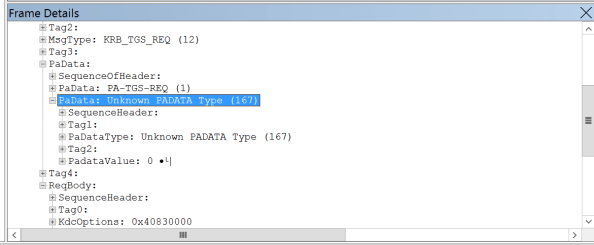
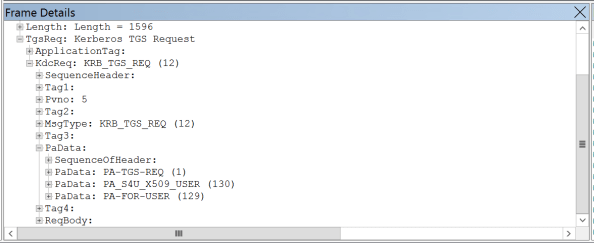
Let’s dig into frame 45 and look more deeply at the request. In the image below we that SERVER13 is obtaining a service ticket for itself on behalf on the mfelton user as detailed in this link. SERVER13 will use this ticket to request additional tickets for the user mfelton in order to access SERVER15.

picture2

The next Kerberos exchange is performed in these two frames.

picture3

Here we have SERVER13 requesting a Kerberos ticket for the CIFS share on SERVER15 on behalf of the user mfelton. If we dig into the PaData of the request we see that the PA-PAC-OPTIONS are included. Although I’m unable to find a way to enumerate the bits, contained in the PAC-OPTIONS are a bit that says resource-based constrained delegation is supported by the client (more detail in this link). Since this is a Windows Server 2012 or later DC, the DC supports resource-based constrained delegation and supplied the application with a ticket it can use to access the FABRIKAM domain.

picture4

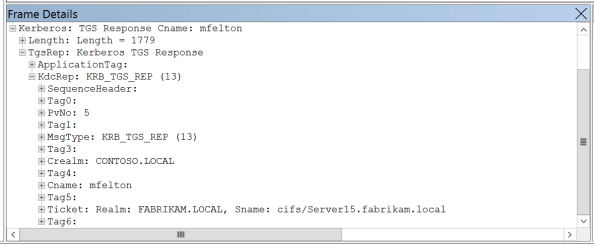
In the third exchange the application delivers the ticket it received from the CONTOSO domain and requests a ticket for SERVER15 on behalf of the user mfelton.

picture5
But wait, is that a KDC_ERR_BADOPTION we see? Well one thing you’ll notice I never did was configure resource-based constrained delegation and I receive the expected error as outlined in this link. So let’s remedy that and look at the differences.

First off, the eternal question, how do we configure resource-based constrained delegation? Well it’s a simple two liner depending on whether or not you’re configuring it on a user or computer account. In our scenario it is the following:

$Computer = Get-ADComputer -Identity SERVER13
Set-ADComputer -Identity SERVER15 -PrincipalsAllowedToDelegateToAccount $Computer

The first two exchanges look exactly the same as the previous example:

picture6

The third exchange is where see a difference:

picture7

Here we see we are successfully able to obtain a ticket to the SMB share on SERVER15 successfully impersonating the mfelton user account as seen in the frame below.

picture8

That’s all there is to it to enable a pretty neat feature in the legacy authentication protocol realm. Hopefully these posts have helped you better understand the feature and how it works. If anything, this series will point to the right articles where you can read more about it.

Deep Dive Into Resource-Based Constrained Delegation – Part 1

Hello all.

Today I wanted to take a step back from cloud and step back into the world of “legacy” authentication protocols. Many of you reading this blog should be familiar with the Kerberos authentication protocol, its usage, and its plusses and minuses. If you’re unfamiliar with the protocol there are plenty of resources online that will walk you through the basics.

The best overview I’ve seen is the Mark Minasi “Cracking Open Kerberos: Understanding How Active Directory Knows Who You Are” presentation. The challenge there is you’ll need to find a working stream of the video as the Channel 9 video seems quite dead. If you enjoy nerding out like I do you can read through the following RFCs and standards:

  • The Kerberos Network Authentication Service V5 RFC 4120
  • MS-KILE Kerberos Protocol Extensions
  • MS-SFU Kerberos Protocol Extensions for Service for User and Constrained Delegation Protocol

For this blog post I’ll be focusing on Resource-Based Kerberos Constrained Delegation (RBKCD). RBKCD provides new capabilities to the Microsoft implementation of Kerberos and was introduced in Windows Server 2012. I am not a fan of re-creating documentation when someone has already done a wonderful job putting together the information, so take a read through the links below for a wonderful overview of the different types of delegation and information as to how RBKCD works.

So what types of business problems could we solve with RBKCD? Let’s suppose two organizations wish to collaborate and leverage a single shared solution to provide data analysis and the solution must meet the following requirements:

  1. The solution will be owned by Company A and hosted using Company A’s infrastructure.
  2. The solution must be capable of querying data sources in both Company A and Company B.
  3. The solution must be accessible by users within both Company A and Company B.
  4. The solution must only return the data the user is authorized to see.
  5. The solution must make security a top priority.

In the above scenario we can satisfy requirement 3 through a standard Active Directory trust between Company A and Company B. Requirement 1, 2, and 4 could be satisfied by Kerberos Unconstrained (Open) Delegation. However, requirement 5 requires we leverage the more secure Kerberos Constrained Delegation. The problem we have with that solution is Kerberos Constrained Delegation can’t satisfy requirement 2 when combined with requirements 3 and 4. Prior to Windows Server 2012, we’d have to accept the risk and loss of features such as protocol transition when using Kerberos Unconstrained Delegation. With Windows Server 2012 and later, we can leverage RBKCD to satisfy all five requirements. There are additional benefits to RBKCD in simplifying administration, but I won’t go into those, you can read about them in the links above.

So now we know what value it can bring to the business, but how does it work and what does it look like? The links I provide above answer a bit of the first question, but not much of the second. We’ll take a look at the latter question in my next blog post.