Over the past few weeks I’ve been diving into the relatively new Azure product Azure Virtual Network Manager (AVNM). AVNM was first introduced back in late 2021 with the connectivity feature and security admin rule feature. In the past year both features have begun to trickle into general availability in some regions. I was interested in the Security Admin Rules feature so I did my usual thing and began to read through all the documentation and experiment with the service. I’ll be covering Security Admin Rules in another post. In this short post I will be focusing on how you onboard virtual networks to the connectivity and security admin rule features.
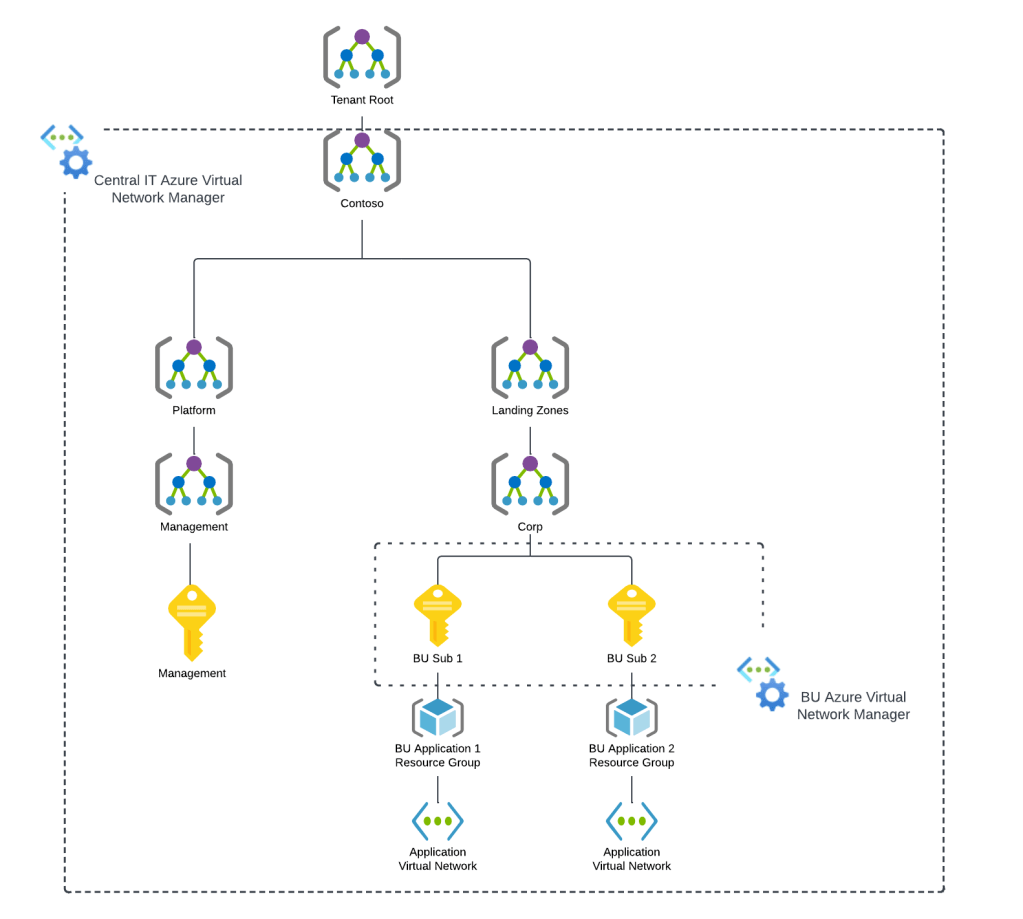
When an AVNM instance is created, it is assigned a scope of what it can manage. This can subscriptions added individually or it can be all subscriptions under a specific management group. A given scope can only have one AVNM instance assigned to it.
Azure Virtual network Manager Sample Architecture
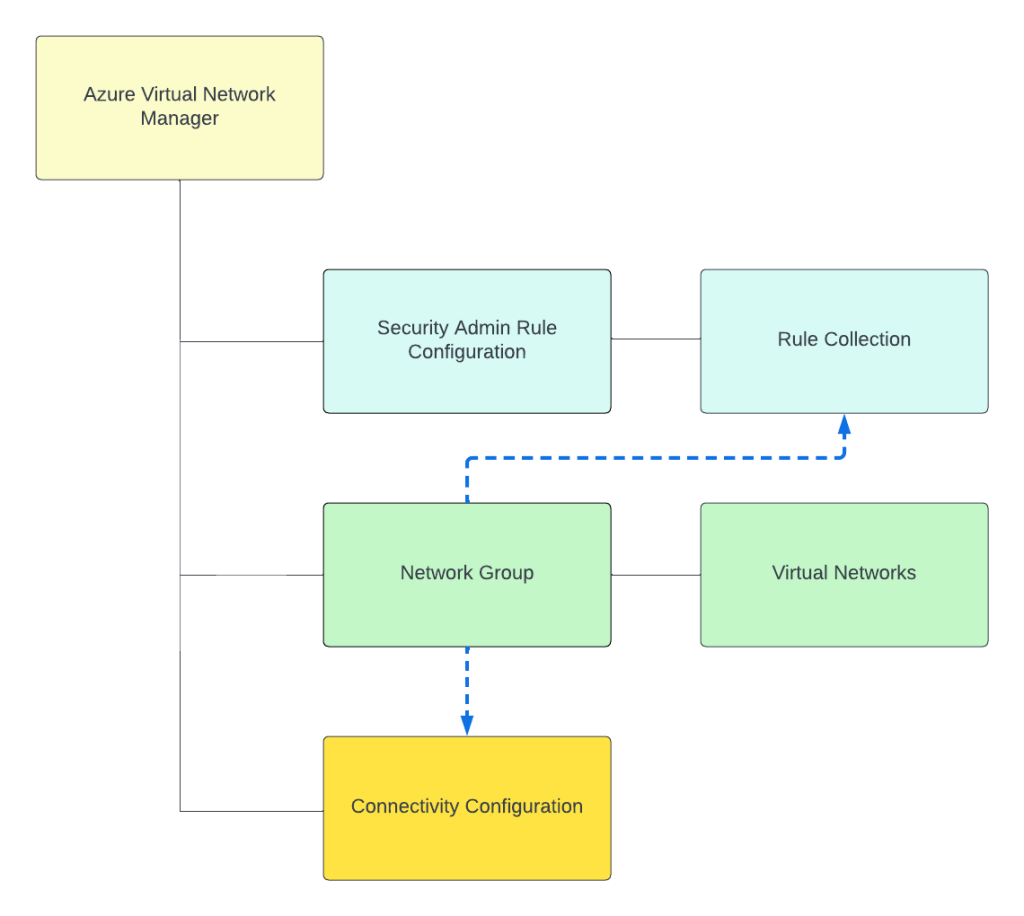
Today, under the assigned scope, AVNM can manage how virtual networks are connected to each other with the connectivity feature and what traffic is allowed or denied within the virtual network with the security admin rules feature superseding Network Security Groups. Within an AVNM instance you group virtual networks under the managed scope into a construct called a Network Group. Network Groups are then associated to either a connectivity or security admin rule configuration as seen below.
Network groups can contain multiple virtual networks and virtual networks can be members of multiple Network Groups. Virtual networks can be added to a Network Group manually or dynamically through Azure Policy. The rest of this post will focus on dynamic membership and some of the interesting properties of the Azure Policy definitions.
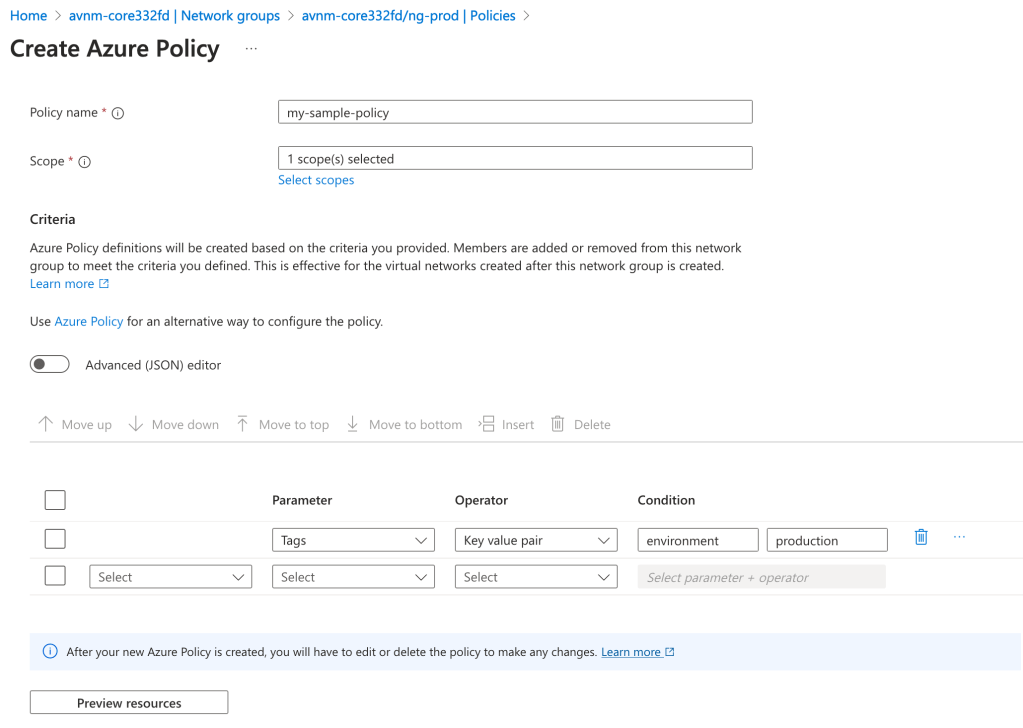
Before I dive into the policy definition I want to call out a neat feature the Product Group built into the solution. When accessing an AVNM instance from the Azure Portal there is a handy GUI-based tool included that can be used to graphically build the conditions on which virtual networks will be members of the Network Group. In the background, this tool builds out the Azure Policy definition and creates the assignment at the scopes you specify. This is one of the only products I’ve come across within Azure that assists the customer in building out an Azure Policy for the service. Great job by the product group!
Azure Policy builder to onboard virtual networks into a Network Group in Azure Virtual Network Manager
With the settings pictured above, I’m creating an Azure Policy to onboard all virtual networks tagged (there are a number of parameters and operators combinations you can use besides tags) with the key of environment and value of production under the specified scope to the Network Group. The policy will look something like this:
I’ve bolded the two properties I want you to key in on. The first property is the mode property. If you’ve written a custom Azure Policy or examined built-in policies you will likely be used to that property being set to either all or indexed. Here you will see it is set to Microsoft.Network.Data. This is one of the new resource provider modes that has been introduced which extends Azure Policy’s functionality. The other interesting property is the effect property. Again, you will likely be used to this being audit, deny, deployIfNotExists, etc. Instead, it is populated with a value of addToNetworkGroup. Both of these properties are specific to AVNM’s feature for dynamic members into its Network Groups.
Being the geek I am, I decided to try writing my own custom Azure Policy definition which would parameterize the the tag key, value, and resource id of the Network Group. Interestingly, you’re blocked from parameterizing the Network Group id due to a regex filter that has been put in. This regex filter validates that the Network Group id looks like an id and will reject if you try to do it as a parameter. I plan on submitting some feedback requesting this regex filter be removed which would allow for this to be fully parameterized. As of now, it looks like you’ll need an Azure Policy definition for each Network Group where you’re using dynamic membership.
Error message when parameterizing Network Group resource id
Once you create your Azure Policy definition and create the assignment, at the next policy evaluation the matching virtual networks will be added into the Network Group as dynamic members. The feature works exactly as described and is incredibly handy in quickly and efficiently onboarding new and existing virtual networks to a specific Network Group to apply a connectivity or security admin rule configuration.
Well folks that’s it for this short blog post. I found the dynamic membership and new Azure Policy properties interesting enough to warrant their own post. I’ve added an example working parameterized Azure Policy definition to my custom Azure Policy GitHub repo if you’re interested in messing around with it yourself.
Expect more posts to come on Azure Virtual Network Manager. Have a great night!
Hello folks! I’m back again with another post on the Azure OpenAI Service. I’ve been working with a number of Microsoft customers in regulated industries helping to get the service up and running in their environments. A question that frequently comes up in this conversations is “How do I prevent usage of the API keys?”. Today, I’m going to cover this topic.
I’ve covered authentication in the AOAI (Azure OpenAI Service) in a past post so read that if you need the gory details. For the purposes of this post, you need to understand that AOIA supports both API keys and AAD (Azure Active Directory) authentication. This dual support is similar to other Azure PaaS (platform-as-a-service) offerings such as Azure Storage, Azure CosmosDB, and Azure Search. When the AOAI instance is created, two API keys are generated which provide full permissions at the data plane. If you’re unfamiliar with the data plane versus management plane, check out my post on authorization.
Azure Portal showing AOAI API Keys
Given the API keys provide full permissions at the data plane monitoring and controlling their access is critical. As seen in my logging post monitoring the usage of these keys is no simple task since the built-in logging is minimal today. You could use a custom APIM (Azure API Management) policy to include a portion of the API key to track its usage if you’re using the advanced logging pattern, but you still don’t have any ability to restrict what the person/application can do within the data plane like you can when using AAD authentication and authorization. You should prefer AAD authentication and authorization where possible and tightly control API key usage.
In my authorization and logging posts I covered how to control and track who gets access to the API keys. I’ve also covered how APIM can be placed in front of an AOAI instance to enforce AAD authentication. If you block network access to the AOAI service to anything but APIM (such as using a Private Endpoint and Network Security Group) you force the usage of APIM which forces the use of AAD authentication preventing API keys from being used.
Azure OpenAI Service and Azure API Management Pattern
The major consideration of the pattern above is it breaks the Azure OpenAI Studio as of today (this may change in the future). The Azure OpenAI Studio is an GUI-based application available within the Azure Portal which allows for simple point-and-click actions within the AOAI data plane. This includes actions such as deploying models and sending prompts to a model through a GUI interface. While all this is available via API calls, you will likely have a user base that wants access a simple GUI to perform these types of actions without having to code to them. To work around this limitation you have to open up network access from the user’s endpoint to the AOAI instance. Opening up these network flows allows the user to bypass APIM which means the user could use an API key to make calls to the AOAI service. So what to do?
In every solution in tech (and life) there is a screwdriver and a hammer. While the screwdriver is the optimal way to go, sometimes you need the hammer. With AOAI the hammer solution is to block usage of API key-based authentication at the AOAI instance level. Since AOAI exists under the Azure Cognitive Services framework, it benefits from a poorly documented property called disableLocalAuth. Setting this property to true blocks the API key-based authentication completely. This property can be set at creation or after the AOAI instance has been deployed. You can set it via PowerShell or via a REST call. Below is code demonstrating how to set it using a call to the Azure REST API.
The AOIA instance will take about 2-5 minutes to update. Once the instance finishes updating, all calls to it using API key-based authentication will receive an error such as seen below when using the OpenAI Python SDK.
You can re-enable the usage of API keys by setting the property back to false. Doing this will update the AOAI resource again (around 2-5 minutes) and the instance will begin accepting API keys. Take note that turning the setting off and then back on again WILL cycle the API keys so don’t go testing this if you have applications in production using API keys today.
Mission accomplished right? The user or application can only access the AOAI instance using AAD authentication which enforced granular Azure RBAC authroization. Heck, there is even an Azure Policy available you can use to audit whether AOAI instances have had this property set.
There is a major consideration with the above method. While you’ve blocked access to the API keys, you’re still created a way to circumvent APIM. This means you lose out on the advanced logging provided by APIM and you’ll have to live with the native logging. You’ll need to determine whether that risk is acceptable to your organization.
My suggestion would be to use this control in combination with strict authorization and network controls. There should be a very limited set of users with permissions directly on the AOAI resource and the direct network access to the resource should be tightly controlled. The network control could be accomplished by creating a shared jump host users that require this access could use. Key thing is you treat access to the Azure OpenAI Studio as an exception versus the norm. I’d imagine Microsoft will evolve the Azure OpenAI Studio deployment options over time and address the gaps in native logging. For today, this provides a reasonable compromise.
I did encounter one “quirk” with this option that is worth noting. The account I used to lab this all out had the Owner role assignment at the subscription level. With this account I was able to do whatever I wanted within the AOAI data layer when disableLocalAuth was set to false. When I set disableLocalAuth to true I was unable to make data plane calls (such as deploying new models). When I granted my user one of the data plane roles (such as Azure Cognitive Service OpenAI Contributor) I was able to perform data plane operations once again. It seems like setting this property to true enforces a rule which requires being granted specific data plane-level permissions. Make sure you understand this before you modify the property.
Well folks that concludes this blog post. Here are your key takeaways:
API Key-based authentication can be blocked at the AOIA instance by setting the disableLocalAuth property to true. This setting can be set at deployment or post deployment and takes 2-5 minutes to take effect. Switching the value of this property from true to false will regenerate the API keys for the instance.
The Azure OpenAI Studio requires the user’s endpoint have direct network access to the AOAI instance. This is because it uses the user’s endpoint to make specific API calls to the data plane. You can look at this yourself using debug mode in your browser or a local proxy like Fiddler. Direct network access to the AOAI instance means you will only have the information located in the native logs for the activities the user performs.
Setting disableLocalAuth to true enforces a requirement to have specific data plane-level permissions. Owner on the subscription or resource group is not sufficient. Ensure you pre-provision your users or applications who require access to the AOAI instance with the built-in Azure RBAC roles such as Azure Cognitive Services OpenAI User or a custom role with equivalent permissions prior to setting the option to true.
1/18/2024 – Logs now include Entra ID security principal objectid property in RequestResponse log
Welcome back fellow geeks.
Over the past few weeks I’ve done a series of posts on the Azure OpenAI Service covering some of the security features of the service. In my first post I gave an overview of what security controls Microsoft makes available for customers to configure to secure their instance of the service. In the second and third posts I did deep dives into the authentication and authorization capabilities of the service. Tonight I’m going to cover the logging capabilities of the service.
Let’s jump right in!
The Azure OpenAI Service emits both logs and metrics. For the purposes of this post I’ll be covering logs. I’ll cover the metrics and monitoring of the service in another post if there is a community interest. Logs emitted by the service have been integrated with the diagnostic setting feature. For those unfamiliar with the diagnostic settings feature, it provides a very simple way to deliver logs and metrics emitted by an Azure service to an Azure Storage Account, Log Analytics Workspace, or to an Event Hub (common use case for passing on to a SIEM like Splunk). In the image below, you can see I’m sending all of the logs and metrics emitted from the service to a Log Analytics Workspace.
Diagnostic Settings
In the image above you can see that the Azure OpenAI Service emits three types of logs which include audit logs, request and response logs, and trace logs. As of the date of this blog all of these logs are sent to the AzureDiagnostics table if you opt to send this logs to a Log Analytics Workspace, so dust off your Kusto skills.
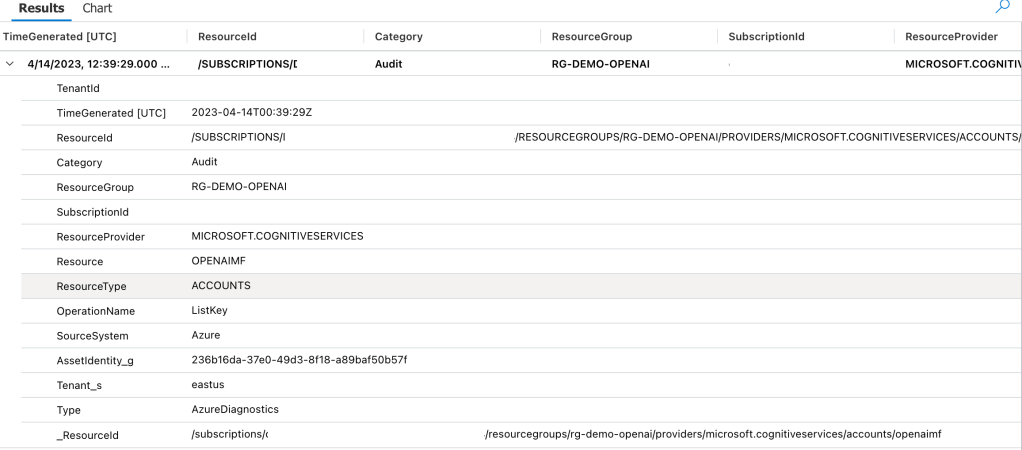
Let’s first take a look at the audit logs, because I know that’s where your security focused eyes darted to. I want to remind you this is a very new service and lots of improvements are coming. Yeah, I did that. I pulled a sales dude move. Seriously though, the audit logging is very limited and likely not what you’d hope for as of the date of this blog. The only events that seem to be logged to the Audit Log for the service are when a ListKeys operation is performed. The operation means a security principal accessed the API Keys. The API keys are used to authenticate to the data plane of the service and do not allow for granular authorization at that plane. Check out my last two posts on authentication and authorization if that sentence doesn’t make sense. Unfortunately, the identity that accessed the API key isn’t listed in the log entry which makes it pretty useless in its current state. Below is a sample entry.
Azure OpenAI Service Audit Log Entry Example
Making this even more useless, this operation is also logged in the Azure Activity Log. The log entry within the Activity Log does include the security principal that performed the action so you’ll want to watch for that activity there. I imagine over time the audit log will be improved to capture more operations and associate those operations to a security principal.
Activity Log Entry Showing List Keys Operation
Next I’m going to cover the Request and Response Logs. This log set is really interesting because likely your expectation is the same as mine was that these would include details around prompts sent to the models and information on the response such as the number of tokens consumed. While it does operations around requests for things such a completions or summarizations, it also captures a ton of other events that would likely be more suited for the audit log. Additionally, the data it captures about these actions is extremely limited.
Let’s take a look at a log entry where I requested the model complete a sentence for me. In my code I’m calling the API using an Azure AD service principal NOT an API key with the shattered hope that the log entry would capture the service principal I’m using. 1/18/2024 – The Entra ID object id is now included in the RequestResponse log entry! Hooray!
Prompt and Response Log Entry
In the above log entry we don’t get any information to correlate the operation back an entity even when using Azure AD authentication. All we can see is the completion action occurred at a specific time and resulted in a success status code. You’ll also see there is a CallerIPAddress field. This will include the first three octets of the IP address called the service but not the last octet. Kinda weird it’s being masked like this, but I guess that’s better than nothing? (Not really, but hey it’s a new service).
Before you ask, no, the content of the prompts and responses are not logged in any of these logs.
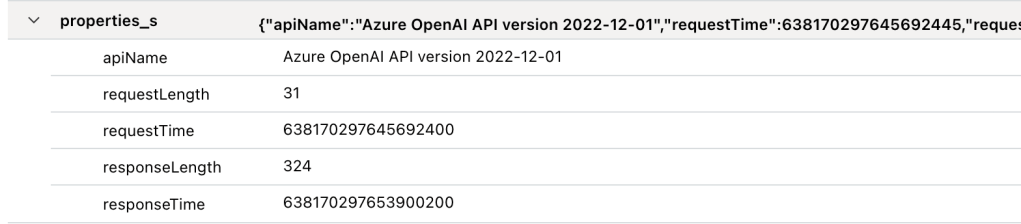
There is one additional field of relevance I couldn’t fit within the above screenshot and that’s properties_s. The only real useful information on this is total response time the service took to return an answer to the user. I hoped this would have had some information around tokens used, but sadly it does not.
properties_s field of a Prompt and Response Log Entry
Besides prompts and responses, this log seems to capture other data plane operations. This includes everything from activities users have performed around uploading files to the service to train fine-tuned models, activities around fine-tuned models (listing, creation, deletion), creation of embeddings, and management of models deployed to the service. Most of these operations should be in the Audit Log in my opinion. I’m not sure why they’re included in this log, but they are. No, none of these operations include details as to who performed these actions beyond the first three octets of the IP address.
Lastly, there is the trace log. I have no idea what’s logged in there because I have yet generate any trace log data. If you know what gets logged in there, let me know in the comments.
So yes folks, there are some serious gaps in the logging for the service today. However, the service is new and the underlining technology is still pretty new as well so we can’t expect perfection out of the gates. My advice to customers has been to build the logging they need into whatever application is fronting the user access and to lock the service down from an authorization perspective so that the only access to the service comes through that application.
My peer Jake Wang has come up with a creative solution to address some of the logging gaps in the service by placing an API Management instance in front of it. With this design anything communicating with the Azure OpenAI Service instance has to go through APIM. Within APIM you can do whatever fancy logging you want to do, toss in some additional throttling to specific user requests, and lots of other cool stuff. It’s a great workaround while the Product Group improves the native logging. Check out my recent post for some of the gotchas of APIM logging for the Azure OpenAI Service.
If you have a different API Gateway like Mulesoft you could use this same pattern with that instead of APIM.
Well folks that wraps things up. I hope you got some value out of this post and I’d encourage you to make your voices heard by submitting feedback to the product group on how you’d like to see the logging improved for the service.
The fun with the new Azure OpenAI Service continues! I’ve been lucky enough to have been tapped to help a number of Microsoft financial services customers with getting the Azure OpenAI Service in place with the appropriate infrastructure and security controls. In the process, I get to learn from a ton of smart people in the AI space. It’s truly been one of the highlights of my 20-year career.
Over the past few weeks I’ve been posting about what I’ve learned, and today I’m going to continue with that. In my first post on the service I gave a high level overview of the security controls Microsoft makes available to the customer to secure their instance of Azure OpenAI Service. In my second post I dove deep into how the service handles authentication and how Azure Active Directory (Azure AD) can be used to improve over the built-in API key-based authentication. Today I’m going to cover authorization and demonstrate how using Azure AD authentication lets you take advantage of granular authorization with Azure RBAC.
Let’s dig in!
As I covered in my last post, the Azure OpenAI Service has both a management plane and data plane. Each plane supports different types of authentication (process of verifying the identity of a user, process, or device, often as a prerequisite to allowing access to resources in an information system) and authorization (The right or a permission that is granted to a system entity to access a system resource). Operations such as swapping to a customer-managed key, enabling a private endpoint, or assigning a managed identity to the service occur within the management plane. Activities such as uploading training data or issuing a prompt to a model occur at the data plane. Each plane uses a different API endpoint. The image below will help you visualize the different planes.
Azure OpenAI Service Management and Data Planes
As illustrated above, authorization within the management plane is handled using Azure RBAC because authentication to that plane requires Azure AD-based authentication. Here we can limit the operations occurring at the management plane a security principal (user, service principal, managed identity, Azure Active Directory group (local or synchronized from on-premises) can perform by using Azure RBAC. For those of you coming from the AWS world, and where the Azure OpenAI Service may be your first venture into Azure, Azure RBAC is Azure’s authorization solution. It’s similar to an AWS IAM Policy. Let’s take a look at a built-in RBAC role that a customer might grant a data scientist who will be using the Azure OpenAI Service.
Let’s briefly walkthrough each property. The id property is the unique resource name assigned to this role definition. Next up we have the name property and description properties which need no explanations. The assignableScopes property determines at which scope an RBAC role can be assigned. Typical scopes include management groups, subscriptions, resource groups, and resources. Built-in roles will always have an assignable scope of “/” which denotes the RBAC role can be assigned to any management group, subscription, resource group, or role.
I’ll spend a bit of time on the permissions property. The permissions property contains a few different child properties including actions, notActions, dataActions, and notDataActions. The actions property lists the management plane operations allowed by the role while the dataActions lists the data plane operations allowed by the role. The notActions and notDataActions are interesting in that they are used to strip permissions out of the actions or dataActions. For example, say you granted a user full data plane operations to an Azure Key Vault but didn’t want them to have the ability to delete keys. You could to this by giving the user the dataAction of Microsoft.KeyVaults/* and notDataAction of Microsoft.KeyVaults/keys/purge/action. Take note this is NOT an explicit deny. If the user gets this permission in another way through assignment of a different RBAC role the user will be able to perform the action. At this time, Azure does not have a generally available feature that allows for an explicit deny like AWS IAM and what does exist in preview has an extremely narrow scope such that it isn’t very useful.
When you’re ready to assign a role to a security principal (user, service principal, managed identity, Azure Active Directory group (local or synchronized from on-premises) you create what is called a role assignment. A role assignment associates an Azure RBAC Role Definition to a security principal and scope. For example, in the below image I’ve created an RBAC Role Assignment for the Cognitive Services User Role at the resource group scope for the user Carl Carlson. This grants Carl the permission to perform the operations listed in the role definition above to any resource within the resource group, including the Azure OpenAI Resource.
Azure RBAC Role Assignment
Scroll back and take a look at the role definition, notice any risky permission? If you noticed the permission Microsoft.CognitiveServices/accounts/listkeys/action (remember that the Azure OpenAI Service falls under the Cognitive Services umbrella), grab yourself a cookie. As I’ve covered previously, every instance of the Azure OpenAI Service comes with two API keys. These API keys allow for authentication to the instance at the data plane level, can’t be limited in what they can do, and are very difficult to ever track back to who used them. You will want to very tightly control access to those API keys so be wary of who you give this role out to and may want to instead create a similar custom role but without this permission.
The are two other roles which are specific two the Azure OpenAI Service are the Cognitive Services OpenAI Contributor and Cognitive Services OpenAI User. Let’s look at the contributor role first.
The big difference here is this role doesn’t grant much at the management plane. While this role may seem appealing to give to a data scientist because it doesn’t allow access to the API keys, it also doesn’t allow access to the instance metrics. I’ll talk about this more when I do a post on logging and monitoring in the service, but access to the metrics are important for the data scientists. These metrics allow them to see how much volume they’re doing with the service which can help them estimate costs and avoid hitting API limits.
Under the dataActions you can see this role allows all data plane operations. These operations include uploading training data for the creation of fine-tuned models. If you don’t want your users to have this access, then you can either strip the permissions Microsoft.CognitiveServices/accounts/OpenAI/files/import/action or grant the user the next role I’ll talk about.
One interesting thing to note is that while this role grants all data actions, which include data plane permissions around deployments, users with this role cannot deploy models to the instance. An error will be thrown that the user does not have the Microsoft.CognitiveServices/accounts/deployments/write permission. I’m not sure if this by design, but if anyone has a workaround for it, let me know in the comments. It would seem like if you want the user to deploy a model, you’ll need to model a custom role after this role and add that permissions.
The last role I’m going to cover is the Cognitive Services OpenAI User role. Let’s look at the permissions for this one.
Like the contributor role, this role is very limited with management plane permissions. At the data plane level, this role really allows for issuing prompts and not much else. This role is great a non-human application role assigned via service principal or managed identity. It will allow the application to issue prompts and not much else. You don’t have to worry about a user exploiting this role to access training data you may have uploaded or making any modification to the Azure OpenAI Service instance.
Well folks that wraps this up. Let’s sum up what we’ve learned:
The Azure OpenAI Service supports fine-grained authorization through Azure RBAC at both the management plane and data plane when the security principal is authenticated through Azure AD.
Avoid using API keys where possible and leverage Azure RBAC for authorization. You can make it much more fine-grained, layer in the controls provided by Azure AD on top of it, and associate the usage of the service back to user (kinda as we’ll see in my post on logging).
Tightly control access to the API keys. I’d recommend any role you give to a data scientist or an application that you strip out the listkeys permissions.
I’d recommend creating a custom role for human users modeled after the Cognitive Services User role but without the listkeys permission. This will grant the user access to the full data plane and allow access to management plane pieces such as metrics. You can optionally be granular with your dataActions and leave out the files permissions to prevent human users from uploading training data.
I’d recommend using the built-in Cognitive Services OpenAI User role for service principals and managed identities assigned to applications. It grants only the permissions these applications are likely going to need and nothing more.
I’d avoid using notActions and notDataActions since it’s not an explicit deny and it’s very difficult to determine an effective user’s access in Azure without another tool like Entra Permissions Management.
Well folks, I hope this post has helped you better understand authorization in the service and how you could potentially craft it to align with least privilege.






 Journey Of The Geek