DNS in Microsoft Azure – DNS Security Policies

This is part of my series on DNS in Microsoft Azure.

Hi there folks! After a busy July packed with a vacation and an insane amount of work , I’m back with a new post. Today I’m going to cover a new feature that has been years coming. Yes folks, DNS query logging is now native to the platform with the introduction of DNS Security Policies into GA (generally available) last month. No longer will you have to solution around this long painful gap. In this post I’ll walk through what this new resource is, what it can do (beyond DNS query logging), cover the use cases I’ve tested with it, show you some samples of the logs, and finally cover some potential designs to incorporate it. Let’s dive in!

A long time coming

If you’ve ever spent time troubleshooting a connection error or trying to detect, block, and analyze malware you are likely familiar with the value of DNS query logs. The former makes it a must for day-to-day operations and the latter a critical piece of data for information security. Historically, it’s been a pain to gather this in Microsoft Azure. The wire server (magic IP, 168 address, whatever your favorite nickname) that is made available within a virtual network to use Azure’s built-in DNS resolution service has lacked the capability to capture DNS queries. This mean queries from compute within your virtual network that were resolving to Azure Private DNS zones or a public DNS zone via Azure-provided DNS weren’t captured. Even the introduction of the Azure Private Resolver didn’t address this gap. This lead to customers with requirements to capture DNS query logs having to get fancy.

The most common pattern customers used to address this gap was to introduce a third-party DNS service like an Infoblox, Bluecat, BIND server, or even Windows DNS Server that all compute running within Azure would use for resolution. While customers were able to use this pattern to get the logs, it meant more virtual machines, more costs, more overhead, and it was typically too expensive to implement for workloads that may require complete isolation and didn’t fit into a typical hub and spoke pattern.

Example design for BYODNS for query logging

When the Azure Private Resolver service got introduced along with DNS Forwarding Rule Sets, customers using Azure Firewall had the option of ditching the third-party DNS service and using Azure Firewall’s DNS proxy service which included DNS query logging (kind odd it went there first, right?). This was another common pattern I saw pop up in that Azure Firewall customer base.

Example design using Azure Firewall for DNS query logging and Azure Private DNS Resolver

Beyond whatever other creative ways customers were addressing this gap, it was a gap and it was costing customers extra money. In comes DNS Security Policies to save the day.

DNS Security Policies Components

DNS Security Policies provide 2 core functions today:

  1. DNS query filtering
  2. DNS query logging

Before I dive into those features in depth, I’m a fan of looking at the resource as a whole from the API layer to get an idea of the components, their purpose, and their relationships.

DNS Security Policies and related resources

DNS Security Policies fall under the Microsoft.Network resource provider and are regional resources. The simplest way to understand a resource provider is to think of a namespace in traditional programming. Within a namespace there are resource types (think classes) with specific resource operations. Within the Microsoft.Network resource provider, the three direct children resources that are key.

You’ll notice the Microsoft Learn documentation uses different terminology from what the API uses for some of the resources. To keep things simple, I’ll be using the Microsoft Learn documentation. Here is a quick cheat sheet:

  • DNS Resolver Policies -> DNS Security Policy
  • DNS Security Rules -> DNS Traffic Rules
  • DNS Resolver Domain Lists -> Domain Lists

Each DNS Security Policy has two children resources: DNS Traffic Rules and Virtual Network Links. DNS traffic rules are the guts of your logic for the DNS Security Policy. Each policy can have up to 10 rules (as of August 2025). Each rule consists of a priority (100 – 65000), action (block, allow, alert), and related domain list (I’ll cover these in a few). You can create multiple rules and order them in priority similar to the screenshot below.

DNS Traffic Rules example

Based on the above logic, when the DNS Security Policy triggers a rule based on the domain matching the associated domain list. If the domain being requested is in the list associated with the priority 100 rule, the query is blocked. If not, it’s then processed by the alert rule (which seems to do nothing in my experience as I’ll cover later). Finally, it will hit the last rule which will allow it through but log it.

As I covered above, each rule is associate with one or more domain list. Domain lists are sibling resources to DNS Security Policies. By being a sibling vs a child, they can be re-used across multiple DNS Security Policies (and whatever other use Microsoft comes up with). This allows you to define your domain lists centrally and re-use them across multiple rule sets if, for example, you wanted to maintain your domains lists consistently across environments (test/qa/prod/etc). Domain lists are pretty simple resources consisting of a domain name or wildcard (denoted by a period). It’s important to understand how the domains will be processed. For example (I’m going to steal this direct from the docs), if you allow contoso.com at rule 100 but block bad.contoso.com at rule 110 the query to bad.contoso.com will be allowed because it falls under contoso.com which was allowed by a higher priority rule.

Example of a domain list

The virtual network link resource is the other child of the DNS Security Policy. This functions similar to the virtual network links with Private DNS Zones as it associates the DNS Security Policy to a virtual network where it will process queries sent through the wire server (Azure-provided DNS). Each virtual network can be linked to one DNS Security Policy but each DNS Security Policy can be linked multiple virtual networks allowing you to use them for those virtual networks connected in a hub and spoke like architecture with centralized DNS as well as those virtual networks that may require complete network isolation.

Example of DNS Security Policy virtual network links

DNS Security Policies support diagnostic logging. This allows you to send each query captured by the policy to storage, event hub, or a log analytics workspace. If using a log analytics workspace, the logs are written to a table named DNSQueryLogs. Log entries will look like the below. You’ll get the key pieces of information such as source IP address of the query and the action taken on it. Here you’ll see the query was denied which is indicated by the ResolverPolicyRuleAction. The values here will be “Deny” for blocks, “None” for alerts, and “Allow” for anything allowed.

Example of DNS Query Logs log entry

When the query is denied, instead of getting back an NXDomain, the machine making the query receives back a CNAME of blockpolicy.azuredns.invalid indicating the query has been blocked by DNS Security Policy. This is much better behavior than a NXDomain because now we know what the culprit for the failed DNS query is.

Example of DNS query being denied by DNS Security Policy

To visualize how the allow and deny works, I threw together two quick and dirty visual representations.

Example of how Allow and Block DNS Traffic Rules work

Scenarios you may be wondering about

Like many of you, I’m curious to see what does work and doesn’t work. I went through and tested a variety of scenarios. Here are a few below and my results when using these policies:

  • Machine using an external DNS server and is not using wire server (magic IP, 168 address, etc)
    • Query is not logged by DNS Security Policies
  • Machine using its wire server in its virtual network
    • Query is captured
  • Machine using Private DNS Resolver in the same virtual network
    • Query is captured
  • Machine using a DNS Proxy which sits in front of the Private DNS Resolver
    • Query is captured
  • Machine queries an A record or PTR record
    • Query is captured
  • Machine queries AAAA record
    • Query is captured
  • Machine queries using TCP-based query instead of UDP-based query
    • Query is captured
  • PaaS Services tested successfully
    • Azure Bastion
    • Azure Firewall

How might you use this?

So now you better understand how the service works and what it does. I’ll now tell you how I’d use it. I’m sure folks smarter than me will come out with more effective ways, but here is how I’m envisioning it now.

Based on the testing I’ve done (and testing done by one of my wonderful peers Chris Jasset) the DNS Security Policies seem to take effect at the wire server. This means you’ll want to link the policies to the virtual networks where DNS packets are directed to the wire server. In a centralized DNS design such as below, this would be linked to the virtual network containing the Azure Private DNS Resolver or 3rd-party DNS solution. You would need one DNS Security Policy per region give they are regional in nature.

Sample design for centralized DNS resolution

If you’re using a distributed DNS model, or have isolated virtual networks, your design would look something more like below. Here the DNS Security Policies are linked to each virtual network to ensure the packet is captured at the wire server of the virtual network where the query originates.

Sample design for distributed DNS Security Policy

As for domain lists, I think most organizations will likely have three separate domain lists. One for block, one for alert (again I don’t find this super useful as of now), and one for allow. These domain lists could be established in a production subscription and shared across lower environments to ensure consistency of blocked domains across environments.

Summing it up

There are a few big takeaways for you this post:

  • It’s time to revisit how you’re capturing DNS query logs. If your only reason for implementing a third-party DNS service was DNS query logging, you may want to revisit that to see to see if this new solution is more cost effective.
  • Just like Azure Private DNS, don’t forget to link your policy to the right virtual network. Whatever virtual network you’re sending DNS queries to the wire server is where these should be linked.
  • DNS query logs are very chatty. You may want to look at ways of optimizing what you capture (if you’re sending it to a third-party logging solution) of how much you retain (if you’re keeping it in a Log Analytics Workspace). This is especially true if you use a wildcard in the allow to capture everything. PaaS especially is very chatty. If you aren’t careful about this, you’ll owe Microsoft a big fat check by the end of that first month.

Lastly, I threw together some samples of the creation of these resources in Terraform if you’re curious. You can find the code here.

Well folks, hopefully you learned something new today. Thanks as always for taking the time to read the content!


AI Foundry – Credential vs Identity Data Stores

This is a part of my series on AI Foundry:

Hello again folks. Today, I’m going to continue my series on AI Foundry. I’ve been scratching my head on how best to tackle this series, because the service consists of so many foundational services plumbed together into a larger solution so there is a lot to talk about. The product can be complicated when implementing it with all the security bells and whistles. Getting it right requires a solid baseline understanding of the foundational components security capabilities (such as Azure Storage, Azure Key Vault, etc) and how these components work together for the purposes of AI Foundry.

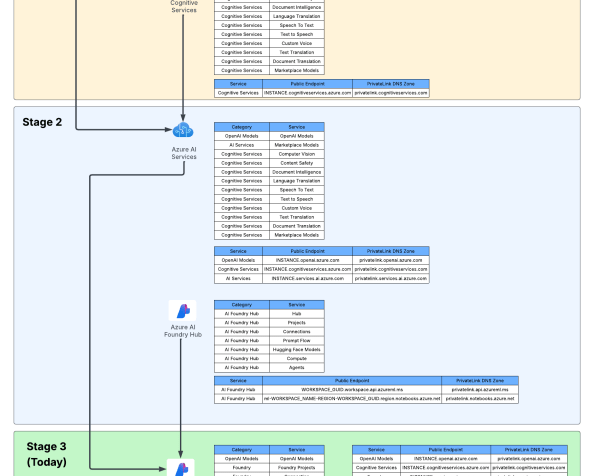
The many components of an AI Foundry deployment

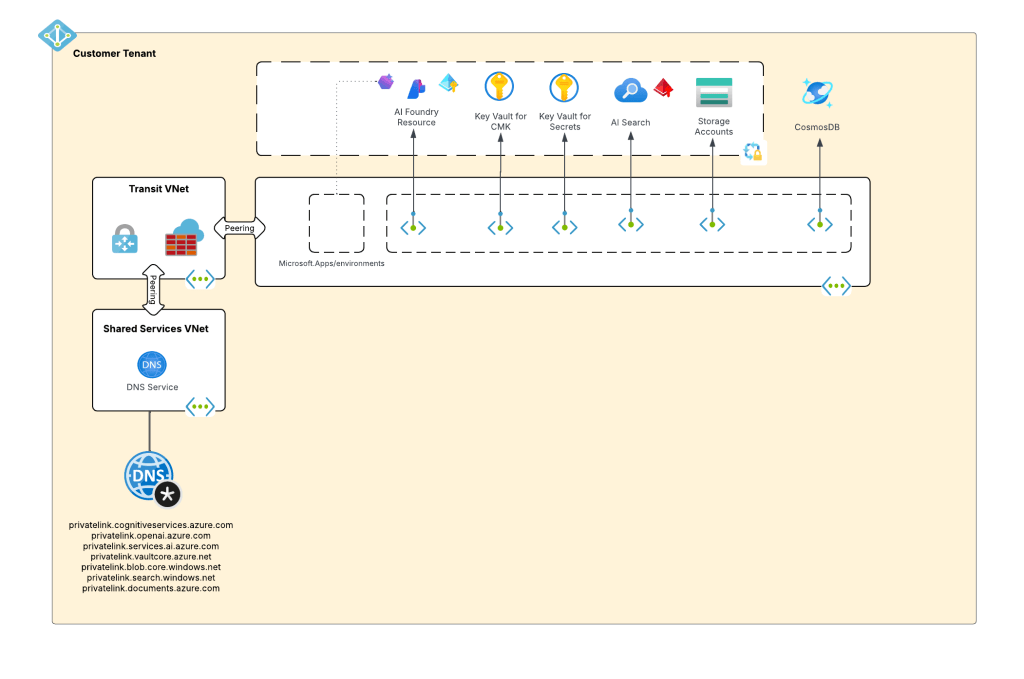
For the purposes of this post, I’m going to focus in on Azure Storage, specifically the storage account associated with the AI Foundry Hub. I will refer to this storage account as the default storage account. As I covered in my first post, AI Foundry is built on top of Azure Machine Learning. Like Azure Machine Learning, AI Foundry uses the default storage account to store artifacts created by the AI Foundry hub and projects. This includes files for the Prompt Flows you create, files used by the compute provisioned in the managed virtual network, and other artifacts related to the functionality of the product. This storage account is shared across the AI Foundry hub and all projects created within it.

The default storage account is critical to the functionality and if you muck up the identity or networking configuration, the product simply won’t work. The errors you’ll receive won’t always indicate an obvious problem with your storage account configuration. To help you avoid mucking up the identity portion, I’m going to use this post to explain your options for identity integration with the default storage account.

AI Foundry uses workspace connection resources to connect to external resources outside of the workspace. This includes the default storage account, AOAI (Azure OpenAI Service) or AI Service instance, and the like. When you create a connection in AI Foundry, you configure how the workspace should authenticate to the resource (determined by the authType property of the connection) when called by a user. This will most commonly be either Entra ID or an API key. In the example below, you see I have a connection object for an AI Search instance set to use Entra authentication by configuring the authType to AAD.

 {
      "id": "/subscriptions/XXXXXXXX-XXXX-XXXX-XXXX-XXXXXXXXXXXX/resourceGroups/rgaifeus296/providers/Microsoft.MachineLearningServices/workspaces/aifhaifoundryeus296/connections/connaisaifoundryeus296",
      "location": null,
      "name": "connmysearchservice",
      "properties": {
        "authType": "AAD",
        "category": "CognitiveSearch",
        "createdByWorkspaceArmId": "/subscriptions/XXXXXXXX-XXXX-XXXX-XXXX-XXXXXXXXXXXX/resourceGroups/rgaifeus296/providers/Microsoft.MachineLearningServices/workspaces/aifhaifoundryeus296",
        "error": "Network Service does not have permission to check resource /subscriptions/XXXXXXXX-XXXX-XXXX-XXXX-XXXXXXXXXXXX/resourceGroups/rgaifeus296/providers/Microsoft.Search/searchServices/aisaifoundryeus296 details. Please consider grant Azure Machine Learning (appId: 0736f41a-0425-4b46-bdb5-1563eff02385) read or contributor access to connected resource.",
        "expiryTime": null,
        "group": "AzureAI",
        "isSharedToAll": true,
        "metadata": {
          "ApiType": "Azure",
          "ApiVersion": "2024-05-01-preview",
          "DeploymentApiVersion": "2023-11-01",
          "ResourceId": "/subscriptions/XXXXXXXX-XXXX-XXXX-XXXX-XXXXXXXXXXXX/resourceGroups/rgaifeus296/providers/Microsoft.Search/searchServices/mysearchservice"
        },
        "peRequirement": "NotApplicable",
        "peStatus": "NotApplicable",
        "sharedUserList": [],
        "target": "https://mysearchservice.search.windows.net",
        "useWorkspaceManagedIdentity": false
      },
      "systemData": {
        "createdAt": "2025-01-12T23:19:01.8005674Z",
        "createdBy": "d34d51b2-34b4-45d9-b6a8-cc5422eb400a",
        "createdByType": "Application",
        "lastModifiedAt": "2025-01-12T23:19:01.8005674Z",
        "lastModifiedBy": "d34d51b2-34b4-45d9-b6a8-cc5422eb400a",
        "lastModifiedByType": "Application"
      },
      "tags": null,
      "type": "Microsoft.MachineLearningServices/workspaces/connections"
    }

Creating this connection allows me to use the AI Search instance within the AI Foundry hub and projects such as using it within the ChatPlayground Chat With Your Data feature. When the connection object is called, an Entra ID identity will be used. This could be the user’s identity, it could a project’s managed identity, or it could even be a managed-online endpoint’s managed identity. In all cases, the identity will be an Entra ID identity that can be authenticated to the tenant and the actions it is authorized to do are determined by its Azure RBAC assignments. It’s critical to understand that if you choose Entra ID-based authentication, you need to have proper permissions in place.

When a new AI Foundry hub is created, it will either create new storage account or integrate with an existing storage account to be used as the default storage account. During setup via the Portal, in the identity section you’ll see the option to choose credential-based or identity-based authentication when connecting to the default storage account. By default, credential-based access will be used. If you are provisioning via Terraform (which as of right now will require you to use the AzApi resource provider) you would set the properties.systemDatastoresAuthMode property to either accesskey or identity. As of the date of this blog, this property still is not documented in the REST API documentation that I could find, however, it will work when referencing it with API version Microsoft.MachineLearningServices/workspaces@2024-10-01-preview.

Credential or Identity-based access

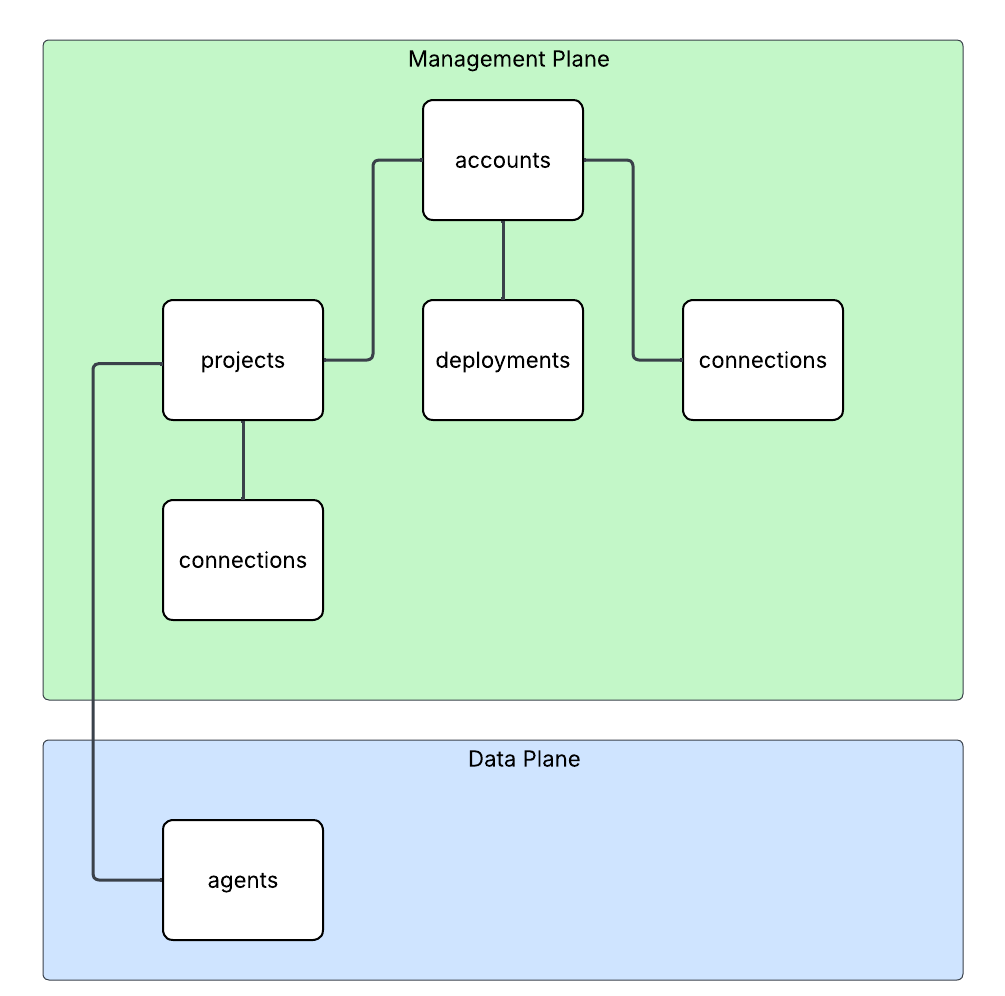
So why would you choose identity-based access if you have to additionally provision the relevant security principals with access via RBAC? Before I answer that, let me do a quick recap on authorization in Azure. As I cover in my series on Azure authorization, services like storage have both a management plane and data plane. While the management plane is always Entra ID-based authentication and Azure RBAC, the data plane for most services (storage included) can use either Entra ID/Azure RBAC or API keys (via Storage Access Keys and SAS tokens). Usage of any type of static key typically grants the security principal using the key complete access to the data plane. Additionally, determining who is using the key at any given time is mostly impossible. For that reason, choosing to use Entra ID/Azure RBAC should be your preference wherever possible. Entra ID will give your traceability back to the security principal that touched the resource and Azure RBAC will give you the ability to assign granular permissions across the data plane.

Management plane versus data plane

If you instead select credential-based authentication a few things happen. When the new AI Foundry hub is created the connections made to the default storage account will be configured to use a SAS token. Any security principal with read access to the workspace can use that connection information for the storage account from within an AI Foundry project to connect to the storage account using those credentials. This means no audibility about what user is doing what with the storage account. This goes for any connection you share across projects that use an API key. Not good.

Default storage account configured to use credential-based authentication

It’s worth understanding the Key Vault resource used by AI Foundry in this scenario. When selecting credential-based authentication for the default storage account, the storage access keys for the storage account are stored in the Key Vault. Both the AI Foundry hub and projects under the hub are granted access to the secrets via Key Vault access policies. Yuck and yuck. Users do not get access to the Key Vault itself. Foundry simply enables them to exercise the use of the credential via permissions over teh connection object within the Foundry hub or project. When using identity-based authentication and Entra ID for your connections, the Azure Key Vault will be used minimally (such as being used if you deploy a model from the model catalog to managed online endpoint and select key-based authentication) to none.

Hopefully at this point I’ve sold you on the benefits of using the identity-based authentication to the default storage account (and Entra ID for connected resources). As a quick recap, if you care about least privilege and audibility, you’ll choose identity-based authentication. The main consideration of choosing identity-based authentication for the default storage account is that you need to get Azure RBAC right or else shit will break. Oh yes will it break.

If you configure your AI Foundry instance with a SMI (system-assigned managed identity) for the hub and projects, the required permissions on the default storage account will be granted for these identities. This includes:

  • Hub identity
    • Storage Blob Data Contributor
    • Storage File Data Privileged Contributor
  • Project identity
    • Storage Account Contributor
    • Storage Blob Data Contributor
    • Storage File Data Privileged Contributor
    • Storage Table Data Contributor

If you’re nosy like I am, you’ll notice the Azure RBAC assignments for both identities for the hub and project have an ABAC condition attached (yes an actual use case!). I plan on covering ABAC conditions in depth in my authorization series, but essentially they are a way of scoping the access to an attribute of the security principal, resource, or session. Within AI Foundry, they are used to limit the managed identities to accessing the blob containers specific to their underlining AML workspace. This helps to prevent the managed identity of one project from accessing artifacts produced by another project. For example, here are the conditions associated with my hub’s managed identity:

(
 (
  !(ActionMatches{'Microsoft.Storage/storageAccounts/blobServices/containers/blobs/delete'})
  AND
  !(ActionMatches{'Microsoft.Storage/storageAccounts/blobServices/containers/blobs/read'})
  AND
  !(ActionMatches{'Microsoft.Storage/storageAccounts/blobServices/containers/blobs/write'})
  AND
  !(ActionMatches{'Microsoft.Storage/storageAccounts/blobServices/containers/blobs/move/action'})
  AND
  !(ActionMatches{'Microsoft.Storage/storageAccounts/blobServices/containers/blobs/add/action'})
 )
 OR 
 (
  @Resource[Microsoft.Storage/storageAccounts/blobServices/containers:name] StringStartsWithIgnoreCase '67b8ddaa-f77e-4d12-b9ca-440326274da9'
 )
)

If you opt to use a UMI (user-assigned managed identity) for the AI Foundry hub you’ll need to manually grant these permissions to the UMI prior to provisioning the hub. You should try to include these conditions.

As I mentioned earlier, there are three primary sets of identities that hit the resources for an AI Foundry. These include the hub/project identity, user identity, and compute identities. If you opt to use identity-based authentication to the storage account, you will need to ensure you grant your users appropriate permissions on the storage account. When a user does something like create a prompt flow, the user’s identity context is used to access the file endpoint in the storage account to create a file share that will contain prompt flows they create.

This typically includes:

  • Storage Blob Data Contributor
  • Storage File Data Privileged Contributor

If you’re spinning up a managed-online endpoint, you will need to grant that managed identity (if using an UMI, these are automatically added if using an SMI):

  • Storage Blob Data Reader
  • Storage Blob Data Contributor

The last thing I want to mention is specific to if you creating Private Endpoints for your default storage account (which for a secure AI Foundry, you should be). Ensure you grant each AI Foundry project managed identity Reader over the private endpoints (both file and blob) for the default storage account. This is required when previewing data from the AI Foundry Portal for use cases like uploading data for fine-tuning a model. I’m not sure where this requirement comes from, but if you don’t include it, your users will run into weird permission errors when attempting to upload data to the default storage account from within AI Foundry.

Let’s sum things up:

  • The default storage account configuration is critical to successful use of the product. Muck up authorization and prepared for pain.
  • Use identity-based authentication for connectivity to the default storage account. This will ensure auditability for who accesses what.
  • Use Entra ID authentication for your AI Foundry connections wherever possible. This will give you auditability and the ability to scope permissions via Azure RBAC.
  • If you using identity-based authentication, ensure you put in place the right permissions for the hub/project (done automatically if using SMI), user, and compute identities.
  • If you’re having trouble with users uploading data for fine-tuning via AI Foundry, your project is probably missing the read permissions over the default storage account private endpoints.
  • If you’re having trouble provisioning a managed online endpoint that is using an UMI, you are probably missing permissions on the default storage account.

That wraps up this post. Thanks folks!

DNS in Microsoft Azure – Private DNS Fallback

This is part of my series on DNS in Microsoft Azure.

Updates:

  • 7/30/2025 – Updated blog to reflect feature is now generally available

Hello folks! I wanted to get at least one blog post in before 2025 so today I’m going to bring the conversation back to DNS once again. I’m going to be hitting on an advanced topic today, so if you’re unfamiliar with DNS in Azure, read up on my prior posts. I’m going to be skipping through much of the basics.

Today we’re going to talk about one of the challenges that tends to pop up when customers begin to heavily use PrivateLink Private Endpoints and Azure Private DNS. You will likely run into this challenge at some point (if you haven’t already) when you attempt to collaborate with another organization using Azure, when using services like Azure Fabric where one BU (business unit) manages Azure and another manages Azure Fabric, or when working across multiple Entra ID tenants.

Brew your coffee, we’re about to dive into the weeds!

As I’ve covered in past posts, Microsoft provides you out-of-the-box DNS resolution for each VNet (virtual network) via the Azure-provided DNS service (I’m going to refer to it as the WireServer for the rest of this post). The WireServer can be reached at 168.63.129.16 from endpoints deployed to the virtual network and will route DNS queries to either Microsoft public DNS resolvers or to Private DNS zones. Private DNS Zones allow customers to host internally-facing DNS namespaces and are very commonly used with PrivateLink Private Endpoints for Microsoft PaaS (platform-as-a-service) services due automatic lifecycle management of the A records for the Private Endpoints. Thus our challenge begins to peek its ugly head.

Example DNS Resolution for Private Endpoints when using Private DNS

Alrighty, I get it. You know all this and it’s boring you. Let’s get to the good stuff.

What if you need to collaborate with another organization and they also use Private Endpoints? How might this cause some issues?

Let’s take a scenario where Bob works for Contoso and Alice works for Fabrikam. Alice over at Fabrikam produces a daily dump of data from a financial system to an Azure Storage Account as a blob. Bob over at Contoso pulls that data down into his environment for analysis by employees of Contoso. Alice provides this dump to over a hundred customers. Due to this large volume of customers, she has opted to provide it over a public endpoint only.

Bob living the good life with resolution working as he expects

This process has been working flawlessly for years and Bob’s life has been good. One day, Bob’s life isn’t good and his automation fails. After lots of troubleshooting involving both Contoso and Fabrikam, it’s determined that DNS resolution is failing when trying to resolve the name of the storage account.

As it turns out, Alice’s Information Security team made it a standard to use Private Endpoints and she turned on a Private Endpoint for the storage account. The creation of the Private Endpoint creates a CNAME for the storage account in public DNS for fabrikam.privatelink.blob.core.windows.net. Since Contoso has this Private DNS Zone configured in its environment, Bob’s query gets redirect to Contoso’s Private DNS Zone which doesn’t have the record and instead returns an NXDOMAIN.

Bob having a bad day with the DNS resolution failing due to Fabrikam turning on a Private Endpoint for the storage account

Historically, this has been a pain to deal with. Customers have had to work around it by creating local host records (yuck), defining the FQDN (fully-qualified domain name) for the storage account as a zone, or creating conditional forwarders for specific FQDNs in their on-premises DNS service. While both will work, it can become a real headache at scale and can make troubleshooting resolution a complete nightmare. Yes, there is always the option of the 3rd party injecting a Private Endpoint into your virtual network, but I rarely see this occur across my customer base in situations where 3rd parties are servicing a large number of customers. Likely due to complexity and cost (yes Private Endpoints and the data transferring through them do have costs and can add up with large amounts of data).

Microsoft introduced a new feature in 2024 called “Fallback to Internet for Private DNS” which seeks to address this problem once and for all. With this feature customers can configure whether resolution should fallback to public DNS on a per virtual network link basis for each Private DNS Zone. This means you can pick which Private DNS Zones fallback to public DNS. Maybe you want to do it for privatelink.blob.core.windows not, but privatelink.database.windows.net. If you use different resolution paths (meaning separate virtual network links) for production and non-production, you can choose to fallback only for non-production while keeping today’s behavior for production. This gives you a ton of flexibility in how you handle resolution.

In the Azure Portal you will see an option in a virtual network link called Enable fallback to Internet. When you enable this option Azure DNS will fallback to public DNS resolution if it can’t find a record in a Private DNS Zone. With fallback off it’s set to the value of Default and if fallback is on it’s set to the value of NxDomainRedirect.

New option in Azure Portal to enable DNS fallback

If we revisit Bob’s challenge. He can now resolve this by enabling fallback on the virtual network link used by his endpoint’s resolution path for the privatelink.blob.core.windows.net. When the WireServer receives back an NXDOMAIN, it will then try to resolve it via public DNS yielding the public endpoint IP Bob needs for Fabrikam’s storage account.

DNS resolution with fallback in place

This feature makes dealing with the scenario way more straightforward. I haven’t heard a good reason to not enable this by default. If you have one in mind, definitely post in the comments.

So your key takeaways:

  1. The usage of Private Endpoints across organizations can create split-brain DNS-like scenarios that require lots of DNS record management overhead.
  2. This feature will help to address those scenarios. You should use it where it makes sense, but it shouldn’t be your default.

Thanks for reading!

Azure OpenAI Service – Tracking Token Usage with APIM

This is part of my series on GenAI Services in Azure:

  1. Azure OpenAI Service – Infra and Security Stuff
  2. Azure OpenAI Service – Authentication
  3. Azure OpenAI Service – Authorization
  4. Azure OpenAI Service – Logging
  5. Azure OpenAI Service – Azure API Management and Entra ID
  6. Azure OpenAI Service – Granular Chargebacks
  7. Azure OpenAI Service – Load Balancing
  8. Azure OpenAI Service – Blocking API Key Access
  9. Azure OpenAI Service – Securing Azure OpenAI Studio
  10. Azure OpenAI Service – Challenge of Logging Streaming ChatCompletions
  11. Azure OpenAI Service – How To Get Insights By Collecting Logging Data
  12. Azure OpenAI Service – How To Handle Rate Limiting
  13. Azure OpenAI Service – Tracking Token Usage with APIM
  14. Azure AI Studio – Chat Playground and APIM
  15. Azure OpenAI Service – Streaming ChatCompletions and Token Consumption Tracking
  16. Azure OpenAI Service – Load Testing

Yeah, yeah, yeah, I missed posting in July. I have been appropriately shamed on a daily basis by WordPress reminders.

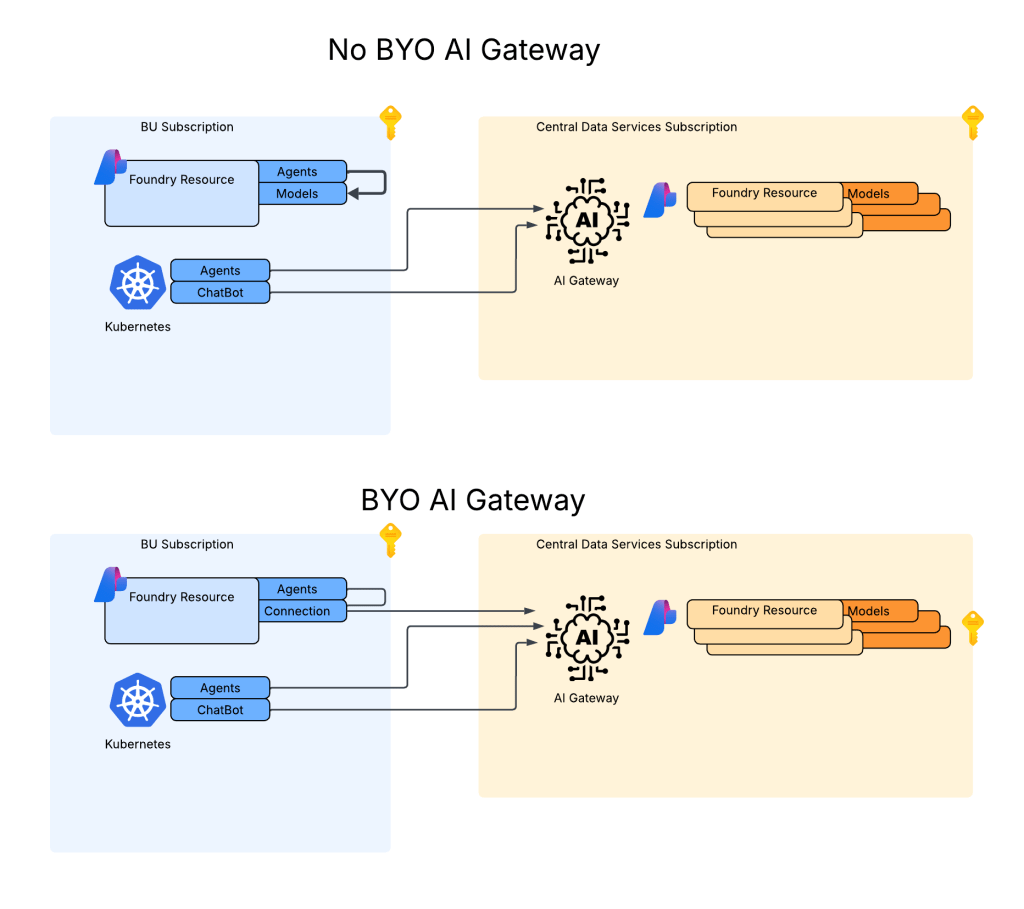
I’m going to make up for it today by covering another of the “Generative AI Gateway” features of APIM (Azure API Management) that were announced a few months back. I’ve already covered the circuit breaker and load balancing and the token-based rate limiting features. These two features have made it far easier to distribute and control the usage of the AOAI (Azure OpenAI Service) that is being offered as a core enterprise service. One of the challenges that isn’t addressed by those features is charge backs.

As I’ve covered in prior posts, you can get away with an instance or two of AOAI dedicated to an app when you have one or two applications at the POC (proof-of-concept) stage. Capacity and charge back isn’t an issue in that model. However, your volume of applications will grow as well as the capacity of tokens and requests those applications require as they move to production. This necessitates AOAI being offered as a core foundational service as basic as DNS or networking. The patterns for doing this involve centrally distributing requests across several instances of AOAI spread across different regions and subscriptions using a feature like the circuit breaker and load balancing features of APIM. Once you have several applications drawing from a common pool, you then need to control how much each of those applications can consume using a feature like the token-based rate limiting feature of APIM.

Common way to scale AOAI service

Wonderful! You’ve built a service that has significant capacity and can service your BUs from a central endpoint. Very cool, but how are you gonna determine who is consuming what volume?

You may think, “That information is returned in the response. I can have the developers use a common code snippet to send that information for each response to a central database where I can track it.” Yeah nah, that ain’t gonna work. First, you ain’t ever gonna get that level of consistency across your enterprise (if you do have this, drop me an email because I want to work there). Second, as of today, the APIs do not return the number of tokens used for streaming based chat completions which will be a large majority of what is being sent to the models.

I know you, and you’re determined. You follow-up with, “Well Matt, I’m simply going to pull the native metrics from each of the AOAI instances I’m load balancing to.” Well yeah, you could do that but guess what? Those only show you the total consumed across the instance and do not provide a dimension for you to determine how much of that total was related to a specific application.

Native metrics and its dimensions for an instance of AOAI

“Well Matt, I’m going to configure diagnostic logging for each of my AOAI instances and check off the Request and Response Logs. Surely that information will be in there!”. You don’t quit do you? Let me shatter your hopes yet again, no that will not work. As I’ve covered in a prior post while the logs do contain the Entra ID object ID (assuming you used Entra ID-based authentication) you won’t find any token counts in those logs either.

AOAI Request and Response Logs

Well fine then, you’re going to use a custom logging solution to capture token usage when it’s returned by the API and calculate it when it isn’t. While yes this does work and does provide a number of additional benefits beyond information for charge backs (and I’m a fan of this pattern) it takes some custom code development and some APIM policy snippet expertise. What if there was an easier way?

That is where the token metrics feature of APIM really shines. This feature allows you to configure APIM to emit a custom metric for the tokens consumed by a Completion, Chat Completion (EVEN STREAMING!!), or Embeddings API call to an AOAI backend with a very basic APIM Policy snippet. You can even add custom dimensions and that is where this feature gets really powerful.

The first step in setting this up is to spin up an instance of Application Insights (if your APIM isn’t already hooked into one) and a Log Analytics Workspace the Application Insights instance will be associated with. Once your App Insights instance is created, you need to modify the settings API in APIM you’ve defined for AOAI and turn on the App Insights integration and enable custom metrics as seen below.

Enable custom metrics in APIM

Next up, you need to modify your APIM policy. In the APIM Policy snippet below I extra a few pieces of data from the request and add them as dimensions to the custom metric. Here I’m extracting the Entra ID app id of security principal accessing the AOAI service (this would be the application’s identity if you’re using Entra ID authentication to the AOAI service) and the model deployment name being called from AOAI which I’ve standardized to be the same as the model name.

         <!-- Extract the application id from the Entra ID access token -->

        <set-variable name="appId" value="@(context.Request.Headers.GetValueOrDefault("Authorization",string.Empty).Split(' ').Last().AsJwt().Claims.GetValueOrDefault("appid", string.Empty))" />

        <!-- Extract the model name from the URL -->

        <set-variable name="uriPath" value="@(context.Request.OriginalUrl.Path)" />
        <set-variable name="deploymentName" value="@(System.Text.RegularExpressions.Regex.Match((string)context.Variables["uriPath"], "/deployments/([^/]+)").Groups[1].Value)" />

        <!-- Emit token metrics to Application Insights -->

        <azure-openai-emit-token-metric namespace="openai-metrics">
            <dimension name="model" value="@(context.Variables.GetValueOrDefault<string>("deploymentName","None"))" />
            <dimension name="client_ip" value="@(context.Request.IpAddress)" />
            <dimension name="appId" value="@(context.Variables.GetValueOrDefault<string>("appId","00000000-0000-0000-0000-000000000000"))" />
        </azure-openai-emit-token-metric>

After making a few calls from my code to APIM, the metrics begin to populate in the App Insights instance. To view those metrics you’ll want to go into the App Insights blade and go to the Monitoring -> Metrics section. Under the Metrics Namespace drop down you’ll see the namespace you’ve created in the policy snippet. I named mine openai-metrics.

Accessing custom metrics in App Insights for token metrics

I can now select metrics based on prompt tokens, completion tokens, and total tokens consumed. Here I select the completion tokens and split the data by the appId, client IP address, and model to give me a view of how many tokens each app is consuming and of which model at any given time span.

Metrics split by dimensions

Very cool right?

As of today, there are some key limitations to be aware of:

  1. Only Chat Completions, Completions, and Embedding API operations are supported today.
  2. Each API operation is further limited by which models it supports. For example, as of August 2024, Chat Completions only supports gpt-3.5 and gpt-4. No 4o support yet unfortunately.
  3. If you’re using a load balanced pool backend, you can’t yet use the actual backend the pool send the request to as a dimension.

Well folks, hopefully this helps you better understand why this functionality was added and the value it provides. While you could do this with another API Gateway (pick your favorite), it likely won’t be as simple as it it with APIM’s policy snippet. Another win for cloud native I guess!

Thanks!