Azure Private Link is a common topic for customers. It provides a service provider with the ability to inject a path to the instance of their service into a customer’s virtual network. It should come as no surprise that Microsoft makes full use this service to provide its customers with the same capability for it’s PaaS services. While the DNS configuration is straightforward for 3rd-party-provided Private Link services, there is some complexity to DNS when using it for access to Microsoft PaaS services behind a Private Link Private Endpoint.
Before I dive into the complexities of DNS, I want to cover how and why the service came to be.
The service was introduced in September 2019. One of the primary drivers behind the introduction of the service was to address the customer demand for secure and private connectivity to native Azure services and 3rd-party services. Native Azure PaaS services used to be accessible only via public IP addresses which required traffic to traverse the public Internet. If the customer wanted the traffic to take a known path to that public IP and have some assurance of consistency in the latency, the customer was forced to implement ExpressRoute with Microsoft Peering (formerly known as ExpressRoute Public Peering) which can be complex and comes with lots of considerations.
Microsoft first tried to address this technical challenge with Service Endpoints, which were introduced in February 2018. For you AWS folk, the Service Endpoints are probably closest to VPC Gateway Endpoints. Service Endpoints provide a means for services deployed with the virtual network to access an Azure PaaS service directly over the Microsoft backbone while also tagging the traffic egressing the Service Endpoint with the virtual network identity. The customer’s instance of that PaaS service could then be locked down access from a specific virtual network.
Access to public IP of Azure PaaS services
Service Endpoints came with a few gaps. One gap was Service Endpoints are not routable from on-premises so machines coming from on-premises can’t benefit from their deployment. The other gap was a Service Endpoint creates a data exfiltration risk because it is a more efficient route to ALL instances of the Azure PaaS service. Customers were often implementing Service Endpoints directly on the compute subnets which would cause traffic to bypass an organization’s security appliance (think traditional hub-and-spoke) making that exfiltration risk that much greater.
Microsoft made an attempt to mitigate the exfiltration risk Service Endpoint policies which are similar to VPC Gateway Endpoint Policies in controls could be applied via the policy to limit which instances of a PaaS service the Service Endpoint would allow traffic to. Unfortunately, Service Endpoint Policies never seemed to catch on and they are limited to Azure Storage.
Microsoft needed a solution to these two gaps and that’s how Azure Private Link came to be. Azure Private Link includes the concept of an Azure Private Link Service and Private Link Endpoint. I won’t be digging into the details of the Private Link Service component, because the focus of this two-part series is on DNS and its role in providing name resolution for Microsoft native PaaS Private Link Private Endpoints. I do want to cover the benefits Private Link brings to the table because it will reinforce why it’s so important to under the DNS integration.
Private Link addresses the major gaps in Service Endpoints by doing the following:
Private access to services running on the Azure platform through the provisioning of a virtual network interface within the customer VNet that is assigned one of the VNet IP addresses from the RFC1918 address space.
Makes the services routable and accessible over private IP space to resources running outside of Azure such as machines running in an on-premises data center or virtual machines running in other clouds.
Protects against data exfiltration by the Private Endpoint providing access to only a specific instance of a PaaS service.
Azure Private Link architecture
Now that you understand what Private Link brings to the table, I’ll focus on the DNS integration required to support Azure native PaaS services deployed behind a Private Link Private Endpoint.
7/2025 – Updated post with DNS Security Policy support for DNS query logging. Tagged scenario 4 as deprecated.Corrected image and description of flow in 3b
This is part of my series on DNS in Microsoft Azure.
Today I’ll be continuing my series on DNS in Microsoft Azure. In my first post I covered fundamental concepts of DNS resolution in Azure such as the 168.63.129.16 virtual IP and Azure-provided DNS. In the second post I went over the Azure Private DNS service and it’s benefits over the default virtual network namespaces. In this post I’m going to cover the Azure Private DNS Resolver.
A majority of organizations have an existing on-premises IT footprint. During the move into Azure, these organizations need to support communication between users and applications on-premises or in other clouds with services deployed into Azure. An important piece of this communication includes name resolution of DNS namespaces hosted on-premises and DNS namespaces hosted in Azure Private DNS Zones. This is where the Azure Private DNS Resolver comes in.
The Azure Private DNS Resolver was introduced into general availability in October 2022. It was developed to address two gaps of the Azure-provided DNS service. As I’ve covered in my prior posts the Azure-provided DNS services does not support resolution of DNS namespaces hosted in on-premises or other cloud DNS services when the DNS query is sourced from Azure. Neither does it support resolution of DNS namespaces hosted in Azure Private DNS Zones from machines on-premises or in another cloud without the customer implementing a 3rd-party DNS proxy. The Azure Private DNS Resolver fills both gaps without the customer having to implement a 3rd-party DNS proxy.
The Resolver (Azure Private DNS Resolver) consists of three different components which include inbound endpoints, outbound endpoints, and forwarding rule sets. Inbound endpoints provide a routable IP address that services running on-premises, in another cloud, or even in Azure can communicate with to resolve DNS namespaces hosted in Azure Private DNS Zones. Outbound endpoints provide a network egress point for DNS traffic to external DNS services running on-premises or within Azure. Forwarding rulesets are groups of DNS forwarding rules (conditional forwarders) that give direction to DNS traffic leaving a virtual network through the 168.63.129.16 virtual IP.
Let’s take a look at a few different scenarios and how this all works together.
Scenario 1 – On-premises machine needs to resolve an Azure Virtual Machine IP address where the DNS namespace is hosted in an Azure Private DNS Zone.
In this scenario an Azure Private DNS Resolver instance has been deployed a shared services virtual network. An Azure Private DNS Zone named mydomain.com has been linked to the virtual network. Connectivity to on-premises has been implemented using either an ExpressRoute or VPN connection. The on-premises DNS service has been configured with a conditional forwarder for mydomain.com with queries being sent to the inbound endpoint IP address at 10.1.0.4.
Let’s look at the steps that are taken for an on-premises machine to resolve the IP address of vm1.mydomain.com.
The on-premises machine creates a DNS query for vm1.mydomain.com after validating it does not have a cached entry. The machine has been configured to use the on-premises DNS server at 192.168.0.10 as its DNS server. The DNS query is passed to the on-premises DNS server.
The on-premises DNS server receives the query, validates it does not have a cached entry and that it is not authoritative for the mydomain.com namespace. It determines it has a conditional forwarder for mydomain.com pointing to 10.1.0.4 which is the IP address of the inbound endpoint for the Azure Private DNS Resolver running in Azure. The query is recursively passed on to the inbound endpoint over the ExpressRoute or Site-to-Site VPN connection.
The inbound endpoint receives the query and recursively passes it into the virtual network through the outbound endpoint which passes it on to the Azure-provided DNS service through the 168.63.129.16 virtual IP.
The Azure-provided DNS service determines it has an Azure Private DNS Zone linked to the shared services virtual network for mydomain.com and resolves the hostname to its IP address of 10.0.0.4.
Scenario 2 – Azure virtual machine needs to resolve an on-premises service IP address where the DNS namespace is hosted on an on-premises DNS server
There are two approaches to using the Resolver as a DNS resolution service for Azure services. There is a centralized architecture and distributed architecture. My peer Adam Stuart has done a wonderful analysis of the benefits and considerations of these two patterns. You will almost always use the centralized architecture. The exceptions will be for workloads that have a high number of DNS queries such as VDI. Both the inbound and outbound endpoints endpoints have a limit to the queries per second (QPS) so by using a decentralized architecture for resolution of on-premises namespaces you can mitigate the risk of hitting the QPS on the inbound endpoint. I suggest reading Adam’s post, it has some great details.
Scenario 2a – Centralized architecture for connected virtual networks
Let me first cover the centralized architecture because it’s the more common architecture and will work for most use cases.
Centralized architecture for resolution of on-premises DNS namespaces
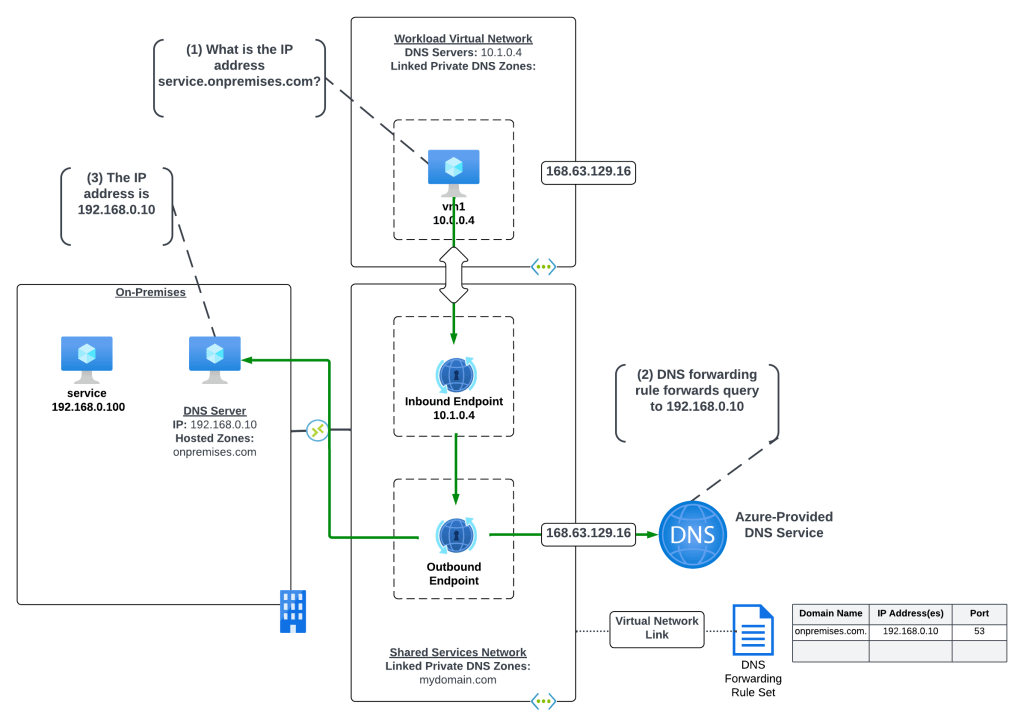
In the centralized architecture all virtual networks in the environment have network connectivity to a shared services virtual network through direct or indirect (such as Azure Virtual WAN or a traditional hub and spoke) virtual network peering. The Resolver and its endpoints are deployed to the shared services virtual network, a DNS Forwarding Rule Set is linked to the shared services virtual network, and it has connectivity back on-premises through an ExpressRoute or VPN connection. This architecture centralizes all DNS queries across your Azure environment pushing them through the inbound endpoint (beware of those QPS limits!).
In the example scenario above, a rule has been configured in the DNS Forwarding Rule Set to forward traffic destined for the onpremises.com domain to the on-premises DNS service at 192.168.1.10. The on-premises DNS service is authoritative for the onpremises.com domain.
Let’s look at the query path for this scenario where a VM1 in Azure is trying to resolve the IP address for an application running on-premises named service.onpremises.com where the namespace onpremises.com is hosted in an on-premises DNS server.
VM1 creates a DNS query for services.onpremises.com. VM1 does not have a cached entry for it so the query is passed on to the DNS Server configured for the VMs virtual network interface (VNIC). The DNS Server has been configured by the Azure DHCP Service to the Resolver inbound endpoint with IP address 10.1.0.4 via the DNS Server settings of the virtual network. The query is passed on to the inbound endpoint.
The inbound endpoint receives the query and recursively passes it into the virtual network through the outbound endpoint and on to the 168.63.129.16 virtual IP address and on to the Azure-provided DNS service. The Azure-provided DNS service checks to see if there is an Azure Private DNS Zone linked to the virtual network the resolver endpoints are in with the name of onpremises.com. Since there is not, the DNS Forwarding Rule Set linked to the virtual network is processed and the rule for onpremises.com is matched and triggered causing the recursive DNS query to be sent out of the outbound endpoint and over the ExpressRoute or VPN connection to the on-premises DNS server at 192.168.0.10.
The on-premises DNS server resolves the hostname to the IP address an returns the result.
Scenario 2b – Distributed architecture for connected virtual networks
Let’s now cover the distributed architecture, which as Adam notes in his blog may be a pattern required if you’re hitting the QPS limits on the inbound endpoint.
Distributed architecture for resolution of on-premises DNS namespaces
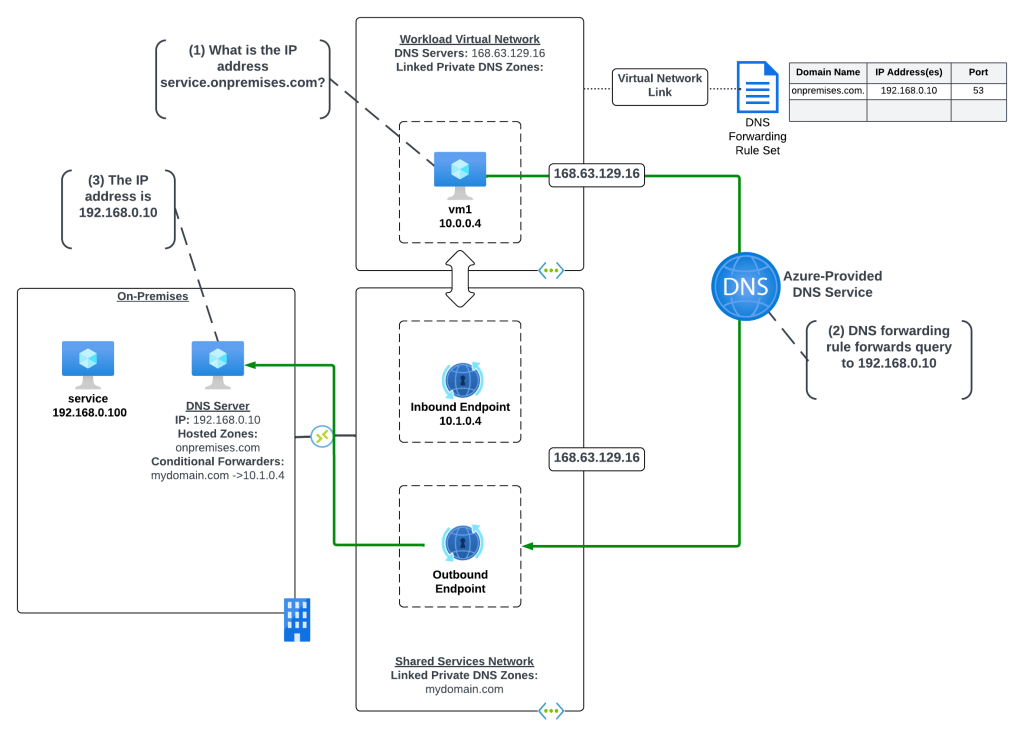
In this distributed architecture all virtual networks in the environment have network connectivity to a shared services virtual network through direct or indirect (such as Azure Virtual WAN or a traditional hub and spoke) virtual network peering. The Resolver endpoints are deployed to the shared services virtual network which has connectivity back on-premises through an ExpressRoute or VPN connection. The workload virtual network DNS Server settings are set to the 168.63.129.16 virtual IP to use Azure-provided DNS. DNS Forwarding Rulesets are linked directly to the workload virtual networks and are configured with the necessary rules to direct DNS queries to the on-premises destinations.
In the above example, there is one rule in the DNS Forwarding Ruleset which is configured to forward DNS queries for onpremises.com to the DNS Server on-premises at 192.168.0.10.
Let’s look at the query path for this scenario where a VM1 in Azure is trying to resolve the IP address for an application running on-premises named service.onpremises.com where the namespace onpremises.com is hosted in an on-premises DNS server.
VM1 creates a DNS query for services.onpremises.com. VM1 does not have a cached entry for vm3.mydomain.com so the query is passed on to the DNS Server configured for the VMs virtual network interface (VNIC). The DNS Server has been configured by the Azure DHCP Service to the 168.63.129.16 virtual IP which is the default configuration for virtual network DNS Server settings and which passes the query on to the Azure-provided DNS services.
The recursive query is received by the Azure-provided DNS service and the rule for onpremises.com in the linked DNS Forwarding Ruleset is triggered passing the recursive query out of the outbound endpoint to the on-premises DNS server at 192.168.0.10. The recursive query is passed on over the ExpressRoute or Site-to-site VPN connection to the on-premises DNS server.
The on-premises DNS server resolves the hostname to the IP address an returns the result.
Scenario 2c – Distributed architecture for isolated virtual networks
There is another pattern for the use of the distributed architecture which could be used for isolated virtual networks. Say for example you have a workload that needs to exist in an isolated virtual network due to a compliance requirement, but you still have a requirement to centrally manage DNS and log all queries.
Distributed architecture for isolated virtual networks for resolution of on-premises DNS namespaces
In this variation of the distributed architecture the virtual network does not have any direct connectivity to the shared service virtual network through direct or indirect peering. The DNS Forwarding Ruleset is linked to the isolated virtual network and it contains a single rule for “.” which tells the Azure-provided DNS service to forward all DNS queries to the configured IP address.
Let’s look at the resolution of a virtual machine in the isolated virtual network trying to resolve the IP address of a publicly-facing API.
VM1 creates a DNS query for my-public-api.com. VM1 does not have a cached entry for vm3.mydomain.com so the query is passed on to the DNS Server configured for the VMs virtual network interface (VNIC). The DNS Server has been configured by the Azure DHCP Service to the 168.63.129.16 virtual IP which is the default configuration for virtual network DNS Server settings and which passes the query on to the Azure-provided DNS service.
The recursive query is received by the Azure-provided DNS service and the rule for “.” in the linked DNS Forwarding Ruleset is triggered passing the recursive query out of the outbound endpoint to the on-premises DNS server at 192.168.0.10. The recursive query is passed on over the ExpressRoute or Site-to-site VPN connection to the on-premises DNS server.
The on-premises DNS server checks its own cache, validates it’s not authoritative for the zone, and then recursively passes the query to its standard forwarder.
The public DNS service resolves the hostname to an IP address.
One thing to note about this architecture is there are some reserved Microsoft namespaces that are not included in the wildcard. This means that these zones will be resolved directly by the Azure-provided DNS service in this configuration.
Scenario 3 – Azure virtual machine needs to resolve a record in an Azure Private DNS Zone.
I’ll now cover DNS resolution of namespaces hosted in Azure Private DNS Zones by compute services running in Azure. There are a number of ways to do this, so I’ll walk through a few of them.
Scenario 3a – Distributed architecture where Azure Private DNS Zones are directly link to each virtual network
One architecture a lot of customers attempt for Azure to Azure resolution is an architecture where the Azure Private DNS Zones are linked directly to each virtual network instead of a common centralized virtual network.
Distributed architecture for resolution of Azure Private DNS Zones for Azure compute with direct links
In this architecture each virtual network is configured to use the Azure-provided DNS service via a DNS Server setting on the virtual networks of the 168.63.129.16 virtual IP. The Azure Private DNS Zones are individually linked to each virtual network. Before I get into the reasons why I don’t like this pattern, let me walk through how a query is resolved in this pattern.
VM2 creates a DNS query for vm1.mydomain.prod.com. VM2 does not have a cached entry for vm1.mydomain.prod.com so the query is passed on to the DNS Server configured for the VMs virtual network interface (VNIC). The DNS Server has been configured by the Azure DHCP Service to the 168.63.129.16 virtual IP which is the default configuration for virtual network DNS Server settings and which passes the query on to the Azure-provided DNS service.
The recursive query is received by the Azure-provided DNS service and the service determines there is a linked Azure Private DNS Zone for the namespace mydomain.prod.com. The service resolves the hostname and returns the IP.
Alright, why don’t I like this architecture? Well, for multiple reasons:
There is a limit to the number of virtual networks an Azure Private DNS Zone can be linked to. As I described in my last post, Azure Private DNS Zones should be treated as global resources and you should be using one zone per namespace and linking that zone to virtual networks in multiple regions. If you begin expanding into multiple Azure regions you could run into the limit.
DNS resolution in this model gets confusing to troubleshoot because you have many links.
So yeah, be aware of those considerations if you end going this route.
Scenario 3b – Distributed architecture where Azure Private DNS Zones are linked to a central DNS resolution virtual network
This is another alternative for the distributed architecture that can be used if you want to centralize queries to address the considerations of the prior pattern (note that query logging isn’t addressed in the visual below unless you insert a customer-managed DNS service or Azure Firewall instance as I discuss later in this post).
Distributed architecture for resolution of Azure Private DNS Zones for Azure compute with central resolution
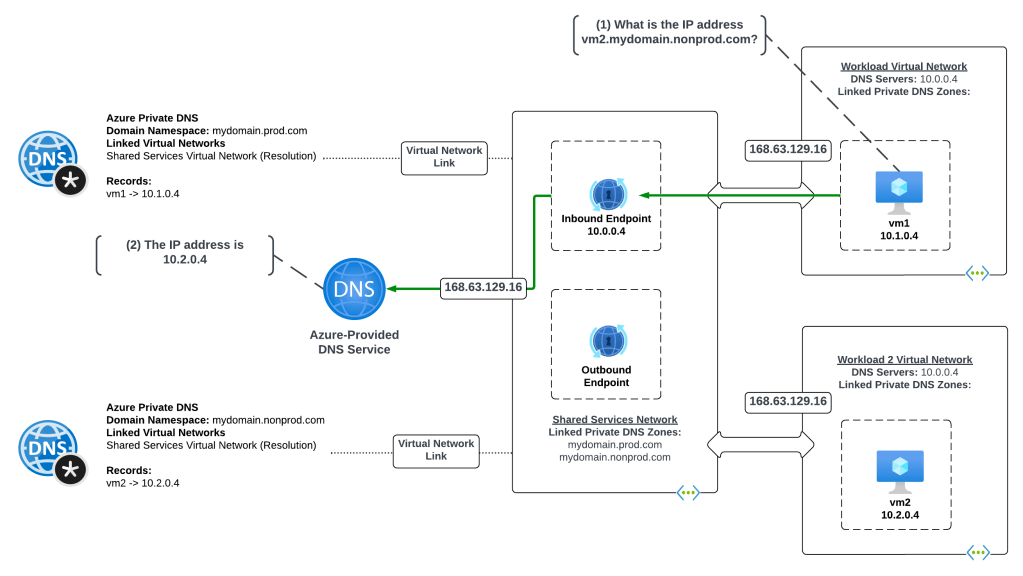
This architecture is somewhat of a combination of a distributed and centralized architecture. All virtual networks in the environment have network connectivity to a shared services virtual network through direct or indirect (such as Azure Virtual WAN or a traditional hub and spoke) virtual network peering. The Resolver and its endpoints are deployed to the shared services virtual network. All Azure Private DNS Zones are linked to the shared services virtual network. A DNS Forwarding Ruleset is linked to each workload virtual network with a single rule forwarding all DNS traffic (except the reserved namespaces covered earlier) to the Resolver inbound endpoint.
Let me walk through a scenario with this architecture where VM1 wants to resolve the IP address for the hostname vm2.mydomain.nonprod.com.
VM1 creates a DNS query for vm2.mydomain.nonprod.com. VM1 does not have a cached entry for vm2.mydomain.nonprod.com so the query is passed on to the DNS Server configured for the VMs virtual network interface (VNIC). The DNS Server has been configured by the Azure DHCP Service to the 168.63.129.16 virtual IP which is the default configuration for virtual network DNS Server settings and which passes the query on to the Azure-provided DNS service.
The Azure Private DNS Service checks to see if there is an Azure Private DNS Zone linked to the workload virtual network for the mydomain.nonprod.com domain and validates there is no. The service then checks the linked DNS Forwarding Rule Set linked the virtual network and finds a rule matching the domain pointing queries to the inbound endpoint IP address. The query is passed through the Resolver outbound endpoint to the inbound endpoint and back out the outbound endpoint to the 168.63.129.16 virtual IP address passing the query to the Azure-provided DNS service.
The Azure-provided DNS service checks the shared services virtual network and determines there is a link Azure Private DNS Zone with the name mydomain.nonprod.com. The service resolves the hostname to the IP address and returns the results.
Scenario 3c – Centralized architecture where Azure Private DNS Zones are linked to a central DNS resolution virtual network
This is the more common of the Azure-to-Azure resolution architectures that I come across. Here queries are sent directly to the inbound resolver IP address via the direct or transitive connectivity to the shared services virtual network.
Centralized architecture for resolution of Azure Private DNS Zones
This architecture is centralized architecture where all virtual networks in the environment have network connectivity to a shared services virtual network through direct or indirect (such as Azure Virtual WAN or a traditional hub and spoke) virtual network peering. The Resolver and its endpoints are deployed to the shared services virtual network. All Azure Private DNS Zones are linked to the shared services virtual network. Each workload virtual network is configured with its DNS Server settings to point to the resolver’s inbound endpoint.
Let me walk through the resolution.
VM1 creates a DNS query for vm2.mydomain.nonprod.com. VM1 does not have a cached entry for vm2.mydomain.nonprod.com so the query is passed on to the DNS Server configured for the VMs virtual network interface (VNIC). The DNS Server has been configured by the Azure DHCP Service to resolver’s inbound endpoint at 10.0.0.4. The query is routed over the virtual network peering to the resolver’s inbound endpoint.
The inbound endpoint passes the query to the 168.64.129.16 virtual IP and onto the Azure-provided DNS Service. The service determines that an Azure Private DNS Zone named mydomain.nonprod.com is linked to the shared services virtual network. The service then resolves the hostname to the IP address and returns the results.
I’m a fan of this pattern because it’s very simple and easy to understand, which is exactly what DNS should be.
Scenario 4 – Centralized architecture that supports adding DNS query logging (Deprecated)
Now that you have an understanding of the benefits of the Azure Private DNS Resolver, let’s talk about some of the gaps. Prior to July 2025 you couldn’t achieve DNS query logging when using Azure Private DNS Resolver and Azure-provided DNS without the use of an additional server in the middle.
Centralized architecture for supporting DNS query logging
The architecture below was a common way customers addressed the gap when they had plans to eventually move fully into the Private Resolver pattern when it was introduced. DNS Security Policy was introduced in July of 2025 and cleaned up this gap making this architecture unnecessary if the additional DNS Server was solely providing DNS query logging. In this architecture all Azure Private DNS Zones and DNS Forwarding Rule Sets were linked to the shared services virtual network and a customer-managed DNS service is also deployed. All workload virtual networks have connected to the shared service through direct or indirect (Azure Virtual WAN or traditional hub and spoke) virtual network peering. Each workload virtual network has its DNS Server settings configured to use the customer-managed DNS service IP address.
Let me walk through a scenario where VM1 wants to resolve the IP address for a record in an on-premises DNS namespace.
VM1 creates a DNS query for service.onpremises.com. VM1 does not have a cached entry for service.onpremises.com so the query is passed on to the DNS Server configured for the VMs virtual network interface (VNIC). The DNS Server has been configured by the Azure DHCP Service to the IP address of the customer managed DNS service at 10.1.2.4. The query is passed over the virtual network peering to the customer-managed DNS service.
The customer-managed DNS service checks its local cache, validates it’s not authoritative for the zone, and passes the query on to its standard forwarder which has been configured to the resolver’s inbound endpoint at 10.1.0.4.
The inbound endpoint passes the query into the virtual network out the outbound endpoint which passes it on to the 168.63.129.16 virtual IP and onto the Azure-provided DNS service. The Azure-provided DNS service checks the Azure Private DNS Zones linked to the shared services virtual network and determines that no Azure Private DNS Zones with the hostname onpremises.com are linked to it. The DNS Forwarding Rule Set linked to the virtual network is then processed and the matching rule is triggered passing the query out of the outbound endpoint over the ExpressRoute or VPN connection and to the on-premises DNS services.
The on-premises DNS service checks its local cache and doesn’t find a cached entry. It then checks to see if it is authoritive for the zone, which it is and it resolves the hostname to an IP address and returns the results.
An alternative to using a customer-managed DNS service was using the Azure Firewall DNS proxy service using the pattern documented here.
The primary reason I didn’t remove this architecture completely in my July 2025 update is you’ll still see this architecture in the wild for customers that may not have fully transitioned to DNS Security Policy. Additionally, there may be use cases for using a 3rd-party DNS server to supplement gaps in Azure Private DNS Resolver such as acting as DNS cache or providing advanced DNS features such as virtualized DNS zones.
Summing it up
So yeah, there are a lot of patterns and each one has its own benefits and considerations. My recommendation is for customers to centralize DNS wherever possible because it makes for a fairly simple integration unless you have concerns over hitting QPS. If you have an edge use case for an isolated virtual network, consider the patterns referenced above.
It’s critically important to understand how DNS resolution works from a processing perspective when you have linked Azure Private DNS Zones and DNS Forwarding Rule Sets. The detail is here.
Alexis Plantin put together a great write-up with fancy animated diagrams that put my diagrams to shame. Definitely take a read through his write-up if anything to give him some traffic for creating the animated diagrams. I’m jealous!
There is some good guidance here which talks about considerations for forwarding timeouts when using a third-party DNS server that is forwarding queries to the Azure Private DNS Resolver or to Azure-provided DNS.
Lastly, let me end this with some benefits and considerations of the product.
Benefits
No infrastructure to manage. Microsoft is responsible for management of the compute powering the service.
Unlike Azure-provided DNS alone, it supports conditional forwarding to on-premises.
Unlike Azure-provided DNS alone, it supports resolution from on-premises to Azure without the need for a DNS proxy.
Supports multiple patterns for its implementation including centralized and decentralized architectures, even supporting isolated virtual networks.
DNS query logging can be achieved using DNS Security Policy as of 7/2025.
Considerations
The Private DNS Resolver MAY NOT support requests from non-RFC 1918 IP addresses to the inbound endpoint. This was a documented limitation, but has since been removed. However, customers of mine still report it does not work. If you have this use case, your best bet is to try it and open a support ticket if you have issues.
The Private DNS Resolver DOES NOT support iterative DNS queries. It only supports recursive DNS queries.
In high volume DNS environments, such as very large VDI deployments, query per second limits could be an issue.
The Private DNS Resolver does not support authenticated dynamic DNS updates. If you have this use case for a VDI deployment, you will need to use a DNS service that does support it.
Welcome back fellow geek to part two of my series on DNS in Azure. In the first post I covered some core concepts behind the DNS offerings in Azure. One of the core concepts was the 168.63.129.16 virtual IP address which serves as a mechanism for services within an Azure Virtual Network to communicate with platform services such as the Azure DNS Service. I also covered the basic DNS offering, Azure-provided DNS. For this post I’m going to cover the Azure Private DNS service.
Azure-provided DNS may serve your needs if you’re doing basic proof-of-concept testing, but not much use beyond that. The limited capabilities around supported record types and scaling challenges when requiring resolution across virtual networks make it a non-starter for anything with production-scale needs Prior to Azure Private DNS, customers were forced to roll their own DNS servers to host any private namespaces they wanted to use in Azure. Programmatic management of records in traditional DNS servers can be limited, making it challenging to balance with the ephemeral nature of the cloud.
Microsoft introduced Azure Private DNS into public preview back in early 2018 to help address these problems. The service officially went general availability in October 2019. It addresses many of the gaps Azure-provided DNS has such as support for:
Custom DNS namespaces
Manually created records
Common DNS record types such as A, MX, CNAME, PTR
Automatic lifecycle management of DNS records for some Azure resources such as virtual machines
DNS namespaces can be shared across virtual networks
Before we jump into the weeds, we’ll first want to cover the basic concepts of the service.
Once the Private DNS Zone is created you need to create a virtual network link to the resource. This resource is also under the Microsoft.Network resource provider and has a path of /providers/Microsoft.Network/privateDnsZones/virtualNetworkLinks/. VNets can resolve and and optionally register DNS records with the zones you create after you create a virtual network link between the VNet and the zone. Each zone can be linked to multiple VNets for registration and resolution. On other hand, VNets can be linked to multiple zones for resolution but only one zone for registration. Once a zone is linked to the VNet, resources within the VNet can resolve and/or register DNS records for those zones through the 168.63.129.16 virtual IP.
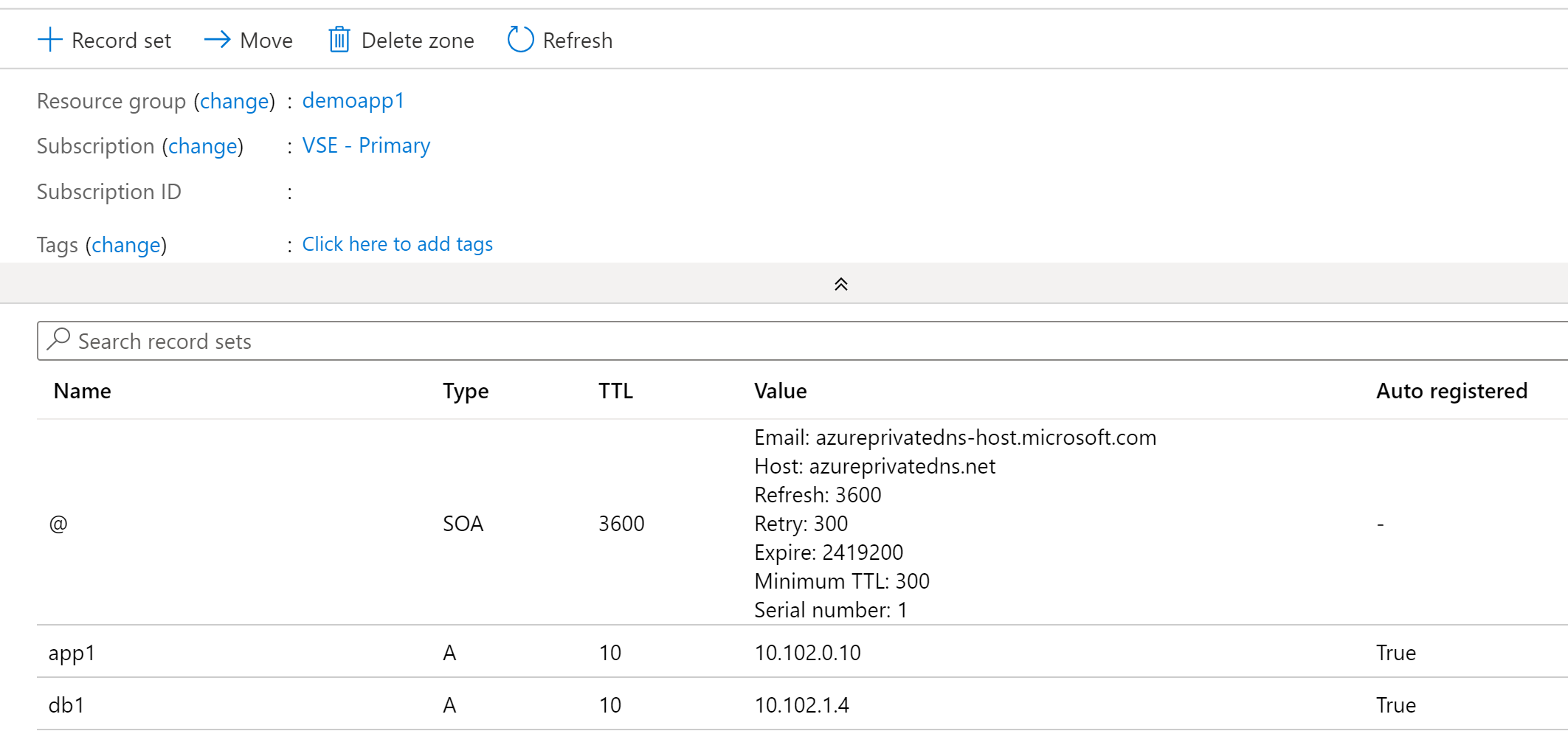
In addition to DNS resolutions, zones can be linked for auto-registration. When a virtual network is linked for auto-registration the VMs will register A records within the Azure Private DNS Zone and the Azure-provided DNS zone. There are a few things to note about the A records automatically created in the private zone:
Each record has a property called isAutoRegistered which has a boolean value of true for any records created through the auto-registration process.
Auto-registered records have an extremely short TTL of 10 seconds. If you have plans of performing DNS scavenging, take note of this and that these records are automatically deleted when the VM is deleted.
Virtual networks can only be linked to one virtual network for auto-registration.
Records within an Azure Private DNS Zone
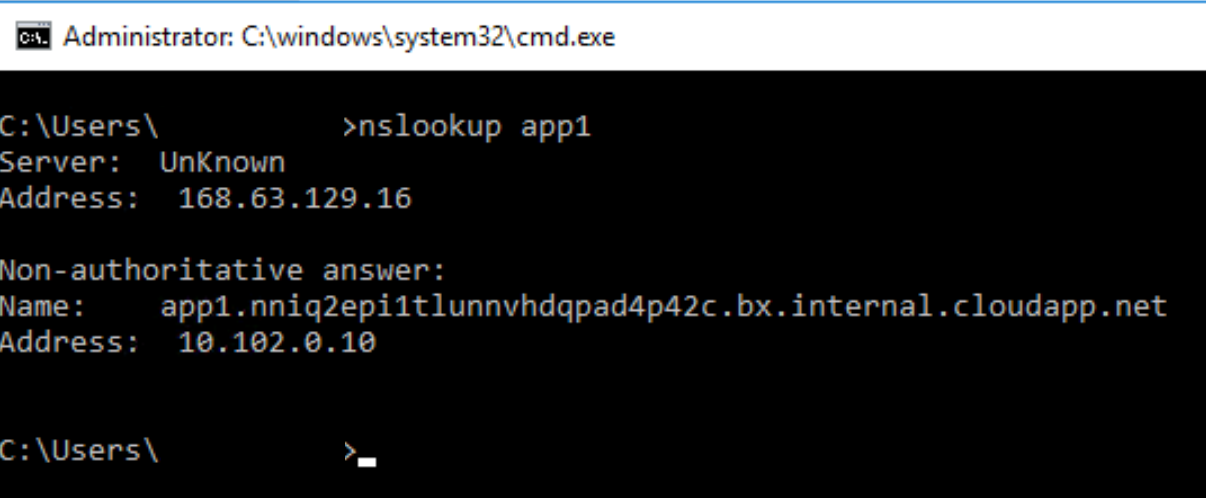
The Azure-provided DNS zone dynamically created for the VNet is still created even when linking an Azure Private DNS zone to a VNet. Additionally, if you try to resolve the IP address using a single label hostname on a Windows machine, you’ll get back the A record for the Azure-provided DNS zone as seen in the image below. This is by design and allows you to control the DNS suffix automatically appended by your VMs. It also means you need to use the FQDN in any application configuration to ensure the record is resolved correctly.
Single label lookup results in Azure-provided DNS virtual network namespace
Let’s take a look at a resolution scenario.
Scenario: VM1 wants to resolve the IP address of VM3.mydomain.com
In the image below we have resolution between two virtual networks. In this scenario we have Virtual Network 1 and Virtual Network 2. Virtual Network 1 is linked for both registration and resolution to the Azure Private DNS Zone of mydomain.com. Virtual Network 2 is linked to the same zone for resolution. In this configuration, both Virtual Network 1 and Virtual Network 2 are able to resolve records in the mydomain.com Azure Private DNS Zone namespace.
Let’s walk through this query resolution process:
VM1 creates a DNS query for vm3.mydomain.com. VM1 does not have a cached entry for vm3.mydomain.com so the query is passed on to the DNS Server configured for the VMs virtual network interface (VNIC). The DNS Server has been configured by the Azure DHCP Service to the 168.63.129.16 virtual IP which is the default configuration for virtual network DNS Server settings.
The DNS query is passed through the virtual IP and on to the Azure-provided DNS Service. The Azure-provided DNS Service identifies there is an Azure Private DNS Zone named mydomain.com linked to the virtual network so the query is resolved against this zone and returned to VM1.
Cross-virtual network resolution with Azure Private DNS Zones
Beyond the auto-registration of records, you can also manually create a variety of record types as I mentioned above. There isn’t anything special or different in the way Azure is handling these records. The only thing worth noting is the records have a standard 1 hour TTL..
One other important thing to note about Azure Private DNS Zones is they are a global resource. This means that the data from an Azure Private DNS Zone is replicated across all Azure regions. If you have a zone linked to virtual network in regionA it can also be linked to virtual network in regionB. This is best practice. Now the caveat of being a global resource is the Private DNS Zone still needs to exist within a resource group, which is regional. In the event of a regional outage in the region where the resource group exists, you will not be able to modify the Azure Private DNS Zone. It will however continue services DNS queries for virtual networks in other regions.
Azure Private DNS Zones can be used to provide custom DNS namespaces for internally-facing applications you build within Azure. Remember that the Azure-provided DNS service cannnot be used by on-premises machines without a DNS Proxy (such as BIND server, Windows DNS Server, InfoBlox, etc) or the Azure Private DNS Resolver. This means you cannot resolve records in an Azure Private DNS Zone unless you have that in place.
An important use case for understanding Azure Private DNS Zones is they play a very important role with Azure PaaS services that support Azure Private Link Private Endpoints. For those use cases you will not be able to pick the namespace, you’ll need to use what Microsoft provides. I cover this in a later post in this series.
When using custom namespaces for applications you develop in Azure where you control the certificate the service serves up there are a few strategies you can employ:
Separate private DNS zone for each application – In this scenario you could grant business units full control of the zone letting them manage the records as they see fit. This would improve the application team’s agility while reducing operational burden on central IT.
Separate private DNS zones for each environment (Dev/QA/Prod) – In this scenario you establish separate zones for each environment which are shared across business units and these zones are managed by central IT.
Summing up the Azure Private DNS Zones when used with only the Azure-provided DNS Service:
Benefits
Managed service where you don’t have to worry the managing the underlining infrastructure
Scalability and availability
Use of custom DNS namespaces
Global resource that can provide resolution for virtual networks spread across Azure regions
Lifecycle of Azure VMs DNS records are automatically managed by the platform if using auto-registration
Applications could be assigned their own DNS zones and application owners delegated some level control over that zone
Azure-provided DNS can support query logging when used in combination with DNS Security Policy
Considerations
The records in these zones cannot be resolved by on-premises endpoints unless you incorporate a DNS Proxy (such as BIND server, Windows DNS Server, InfoBlox, etc) or the Azure Private DNS Resolver.
While Azure Private DNS Zone resources are global the service’s control plane is regionally dependent on the region the of the resource group the zone is deployed in
Linking the Private DNS Zones to every virtual network could risk hitting the limits of the service
No support for WINS or NETBIOS
In my next post I’ll cover the how the Azure Private DNS Resolver builds on these two components and begins addressing some of these considerations..








 Journey Of The Geek