Azure OpenAI Service – How To Handle Rate Limiting

This is part of my series on GenAI Services in Azure:

  1. Azure OpenAI Service – Infra and Security Stuff
  2. Azure OpenAI Service – Authentication
  3. Azure OpenAI Service – Authorization
  4. Azure OpenAI Service – Logging
  5. Azure OpenAI Service – Azure API Management and Entra ID
  6. Azure OpenAI Service – Granular Chargebacks
  7. Azure OpenAI Service – Load Balancing
  8. Azure OpenAI Service – Blocking API Key Access
  9. Azure OpenAI Service – Securing Azure OpenAI Studio
  10. Azure OpenAI Service – Challenge of Logging Streaming ChatCompletions
  11. Azure OpenAI Service – How To Get Insights By Collecting Logging Data
  12. Azure OpenAI Service – How To Handle Rate Limiting
  13. Azure OpenAI Service – Tracking Token Usage with APIM
  14. Azure AI Studio – Chat Playground and APIM
  15. Azure OpenAI Service – Streaming ChatCompletions and Token Consumption Tracking
  16. Azure OpenAI Service – Load Testing

Updates:

  • 10/29/2024 – Microsoft has announced a deployment option referred to as a data zone (https://azure.microsoft.com/en-us/blog/accelerate-scale-with-azure-openai-service-provisioned-offering/). Data zones can be thought of as data sovereignty boundaries incorporated into the existing global deployment option. This will significantly ease load balancing so you will no longer need to deploy individual regional instances and can instead deploy a single instance with a data zone deployment within a single subscription. As you hit the cap for TPM/RPM within that subscription, you can then repeat the process with a new subscription and load balance across the two. This will result in fewer backends and a more simple load balancing setup.

Another week, another AOAI (Azure OpenAI Service) post. Today, I’m going to continue to discuss the new “Generative AI Gateway”-type features released to APIM (Azure API Management). In my last post I covered the new built-in load balancing and circuit breaker feature. For this post I’m going to talk about the new token-based rate limiting feature and rate limiting in general. Put on your nerd cap and caffeinate because we’re going to be analyzing some Fiddler captures.

The Basics

When talking rate limiting for AOAI it’s helpful to understand how an instance natively handles subscription service limits. There are a number of limits to be aware, but the most relevant to this conversation are the regional quota limits. Each Azure Subscription gets a certain quota of tokens per minute and request per minute for each model in a given region. That regional quota is shared among all the AOAI instances you provision with the model within that subscription in that given region. When you exhaust your quota for a region, you scan scale by requesting quota (good luck with that), create a new instance in another region in the same subscription, create a new instance in the same region in a different subscription, or going the provisioned throughput option.

Representation of regional quotas

In October 2024, Microsoft introduced the concept of a data zone deployment. Data zones address the compliance issues that came with global deployments. In a global deployment the prompt can be sent and serviced by the AOAI service in any region across the globe. For customers in regulated industries, this was largely a no go due to data sovereignty requirements. The new data zone deployment type allows you to pool AOAI capacity within a subscription across all regions within a given geopolitical boundary. As of October 2024, this supports two data zones including the US and EU.

Global and Data Zone Deployments

With each AOAI instance you provision in a subscription, you’ll be able to adjust the quota of the deployment of a particular model for that instance. Each AOAI instance you create will share the total quota available. If you have a use case where you need multiple AOAI instances, like for example making each its own authorization boundary with Azure RBAC for the purposes of separating different fine-tuned models and training data, each instance will draw from that total subscription-wide regional quota. Note that the more TPM (tokens per minute) you give the instance the higher RPM (requests per minute, 1K TPM = 6 RPM).

Adjusting quota for a specific instance of AOAI

Alright, so you get the basics of quota so now let’s talk about what rate limiting looks like from the application’s point of view. I’ll first walk through how things work when contacting the AOAI instance directly and then I’ll cover how things work when APIM sits in the middle (YMMV on this one if you’re using another type of “Generative AI Gateway”).

Direct Connectivity to Azure OpenAI Instance

Here I’ve set the model deployment to a rate limit of 50K TPM which gives me a limit of 300 RPM. I’ll be contacting the AOAI instance directly without any “Generative AI Gateway” component between my code and the AOAI instance. I’m using the Python openai SDK version 1.14.3.

I’ll be using this simple function to make Chat Completion calls to GPT3.5 Turbo.

Code being used in this post

Let’s dig into the response from the AOAI service.

Response headers from direct connectivity to AOAI

The headers relevant to the topic at hand are x-ratelimit-remaining-requests and x-ratelimit-remaining-tokens.

The x-rate-limit-remaining-requests header tells you have many responses you have left before you’ll be rate limited for requests. There’s a few interesting things about this header. First, it always starts decrementing from 1/1000 of whatever the TPM. In my testing 50K TPM starts with 50 requests, 10K TPM with 10 requests. The Portal says 300 RPM at 50K TPM, so it’s odd that the response header shows something different and far less than what I’d expect. I also noticed that each corresponding request will decrease the x-ratelimit-remaining-tokens but will not necessarily reduce the x-rate-limit-remaining-requests header. Good example is at 1K TPM (which gives you 6 requests according to the Portal but gives me 1 RPM according to this header) would tell me I had zero requests left after my first request but wouldn’t always throttle me. Either there’s additional logic being executed to determine when to rate limit based on request or it’s simply inaccurate. My guess is the former, but I’m not sure.

The next header is the x-ratelimit-remaining-tokens which does match the TPM you set for the deployment. The functionality is pretty straightforward, but it’s important to understand how the max_tokens parameter Chat Completions and the like can affect it. In my example above, I ask the model to say hello which uses around 20 total tokens across the prompt and completion. When I set the max_tokens parameter to 100 the x-ratelimit-remaining-tokens is reduced by 100 even though I’ve only used 20 tokens. What you want to take from that is be careful with what you set in your max_tokens parameter because you can very easily exhaust your quota on an specific AOAI instance. I believe consideration holds true in both pay-as-you-go and PTU SKUs.

When you hit a limit and begin to get rate limited, you’ll get a message similar to what you see below with the policy-id header telling you which limit you hit (token or requests) and the Retry-After header telling you how long you’re rate limited. If you’re using the openai SDK (I can only speak for Python) the retry logic within the library will kick off.

Let me dig into that a bit.

Rate limited by AOAI instance

The retry logic for the openai SDK for Python is in the openai/lib/_base_client.py file. It’s handled by a few different functions including _parse_retry_after_header, _calculate_retry_timeout, and _should_retry. I’ll save the you the gooey details and give you the highlights. In each response the SDK looks for the retry-after-ms and retry-after headers. If either is found it looks to see if the value is less than 60 seconds. If it’s greater than 60 seconds, it ignores the value and executes its own logic which starts at around 1 to 2 seconds and increases up to 8 seconds for a maximum of 2 retries by default (constants used for much of the calculations are located in openai/lib/_constants.py). The defaults should be good for most instances but you can certainly tweak the max retries if it’s not sufficient. While the retry logic is very straightforward in the instance of hitting the AOAI instance directly, you will see some interesting behavior when APIM is added.

Throttling and APIM

I’ve talked ad-nauseam about why you’d want to place APIM in between your applications and the AOAI instance. To save myself some typing these are some of the key reasons:

  1. Load balancing across multiple AOAI instances spread across regions spread across subscriptions to maximize model quota.
  2. Capturing operational and security information such as metrics for response times, token usage for chargebacks, and prompts and responses for security review or caching to reduce costs.

In the olden days (two months ago) customers struggled to limit specific applications to a certain amount of token usage. Using APIM’s request limiting wasn’t very helpful because the metric we care most about with GenAI is tokens, not requests. Customers came up with creative solutions to distribute applications to different sets of AOAI instances, but it was difficult to manage at scale. I can’t count the number of times I heard “How do I throttle based upon token usage in APIM?” and I was stuck giving the customer the bad news it wasn’t possible without extremely convoluted PeeWee Herman Breakfast Machine-type solutions.

Microsoft heard the customer pain and introduced a new APIM policy for rate limiting based on token usage. This new policy allows you to rate limit an application based on a counter key you specify. APIM will then limit the application if it pushes beyond the TPM you specify. This allows you to move away from the dedicated AOAI instance pattern you may have been trying to use to solve this problem and into a design where you position a whole bunch of AOAI instances behind APIM and load balance across them using the new load balancer and circuit breaker capabilities of APIM relying upon this new policy to control consumption.

Now that you get the sales pitch, take a look at the options available for the policy snippet.

Below you’ll see a section from my APIM policy. In this section I’m setting up the token rate limiting feature. The counter key I’m using in this scenario is the appid property I’ve extracted from the Entra ID access token. I’m a huge proponent of blocking API key access to AOAI instances and instead using Entra ID based authentication under the context of the application’s identity for the obvious reasons.


        <!-- Enforce token usage limits -->
        <azure-openai-token-limit counter-key="@(context.Variables.GetValueOrDefault<string>("appId","00000000-0000-0000-0000-000000000000"))" estimate-prompt-tokens="true" tokens-per-minute="1000" remaining-tokens-header-name="x-apim-remaining-token" tokens-consumed-header-name="x-apim-tokens-consumed" />
        <set-backend-service backend-id="backend_pool_aoai" />
        

I’ve also set the estimate-prompt-tokens property to true. The docs state this could cause some performance impact, so you’ll want to test that on and off in your own environment. It’s worth noting that APIM will always estimate prompt tokens if a streaming completion is being used whether or not you’ve set this option to true. Next, I’m setting a custom header name for both the remaining-tokens header and tokens-consumed headers. This will ensure these headers are returned to the client and they’re uniquely identifiable such that they couldn’t be confused with the headers natively returned by AOAI instance behind the scenes.

Notice I didn’t modify the name of the retry header. Recall that the openai SDK looks for retry-after so if you modify this header you won’t get the benefit of the SDK’s retry logic. My advice is keep this as the default.

When I send the Chat Completion request to APIM, I get back the response headers below which includes the two new headers x-apim-remaining-tokens and x-apim-tokens-consumed which show my request consumed 22 of the 1K TPM I’ve been allotted. Notice how this is keeping track of exact number of tokens being used vs how the service natively will feed of the max_tokens parameter which is a nice improvement.

Once I exhaust my 1K TPM, I’m hit with a 429 and a retry-after header. The SDK will execute its retry logic and wait the amount of time in the retry logic. This is why you shouldn’t muck with the header name.

Very cool right? You are now saved from a convoluted solution of dedicated AOAI instances or an insanely complex APIM policy snippet.

Before I close this out I want to show one more interesting “feature” I ran into when I was testing. In my environment I’m using a load balanced pool backend where I have 4 AOAI instances stretched across multiple regions and a circuit breaker to bounce to temporarily remove pool members if they 429. When I was doing testing for this post I noticed an interesting behavior of APIM when one of the pool members begins to 429.

In the image below I purposely went over the AOAI instance backend quota to trigger the pool member’s rate limiting. Notice how I receive a 429 with the Retry-After is set to 86,400 seconds which is the number of seconds in a day. It seems like the load balanced pool will shoot this value back when a pool member 429s. Recall again the behavior or the openai SDK which ignores retry-after greater than 60 second. This means the SDK will execute its own shorter timer making for a quick retry. Whether the PG designed this with the openai SDK behavior’s in mind, I don’t know, but it worked out well either way.

Rate limited by AOAI instance behind a load balancing APIM backend

That about completes this post. Your key takeaways today are:

  • If you’re using request rate limiting or something more convoluted like dedicating AOAI instances to handle rate limiting across applications, plan to move to using the token-based rate limiting policy in APIM.
  • Be careful with what you’re setting the max_tokens parameter to when you call the models because setting too high can trigger the AOAI instance rate limiting even though you haven’t exhausted the TPM set in the token rate limiting APIM policy.
  • Don’t mess with the retry-after header in your token rate limiting policy if you’re using the openai SDK. If you do you’ll have to come up with your own retry logic.
  • Ensure you set the remaining-tokens-header-name and tokens-consumed-header-name so it’s easily identified which rate limit is affecting an application.
  • Be aware that in my testing the tokens-consumed returned by the token rate limiting policy didn’t account for completion tokens when it was a streaming Chat Completion. You’ll still need to be creative to calculating streaming token usage for chargeback.

Azure OpenAI Service – How To Get Insights By Collecting Logging Data

Azure OpenAI Service – How To Get Insights By Collecting Logging Data

This is part of my series on GenAI Services in Azure:

  1. Azure OpenAI Service – Infra and Security Stuff
  2. Azure OpenAI Service – Authentication
  3. Azure OpenAI Service – Authorization
  4. Azure OpenAI Service – Logging
  5. Azure OpenAI Service – Azure API Management and Entra ID
  6. Azure OpenAI Service – Granular Chargebacks
  7. Azure OpenAI Service – Load Balancing
  8. Azure OpenAI Service – Blocking API Key Access
  9. Azure OpenAI Service – Securing Azure OpenAI Studio
  10. Azure OpenAI Service – Challenge of Logging Streaming ChatCompletions
  11. Azure OpenAI Service – How To Get Insights By Collecting Logging Data
  12. Azure OpenAI Service – How To Handle Rate Limiting
  13. Azure OpenAI Service – Tracking Token Usage with APIM
  14. Azure AI Studio – Chat Playground and APIM
  15. Azure OpenAI Service – Streaming ChatCompletions and Token Consumption Tracking
  16. Azure OpenAI Service – Load Testing

Hello geeks! Yes, I’m back with yet another post on the Azure OpenAI Service. There always seems to be more cool stuff to talk about with this service that isn’t specific to the models themselves. If you follow this blog, you know I’ve spent the past year examining the operational and security aspects of the service. Through trial and error and a ton of discussions with S500 customers across all industries, I’ve learned a ton and my goal has to be share back those lessons learned with the wider community. Today I bring you more nuggets of useful information.

Like any good technology nerd, I’m really nosey. Over the years I’ve learned about all the interesting information web-based services return the response headers and how useful this information can be to centrally capture and correlate to other pieces of logging information. These headers could include things like latency, throttling information, or even usage information that can be used to correlate the costs of your usage of the service. While I had glanced at the response headers from the Azure OpenAI Service when I was doing my work on the granular chargeback and streaming ChatCompletions posts, I hadn’t gone through the headers meticulously. Recently, I was beefing up Shaun Callighan’s excellent logging helper solution with some additional functionality I looked more deeply at the headers and found some cool stuff that was worth sharing.

How to look at the headers (skip if you don’t want to nerd out a bit)

My first go to whenever examining a web service is to power up Fiddler and drop it in between my session and the web service. While this works great on a Windows or MacOS box when you can lazily drop the Fiddler-generated root CA (certificate authority) into whatever certificate store your browser is using to draw its trusted CAs from, it’s a bit more work when conversing with a web service through something like Python. Most SDKs in my experience use the requests module under the hood. In that case it’s a simple matter of passing a kwarg some variant of the option to disable certificate verification in the requests module (usually something like verify=false) like seen below in the azure.identity SDK.

from azure.identity import DefaultAzureCredential, get_bearer_token_provider

try:
    token_provider = get_bearer_token_provider(
        DefaultAzureCredential(
            connection_verify=False
        ),
        "https://cognitiveservices.azure.com/.default",
    )
except:
    logging.error('Failed to obtain access token: ', exc_info=True)

Interestingly, the Python openai SDK does not allow for this. Certificate verification cannot be disabled with an override. Great security control from the SDK developers, but no thought of us lazy folks. The openai SDK uses httpx under the hood, so I took the nuclear option and disabled verification of certificates in the module itself. Obviously a dumb way of doing it, but hey lazy people gotta lazy. If you want to use Fiddler, be smarter than me and use one of the methods outlined in this post to trust the root CA generated by Fiddler.

All this to get the headers? Well, because I like you, I’m going to show you a far easier way to look at these headers using the native openai SDK.

The openai SDK doesn’t give you back the headers by default. Instead the response body is parsed neatly for you and a new object is returned. Thankfully, the developers of the library put in a way to get the raw response object back which includes the headers. Instead of using the method chat.completions.create you can use chat.completions.with_raw_response.create. Glancing at the SDK, it seems like all methods supported by both the native client and AzureOpenAI client support the with_raw_response method.

def get_raw_chat_completion(client, deployment_name, message):
    response = client.chat.completions.with_raw_response.create(
    model=deployment_name,
    messages= [
        {"role":"user",
         "content": message}
    ],
    max_tokens=1000,
    )

    return response

Using this alternative method will save you from having to mess with the trusted certificates as long as you’re good with working with a text-based output like the below.

Headers({'date': 'Fri, 17 May 2024 13:18:21 GMT', 'content-type': 'application/json', 'content-length': '2775', 'connection': 'keep-alive', 'cache-control': 'no
-cache, must-revalidate', 'access-control-allow-origin': '*', 'apim-request-id': '01e06cdc-0418-47c9-9864-c914979e9766', 'strict-transport-security': 'max-age=3
1536000; includeSubDomains; preload', 'x-content-type-options': 'nosniff', 'x-ms-region': 'East US', 'x-ratelimit-remaining-requests': '1', 'x-ratelimit-remaini
ng-tokens': '1000', 'x-ms-rai-invoked': 'true', 'x-request-id': '6939d17e-14b2-44b7-82f4-e751f7bb9f8d', 'x-ms-client-request-id': 'Not-Set', 'azureml-model-sess
ion': 'turbo-0301-57d7036d'})

This can be incredibly useful if you’re dropped some type of gateway, such as an APIM (API Management) instance in front of the OpenAI instance for load balancing, authorization, logging, throttling etc. If you’re using APIM, you can my buddy Shaun’s excellent APIM Policy Snippet to troubleshoot a failing APIM policy. Now that I’ve given you a workaround to using Fiddler, I’m going to use Fiddler to explore these headers for the rest of the post because I’m lazy and I like a pretty GUI sometimes.

Examining the response headers and correlating data to diagnostic logs

Here we can see the response headers returned from a direct call to the Azure OpenAI Service.

The headers which should be of interest to you are the x-ms-region, x-ratelimit-remaining-requests, x-ratelimit-remaining-tokens, and x-request-id. The x-ms-region is the region where the Azure OpenAI instance you called is located (I’ll explain why this can be useful in a bit). The x-ratelimit headers tell you how close you are to hitting rate limits on a specific instance of a model in an AOAI instance. This is where load balancing and provisioned throughput units can help mitigate the risk of throttling. The load balancing headers are still important to your application devs to pay attention to and account for even if you’re load balancing across multiple instances because load balancing mitigates but doesn’t eliminate the risk of throttling. The final interesting header is the apim-request-id which is the unique identifier of this specific request to the AOAI service. If you’re wondering, yes it looks like the product group has placed the compute running the models behind an instance of Azure API Management.

Let’s first start with the apim-request-id response header. This header is useful because it can be used to correlate a specific request it’s relevant entry in the native diagnostic logging for the Azure OpenAI Service. While I’ve covered the limited use of the diagnostic logging within the service, there are some good nuggets in there which I’ll cover now.

Using the apim-request-id, I can make a query to wherever I’m storing the diagnostic logs for the AOAI instance to pull the record for the specific request. In my example I’m using a Log Analytics Workspace. Below you can see my Kusto query which pulls the relevant record from the RequestResponse category of logs.

Correlating a request to the Azure OpenAI Service to the diagnostic logs

There are a few useful pieces of information in this log entry.

  • DurationMs – This field tells us how long the response took from the Azure OpenAI Service. My favorite use of this field comes when considering non-PTU-based Azure OpenAI instances. Lots of people want to use the service and the underlining models in a standard pay-as-you-go tier can get busy in certain regions at certain times. If you combine this information with the x-ms-region response header you can begin to build a picture of average response times per region at specific times of the day. If you’re load balancing, you can tweak your logic to direct your organization’s prompts to the region that has the lowest response time. Cool right?
  • properties_s.streamType – This field tells you whether or not the request was a streaming-type completion. This can be helpful to give you an idea of how heavily used streaming is in your org. As I’ve covered previously, capturing streaming prompts and completions and calculating token usage can a challenge. This property can help give you an idea how heavily used it is across your org which may drive you to get a solution in place to do that calculation sooner rather than later.
  • properties_s.modelName, modelVersion – More useful information to enrich the full picture of the service usage while being able to trace that information back to specific prompts and responses.
  • objectId – If your developers are using Entra ID-based identities to authenticate to the AOAI service (which you should be doing and avoiding use of API keys where possible), you’ll have the objectid of the specific service principal that made the request.

Awesome things you can do with this information

You are likely beginning to see the value of collecting the response headers, prompt and completions from the request and respond body, and enriching that information from logging data collected from diagnostics logs. With that information you can begin getting a full picture of how the service is being used across your organization.

Examples include:

  • Calculating token usage for organizational chargebacks
  • Optimizing the way you load balance to take advantage of less-used regions for faster response times
  • Making troubleshooting easier by being able to trace a specific response back to which instance it, the latency, and the prompt and completion returned by the API.

There are a ton of amazing things you can do with this data.

How the hell do you centrally collect and visualize this data?

Your first step should be to centrally capturing this data. You can use the APIM pattern that is quite popular or you can build your own solution (I like to refer to this middle tier component as a “Generative AI Gateway”. $50 says that’s the new buzzwords soon enough). Either way, you want this data captured and delivered somewhere. In my demo environment I deliver the data to an Event Hub, do a bit of transformation and dump it into a CosmosDB with Stream Analytics, and the visualize it with PowerBI. An example of the flow I use in my environment is below.

Example flow of how to capture and monetize operational and security data from your Azure OpenAI Usage

The possibilities for the architecture are plentiful, but the value of this data to operations, security, and finance is worth the effort to assemble something in your environment. I hope this post helped to get your more curious about what your usage looks like and how could use this data to optimize operationally, financially, and even throw in a bit more security with more insight into what your users are doing with this GenAI models by reviewing the captured prompts and responses. While there isn’t a lot of regulation around the use of GenAI yet, it’s coming and by capturing this information you’ll be ready to tackle it.

Thanks for reading!

The Challenge of Logging Azure OpenAI Stream Completions

This is part of my series on GenAI Services in Azure:

  1. Azure OpenAI Service – Infra and Security Stuff
  2. Azure OpenAI Service – Authentication
  3. Azure OpenAI Service – Authorization
  4. Azure OpenAI Service – Logging
  5. Azure OpenAI Service – Azure API Management and Entra ID
  6. Azure OpenAI Service – Granular Chargebacks
  7. Azure OpenAI Service – Load Balancing
  8. Azure OpenAI Service – Blocking API Key Access
  9. Azure OpenAI Service – Securing Azure OpenAI Studio
  10. Azure OpenAI Service – Challenge of Logging Streaming ChatCompletions
  11. Azure OpenAI Service – How To Get Insights By Collecting Logging Data
  12. Azure OpenAI Service – How To Handle Rate Limiting
  13. Azure OpenAI Service – Tracking Token Usage with APIM
  14. Azure AI Studio – Chat Playground and APIM
  15. Azure OpenAI Service – Streaming ChatCompletions and Token Consumption Tracking
  16. Azure OpenAI Service – Load Testing

Updates:

Hello again fellow geeks. Today I’m back with another Azure OpenAI Service (AOAI) post. I’ve talked in the past about the gaps in the native logging for the AOAI service and how the logs lack traceability and details on token usage to be used for chargebacks. I was lucky enough to work with Jake Wang and others on a reference architecture that could address these gaps using Azure API Manager (APIM). I also wrote some custom APIM policies to provide examples for how this information could be captured within APIM. I’ve observed customers coming up with creative solutions such as capturing the data within the application sitting in front of AOAI as a tactical means to get this data while more strategically using third-party API Gateway products such as Apigee, or even building custom highly functional and complex gateways. However, there was a use case that some of these solutions (such as the custom policies I wrote) didn’t account for, and that was streaming completions.

Like OpenAI’s API, the AOAI service API offers support for streaming chat completions. Streaming completions return the model’s completion as a series as events as the tokens are processed versus a non-streaming completion which returns the entire completion once the model is finished processing. The benefit of a streaming completion is a better user experience. There have been studies that show that any delay longer than 10 seconds won’t hold user attention. By streaming the completion as it’s generated the user is receiving that feedback that the website is responding.

Streaming Chat Completion

The OpenAI documentation points out a few challenges when using streaming completions. One of those challenges is the response from the API no longer includes token usage, which means you need to calculate token usage by some other means such as using OpenAI’s open source tokeniser tiktoken. It also makes it difficult to moderate content because only partial completions are received in each event. Outside of those challenges, there is also a challenge when using APIM. As my peer Shaun Callighan points out, Microsoft does not recommend logging the request/response body when dealing with a stream of server-events such as the API is returning with streaming chat completions because it can cause unexpected buffering (which it does with streaming chat completions). This means the application user will not get the behavior the application owner intended them to get. In my testing, nothing was returned until model finished the completion.

If using the Python SDK, you can make a chat completion streaming by adding the stream=true property to the ChatCompletion object as seen below.

        response = openai.ChatCompletion.create(
            engine=DEPLOYMENT_NAME,
            messages=[
                {
                   "role": "user",
                   "content": "Write me a bedtime story"
                }
            ],
            max_tokens=300,
            stream=True
        )

The body of the response includes a series of server-events such as the below.

...
data: {"id":"chatcmpl-8JNDagQPDWjNWOgbUm9u5lRxcmzIw","object":"chat.completion.chunk","created":1699628174,"model":"gpt-35-turbo","choices":[{"index":0,"finish_reason":null,"delta":{"content":"Once"}}],"usage":null}
data: {"id":"chatcmpl-8JNDagQPDWjNWOgbUm9u5lRxcmzIw","object":"chat.completion.chunk","created":1699628174,"model":"gpt-35-turbo","choices":[{"index":0,"finish_reason":null,"delta":{"content":" upon"}}],"usage":null}
data: {"id":"chatcmpl-8JNDagQPDWjNWOgbUm9u5lRxcmzIw","object":"chat.completion.chunk","created":1699628174,"model":"gpt-35-turbo","choices":[{"index":0,"finish_reason":null,"delta":{"content":" a"}}],"usage":null}
...

So how do you deal with this if you are or were planning to use APIM for logging, load balancing, authorization, and throttling? You have a few options.

  1. You can move logging into the application and use APIM only for load balancing, authorization, and throttling.
  2. You can insert a proxy logging solution behind APIM to handle logging of both streaming and non-streaming completions and use APIM only for load balancing, authorization, and throttling.
  3. You can block streaming completions at APIM.

Option 1

Option 1 is workable at a small scale and is a good tactical solution if you need to get something out to production quickly. The challenge with this option is enforcing it at scale. If you have amazing governance within your organization and excellent SDLC maybe you can enforce this. In my experience, few organizations have the level of maturity needed for this. The other problem with this is ideally logging for the purposes of compliance should be implemented and enforced by another entity to ensure separation of duties.

Benefits

  1. Quick and easy to put in place.

Considerations

  1. Difficult to enforce at scale.
  2. Puts the developers in charge of enforcing logging on themselves. Could be an issue with separation of duties.

Option 2

Option 2 is an interesting solution that my peer Shaun Callighan came up. In Shaun’s architecture a proxy-type solution is placed between APIM and AOAI and that solution handles parsing the requests and responses, calculating token usage, and logging the information to an Event Hub. They have even been kind enough to provide a sample solution demonstrating how this could be done with an Azure Function.

Benefits

  1. Allows you to use continue using APIM for the benefits around load balancing, authorization, and throttling.
  2. Supports streaming chat completions.
  3. Provides the logging necessary for compliance and chargebacks for both streaming and non-streaming chat completions.
  4. Centralized enforcement of logging.

Considerations

  1. You will need to develop your own code to parse the responses/responses, calculate chargebacks, and deliver the logs to Event Hub. (You could use Shaun’s code as a starting point)
  2. You’ll need to ensure this proxy does not become a bottleneck. It will need to scale as requests to the AOAI instance scale along with APIM and whatever else you have in path of the user’s request.

Option 3

Option 3 is another valid option (and honestly a simple fix IMO) and may be where some customers end up in the near term. With this option you block the use of streaming completions at APIM with a custom policy snippet like below. If the developers are worried about the user experience, there is always the option to flash a “processing”-like message in the text window while the model processes the completion.

Benefits

  1. Allows you to continue using APIM for logging, load balancing, throttling, and authorization.
  2. No new code introduced.
  3. Centralized enforcement of logging.
  4. No additional bottlenecks.

Considerations

  1. Your developers may hate you for this.
  2. There may be a legitimate use case where stream chat completions are required.

Since Shaun has a proof-of-concept example for option 2, I figured I’d showcase a sample APIM policy snippet for option 3. In the APIM policy snippet below, I determine if the stream property is included in the request body and store the value in a variable (it will be true or false). I then check the variable to see if the value is true, and if so I return a 404 status code with the message that streaming chat completions are not allowed.

        <!-- Capture the value of the streaming property if it is included -->
        <choose>
            <when condition="@(context.Request.Body.As<JObject>(true)["stream"] != null && context.Request.Body.As<JObject>(true)["stream"].Type != JTokenType.Null)">
                <set-variable name="isStream" value="@{
                    var content = (context.Request.Body?.As<JObject>(true));
                    string streamValue = content["stream"].ToString();
                    return streamValue;
                }" />
            </when>
        </choose>
        <!-- Blocks streaming completions and returns 404 -->
        <choose>
            <when condition="@(context.Variables.GetValueOrDefault<string>("isStream","false").Equals("true", StringComparison.OrdinalIgnoreCase))">
                <return-response>
                    <set-status code="404" reason="BlockStreaming" />
                    <set-header name="Microsoft-Azure-Api-Management-Correlation-Id" exists-action="override">
                        <value>@{return Guid.NewGuid().ToString();}</value>
                    </set-header>
                    <set-body>Streaming chat completions are not allowed by this organization.</set-body>
                </return-response>
            </when>
        </choose>

If you ignore streaming chat completions and try to use a policy such as this one, the model will complete the completion but APIM will throw a 500 status code back at the developer because the structure of a streaming response doesn’t look like the structure of a non-streaming response and it can’t be parsed using that policy’s logic. This means you’ll be throwing money out of the window and potentially struggling with troubleshooting root cause. TLDR, pick an option above to deal with streaming and get it in place if you’re using APIM for logging today or plan to.

Last but not least, I want to link to a wonderful policy snippet by Shaun Callighan. This policy snippet dumps the trace logs from APIM into the headers returned in the response from APIM. This is incredibly helpful when troubleshooting a 500 status code returned by APIM.

Well folks, that wraps up this short blog post on this Friday afternoon. Have a great weekend and happy holidays!

Securing Azure OpenAI Studio

Securing Azure OpenAI Studio

This is part of my series on GenAI Services in Azure:

  1. Azure OpenAI Service – Infra and Security Stuff
  2. Azure OpenAI Service – Authentication
  3. Azure OpenAI Service – Authorization
  4. Azure OpenAI Service – Logging
  5. Azure OpenAI Service – Azure API Management and Entra ID
  6. Azure OpenAI Service – Granular Chargebacks
  7. Azure OpenAI Service – Load Balancing
  8. Azure OpenAI Service – Blocking API Key Access
  9. Azure OpenAI Service – Securing Azure OpenAI Studio
  10. Azure OpenAI Service – Challenge of Logging Streaming ChatCompletions
  11. Azure OpenAI Service – How To Get Insights By Collecting Logging Data
  12. Azure OpenAI Service – How To Handle Rate Limiting
  13. Azure OpenAI Service – Tracking Token Usage with APIM
  14. Azure AI Studio – Chat Playground and APIM
  15. Azure OpenAI Service – Streaming ChatCompletions and Token Consumption Tracking
  16. Azure OpenAI Service – Load Testing

Updates

  • 5/28/2024 – Updated to mention that objectid of security principal is now included in native diagnostic logs

Hello again folks! Today I’m going to bounce back into AOAI (Azure OpenAI Service) mode and cover a topic that frequently comes up with my customers in regards to securing the service. Over the past year I’ve covered the infrastructure and security controls available within the AOAI. Much of that focus was on accessing the service through an SDK (software development kit) or directly through the API. Today I’m going to spend some time talking about the security controls available to secure the Azure OpenAI Studio, which I’m going to refer to as Studio for the rest of this post.

If you’re unfamiliar with Studio, it’s a GUI-based experience for interacting with the data plane of the AOAI service. In my authorization post, I cover the difference between the service’s management and data planes. At a high level, the management plane is for operations “on the service” while the data plane is for operations “in the service”.

Azure OpenAI Service Management Plane vs Data Plane

Microsoft recommends using an SDK or the API directly when interacting with the data plane of the service. It’s a good recommendation because there are lots of knobs for you to turn to lock down the service and address gaps in the service. When the service is using through the Azure OpenAI Studio, you lose the ability to inject some type of control component between the user’s endpoint and the instance of AOAI. The rest of this post will cover why that is, what controls are available to you, and what risks you’ll have to accept if you opt to make Studio available to your users.

Before I jump into the details of what you get and what you don’t get, I want to cover what some of the main use cases are for using Studio versus accessing the service through an SDK or direct through the API. First and foremost, it should be obvious that GUIs are much more accessible than having to write code to interact with the API. For example, say I’m performing a PoC (proof-of-concept) of the service and I want to quickly test the gpt 3.5 model’s ability to answer a question in my field. For that I can use the Completions interface within Studio to get a chat-like interface with zero coding.

Example of Chat Completion functionality in Azure OpenAI Studio

Another use case may be I want a simple way to test the models on my organization’s data to see if the models can provide value to that data. I don’t want to invest a ton of time coding to perform this functionality because I don’t yet know if the models will be able to provide any value on top of my data.

A lot of the use for Studio comes down to its simplicity of use. If you need to do some basic PoC with minimal funding, using Studio can be a nice shortcut to doing all the code you’d need to do in order to interact with the API to perform the actions.

Long story short, if you’re offering this service to your business units you’re likely going to be asked to provide Studio access to your users. My goal here is to help you understand the risks and mitigations of doing so.

So how does the Azure OpenAI Studio work? It appears to use an MVC (model-view-controller) architecture (or something similar to it for those application developer purists who are much smarter than me). In simple terms for non-developers like myself, the Studio application instructs the user’s browser which data plane endpoints to call and then provides a pretty view in the user’s browser of the responses received from those endpoints.

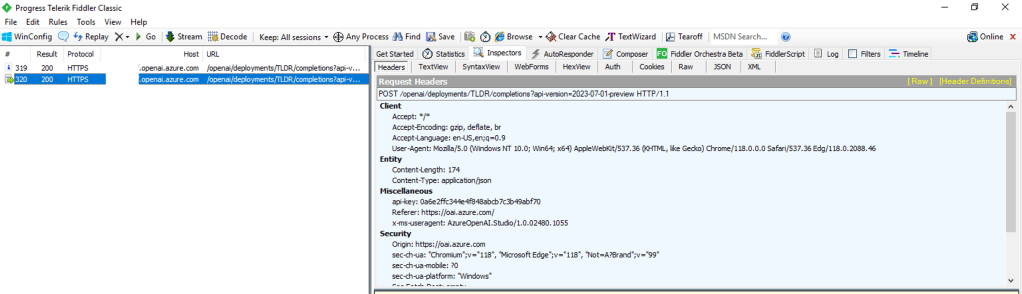
For you non-developers like myself, I find it helpful to perform an action within Studio and then review the Fiddler capture to observe what the browser did. In the Fiddler capture below, I used the Chat Completion interface in Studio to send a request a completion. You can see that the request was sent from my browser to the data plane endpoint of the service (openai.azure.com).

Fiddler capture of Chat Completion in Azure OpenAI Studio

This trait of the Studio can work to your advantage when you need to secure the Studio. If the calls are made from the user’s endpoint to the data plane, then that means network controls around the data plane can be used to enforce control over access to the Studio for the instance of AOAI. As I covered in my prior posts, AOAI is no different from other Microsoft PaaS services and provides the standard network controls which include the service firewall and support for Private Endpoints.

A common security standard for organizations using Azure is to use Private Endpoints for PaaS services. Private Endpoints allow you to restrict access to the public IP of a PaaS service and limit it to access through an endpoint deployed in the customer’s virtual network. Accessing the service through the Private Endpoint requires the user’s endpoint to be within your organization’s private network. This means by creating a Private Endpoint you can block access to access to the AOAI instance through Studio to endpoints within your private network. If the user attempts to access the AOAI instance through Studio outside of the private network, they’ll be blocked and will receive the error you see below.

Network controls blocking access through Azure OpenAI Studio

Placing your AOAI instance behind a Private Endpoint will be your primary means of controlling access to an AOAI instance through Studio. Creating the private endpoint and blocking public access keeps user’s from accessing the AOAI instance through Studio when hitting the public IP. However, users can still reach the AOAI instance through Studio if they are on the private network. You can lock that down by wrapping an NSG (Network Security Group) around the subnet containing the Private Endpoint, turning on Private Endpoint Network Policies in the subnet, and placing some type of mediator (such an Azure API Management instance) between the user’s endpoint and the AOAI instance. That will restrict the users to the API when interacting with the AOAI instance.

Example AOAI architecture

Outside of network controls, you don’t have much ability to control Studio access. There are no specific RBAC permissions that I’m aware of today that could be stripped from an RBAC role to prevent access to Studio. When it comes to authorization you should strive for least privilege as you’ve always done. My authorization blog has some guidance on how to handle that within the service.

Now that you understand what controls you have, let’s talk about the risks you’re going to need to accept if you plan on granting users access to Studio.

First and foremost, you’re going to need to accept the very basic logging provided by the diagnostics logging available within an AOAI instance. As I cover in the linked post above, the logging is minimal. Prompts and responses will not be logged, traceability in the logs will be limited, and you won’t get metrics as to token usage per call. The lack of visibility into prompts and responses becomes all that much more critical if shut off the built in content filtering and abuse monitoring.

Next up, you won’t have the ability to limit the usage of service on a per user or per app basis. AOAI has API limits around requests and tokens. There are capabilities today to control this on per user or per app basis within a single instance of AOAI today.

Let me summarize what we covered today:

  • Network controls are your primary means to securing access to an AOAI instance through the Azure OpenAI Studio
  • Placing an AOAI instance behind a Private Endpoint and blocking public access restrict Azure OpenAI Studio access to the AOAI instance to endpoints within your private network
  • Azure OpenAI Studio access to an AOAI instance can be blocked completely by placing the AOAI instance behind a private endpoint, inserting some sort of mediation solution (such as API Management, and wrapping an NSG around the subnet containing the Private Endpoint which blocks all access but traffic from the mediator.
  • Exercise least privilege using Azure RBAC but be aware there is no specific permission that allows access to the Azure OpenAI Studio
  • The diagnostic logs provided limited information. Prompts and responses are not logged to the diagnostic logs and neither are token consumption. The former will mean you don’t have visibility into the prompts users are making (think abuse, inclusion of PII, etc) and the latter means you won’t be able to tell who is creating the costs within the instance.

Considering all of the above, my recommendation to customers it to establish an approval process for usage of Studio and ensure there is a strong business need to justify accepting the risks outlined above. The lack of logging is the real gut punch for me. That is a lot of risk, especially since most regulated orgs opt out of content filtering and abuse monitoring.

Nothing to fancy in this post, but hopefully it helps some folks better understand the security options for Azure OpenAI Studio access.

Thanks!