Azure OpenAI Service – Load Balancing

This is part of my series on GenAI Services in Azure:

  1. Azure OpenAI Service – Infra and Security Stuff
  2. Azure OpenAI Service – Authentication
  3. Azure OpenAI Service – Authorization
  4. Azure OpenAI Service – Logging
  5. Azure OpenAI Service – Azure API Management and Entra ID
  6. Azure OpenAI Service – Granular Chargebacks
  7. Azure OpenAI Service – Load Balancing
  8. Azure OpenAI Service – Blocking API Key Access
  9. Azure OpenAI Service – Securing Azure OpenAI Studio
  10. Azure OpenAI Service – Challenge of Logging Streaming ChatCompletions
  11. Azure OpenAI Service – How To Get Insights By Collecting Logging Data
  12. Azure OpenAI Service – How To Handle Rate Limiting
  13. Azure OpenAI Service – Tracking Token Usage with APIM
  14. Azure AI Studio – Chat Playground and APIM
  15. Azure OpenAI Service – Streaming ChatCompletions and Token Consumption Tracking
  16. Azure OpenAI Service – Load Testing

Updates:

  • 10/29/2024 – Microsoft has announced a deployment option referred to as a data zone (https://azure.microsoft.com/en-us/blog/accelerate-scale-with-azure-openai-service-provisioned-offering/). Data zones can be thought of as data sovereignty boundaries incorporated into the existing global deployment option. This will significantly ease load balancing so you will no longer need to deploy individual regional instances and can instead deploy a single instance with a data zone deployment within a single subscription. As you hit the cap for TPM/RPM within that subscription, you can then repeat the process with a new subscription and load balance across the two. This will result in fewer backends and a more simple load balancing setup.

Welcome back folks!

Today I’m back again talking load balancing in AOAI (Azure OpenAI Service). This is an area which has seen a ton of innovation over the past year. From what began as a very basic APIM (API Management) policy snippet providing randomized load balancing was matured to add more intelligence by a great crew out of Microsoft via the “Smart” Load Balancing Policy. Innovative Microsoft folk threw together a solution called PowerProxy which provides load balancing and other functionality without the need for APIM. Simon Kurtz even put together a new Python library to provide load balancing at the SDK-level without the need for additional infrastructure. Lots of great ideas put into action.

The Product Group for APIM over at Microsoft was obviously paying attention to the focus in this area and have introduced native functionality which makes addressing this need cake. With the introduction of the load balancer and circuit breaker feature in APIM, you can now perform complex load balancing without needing a complex APIM policy. This dropped with a bunch of other Generative AI Gateway (told you this would become an industry term!) features for APIM that were announced this week. These other features include throttling based on tokens consumed (highly sought after feature!), emitting token counts to App Insights, caching completions for optimization of token usage, and a simpler way to onboard AOAI into APIM. Very cool stuff of which I’ll be covering over the next few weeks. For this post I’m going to focus on the new load balancing and circuit breaker feature.

Before I dive into the new feature I want to do a quick review of why scaling across AOAI instances is so important. For each model you have a limited amount of requests and tokens you can pass to the service within a given subscription within a region. These limits vary on a per model basis. If you’re consuming a lot of prompts or making a lot of requests it’s fairly easy to hit these limits. I’ve seen a customer hit the limits within a region with one document processing application. I had another customer who deployed a single Chat Bot in a simple RAG (retrieval augmented generation) that was being used by large swath of their help desk staff and limits were quickly a problem. The point I’m making here is you will hit these limits and you will need to add figure out how to solve it. Solving it is going to require additional instances in different Azure regions likely spread across multiple subscriptions. This means you’ll need to figure out a way to spread applications across these instances to mitigate the amount of throttling your applications have to deal with.

Load Balancing Azure OpenAI Service

As I covered earlier, there are a lot of ways you can load balancing this service. You could do it at the local application using Simon’s Python library if you need to get something up and running quickly for an application or two. If you have an existing deployed API Gateway like an Apigee or Mulesoft, you could do it there if you can get the logic right to support it. If you want to custom build something from scratch or customize a community offering like PowerProxy you could do that as well if you’re comfortable owning support for the solution. Finally, you have the native option of using Azure APIM. I’m a fan of the APIM option over the Python library because it’s scalable to support hundreds of applications with a GenAI (generative AI) need. I also like it more than custom building something because the reality is most customers don’t have the people with the necessary skill sets to build something and are even less likely to have the bodies to support yet another custom tool. Another benefit of using APIM include the backend infrastructure powering the solution (load balancers, virtual machines, and the like) are Microsoft’s responsibility to run and maintain. Beyond load balancing, it’s clear that Microsoft is investing in other “Generative AI Gateway” types of functionality that make it a strategic choice to move forward with. These other features are very important from a security and operations perspective as I’ve covered in past posts. No, there was not someone from Microsoft holding me hostage forcing me to recommend APIM. It is a good solution for this use case for most customers today.

Ok, back to the new load balancing and circuit breaker feature. This new feature allows you to use new native APIM functionality to create a load balancing and circuit breaker policy around your APIM backends. Historically to do this you’d need a complex policy like the “smart” load balancing policy seen below to accomplish this feature set.

<policies>
    <inbound>
        <base />
        <!-- Getting the main variable where we keep the list of backends -->
        <cache-lookup-value key="listBackends" variable-name="listBackends" />
        <!-- If we can't find the variable, initialize it -->
        <choose>
            <when condition="@(context.Variables.ContainsKey("listBackends") == false)">
                <set-variable name="listBackends" value="@{
                    // -------------------------------------------------
                    // ------- Explanation of backend properties -------
                    // -------------------------------------------------
                    // "url":          Your backend url
                    // "priority":     Lower value means higher priority over other backends. 
                    //                 If you have more one or more Priority 1 backends, they will always be used instead
                    //                 of Priority 2 or higher. Higher values backends will only be used if your lower values (top priority) are all throttling.
                    // "isThrottling": Indicates if this endpoint is returning 429 (Too many requests) currently
                    // "retryAfter":   We use it to know when to mark this endpoint as healthy again after we received a 429 response

                    JArray backends = new JArray();
                    backends.Add(new JObject()
                    {
                        { "url", "https://andre-openai-eastus.openai.azure.com/" },
                        { "priority", 1},
                        { "isThrottling", false }, 
                        { "retryAfter", DateTime.MinValue } 
                    });

                    backends.Add(new JObject()
                    {
                        { "url", "https://andre-openai-eastus-2.openai.azure.com/" },
                        { "priority", 1},
                        { "isThrottling", false },
                        { "retryAfter", DateTime.MinValue }
                    });

                    backends.Add(new JObject()
                    {
                        { "url", "https://andre-openai-northcentralus.openai.azure.com/" },
                        { "priority", 1},
                        { "isThrottling", false },
                        { "retryAfter", DateTime.MinValue }
                    });

                    backends.Add(new JObject()
                    {
                        { "url", "https://andre-openai-canadaeast.openai.azure.com/" },
                        { "priority", 2},
                        { "isThrottling", false },
                        { "retryAfter", DateTime.MinValue }
                    });

                    backends.Add(new JObject()
                    {
                        { "url", "https://andre-openai-francecentral.openai.azure.com/" },
                        { "priority", 3},
                        { "isThrottling", false },
                        { "retryAfter", DateTime.MinValue }
                    });

                    backends.Add(new JObject()
                    {
                        { "url", "https://andre-openai-uksouth.openai.azure.com/" },
                        { "priority", 3},
                        { "isThrottling", false },
                        { "retryAfter", DateTime.MinValue }
                    });

                    backends.Add(new JObject()
                    {
                        { "url", "https://andre-openai-westeurope.openai.azure.com/" },
                        { "priority", 3},
                        { "isThrottling", false },
                        { "retryAfter", DateTime.MinValue }
                    });

                    backends.Add(new JObject()
                    {
                        { "url", "https://andre-openai-australia.openai.azure.com/" },
                        { "priority", 4},
                        { "isThrottling", false },
                        { "retryAfter", DateTime.MinValue }
                    });

                    return backends;   
                }" />
                <!-- And store the variable into cache again -->
                <cache-store-value key="listBackends" value="@((JArray)context.Variables["listBackends"])" duration="60" />
            </when>
        </choose>
        <authentication-managed-identity resource="https://cognitiveservices.azure.com" output-token-variable-name="msi-access-token" ignore-error="false" />
        <set-header name="Authorization" exists-action="override">
            <value>@("Bearer " + (string)context.Variables["msi-access-token"])</value>
        </set-header>
        <set-variable name="backendIndex" value="-1" />
        <set-variable name="remainingBackends" value="1" />
    </inbound>
    <backend>
        <retry condition="@(context.Response != null && (context.Response.StatusCode == 429 || context.Response.StatusCode >= 500) && ((Int32)context.Variables["remainingBackends"]) > 0)" count="50" interval="0">
            <!-- Before picking the backend, let's verify if there is any that should be set to not throttling anymore -->
            <set-variable name="listBackends" value="@{
                JArray backends = (JArray)context.Variables["listBackends"];

                for (int i = 0; i < backends.Count; i++)
                {
                    JObject backend = (JObject)backends[i];

                    if (backend.Value<bool>("isThrottling") && DateTime.Now >= backend.Value<DateTime>("retryAfter"))
                    {
                        backend["isThrottling"] = false;
                        backend["retryAfter"] = DateTime.MinValue;
                    }
                }

                return backends; 
            }" />
            <cache-store-value key="listBackends" value="@((JArray)context.Variables["listBackends"])" duration="60" />
            <!-- This is the main logic to pick the backend to be used -->
            <set-variable name="backendIndex" value="@{
                JArray backends = (JArray)context.Variables["listBackends"];

                int selectedPriority = Int32.MaxValue;
                List<int> availableBackends = new List<int>();

                for (int i = 0; i < backends.Count; i++)
                {
                    JObject backend = (JObject)backends[i];

                    if (!backend.Value<bool>("isThrottling"))
                    {
                        int backendPriority = backend.Value<int>("priority");

                        if (backendPriority < selectedPriority)
                        {
                            selectedPriority = backendPriority;
                            availableBackends.Clear();
                            availableBackends.Add(i);
                        } 
                        else if (backendPriority == selectedPriority)
                        {
                            availableBackends.Add(i);
                        }
                    }
                }

                if (availableBackends.Count == 1)
                {
                    return availableBackends[0];
                }
            
                if (availableBackends.Count > 0)
                {
                    //Returns a random backend from the list if we have more than one available with the same priority
                    return availableBackends[new Random().Next(0, availableBackends.Count)];
                }
                else
                {
                    //If there are no available backends, the request will be sent to the first one
                    return 0;    
                }
                }" />
            <set-variable name="backendUrl" value="@(((JObject)((JArray)context.Variables["listBackends"])[(Int32)context.Variables["backendIndex"]]).Value<string>("url") + "/openai")" />
            <set-backend-service base-url="@((string)context.Variables["backendUrl"])" />
            <forward-request buffer-request-body="true" />
            <choose>
                <!-- In case we got 429 or 5xx from a backend, update the list with its status -->
                <when condition="@(context.Response != null && (context.Response.StatusCode == 429 || context.Response.StatusCode >= 500) )">
                    <cache-lookup-value key="listBackends" variable-name="listBackends" />
                    <set-variable name="listBackends" value="@{
                        JArray backends = (JArray)context.Variables["listBackends"];
                        int currentBackendIndex = context.Variables.GetValueOrDefault<int>("backendIndex");
                        int retryAfter = Convert.ToInt32(context.Response.Headers.GetValueOrDefault("Retry-After", "-1"));

                        if (retryAfter == -1)
                        {
                            retryAfter = Convert.ToInt32(context.Response.Headers.GetValueOrDefault("x-ratelimit-reset-requests", "-1"));
                        }

                        if (retryAfter == -1)
                        {
                            retryAfter = Convert.ToInt32(context.Response.Headers.GetValueOrDefault("x-ratelimit-reset-tokens", "10"));
                        }

                        JObject backend = (JObject)backends[currentBackendIndex];
                        backend["isThrottling"] = true;
                        backend["retryAfter"] = DateTime.Now.AddSeconds(retryAfter);

                        return backends;      
                    }" />
                    <cache-store-value key="listBackends" value="@((JArray)context.Variables["listBackends"])" duration="60" />
                    <set-variable name="remainingBackends" value="@{
                        JArray backends = (JArray)context.Variables["listBackends"];

                        int remainingBackends = 0;

                        for (int i = 0; i < backends.Count; i++)
                        {
                            JObject backend = (JObject)backends[i];

                            if (!backend.Value<bool>("isThrottling"))
                            {
                                remainingBackends++;
                            }
                        }

                        return remainingBackends;
                    }" />
                </when>
            </choose>
        </retry>
    </backend>
    <outbound>
        <base />
        <!-- This will return the used backend URL in the HTTP header response. Remove it if you don't want to expose this data -->
        <set-header name="x-openai-backendurl" exists-action="override">
            <value>@(context.Variables.GetValueOrDefault<string>("backendUrl", "none"))</value>
        </set-header>
    </outbound>
    <on-error>
        <base />
    </on-error>
</policies>

Complex policies like the above are difficult to maintain and easy to break (I know, I break my policies all of time). Compare that with a policy that does something very similar with the new load balancing and circuit breaker feature.

<policies>
    <!-- Throttle, authorize, validate, cache, or transform the requests -->
    <inbound>
        <set-backend-service backend-id="backend_pool_aoai" />
        <base />
    </inbound>
    <!-- Control if and how the requests are forwarded to services  -->
    <backend>
        <base />
    </backend>
    <!-- Customize the responses -->
    <outbound>
        <base />
    </outbound>
    <!-- Handle exceptions and customize error responses  -->
    <on-error>
        <base />
    </on-error>
</policies>

A bit simpler eh? With the new feature you establish a new APIM backend of a “pool” type. In this backend you configure your load balancing and circuit breaker logic. In the Terraform template below, I’ve created a load balanced pool that includes three existing APIM backends which are each an individual AOAI instance. I’ve divided the three backends into two priority groups such that the APIM so that APIM will concentrate the requests to the first priority group until a circuit break rule is triggered. I configured a circuit breaker rule that will hold sending additional requests for 1 minute (tripDuration) to a backend if that backend returns a single (count) 429 over the course of 1 minute (interval). You’ll likely want to play with the tripDuration and interval to figure out what works for you.

Priority group 2 will only be used if all the backends in priority group 1 have circuit breaker rules tripped. The use case here might be that your priority group 1 instance is a AOAI instance setup for PTU (provisioned throughput units) and you want overflow to dump down into instances deployed at the standard tier (basically consumption based).

resource "azapi_resource" "symbolicname" {
  type = "Microsoft.ApiManagement/service/backends@2023-05-01-preview"
  name = "string"
  parent_id = "string"
  body = jsonencode({
    properties = {
      circuitBreaker = {
        rules = [
          {
            failureCondition = {
              count = 1
              errorReasons = [
                "Backend service is throttling"
              ]
              interval = "PT1M"
              statusCodeRanges = [
                {
                  max = 429
                  min = 429
                }
              ]
            }
            name = "breakThrottling "
            tripDuration = "PT1M",
            acceptRetryAfter = true
          }
        ]
      }
      description = "This is the load balanced backend"
      pool = {
        services = [
          {
            id = "/subscriptions/XXXXXXXX-XXXX-XXXX-XXXX-XXXXXXXXXXXX/resourceGroups/rg-demo-aoai/providers/Microsoft.ApiManagement/service/apim-demo-aoai-jog/backends/openai-3",
            priority = 1
          },
          {
            id = "/subscriptions/XXXXXXXX-XXXX-XXXX-XXXX-XXXXXXXXXXXX/resourceGroups/rg-demo-aoai/providers/Microsoft.ApiManagement/service/apim-demo-aoai-jog/backends/openai-1",
            priority = 2
          },
          {
            id = "/subscriptions/XXXXXXXX-XXXX-XXXX-XXXX-XXXXXXXXXXXX/resourceGroups/rg-demo-aoai/providers/Microsoft.ApiManagement/service/apim-demo-aoai-jog/backends/openai-2",
            priority = 2
          }
        ]
      }
    }
  })
}

Very cool right? This makes for way simpler APIM policy which means troubleshooting APIM policy that much easier. You could also establish different pools for different categories of applications. Maybe you have a pool with a PTU and standard tier instances for mission-critical production apps and another pool of only standard instances for non-production applications. You could then direct specific applications (based on their Entra ID service principal id) to different pools. This feature gives you a ton of flexibility in how you handle load balancing without a to of APIM policy overhead.

With the introduction of this feature into APIM, it makes APIM that much more of an appealing solution for this use case. No longer do you need a complex policy and in-depth APIM policy troubleshooting skills to make this work. Tack on the additional GenAI features Microsoft introduced that I mentioned earlier, as well as its existing features and capabilities available in APIM policy, you have a damn fine tool for your Generative AI Gateway use case.

Well folks that wraps up this post. I hope this overview gave you some insight into why load balancing is important with AOAI, what the historical challenges have been doing it within APIM, and how those challenges have been largely removed with the added bonus of additional new GenAI-based features make this a tool worth checking out.

The Challenge of Logging Azure OpenAI Stream Completions

This is part of my series on GenAI Services in Azure:

  1. Azure OpenAI Service – Infra and Security Stuff
  2. Azure OpenAI Service – Authentication
  3. Azure OpenAI Service – Authorization
  4. Azure OpenAI Service – Logging
  5. Azure OpenAI Service – Azure API Management and Entra ID
  6. Azure OpenAI Service – Granular Chargebacks
  7. Azure OpenAI Service – Load Balancing
  8. Azure OpenAI Service – Blocking API Key Access
  9. Azure OpenAI Service – Securing Azure OpenAI Studio
  10. Azure OpenAI Service – Challenge of Logging Streaming ChatCompletions
  11. Azure OpenAI Service – How To Get Insights By Collecting Logging Data
  12. Azure OpenAI Service – How To Handle Rate Limiting
  13. Azure OpenAI Service – Tracking Token Usage with APIM
  14. Azure AI Studio – Chat Playground and APIM
  15. Azure OpenAI Service – Streaming ChatCompletions and Token Consumption Tracking
  16. Azure OpenAI Service – Load Testing

Updates:

Hello again fellow geeks. Today I’m back with another Azure OpenAI Service (AOAI) post. I’ve talked in the past about the gaps in the native logging for the AOAI service and how the logs lack traceability and details on token usage to be used for chargebacks. I was lucky enough to work with Jake Wang and others on a reference architecture that could address these gaps using Azure API Manager (APIM). I also wrote some custom APIM policies to provide examples for how this information could be captured within APIM. I’ve observed customers coming up with creative solutions such as capturing the data within the application sitting in front of AOAI as a tactical means to get this data while more strategically using third-party API Gateway products such as Apigee, or even building custom highly functional and complex gateways. However, there was a use case that some of these solutions (such as the custom policies I wrote) didn’t account for, and that was streaming completions.

Like OpenAI’s API, the AOAI service API offers support for streaming chat completions. Streaming completions return the model’s completion as a series as events as the tokens are processed versus a non-streaming completion which returns the entire completion once the model is finished processing. The benefit of a streaming completion is a better user experience. There have been studies that show that any delay longer than 10 seconds won’t hold user attention. By streaming the completion as it’s generated the user is receiving that feedback that the website is responding.

Streaming Chat Completion

The OpenAI documentation points out a few challenges when using streaming completions. One of those challenges is the response from the API no longer includes token usage, which means you need to calculate token usage by some other means such as using OpenAI’s open source tokeniser tiktoken. It also makes it difficult to moderate content because only partial completions are received in each event. Outside of those challenges, there is also a challenge when using APIM. As my peer Shaun Callighan points out, Microsoft does not recommend logging the request/response body when dealing with a stream of server-events such as the API is returning with streaming chat completions because it can cause unexpected buffering (which it does with streaming chat completions). This means the application user will not get the behavior the application owner intended them to get. In my testing, nothing was returned until model finished the completion.

If using the Python SDK, you can make a chat completion streaming by adding the stream=true property to the ChatCompletion object as seen below.

        response = openai.ChatCompletion.create(
            engine=DEPLOYMENT_NAME,
            messages=[
                {
                   "role": "user",
                   "content": "Write me a bedtime story"
                }
            ],
            max_tokens=300,
            stream=True
        )

The body of the response includes a series of server-events such as the below.

...
data: {"id":"chatcmpl-8JNDagQPDWjNWOgbUm9u5lRxcmzIw","object":"chat.completion.chunk","created":1699628174,"model":"gpt-35-turbo","choices":[{"index":0,"finish_reason":null,"delta":{"content":"Once"}}],"usage":null}
data: {"id":"chatcmpl-8JNDagQPDWjNWOgbUm9u5lRxcmzIw","object":"chat.completion.chunk","created":1699628174,"model":"gpt-35-turbo","choices":[{"index":0,"finish_reason":null,"delta":{"content":" upon"}}],"usage":null}
data: {"id":"chatcmpl-8JNDagQPDWjNWOgbUm9u5lRxcmzIw","object":"chat.completion.chunk","created":1699628174,"model":"gpt-35-turbo","choices":[{"index":0,"finish_reason":null,"delta":{"content":" a"}}],"usage":null}
...

So how do you deal with this if you are or were planning to use APIM for logging, load balancing, authorization, and throttling? You have a few options.

  1. You can move logging into the application and use APIM only for load balancing, authorization, and throttling.
  2. You can insert a proxy logging solution behind APIM to handle logging of both streaming and non-streaming completions and use APIM only for load balancing, authorization, and throttling.
  3. You can block streaming completions at APIM.

Option 1

Option 1 is workable at a small scale and is a good tactical solution if you need to get something out to production quickly. The challenge with this option is enforcing it at scale. If you have amazing governance within your organization and excellent SDLC maybe you can enforce this. In my experience, few organizations have the level of maturity needed for this. The other problem with this is ideally logging for the purposes of compliance should be implemented and enforced by another entity to ensure separation of duties.

Benefits

  1. Quick and easy to put in place.

Considerations

  1. Difficult to enforce at scale.
  2. Puts the developers in charge of enforcing logging on themselves. Could be an issue with separation of duties.

Option 2

Option 2 is an interesting solution that my peer Shaun Callighan came up. In Shaun’s architecture a proxy-type solution is placed between APIM and AOAI and that solution handles parsing the requests and responses, calculating token usage, and logging the information to an Event Hub. They have even been kind enough to provide a sample solution demonstrating how this could be done with an Azure Function.

Benefits

  1. Allows you to use continue using APIM for the benefits around load balancing, authorization, and throttling.
  2. Supports streaming chat completions.
  3. Provides the logging necessary for compliance and chargebacks for both streaming and non-streaming chat completions.
  4. Centralized enforcement of logging.

Considerations

  1. You will need to develop your own code to parse the responses/responses, calculate chargebacks, and deliver the logs to Event Hub. (You could use Shaun’s code as a starting point)
  2. You’ll need to ensure this proxy does not become a bottleneck. It will need to scale as requests to the AOAI instance scale along with APIM and whatever else you have in path of the user’s request.

Option 3

Option 3 is another valid option (and honestly a simple fix IMO) and may be where some customers end up in the near term. With this option you block the use of streaming completions at APIM with a custom policy snippet like below. If the developers are worried about the user experience, there is always the option to flash a “processing”-like message in the text window while the model processes the completion.

Benefits

  1. Allows you to continue using APIM for logging, load balancing, throttling, and authorization.
  2. No new code introduced.
  3. Centralized enforcement of logging.
  4. No additional bottlenecks.

Considerations

  1. Your developers may hate you for this.
  2. There may be a legitimate use case where stream chat completions are required.

Since Shaun has a proof-of-concept example for option 2, I figured I’d showcase a sample APIM policy snippet for option 3. In the APIM policy snippet below, I determine if the stream property is included in the request body and store the value in a variable (it will be true or false). I then check the variable to see if the value is true, and if so I return a 404 status code with the message that streaming chat completions are not allowed.

        <!-- Capture the value of the streaming property if it is included -->
        <choose>
            <when condition="@(context.Request.Body.As<JObject>(true)["stream"] != null && context.Request.Body.As<JObject>(true)["stream"].Type != JTokenType.Null)">
                <set-variable name="isStream" value="@{
                    var content = (context.Request.Body?.As<JObject>(true));
                    string streamValue = content["stream"].ToString();
                    return streamValue;
                }" />
            </when>
        </choose>
        <!-- Blocks streaming completions and returns 404 -->
        <choose>
            <when condition="@(context.Variables.GetValueOrDefault<string>("isStream","false").Equals("true", StringComparison.OrdinalIgnoreCase))">
                <return-response>
                    <set-status code="404" reason="BlockStreaming" />
                    <set-header name="Microsoft-Azure-Api-Management-Correlation-Id" exists-action="override">
                        <value>@{return Guid.NewGuid().ToString();}</value>
                    </set-header>
                    <set-body>Streaming chat completions are not allowed by this organization.</set-body>
                </return-response>
            </when>
        </choose>

If you ignore streaming chat completions and try to use a policy such as this one, the model will complete the completion but APIM will throw a 500 status code back at the developer because the structure of a streaming response doesn’t look like the structure of a non-streaming response and it can’t be parsed using that policy’s logic. This means you’ll be throwing money out of the window and potentially struggling with troubleshooting root cause. TLDR, pick an option above to deal with streaming and get it in place if you’re using APIM for logging today or plan to.

Last but not least, I want to link to a wonderful policy snippet by Shaun Callighan. This policy snippet dumps the trace logs from APIM into the headers returned in the response from APIM. This is incredibly helpful when troubleshooting a 500 status code returned by APIM.

Well folks, that wraps up this short blog post on this Friday afternoon. Have a great weekend and happy holidays!

Load Balancing in Azure OpenAI Service

Load Balancing in Azure OpenAI Service

This is part of my series on GenAI Services in Azure:

  1. Azure OpenAI Service – Infra and Security Stuff
  2. Azure OpenAI Service – Authentication
  3. Azure OpenAI Service – Authorization
  4. Azure OpenAI Service – Logging
  5. Azure OpenAI Service – Azure API Management and Entra ID
  6. Azure OpenAI Service – Granular Chargebacks
  7. Azure OpenAI Service – Load Balancing
  8. Azure OpenAI Service – Blocking API Key Access
  9. Azure OpenAI Service – Securing Azure OpenAI Studio
  10. Azure OpenAI Service – Challenge of Logging Streaming ChatCompletions
  11. Azure OpenAI Service – How To Get Insights By Collecting Logging Data
  12. Azure OpenAI Service – How To Handle Rate Limiting
  13. Azure OpenAI Service – Tracking Token Usage with APIM
  14. Azure AI Studio – Chat Playground and APIM
  15. Azure OpenAI Service – Streaming ChatCompletions and Token Consumption Tracking
  16. Azure OpenAI Service – Load Testing

Updates:

5/23/2024 – Check out my new post on this topic here!

Another Azure OpenAI Service post? Why not? I gotta justify the costs of maintaining the blog somehow!

The demand for the AOAI (Azure OpenAI Service) is absolutely insane. I don’t think I can compare the customer excitement over the service to any other service I’ve seen launch during my time working at cloud providers. With that demand comes the challenge to the cloud service provider of ensuring there is availability of the service for all the customers that want it. In order to do that, Microsoft has placed limits on the number of tokens/minute and requests/minute that can be made to a specific AOAI instance. Many customers are hitting these limits when moving into production. While there is a path for the customer to get the limits raised by putting in a request to their Microsoft account team, this process can take time and there is no guarantee the request can or will be fulfilled.

What can customers do to work around this problem? You need to spin up more AOAI instances. At the time of this writing you can create 3 instances per region per subscription. Creating more instances introduces the new problem distributing traffic across those AOAI instances. There are a few ways you could do this including having the developer code the logic into their application (yuck) ore providing the developer a singular endpoint which is doing the load balancing behind the scenes. The latter solution is where you want to live. Thankfully, this can be done really easily with a piece of Azure infrastructure you are likely already using with AOAI. That piece of infrastructure is APIM (Azure API Management).

Sample AOAI Architecture

As I’ve covered in my posts on AOAI and APIM and my granular chargebacks in AOAI, APIM provides a ton of value the AOIA pattern by providing a gate between the application and the AOAI instance to inspect and action on the request and response. It can be used to enforced Azure AD authentication, provide enhanced security logging, and capture information needed for internal chargebacks. Each of these enhancements is provided through APIM’s custom policy language.

APIM and AOAI Flow

By placing APIM into the mix and using a simple APIM policy we can introduce simple randomized load balancing. Let’s take a deeper look at this policy

<!-- This policy randomly routes (load balances) to one of the two backends -->
<!-- Backend URLs are assumed to be stored in backend-url-1 and backend-url-2 named values (fka properties), but can be provided inline as well -->
<policies>
    <inbound>
        <base />
        <set-variable name="urlId" value="@(new Random(context.RequestId.GetHashCode()).Next(1, 3))" />
        <choose>
            <when condition="@(context.Variables.GetValueOrDefault<int>("urlId") == 1)">
                <set-backend-service base-url="{{backend-url-1}}" />
            </when>
            <when condition="@(context.Variables.GetValueOrDefault<int>("urlId") == 2)">
                <set-backend-service base-url="{{backend-url-2}}" />
            </when>
            <otherwise>
                <!-- Should never happen, but you never know ;) -->
                <return-response>
                    <set-status code="500" reason="InternalServerError" />
                    <set-header name="Microsoft-Azure-Api-Management-Correlation-Id" exists-action="override">
                        <value>@{return Guid.NewGuid().ToString();}</value>
                    </set-header>
                    <set-body>A gateway-related error occurred while processing the request.</set-body>
                </return-response>
            </otherwise>
        </choose>
    </inbound>
    <backend>
        <base />
    </backend>
    <outbound>
        <base />
    </outbound>
    <on-error>
        <base />
    </on-error>
</policies>

In the policy above a random number is generated that is greater than or equal to 1 and less than 3 using the Next method. The application’s request is sent along to one of the two backends based upon that number. You could add additional backends by upping the max value in the Next method and adding another when condition. Pretty awesome right?

Before you ask, no you do not need a health probe to monitor a cloud service provider managed service. Please don’t make your life difficult by introducing an Application Gateway behind the APIM instance in front of the AOAI instance because Application Gateway allows for health probes and more complex load balancing. All you’re doing is paying Microsoft more money, making your operations’ team life miserable, and adding more latency. Ensuring the service is available and health is on the cloud service provider, not you.

But Matt, what about taking an AOAI instance out of the pool if it beings throttling traffic? Again, no you do not need to this. Eventually this APIM as a simple load balancer pattern will not necessary when the AOAI service is more mature. When that happens, your applications consuming the service will need to be built to handle throttling. Developers are familiar with handling throttling in their application code. Make that their responsibility.

Well folks, that’s this short and sweet post. Let’s summarize what we learned:

  • This pattern requires Azure AD authentication to AOAI. API keys will not work because each AOAI instance has different API keys.
  • You may hit the requests/minute and tokens/minute limits of an AOAI instance.
  • You can request higher limits but the request takes time to be approved.
  • You can create multiple instances of AOAI to get around the limits within a specific instance.
  • APIM can provide simple randomized load balancing across multiple instances of AOAI.
  • You DO NOT need anything more complicated than simple randomized load balancing. This is a temporary solution that you will eventually phase out. Don’t make it more complicated than it needs to be.
  • DO NOT introduce an Application Gateway behind APIM unless you like paying Microsoft more money.

Have a great week!

Granular Chargebacks in Azure OpenAI Service

Granular Chargebacks in Azure OpenAI Service

This is part of my series on GenAI Services in Azure:

  1. Azure OpenAI Service – Infra and Security Stuff
  2. Azure OpenAI Service – Authentication
  3. Azure OpenAI Service – Authorization
  4. Azure OpenAI Service – Logging
  5. Azure OpenAI Service – Azure API Management and Entra ID
  6. Azure OpenAI Service – Granular Chargebacks
  7. Azure OpenAI Service – Load Balancing
  8. Azure OpenAI Service – Blocking API Key Access
  9. Azure OpenAI Service – Securing Azure OpenAI Studio
  10. Azure OpenAI Service – Challenge of Logging Streaming ChatCompletions
  11. Azure OpenAI Service – How To Get Insights By Collecting Logging Data
  12. Azure OpenAI Service – How To Handle Rate Limiting
  13. Azure OpenAI Service – Tracking Token Usage with APIM
  14. Azure AI Studio – Chat Playground and APIM
  15. Azure OpenAI Service – Streaming ChatCompletions and Token Consumption Tracking
  16. Azure OpenAI Service – Load Testing

Updates:

Yes folks, it’s time for yet another Azure OpenAI Service post. This time around I’m going to cover a pattern that can help with operationalizing the service by collecting and analyzing logging data for proper internal chargebacks to the many business units you likely have requesting the service. You’ll want to put on your nerd hat today because we’re going to need to dive a bit in the weeds for this one.

Let me first address why this post is even necessary. The capabilities provided by the AOAI (Azure OpenAI Service) have the feel of a core foundational technology, almost feeling as necessary as basic networking and PKI (public key infrastructure). The service has usages in almost every portion of the business and, very likely, every business unit is asking you for AI at this point.

Beyond the business demand, the architecture of the Azure OpenAI Service lends itself well to being centralized. Each instance offers the same set of static models and the data sent to and returned from the models is ephemeral. Unless you are creating fine-tuned models (which should be a very small percentage of customers), there isn’t any data stored by the service. Yes, there is default storage and human review of prompts and completions for abuse, but customers can opt out of this process. Additionally, as of the date of this blog, customers do not have access to those stored prompts and completions anyway so the risk of one compromise of those 30-days of stored prompts and completions due to a failed customer control doesn’t exist. Don’t get me wrong, there are legitimate reasons to create business unit specific instances for the service for edge use cases such as the creation of fine-tuned models. There are also good arguments to be made to create specific instances for compliance boundaries and separating production from non-production. However, you should be looking at consolidating instances where possible and providing it as a centralized core service.

Now if you go down the route I suggested above, you’ll run into a few challenges. Two of most significant challenges are throttling limits per instance and chargebacks. Addressing the throttling problem isn’t terribly difficult if you’re using the APIM (Azure API Management) pattern I mentioned in my last post. You can enforce specific limits on a per application basis when using Azure AD authentication at APIM on the frontend and you can use a very basic round robin-like load balancing APIM policy at the backend to scale across multiple Azure OpenAI Service instances. The chargeback problem is a bit more difficult to solve and that’s what I’ll be covering in the rest of the post.

The AOAI Service uses a consumption model for pricing which means the more you consume, the more you pay. If you opt to centralize the service, you’re going to need a way to know which app is consuming which amount of tokens. As I covered in my logging post, the native logging capabilities of the AOAI service are lacking as of the date of this blog post. The logs don’t include details as to who made a call (beyond an obfuscated IP address) or the number of tokens consumed by a specific call. Without this information you won’t be able to determine chargebacks. You should incorporate some of this logging directly into the application calling the AOAI service, but that logging will likely be application centric where the intention is to trace a specific call back to an individual user. For a centralized service, you’re likely more interested in handling chargebacks at the enterprise level and want to be able to associate specific token consumption back to a specific business unit’s application.

I took some time this week and thought about how this might be able to be done. The architecture below is what I came up with:

Azure OpenAI Service Chargeback Architecture

APIM and APIM custom policies are the key components of this architecture that make chargebacks possible. It is used to accomplish two goals:

  1. Enforce Azure AD Authentication and Authorization to the AOAI endpoint.
  2. Provide detailed logging of the request and response sent to the service.

Enforcing Azure AD authentication and authorization gives me the calling application’s service principal or managed identity identifier which allows me to correlate the application back to a specific business unit. If you want the details on that piece you can check out my last post. I’ve also pushed the custom APIM policy snippet to GitHub if you’d like to try it yourself.

The second goal is again accomplished through a custom APIM policy. Since APIM sits in the middle of the conversation it gets access to both the request from the application to the AOAI service and the response back. Within the response from a Completion or ChatCompletion the API returns the number of prompt, completion, and total tokens consumed by a specific request as can be seen below.

{
  "choices": [
    {
      "finish_reason": "stop",
      "index": 0,
      "message": {
        "content": "This is a test message.",
        "role": "assistant"
      }
    }
  ],
  "created": 1684425128,
  "id": "chatcmpl-7HaDAS0JUZKcAt2ch2GC2tOJhrG2Q",
  "model": "gpt-35-turbo",
  "object": "chat.completion",
  "usage": {
    "completion_tokens": 6,
    "prompt_tokens": 14,
    "total_tokens": 20
  }
}

Awesome, the information we need is there but how do we log it? For that, you can use an APIM Logger. An APIM Logger is an integration with a specific instance of Azure Application Insights or Azure Event Hub. The integration allows you to specify the logger in an APIM policy and send specific data to that integrated service. For the purposes of this integration I choose the Azure Event Hub. The reason being I wanted to allow logging large events (the integration supports up to 200KB messages) in case I wanted to capture the prompt or completion and I wanted the flexibility to integrate with an upstream service for ETL (extract, transform, load).

Setting the up the logger isn’t super intuitive if you want to use a managed identity for APIM to authenticate to the Azure Event Hub. Once the logger is created, you can begin calling it in the APIM policy. Below is an example of the APIM policy I used to parse the request and response and extract the information I was interested in.

        <log-to-eventhub logger-id="chargeback" partition-id="1">@{
                var responseBody = context.Response.Body?.As<JObject>(true);
                return new JObject(
                    new JProperty("event-time", DateTime.UtcNow.ToString()),
                    new JProperty("appid", context.Request.Headers.GetValueOrDefault("Authorization",string.Empty).Split(' ').Last().AsJwt().Claims.GetValueOrDefault("appid", string.Empty)),
                    new JProperty("operation", responseBody["object"].ToString()),
                    new JProperty("model", responseBody["model"].ToString()),
                    new JProperty("modeltime", context.Response.Headers.GetValueOrDefault("Openai-Processing-Ms",string.Empty)),
                    new JProperty("completion_tokens", responseBody["usage"]["completion_tokens"].ToString()),
                    new JProperty("prompt_tokens", responseBody["usage"]["prompt_tokens"].ToString()),
                    new JProperty("total_tokens", responseBody["usage"]["total_tokens"].ToString())
                ).ToString();
        }</log-to-eventhub>

In the policy above I’m extracting the application’s client id from the access token generated by Azure Active Directory for access to the Azure OpenAI Service. Recall that I have the other policy snippet in place I mentioned earlier in this post in place to force the application to authenticate and authorize using Azure AD. I then grab the pieces of information from the response that I would find useful in understanding the costs of the service and each app’s behavior within the AOAI service.

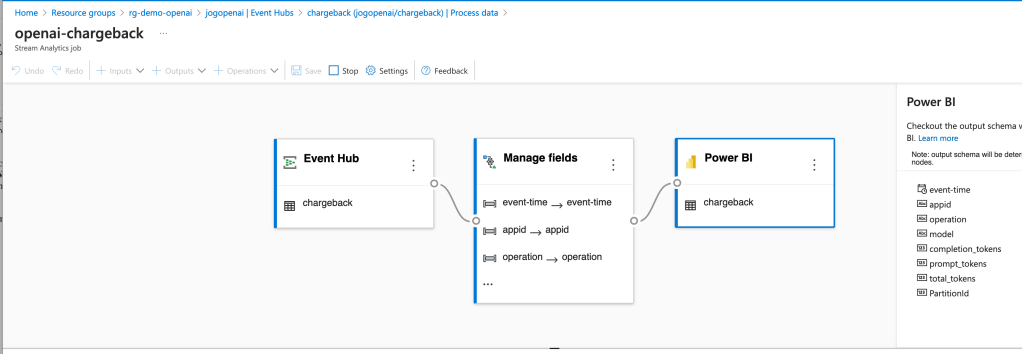
Now that the logs are being streamed to the Event Hub, you need something to pick them up. You have a lot of options in this space. You could use Azure Data Factory, custom function, Logic App, SIEM like Splunk, and many others. What you choose to do here really depends on where you want to put the data and what you want to do with it prior to putting it there. To keep it simple for this proof-of-concept, I chose the built-in Azure Stream Analytics integration with Event Hub.

The integration creates a Stream Analytics Job that connects to the Event Hub, does small amount of transformation in setting the types for specific fields, and loads the data into a PowerBI dataset.

Azure Stream Analytics and Event Hub Integration

Once the integration was setup, the requests and responses I was making to the AOAI services began to populate in the Power BI dataset. I was then able to build some really basic (and very ugly) visuals to demonstrate the insights this pattern provides for chargebacks. Each graphic shows the costs accumulated by individual applications by their application id.

Power BI Report Showing Application by Application Costs

Pretty cool right? Simple, easy to implement, and decent information to work from.

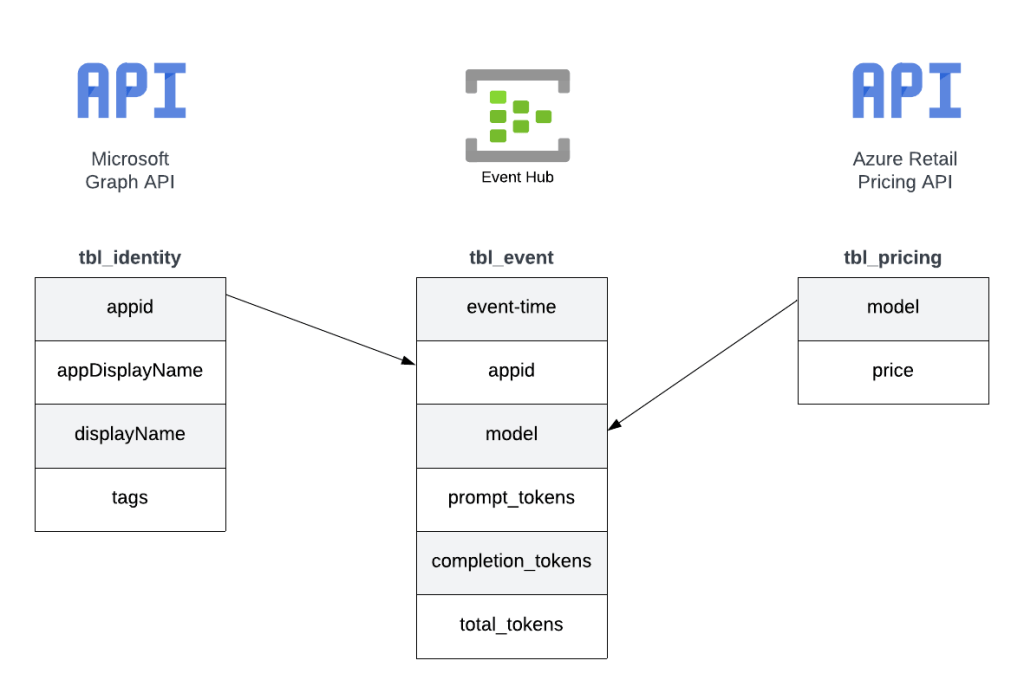
Since this was a POC, I cut some corners on the reporting piece. For example, I hardcoded the model pricing into some custom columns. If I were to do this at the enterprise level, I’d be supplementing this information from data pulled from the Microsoft Graph and the Azure Retail Pricing REST API. From the Microsoft Graph I’d pull additional attributes about the service principal / managed identity such as a more human readable name. From the Azure Retail Pricing REST API I’d pull down the most recent prices on a per model basis. I’d also likely store this data inside something like Cosmos or Azure SQL to provide for more functionality. From a data model perspective, I’d envision a “enterprise-ready” data model version of the pattern looking like the below.

Possible data model

The key challenge I set out to address here was how to get the data necessary to do chargebacks and what could I do with that data once I got it. Mission accomplished!

Well folks, that covers it. I’d love to see someone looking for a side project with more data skills than me (likely any human being breathing air today) build out the more “full featured” solution using a similar data model to what I referenced above. I hope this pattern helps point your organization in the right direction and spurs some ideas as to how you could solve the ETL and analysis part within your implementation of this pattern.

I’m always interested in hearing about cool solutions. If you come up with something neat, please let me know in the comments or each out on LinkedIn.

Have a great week!