Azure Authorization – Resource Locks and Azure Policy denyActions

This is part of my series on Azure Authorization.

  1. Azure Authorization – The Basics
  2. Azure Authorization – Azure RBAC Basics
  3. Azure Authorization – actions and notActions
  4. Azure Authorization – Resource Locks and Azure Policy denyActions
  5. Azure Authorization – Azure RBAC Delegation
  6. Azure Authorization – Azure ABAC (Attribute-based Access Control)

Welcome back! Today I have another post in my series on Azure Authorization. In my last post I covered how permissions listed in notActions and notDataActions in an Azure RBAC Role Definition is not an explicit deny but rather a subtraction from the permissions listed in the definition in the action and nonActions section. In this post I’m going two features which help to address that gap: Resource Locks and the Azure Policy denyActions feature.

Resource Locks

Let’s start with Resource Locks. Resource Locks can be used to protect important resources from actions that could delete the resource or actions that could modify the resource. They are an Azure Resource that are administered through the Microsoft.Authorization resource provider (specifically Microsoft.Authorization/locks) and come in two forms which include delete (CanNotDelete) and modification locks (ReadOnly). Resource locks can be applied at the subscription scope, resource group scope, and resource scope. Resource locks applied at a higher scope are inherited down.

Resource locks are a wonderful defense-in-depth control because they are another authorization control in addition to Azure RBAC. A common use case might be to place a read only resource lock on an Azure Subscription which is used to house ExpressRoutes resources since once setup, ExpressRoute Circuits are relatively static from a configuration perspective. This could help mitigate the risk of an authorized user or CI/CD pipeline identity, who may have the Azure RBAC Owner or Contributor over the subscription, from mucking up the configuration purposefully or by accident and causing broad issues for your Azure landscape.

Example of a resource lock on a resource

Resource locks do have a number of considerations that you should be aware of before you go throwing them everywhere. One of the main considerations is that they can be removed by anyone with access to Microsoft.Authorization/*, which will include built-in Azure RBAC roles such as Owner and User Access Administrator. It’s common practice for organizations to grant the identity (service principal or managed identity) used by a CI/CD pipeline the Owner role in order for that role to create role assignments required for the services it is deploying (you can work around this with delegation which I will cover in my next post!). This means that anyone with sufficient permissions on the pipeline could theoretically pass some code that removes the lock.

Another consideration is resource locks only affect management plane operations (if you’re unfamiliar with this concept check out my first post on authorization). Using a Storage Account as an example, a ReadOnly lock would prevent someone from modifying the CMK used to encrypt a storage account, but it wouldn’t stop a user with sufficient permissions at the data plane from deleting a container or blob. Before applying a ReadOnly resource lock, make sure you understand some of the ramifications of blocking management plane operations. Using an App Service as an example, a ReadOnly lock would prevent you from scaling that App Service up or down.

I’m a big fan of using resource locks for mission critical pieces of infrastructure such as ExpressRoute. Outside of that you’ll want to evaluate the considerations I’ve listed above in the public documentation. If your primary goal is to prevent delete operations, then you may be better off with using the next feature, Azure Policy deny Actions.

Azure Policy denyActions

Azure Policy is Azure’s primary governance tool. For those of you coming from AWS, think of Azure Policy as if AWS IAM Policy conditions had a baby with AWS Config. I like to think of it as a way to enforce the way a resource needs to look, and if the resource doesn’t look that way, you can block the action altogether, log that it’s not compliance, or remediate it.

It’s important to understand that Azure Policy sits in line with the ARM (Azure Resource Manager) API allowing it to prevent or remediate the resource creation or modification before it ever gets processed by the API. This is bonus vs having to remediate it after the fact with something like AWS Config.

Azure Policy Architecture

In addition to the functionality above, Microsoft has added a bit of authorization logic in to Azure Policy with effect of denyAction (yes it was a bit confusing to me why authorization to do something was introduced, but you know what, it can come in handy!). As of the date of this blog, the only action that can be denied is the DELETE action. While this may seem limited, it’s an awesome improvement and addresses some of the gaps in resource locks.

First, you can use the power of the Azure Policy language to filter to a specific resource type type with a specific set of tags. This allows you to apply these rules at scale. Use case here might be I want to deny the delete action on all Log Analytics Workspaces across my entire Azure estate. Second, the policy could be assigned a management group scope. By assigning the policy at the management group scope I can prevent deletions of these resources even by a user or service principal that might hold the Owner role of the subscription. This helps me mitigate the risk present with resource locks when a CI/CD pipeline has been given the Owner role over a subscription.

An example policy could look like something below. This policy would prevent any Log Analytics Workspaces tagged with a tag named rbac with a value equal to prod from being deleted.

$policy_id=(New-AzPolicyDefinition -Name $policy_name `
    -Description "This is a policy used for RBAC demonstration that blocks the deletion of Log Analytics Workspaces tagged with a key of rbac and a value of prod" `
    -ManagementGroupName $management_group_name `
    -Mode Indexed `
    -Policy '{
            "if": {
                "allOf": [
                    {
                        "field": "type",
                        "equals": "Microsoft.OperationalInsights/workspaces"
                    },
                    {
                        "field": "tags.rbac",
                        "equals": "prod"
                    }
                ]
            },
            "then": {
                "effect": "denyAction",
                "details": {
                    "actionNames": [
                        "delete"
                    ],
                    "cascadeBehaviors": {
                        "resourceGroup": "deny"
                    }
                }
            }
        }')
    ```

Just like resource locks, Azure Policy denyActions have some considerations you should be aware of. These include limitations such as it not preventing deletion of the resources when the subscription is deleted. Full limitations can be found here.

Conclusion

What I want you to take away from this post is that there are other tools beyond Azure RBAC that can help you secure your Azure resources. It’s important to practice a defense-in-depth approach and utilize each tool where it makes sense. Some general guidance would be the following:

  • Use resource locks when you want to prevent modification and Azure Policy denyActions when you want to prevent deletion. This will allow you to do it at scale and mitigate the Owner risk.
  • Be careful where you use ReadOnly resource locks. Blocking management plane actions even when the user has the appropriate permission can be super helpful, but it can also bite you in weird ways. Pay attention to the limitations in the documentation.
  • If you know the defined state of a resource needs to look like, and you’re going to deploy it that way, look at using Azure Policy with the deny effect instead of a ReadOnly resource lock. This way can enforce that configuration in code and mitigate the Owner risk.

So this is all well and good, but neither of these features allow you to pick the SPECIFIC actions you want to deny. In an upcoming post I’ll cover the feature that is kind there, but not really, to address that ask.

Azure Authorization – actions and notActions

This is part of my series on Azure Authorization.

  1. Azure Authorization – The Basics
  2. Azure Authorization – Azure RBAC Basics
  3. Azure Authorization – actions and notActions
  4. Azure Authorization – Resource Locks and Azure Policy denyActions
  5. Azure Authorization – Azure RBAC Delegation
  6. Azure Authorization – Azure ABAC (Attribute-based Access Control)

Hello again! This post will be a continuation of my series on Azure authorization where I’ll be covering how actions and notActions (and dataActions and notDataActions) work together. I will cover what they do and, more importantly, what they don’t do. If there is one place I see customers make mistakes when creating custom Azure RBAC roles, it’s with the use of notActions (and notDataActions).

In my last post I explained the structure of an Azure RBAC Role Definition. As a quick refresher, each role definition has a permissions section which consists of subsections named actions, notActions, dataActions, and notDataActions. Actions are the management plane permissions (operations on the resource) the role is granted and dataActions are the data plane actions (operations on the data stored within the resource) the role is granted.

Sample Azure RBAC role definition for a built-in role

So what about notActions and notDataActions? The notActions section subtracts permissions from the actions section while the notDataActions subtracts permissions from the notDataActions. Notice I used the word subtract and not deny. notActions and notDataActions IS NOT an explicit deny but rather a way to subtract a specific or permission or set of permissions. If a user receives a permissions from another Azure RBAC role assignment for another role which grants the permission, the user would have that permission. Azure’s authorization engine evaluates all of the permissions a user has across all Azure RBAC role assignments relevant to the resource the user is trying to perform an operation on. We’ll see this in more detail in a later post. Confusing right? Let’s explore a use case and do a compare and contrast to an AWS IAM Policy to drive this point home.

Example AWS IAM Role and Azure RBAC Role Definition

In the AWS IAM Policy above (on the left side) I’ve authored a custom IAM Policy that includes an allow rule allowing all actions on Amazon CloudWatch Logs (AWS’s parallel to a Log Analytics Workspace). The policy also includes a deny rule which explicitly denies the delete action. Finally, it contains a condition that the CloudWatch Logs instance must be tagged with a tag of environment with value of production. Any IAM Users, Groups, or Roles assigned the policy will have the ability to perform all operations on a CloudWatch Logs instance EXCEPT for the delete action if the CloudWatch Logs instance is tagged with environment=production. This is a very common way to design AWS IAM Policy where you grant all permissions then strip out risky or destructive permissions.

What if you wanted to do something similar in Azure? You might design an Azure RBAC role definition like what is pictured on the right. Here the actions section is granting all permissions on the Log Analytics resource provider and the notActions section is subtracting purge and delete. Notice that while Azure RBAC definition support conditions as well, but today they cannot be used in the same way they are used in AWS and you’d instead need to use another Azure feature such as a resource lock or Azure Policy denyAction. I’ll cover those features and the capabilities of Azure RBAC definition and assignment conditions future posts in this series. For the purposes of this post, let’s ignore that condition. Would an assignment of this role definition prevent a user from deleting a Log Analytics Workspace? Let’s try it out and see.

Here we have a user name Carl Carlson. An Azure RBAC role assignment has been created at the resource group scope for the role definition described below. This role definition includes all permissions for a log analytics workspace but removes the delete action.

{
    "id": "/subscriptions/XXXXXXXX-c6c1-4b3d-bf0f-5cd4ca6b190b/providers/Microsoft.Authorization/roleDefinitions/a21541c6-401d-48b7-9149-7c3de8db2adc",
    "properties": {
        "roleName": "Custom - notActions Demo - Remove action",
        "description": "Custom role that demonstrates notActions. This role uses a notAction to remove the delete action from a Log Analytics Workspace.",
        "assignableScopes": [
            "/subscriptions/XXXXXXXX-c6c1-4b3d-bf0f-5cd4ca6b190b"
        ],
        "permissions": [
            {
                "actions": [
                    "Microsoft.OperationalInsights/*"
                ],
                "notActions": [
                    "Microsoft.OperationalInsights/workspaces/delete"
                ],
                "dataActions": [],
                "notDataActions": []
            }
        ]
    }
}

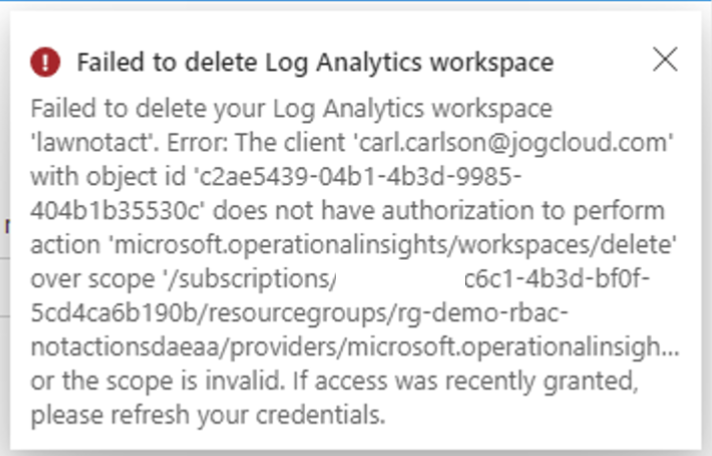
When Carl attempts to delete the Log Analytics Workspace he receives an error stating that he does not have authorization to perform this action. This demonstrates that the delete action was indeed removed from the actions. Let me now drive home why this is not a deny.

Unauthorized error message

I’ll now create an additional Azure RBAC role assignment at the resource group scope for the custom role described in the definition below. This role definition includes the delete action that the other role definition subtracted.

{
    "id": "/subscriptions/b3b7aae7-c6c1-4b3d-bf0f-5cd4ca6b190b/providers/Microsoft.Authorization/roleDefinitions/bed940de-a64b-4601-bd47-651182f9f3e1",
    "properties": {
        "roleName": "Custom - notActions Demo - Add Action",
        "description": "Custom role that demonstrates notActions. This role grants the delete action from a Log Analytics Workspace.",
        "assignableScopes": [
            "/subscriptions/b3b7aae7-c6c1-4b3d-bf0f-5cd4ca6b190b"
        ],
        "permissions": [
            {
                "actions": [
                    "Microsoft.OperationalInsights/workspaces/delete"
                ],
                "notActions": [],
                "dataActions": [],
                "notDataActions": []
            }
        ]
    }
}

This time when Carl attempts to delete the Log Analytics Workspace he is successful. This is because the action subtracted by the first role has been added back in by this second role because the Azure RBAC authorization engine looks at all permissions cumulatively.

Successful deletion of resource due to cumulative permissions

So what do I want you to walk away with from this post? I want you to walk away with an understanding that notActions and notDataActions ARE NOT explicit denies and they are simply subtracting a permission(s) from actions or dataActions. As of today, you cannot design your roles the same way you did it in AWS (if you’re coming from there).

The next question bubbling in your mind is what tools does Microsoft provide to address this behavior of notActions and notDataActions. The answer to that is there are a lot of them. These include things like resource locks, Azure Policy denyActions, and denyAssignments. Each of these tools has benefits and considerations to their usage. Thankfully for you, I’ll be including a post on each of these features and some of the more advanced features working their way to general availability.

See you next post!

Azure Authorization – Azure RBAC Basics

This is part of my series on Azure Authorization.

  1. Azure Authorization – The Basics
  2. Azure Authorization – Azure RBAC Basics
  3. Azure Authorization – actions and notActions
  4. Azure Authorization – Resource Locks and Azure Policy denyActions
  5. Azure Authorization – Azure RBAC Delegation
  6. Azure Authorization – Azure ABAC (Attribute-based Access Control)

Welcome back folks. In this post I will be continuing my series on Azure authorization by covering the basics of Azure RBAC. I will review the components that make up Azure RBAC and touch upon some of the functionality I’ll be covering in future posts of this series. Grab a coffee, get comfy, and prepare to review some JSON!

In my first post in this series I touched on the basics of authorization in Azure. In that post I covered the differences between the management plane (actions on a resource) and the data plane (actions on data stored in the resource). I also called out the four authorization planes for Azure which include Entra ID Roles, Enterprise Billing Accounts, Azure Classic Subscription Admin Roles, and Azure RBAC (Role-Based Access Control). If you’re unfamiliar with these concepts, take a read through that post before you continue.

Authorization Planes for Azure

Azure RBAC is the primary authorization plane for Microsoft Azure. When making a request to the ARM (Azure Resource Manager) REST API it’s Azure RBAC that decides whether or not the action is allowed (with the exceptions I covered in my first post and some exceptions I’ll cover through this series). Azure RBAC is configured by using a combination of two resources which include the Azure RBAC Role Definition and Azure RBAC Role Assignment. At a high level, an Azure RBAC Role Definition is a collection of permissions and an assignment is the granting of those permissions to a security principal for an access scope. Definitions and assignments can only be created by a security principal that has been assigned an Azure RBAC Role with the permissions in the Microsoft.Authorization resource provider. The specific permissions include Microsoft.Authorization/roleDefinitions/* and Microsoft.Authorization/roleAssignments/*. Out of the box there are two built-in roles that have these permission which include User Access Administrator and Owner (there are a few others that are newer and I’ll discuss in a future post).

Let me dig deeper into both of these resources.

It all starts with an Azure Role Definition. These can be either built-in (pre-existing roles Microsoft provides out of the box) or custom (a role you design yourself). A role definition is made up of three different components which include the permissions (actions), assignable scopes, and conditions. The permissions include the actions that can be performed, the assignable scope is the access scopes the role definition can be assigned to, and the conditions further constrain the access for the purposes of a largely new and upcoming additional features for Azure RBAC.

Azure RBAC Role Definition – Structure

Permissions are divided into four categories which include actions, notActions, dataActions, and notDataActions. The actions and notActions are management plane permissions and dataActions and notDataActions are data plane permissions. As mentioned earlier, management plane is actions on the resource while data plane is actions on the data within the resource. Azure RBAC used to be management plane only, but has increasingly (thankfully) been expanded into the data plane. Actions and dataActions are the actions that are allowed and notActions and notDataActions are the actions which should be removed from the list of actions. That likely sounds very confusing and I’ll cover it in more depth in my next post. For now, understand that a permission in notAction or notDataAction is not an explicit deny.

The assignable scopes component is a list of places the role definition can be assigned (I’ll get to this later). The assignable scopes include management group (with some limitations for custom role definitions), subscription, resource group, or resource. Note that whatever scopes are includes, the scopes under it are also included. For example, an assignable scope of a management group would make the role definition usable at that management scope, subscriptions associated with that management group, resource groups within those subscriptions, and resources within those resource groups.

Lastly, we have the conditions. Conditions are a new feature of Azure RBAC Role Definitions and Assignments and are used to further filter the access based on other properties of the security principal, session, or resource. These conditions are used in newer features I’ll be covering throughout this series.

When trying to learn something, I’m a big fan of looking at the raw information from the API. It gives you all the properties you’d never know about when interacting via the GUI. Below is the representation of a built-in Azure RBAC Role Definition. You can dump this information using Azure PowerShell, Azure CLI, or the REST API. Using Azure CLI you would use the az role definition command.

Azure RBAC Role Definition – Data

There are a few things I want you to focus on. First, you’ll notice the id property. Each Azure RBAC Role Definition has a unique GUID which must be unique across the Entra ID tenant. The GUIDs for built-in roles should (never run into an instance where they were not) be common across all instances of Entra ID. Like all Azure objects, Azure RBAC Role Definitions also have be be stored somewhere. Custom Azure RBAC Role Definitions can be stored at the management group or subscription-level. I’d recommend you store your Azure RBAC Role Definitions at the management group level whenever possible so they can be re-used (there is a limit of 5,000 custom Azure RBAC Role Definitions per Entra ID tenant) and they exist beyond the lifetime of the subscription (think of use case where you re-use a role definition from subscription 1 in subscription 2 then blow up subscription 1, uh oh).

Next, you’ll see the assignableScopes property with a value of “/”. That “/” represents the root management group (see my post on the root management group if you’re unfamiliar with the concept). As of 3/2024, only built-in role definitions can have an assignable scope of “/”. When you create a custom role definition you will likely create it with an assignable scope of either a management group (good for common roles that will be used across subscriptions and to keep under the 5,000 role definition limit) or subscription (good for use cases where a business unit may have specific requirements).

Lastly, you’ll see that a condition has been applied to this Azure RBAC Role Definition. As of 3/2024 only built-in roles will include conditions in the definitions. I’ll cover what these conditions do in a future post.

Excellent, so you now grasp the Azure RBAC Role Definition. Let me next dive into Assignments.

Azure RBAC Role Assignments associate a role definition to a security principal and assign an access scope to those permissions. At a high-level, they are made up of four components which include the security principal (the entity assigned the role), role definition (the collection of permissions), scope (the access scope), and conditions (further filters on how this access can be exercised).

Azure RBAC Role Assignment – Structure

The security principal component is the entity that will be assigned the role for the specific access scope. This can be an Entra ID user, group, service principal, or managed identity.

The role definition is the Azure RBAC Role Definition (collection of permissions) the security principal will be assigned. This can include a built-in role or a custom role.

The scope is the access scope the security principal can exercise the permissions defined in the role definition. It’s most common to create Azure RBAC Role Assignments at the subscription and resource group scope. If you have a subscription strategy where every application gets its own subscription, the subscription scope may make sense for you. If your strategy is subscriptions at the business unit level you may create assignments at the resource group. Assignments at the management group tend to be limited to roles for the central IT (platform and security) team. Take note there are limits to the number of assignments at different scopes which are documented at this link. As of 3/2024 you cannot assign an Azure RBAC Role with dataActions or notDataActions permissions at the management group scope.

Let’s now take a look at the API representation of a typical role assignment. You can dump this information using Azure PowerShell, Azure CLI, or the REST API. When using Azure CLI you would do:

az role assignment list
Azure RBAC Role Assignment – Data

Here there are a few properties to note. Just like the Azure Role Definitions, the id property of an Azure RBAC Assignment must contain a GUID unique to the Entra ID tenant.

The principalId is the object id of the security principal in Entra ID and the principalType is the object type of the security principal which will be user, group, or service principal. Why no managed identity? The reason for that is managed identities are simply service principals with some orchestration on top. If you’re curious as to how managed identities are represented in Entra ID, check out my post on orphaned managed identities.

The scope is the access scope the permissions will apply to. In the example above, the permissions granted by this role assignment will have the scope of the rg-demo-da-50bfd resource group.

This role assignment also has a condition. The capabilities of conditions and where they are used will be covered in a future post.

The last property I want to touch on is the delegatedManagedIdentityResourceId. This is a property used when Azure Lighthouse is in play.

Alright folks, that should give you a basic understanding of the foundations of Azure RBAC. Your key takeaways for today are:

  • Assigning a security principal permissions consists of two resources, the role definition (the set of permissions) and the assignment (combination of the role, security principal, and access scope).
  • Custom Azure RBAC Role Definitions should be created at the management group level where possible to ensure their lifecycle persists beyond the subscription they are used within. Be aware of the 5,000 per Entra ID tenant limit.
  • Azure RBAC Role Assignments are most commonly created at the subscription or resource group level. Usage at management groups will likely be limited to granting permissions for Central IT or Security. Be aware of the limits around the number of assignments.

In my next post I’ll dig deeper into how notActions and notDataActions works, demonstrate how it is not an explicit deny, and compare and contract an Azure RBAC Role Definition to an AWS IAM Policy.

Have a great week!