Network Security Perimeters – The Problem They Solve

Network Security Perimeters – The Problem They Solve

This is part of my series on Network Security Perimeters:

  1. Network Security Perimeters – The Problem They Solve
  2. Network Security Perimeters – NSP Components
  3. Network Security Perimeters – NSPs in Action – Key Vault Example
  4. Network Security Perimeters – NSPs in Action – AI Workload Example

Hello folks!

Last month a much anticipated new feature became available. No, it wasn’t AI-related (hence why little fanfare) but instead one of the biggest network security improvements in Azure. In early August, Microsoft announced that Network Security Perimeters were finally generally available. If you’ve ever had the pain of making PaaS (platform-as-a-service) to PaaS work in Azure, or had an organization that hadn’t yet fully adopted PrivateLink Private Endpoints, or even had a use case where public access was required and there wasn’t a way around it, then Network Security Perimeters (NSPs) will be one of your favorite new features.

This is gonna be lengthy, so I’m going to divide this content into 2 -3 separate posts. In this first post I’m going to cover a bit of history and the problem NSPs were created to solve.

Types of PaaS

Like any cloud platform, Azure has many PaaS-based services. I like to mentally divide these services into compute-based PaaS (where you upload code and control the actions the code performs) and service-based PaaS (where you upload data but don’t control the code that executes the actions). Examples of compute-based PaaS would be App Services, Functions, AKS, and the like. Service-based PaaS would be things like Storage, Key Vault, and AI Search. I’m sure there are other more effective ways to divide PaaS, but this is the way I’m gonna do it and you’ll have to like it for the purposes of this post.

Compute-based PaaS has historically been easier to control both inbound and outbound given because the feature set to do that was built directly into the product. These control mechanisms consisted of Private Endpoints or VNet injection to control inbound traffic and VNet integration and VNet injection to control outbound traffic.

Controlling service-based PaaS was a much different story.

How Matt’s brain divides PaaS

Prior to the introduction of PrivateLink Private Endpoint support for service-based PaaS customers controlled inbound traffic destined for the public IP of the service instance using what I refer to as the service firewall. The service firewall has a few capabilities to control inbound traffic to the public IP address including:

  • IP-based whitelisting
  • Service-based whitelisting (via Trusted Microsoft Services)
  • Subnet whitelisting (via Service Endpoints)
  • Resource-based whitelisting

Not every service-based PaaS supports all of these capabilities. For example, resource-based whitelisting via the service firewall is only available in Storage today.

Service Firewall – IP Whitelisting

IP-based whitelisting is exactly what you think it is. You plug in an individual public IP or public IP CIDR (consider this a rule) and those sources are allowed through the service firewall and can create TCP connections. This feature was commonly used to allow specific customer IP addresses, often linked to forward web proxies, access to the service-based PaaS prior to the organization implementing Private Endpoints. The major consideration of this feature is there is a finite number of rules (400 last I checked) you can have. While this worked well for the forward web proxy use case, it would often be insufficient for PaaS to PaaS communication (such as Storage to Key Vault to retrieve a CMK for encryption or attempting to whitelist the entire Power BI service prior to its own vnet integration support).

Service Firewall – IP-based Rules

Service Firewall – Service Whitelisting

Next up you had service-based whitelisting through toggling the “Trusted Microsoft Services” option. This toggle would allow all of the public IP addresses belonging a specific set of Microsoft services which differs on a per service-based PaaS basis. This means that toggling that switch for Storage allows a different set of services versus toggling that for Key Vault. The differing of what constitutes a trusted service made this option painful because the documentation on what’s trusted for each service has never been documented well. Additionally, this allows ALL public IPs from that service used by any Microsoft customer not just the public IPs used by your instances of these services. This particular risk was always a pain point for most organizational security teams. Unfortunately, in the past, this was required to be enabled to facilitate any service-based PaaS to service-based PaaS communication. Even worse is the listing of trusted services didn’t include the service you actually needed.

Service Firewall – Trusted Microsoft Services exception

Service Firewall – Virtual Network Service Endpoints

Next up you have Virtual Network Service Endpoints (or subnet whitelisting as I think of them). Service Endpoints were the predecessor to Private Endpoints. They allowed you to limit access to the public IP address of an Azure PaaS instance based on the virtual network (really the subnet in the virtual network) id. They do this by injecting specific routes into the virtual network’s subnet where they are deployed. When the traffic egresses the subnet, it is tagged with an identifier which is used in the ACL (access control list) of the PaaS instance. These routes can be seen when viewing the effective routes on a NIC (network interface card) of a virtual machine running in the subnet.

Service Firewall – Service Endpoints Routes

You would then whitelist the virtual network’s subnet on the PaaS instance allowing that traffic to flow the PaaS instance’s public IP address.

Service Firewall – Service Endpoint Rules

The major security issue with Service Endpoints is they create a wide open data exfiltration point. Any traffic leaving a compute within that subnet will traverse directly to the PaaS instance and will ignore any UDRs (since the UDRs are less specific) bypassing any customer NVA (network virtual appliance like a firewall). Unlike Private Endpoints, Service Endpoints aren’t limited to a specific instance of your PaaS but allow network access to all instances of that PaaS. This means an attacker could take advantage of a Service Endpoint to exfiltrate data to their malicious PaaS instance with zero network visibility to the customer. Gross. There were attempts to address this gap with Service Endpoint Policies which allow you to limit the egress to specific PaaS instances, but these never saw wider adoption than storage.

Operationally, these things are a complete shit show. First off, they are non-routeable outside the subnet so they do you no good from on-premises. The other pain point with them is customers will often implement them without understanding how they actually work causing confusion on why Azure traffic is routing the way it is or trying to figure out why traffic isn’t getting to where it needs to go.

These days service endpoints have very limited use cases and you should avoid them where possible in favor of Private Endpoints. The exception being cost optimization. There is an inbound and outbound network charge for Private Endpoints which can get considerable when talking about Azure Backup or Azure Site Recovery at scale. Service Endpoints do not have that same inbound/outbound network cost and can help to reduce costs in those circumstances.

While Service Endpoints don’t really have much to do with NSPs, I did want to cover them because of the amount of confusion around how they work (and how much I hate them) and because they have traditionally been an inbound network control.

Service Firewall – Resource Whitelisting

Last but not least, we have resource whitelisting. Resource whitelisting is a service-firewall capability unique to Azure Storage. It allows you to permit inbound network connectivity to Azure Storage to a specific instance of an Azure PaaS service, all instances of a PaaS service in a subscription, or all within the customer tenant. The resource then uses it managed identity and RBAC assignments to control what it can do with the resource after it creates its network connection. This was a good example of early attempt to authorize network access based on a service identity. It was commonly used when an instance of Azure Machine Learning (AML), AI Foundry Hubs, AI Search, and the like needed to connect to storage. It provided a more restricted method of network control vs the traditional Allow Trusted Microsoft Services option.

Service Firewall – Resource Whitelisting

Ok… and what about outbound?

Another major issue you should notice is the above are all inbound. What the hell do you do about outbound controls for these service-based PaaS? Well, the answer has historically been jack shit for almost every PaaS service. The focus was all about controlling the inbound network traffic and authorization of the resource to hope no one does anything shady with the resource by having it make outbound calls to other services to exfiltrate data or do something else malicious. Not ideal right?

Some service-based PaaS services came up with creative solutions around this. Resources that fall under the Cognitive Services umbrella, such as the Azure OpenAI Service got data exfiltration controls. AI Search introduced the concept of Shared Private Access which didn’t really control the outbound access, but did allow you to further secure the downstream resources AI Search accessed. Each Product Group was doing their best within the confines of their bubble.

Network Security Perimeters to the rescue

You should now see the challenges that faced inbound and outbound network controls in service-based PaaS.

  • Sure you had lots of options for inbound controls, but they had issues at scale (IP whitelisting) or certain features were not available in all PaaS (resource-based whitelisting).
  • The configuration for inbound network control features lived as properties of the resource and could be configured differently by different teams resulting in access challenges.
  • Outbound, you had very few controls, and if there were controls, they differed on a per-service basis.
  • Some services would give great details as to the inbound traffic allowed or denied (such as Azure Storage) while other services didn’t give you any of that network information (I’m looking at you AI Search).

In my next post I’ll walk through how NSPs help to solve each of these issues and why you should be planning a migration over to them as soon as possible. I’ll walk through a few common examples of how NSPs can ease the burden using common service-based PaaS to service-based PaaS. I’ll also cover how they can be extremely useful in troubleshooting network connectivity caused by routing issues or even DNS issues.

See you next post!

Azure Networking – Inspecting traffic to Private Endpoints Revisited… Again. Maybe for the last time?

Update 11/4/2024 – Added limitations
Update 10/11/2024 – Updated with generally available announcement

Welcome back! Today I’m going to step back from the Generative AI world and talk about some good ole networking. Networking is one of those technical components of every solution that gets glossed over until the rubber hits the road and the application graduates to “production-worthy”. Sitting happily beside security, it’s the topic I’m most often asked to help out with at Microsoft. I’m going to share a new feature has gone generally available under the radar that is pretty damn cool, even if a bit confusing.

Organizations in the regulated space frequently have security controls where a simple 5-tuple-based firewall rule at OSI layer 4 won’t suffice and traffic inspection needs to occur to analyze layer 7. Take for an example a publicly facing web application deployed to Azure. These applications can be subject to traffic inspection at multiple layers like an edge security service (Akamai, CloudFlare, FrontDoor, etc) and again when the traffic enters the customer’s virtual through a security appliance (F5, Palo Alto, Application Gateway, Azure Firewall, etc). Most of the time you can get away with those two inspection points (edge security service and security appliance deployed into virtual network) for public traffic and one inspection point for private traffic (security appliance deployed into virtual network and umpteenth number of security appliances on-premises). However, that isn’t always the case.

Many customers I work with have robust inspection requirements that may require multiple inspection points within Azure. The two most common patterns where this pops up is when traffic first moves through an Application Gateway or APIM (API Management) instance. In these scenarios some customers want to funnel the traffic through an additional inspection point such as their third-party firewall for additional checks or a centralized choke point managed by information security (in the event Application Gateways / APIM have been democratized). When the backend is a traditional virtual machine or virtual network injected/integrated (think something like an App Service Environment v3) the routing is quite simple and looks like something like the below.

Traffic inspection with traditional virtual machine or VNet Injected/VNet integrated service

In the above image we slap a custom route table on the Application Gateway subnet, and add a user-defined route that says when contacting the subnet containing the frontend resources of the application, it needs to go the firewall first. To ensure the symmetry of return traffic, we put a route table on the frontend subnet with a user-defined route that says communication to the Application Gateway subnet needs to also go to the firewall. The routes in these two route tables are more specific than the system route for the virtual network and take precedence forcing both the incoming and return traffic to flow symmetrically through the firewall. Easy enough.

The routing when inspecting traffic to services which receive their inbound traffic via a Private Endpoint (such as an App Service running in a Premium App Services Plan, a Storage Account, a Key Vault, etc) that inspection gets more challenging. These challenges exist for both controlling the traffic to the Private Endpoint and controlling the return traffic.

When a Private Endpoint is provisioned in a virtual network, a new system route is injected into the route tables of each subnet in that virtual network AND any peered virtual networks. This route is a /32 for the IP address assigned to the network interface associated with the Private Endpoint as seen in the image below.

System route added by the creation of a Private Endpoint in a virtual network

Historically, to work around this you had to drop /32 routes everywhere to override those routes to push the incoming traffic to the Private Endpoints through an inspection point. This was a nightmare at scale as you can imagine. Back in August 2023, Microsoft introduced what they call Private Endpoint Network Policies, which is a property of a subnet that allows you to better manage this routing (in addition to optionally enforcing Network Security Groups on Private Endpoints) by allowing less specific routes to override the more specific Private Endpoint /32 routes. You set this property to Enabled (both this routing feature and network security group enforcement) or RouteTableEnabled (just this routing feature). This property is set on the subnet you place the Private Endpoints into. Yeah I know, confusing because that is not how routing is supposed to work (where less specific routes of the same length override more specific routes), but this is an SDN (software defined network) so they’ll do what they please and you’ll like it.

Private Endpoint route invalid because Private Endpoint Network Policy property set to RouteTableEnabled

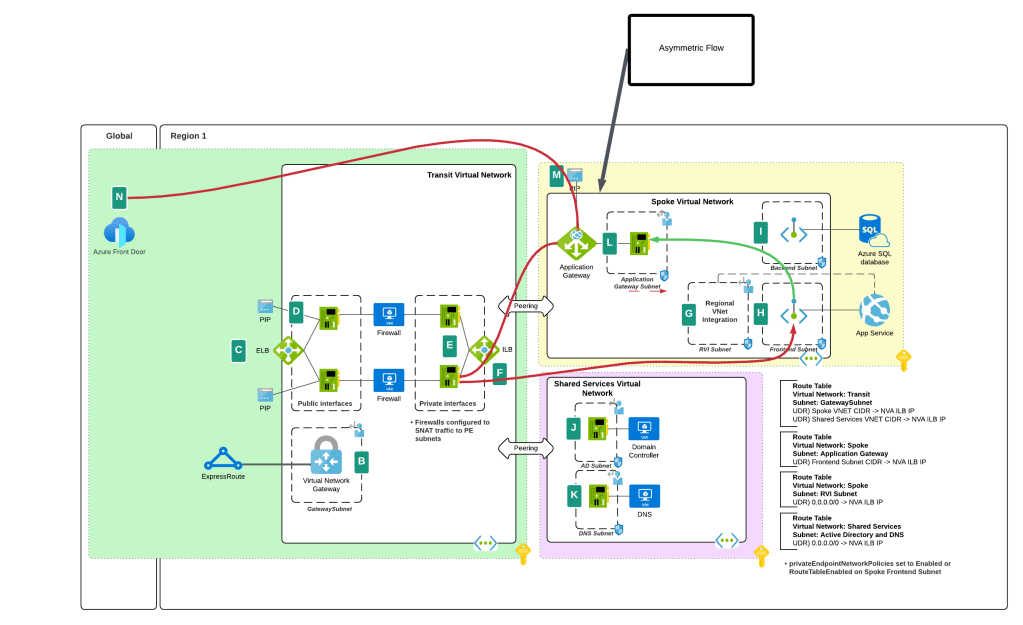
While this feature helped to address traffic to the Private Endpoint, handling the return traffic wasn’t so simple. Wrapping a custom route table around a subnet containing Private Endpoints does nothing to control return traffic from the Private Endpoints. They do not care about your user-defined routes and won’t honor them. This created an asymmetric traffic flow where incoming traffic was routed through the inspection point but return traffic bypassed it and went direct to the calling endpoint.

This misconfiguration was very common in customer environments and rarely was noticed because many TCP sessions with Private Endpoints are short lived and thus the calling client isn’t affected by the TCP RST sent by the firewall after X number of minutes. Customers could work around this by SNATing to the NVA’s (inspection point) IP address and ensure the return traffic was sent back to the NVA before it was passed back to the calling client. What made it more confusing was some services “just worked” because Microsoft was handling that symmetry in the data plane of the SDN. Azure Storage was an example of such a service. If you’re interested in understanding the old behavior, check out this post.

Prior asymmetric behavior without SNAT at NVA

You’ll notice I said “prior” behavior. Yes folks, SNATing when using a 3rd-party NVA (announcement is specific to 3rd-party NVAs. Those of you using Azure Firewall in a virtual network, Azure Firewall in a VWAN Secure Hub, or a 3rd-party NVA in a VWAN Secure Hub will need to continue to SNAT for now (As of 11/2024) until this feature is extended to those use case.

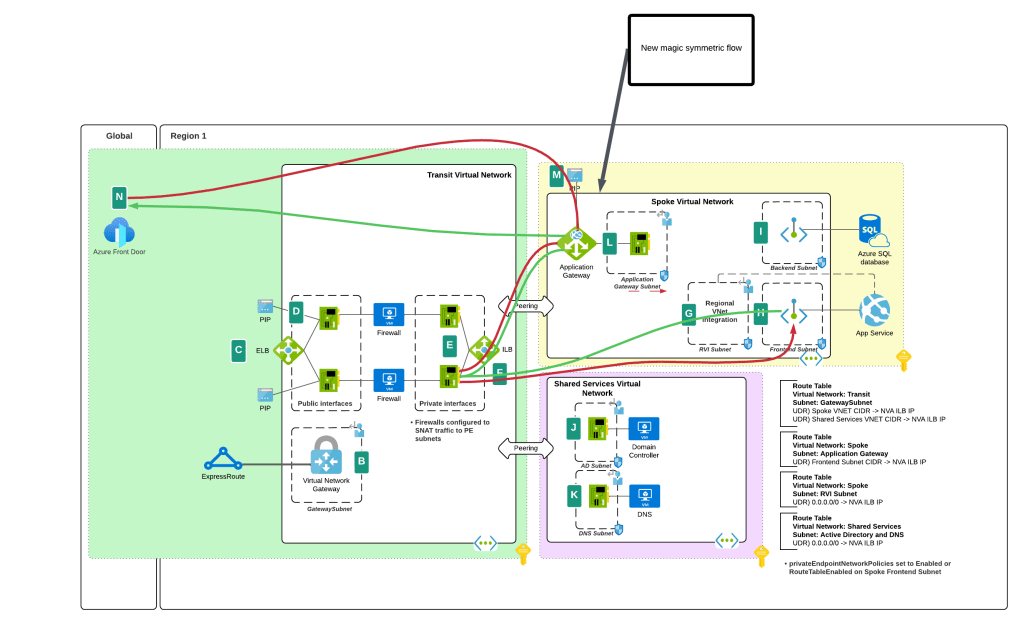
I bet you’re thinking “Oh cool, Microsoft is now having Private Endpoints honor user-defined routes in route tables”. Ha ha, that would make far too much sense! Instead Microsoft has chosen to require resource tags on the NICs of the NVAs to remove the SNAT requirement. Yeah, wouldn’t have been my choice either but here we are. Additionally, in my testing, I had it working without the resource tags to get a symmetric flow of traffic. My assumption (and total assumption as an unimportant person at Microsoft) is that this may be the default behavior on some of the newer SDN stacks while older SDN stacks may require the tags. Either way, do what the documentation says and put the tags in place.

As of today (10/11/2024) the generally available documentation is confusing as to what you need to do. I’ve provided some feedback to the author to fix some of the wording, but in the meantime let me explain what you need to do. You need to create a resource tag on either the NIC (non-VMSS) or VM instance (VMSS) that has a key of disableSnatOnPL with a value of true.

Magic of SDN ensuring symmetric flow without SNAT

TLDR; SNAT should no longer be required to ensure symmetric traffic flow when placing an NVA between an endpoint and a Private Endpoint if you have the proper resource tag in place. My testing of the new feature was done in Central US and Canada Central with both Azure Key Vault and Azure SQL. I tested when the calling endpoint was within the same virtual network, when it was in a peered virtual network connected in a hub and spoke environment, and when the calling machine was on-premises calling a private endpoint in a spoke. In all scenarios the NVA showed a symmetric flow of traffic in a packet capture.

Azure VWAN and Private Endpoint Traffic Inspection – Findings

Azure VWAN and Private Endpoint Traffic Inspection – Findings

Today I’m taking a break from my AI series to cover an interesting topic that came up at a customer.

My customer base exists within the heavily regulated financial services industry which means a strong security posture. Many of these customers have requirements for inspection of network traffic which includes traffic between devices within their internal network space. This requirement gets interesting when talking inspection of traffic destined for a service behind a Private Endpoint. I’ve posted extensively on Private Endpoints on this blog, including how to perform traffic inspection in a traditional hub and and spoke network architecture. One area I hadn’t yet delved into was how to achieve this using Azure Virtual WAN (VWAN).

VWAN is Microsoft’s attempt to iterate on the hub and spoke networking architecture and make the management and setup of the networking more turnkey. Achieving that goal has been an uphill battle for VWAN with it historically requiring very complex architectures to achieve the network controls regulated industries strive for. There has been solid progress over the past few months with routing intent and support for additional third-party next generation firewalls running in the VWAN hub such as Palo Alto becoming available. These improvements have opened the doors for regulated customers to explore VWAN Secure Hubs as a substitute for a traditional hub and spoke. This brings us to our topic: How do VWAN Secure Hubs work when there is a requirement to inspect traffic destined for a Private Endpoint?

My first inclination when pondering this question was that it would work in the same way a traditional hub and spoke works. In past posts I’ve covered that pattern. You can take a look at this repository I’ve put together which walks through the protocol flows in detail if you’re curious. The short of it is inspection requires enabling network policies for the subnet the Private Endpoints are deployed to and SNATing at the firewall. The SNATing is required at the firewall because Private Endpoints do not obey user-defined routes defined in a route table. Without the SNAT you get asymmetric routing that becomes a nightmare of troubleshooting to identify. Making it even more confusing, some services like Azure Storage will magically keep traffic symmetric as I’ve covered in past posts. Best practice for traditional hub and spoke is SNATing for firewall inspection with Private Endpoints.

Hub and Spoke Firewall Inspection

My first stop was to read through the Microsoft documentation. I came across this article first which walks through traffic inspection with Azure Firewall with a VWAN Secure Hub. As expected, the article states that SNAT is required (yes I’m aware of the exception for Azure Firewall Application Rules, but that is the exception and not the rule and very few in my customer space use Azure Firewall). Ok great, this aligns with my understanding. But wait, this article about Secure Hub with routing intent does not mention SNAT at all. So is SNAT required or not?

When public documentation isn’t consistent (which of course NEVER happens) it’s time to lab and see what we see. I threw together a single region VWAN Secure Hub with Azure Firewall, enabled routing intent for both Internet and Private traffic, and connected my home lab over a S2S VPN. I created then Private Endpoint for a Key Vault and Azure SQL resource. Per the latter article mentioned above, I enabled Private Endpoint Network Policies for the snet-svc subnet in the spoke virtual network. Finally, I created a single Network Rule allowing traffic for 443 and 1433 from my lab to the spoke virtual network. This ensured I didn’t run into the transparent proxy aspect of Application Rules throwing off my findings.

Lab used

If you were doing this in the “real world” you’d setup a packet capture on the firewall and validate you see both sides of the conversation. If you’ve used Azure Firewall, you’re well aware it does not yet support packet captures making this impossible. Thankfully, Microsoft has recently introduced Azure Firewall Structure Firewall Logs which include a log called Azure Firewall Flow Trace Log. This log will show you the gooey details of the TCP conversation and helps to fill the gap of troubleshooting asymmetric traffic while Microsoft works on offering a packet capture capability (a man can dream, can’t he?).

While the rest of the Azure Firewall Structured Logs need nothing special to be configured, the Flow Trace Logs do (likely because as of 8/20/2023 they’re still in public preview). You need to follow the instructions located within this document. Make sure you give it a solid 30 minutes of completing the steps to enable the feature before you enable the log through the diagnostic settings of the Azure Firewall. Also, do not leave this running. Beyond the performance hit that can occur because of how chatty this log is, you could also be in a world of hurt for a big Log Analytics Workspace bill if you leave it running.

Once I had my lab deployed and the Flow Trace Logs working, I next went ahead testing using the Test-NetConnection PowerShell cmdlet from a Windows machine in my home lab. This is a wonderful cmdlet if you need something built-in to Windows to do a TCP Ping.

Testing Azure SQL via Private Endpoint

In the above image you can see that the TCP Ping to port 1433 of an Azure SQL database behind a Private Endpoint was successful. Review of the Azure Firewall Network Logs showed my Network Rule firing which tells me the TCP SYN at least passed through providing proof that Private Endpoint Network Policies were successfully affecting the traffic to the Private Endpoint.

What about return traffic? For that I went to the Flow Trace Logs. Oddly enough, the firewall was also receiving the SYN-ACK back from the Private Endpoint all without SNAT being configured. I repeated the test for a Azure Key Vault behind a Private Endpoint and observed the same behavior (and I’ve confirmed in the Azure Key Vault needs SNAT for return traffic in the past in a standard hub and spoke).

Azure Firewall Flow Trace Log

So is SNAT required or not? You’re likely expecting me to answer yes or no. Well today I’m going to surprise you with “I don’t know”. While testing with these two services in this architecture seemed to indicate it was not, I’ve circulated these findings within Microsoft and the recommendation to SNAT to ensure flow symmetry remains. As I’ve documented in prior posts, not all Azure services behave the same way with traffic symmetry and Azure Private Endpoints (Azure Storage for example) and for consistent purposes you should be SNATing. Do not rely on your testing of a few services in a very specific architecture as being gospel. You should be following the practices outlined in the documentation.

I feel like I’m ending this blog Sopranos-style with fade to black, but sometimes even tech has mystery. In this post you got a taste of how Flow Trace Logs can help troubleshoot traffic symmetry issues when using Azure Firewall and you learned that not all things in the cloud work the way you expect them to work. Sometimes that is intentional and sometimes it’s not intentional. When you run into this type of situation where behavior you’re observing doesn’t match documentation, it’s always best to do what is documented (in this case you should be doing SNAT). Maybe it’s something you’re doing wrong (this is me we’re talking about) or maybe you don’t have all the data (I tested 2 of 100+ services). If you go with what you experience, you risk that undocumented behavior being changed or corrected and then being in a heap of trouble in the middle of the night (oh the examples I could give of this across my time at cloud providers over a glass of Titos).

Well folks, that wraps things up. TLDR; SNAT until the documentation says otherwise regardless of what you experience.

Thanks!

Application Gateway and Private Link

Welcome back fellow geeks!

Over the past few years I’ve written a ton on Private Endpoints for PaaS (platform-as-a-service) services Microsoft provides. I haven’t written anything about the Private Link service that powers the Private Endpoints. There is a fair amount of community knowledge and documentation on building a Private Link service behind an Azure Load Balancer, but far less on how to do it behind an Application Gateway (Adam Stuart’s video on it is a wonderful resource). Today, I’m going to make an attempt at furthering that collective community knowledge with a post on the feature and give you access to a deployable lab you can use to replicate what I’ll be writing about in this post. Keep in mind the service is still in public preview, so remember to check the latest documentation to validate the correctness of what I discuss below.

Let’s get to it!

I’ll be using a lab environment that I’ve built which mimics a typical enterprise environment. The lab uses a hub-and-spoke architecture where on-premises connectivity and centralized mediation and optional inspection is provided in a transit virtual network which is peered to all spoke virtual network. A shared services virtual network provides core infrastructure services such as DNS. The other spoke contains the workload which is a simple Python application deployed in Azure App Services.

The App Service has been configured to inject both its ingress and egress traffic into the virtual network using a combination of Private Endpoints and Regional VNet Integration. An Application Gateway has been placed in front of the App Service and has been deployed with both a public listener (listening on 8443) and a private listener (listening on 443). The application is accessible to internal clients (such as the VMs in the shared service virtual network) by issuing an HTTP request to https://www.jogcloud.com. Azure Private DNS provides the necessary DNS resolution for internal clients.

The deployed Python application retrieves the current time from a public API (assuming the API is up) and returns the source IP on the HTTP request as well as the X-Forwarded-For header. I’ll use this application to show some of the caveats of this pattern that are worth knowing if you ever plan to operationalize it.

To maintain visibility and control of traffic coming in either publicly or privately to the application, the route table assigned to the Application Gateway subnet is configured to route traffic through the Azure Firewall instance in the hub before allowing the traffic to the App Service. This pattern allows for democratization of Application Gateway while maintaining the ability to exercise additional IDS/IPS (intrusion detection/intrusion prevention) via the security appliance in the hub.

Lab Environment

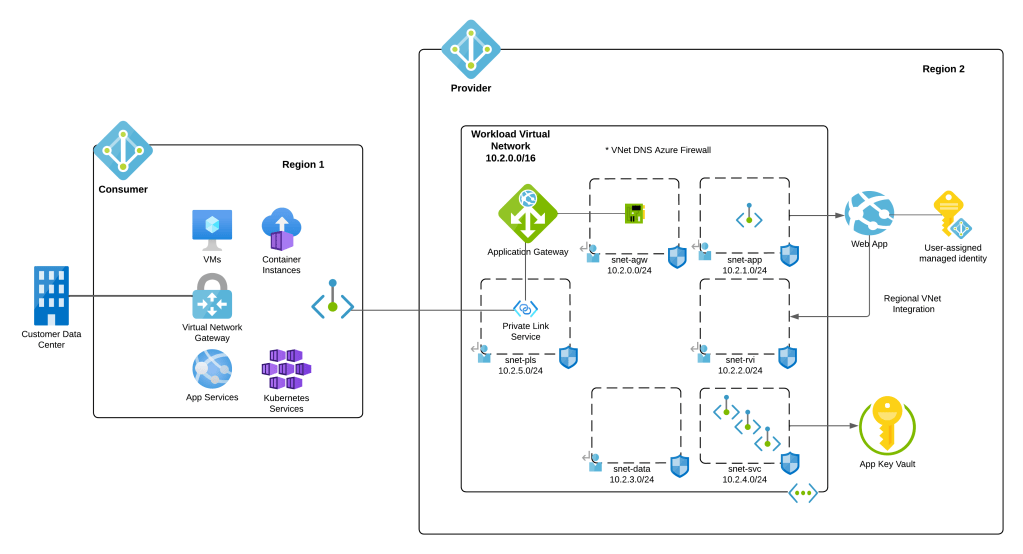
Imagine this application is serving up confidential data and you need to provide a partner organization with access. Your information security team does not want the partner accessing the application over the Internet due to the sensitivity of the information the partner will be accessing. While direct connectivity with the partner is an option, it would likely result in a significant amount of design to ensure the partner’s network only knows about the application IP space and appropriate firewall rules are in place to limit access to the Application Gateway endpoint. In this scenario, your organization will be the provider and the customer’s organization will be the consumer. I don’t know about you, but I’ve been in this situation a lot of times in my past. Back in the day (yeah I’m old, what of it?) you’d have to go the direct connectivity route and you’d spend months putting together a design and getting it approved by the powers that be. Let’s now look at how the new Private Link feature of Application Gateway can make this whole problem a lot easier to solve.

Assume this partner has a presence in Azure so we don’t have to get into the complexity of alternatives (such as building an isolated virtual network with VPN Gateway the partner connects to). The service could be exposed to the customer using the architecture below. Note that I’ve trimmed down the provider environment to show only the workload virtual network and illustrated a few compute services on the consumer end that are capable of accessing services exposed through Private Endpoints.

Goal State

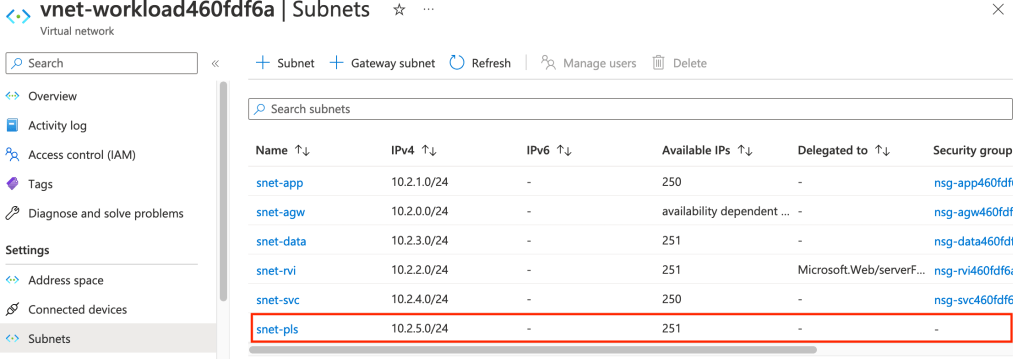
In the above image you will notice a new subnet in the provider’s virtual network. This subnet is used for the Private Link configuration. Traffic entering the provider environment will be NATed to an IP within this subnet. You can opt to use an existing subnet, but I’d recommend dedicating a subnet instead vs mixing it within the any of the application tier subnets.

There are considerations when sizing the subnet. Each IP allocated to the subnet can be used to service 64,000 connections and you can have up to eight IP addresses as of today allowing you to escape with a /28 (5 IP addresses reserved by Azure + 8 IPs for PrivateLink configuration). Just remember this is preview so that limit could be changed in the future. For the purposes of this post I used a /24 since I’m terrible at subnetting.

New subnet for Private Link Configuration

It’s time to create the Private Link configuration now that the subnet is in place. This can be done in all the usual ways (Portal, CLI, PowerShell, REST). When using the Portal you will need to navigate to the Application Gateway instance you’re using, select the Private Link menu item and select the option to add a new Private Link configuration.

Private Link Configuration Setup

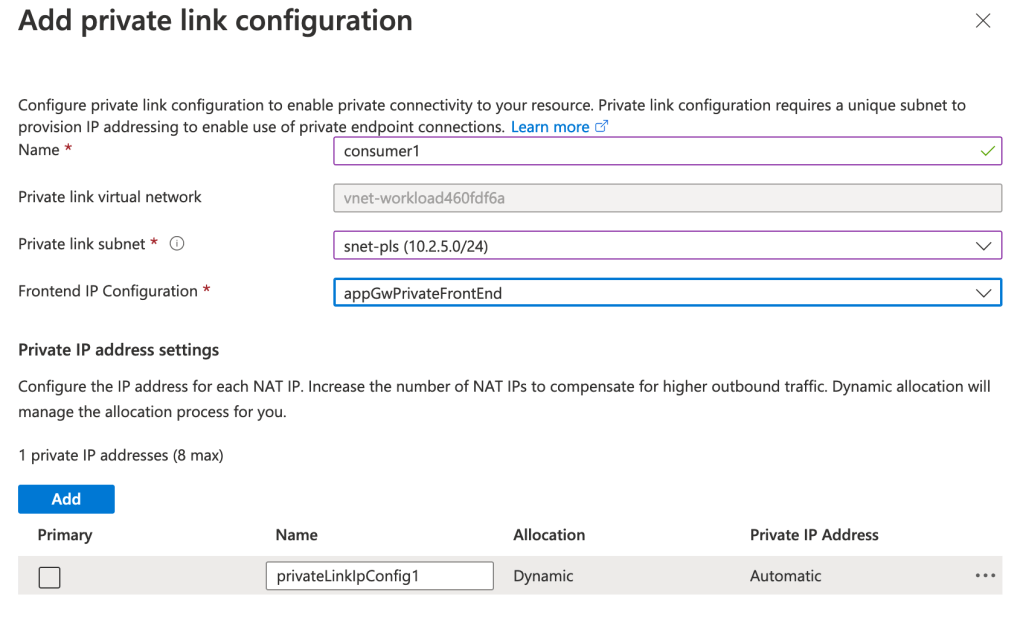
On the next screen you will need to select the subnet you’ll use for the Private Link configuration. You will also pick the listener you want to expose and determine the number of IPs you want to allocate to the service. Note that both the public and private listeners are available. If you’re exposing a service within your virtual network, you’ll likely be creating these with private listeners almost exclusively. A use case for a public listener might be a single client wants a more consistent network experience provided by their ExpressRoute or VPN connectivity into Azure vs going over the Internet.

Private Link configuration

Once completed, you can freely create Private Endpoints for your service within the same tenant. Within the same tenant, your Private Link service will be detected when creating a Private Endpoint as seen below. All that is left for you to do is create a DNS entry that matches the FQDN you are presenting within the certificates loaded on your Application Gateway. At this point you should be saying, “That’s all well and good Matt, but my use case is providing this to a consumer in a DIFFERENT tenant.” Let’s explore that scenario.

Creating Private Endpoint in same tenant

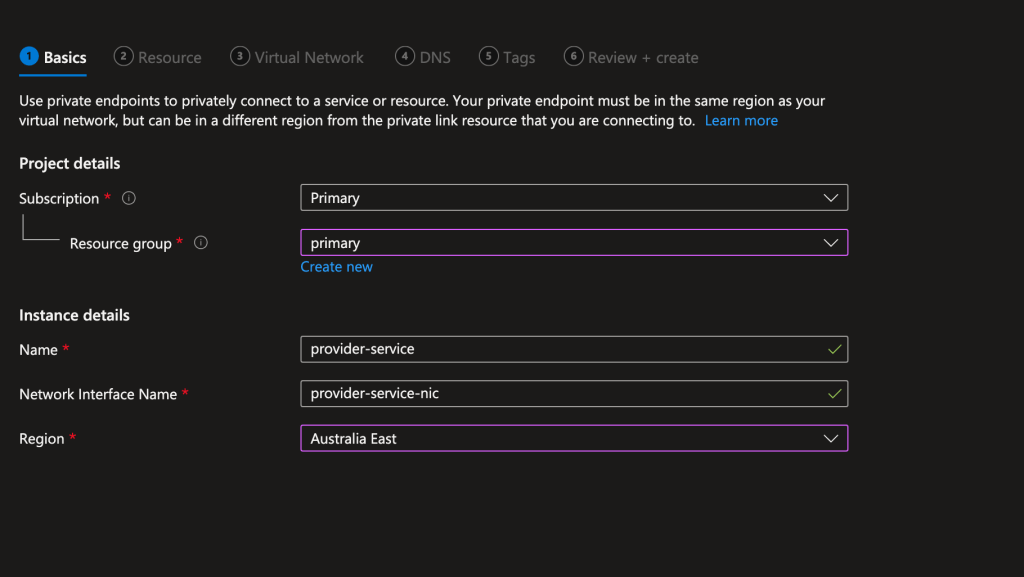
I switched to a subscription in a separate Azure AD tenant which would represent the consumer. In this tenant I created a virtual network with a single subnet with the IP space of 10.1.0.0/16 which overlaps with the provider’s network demonstrating that overlapping IP space doesn’t matter with Private Link. In that subnet I placed a VM running Ubuntu that I would use to SSH in. I created this resources in the Australia East region to demonstrate that the service exposed via Private Link can have Private Endpoints created for it in any other Azure region. Connections made through the Private Endpoint will ride the Azure backbone to the destined service.

Once the basics were in place for testing, I then created the Private Endpoint for the provider service within the consumer’s network. This can be done through the Private Link Center blade using the Private Endpoint menu item in the Azure Portal as seen below.

Creation of Private Endpoint

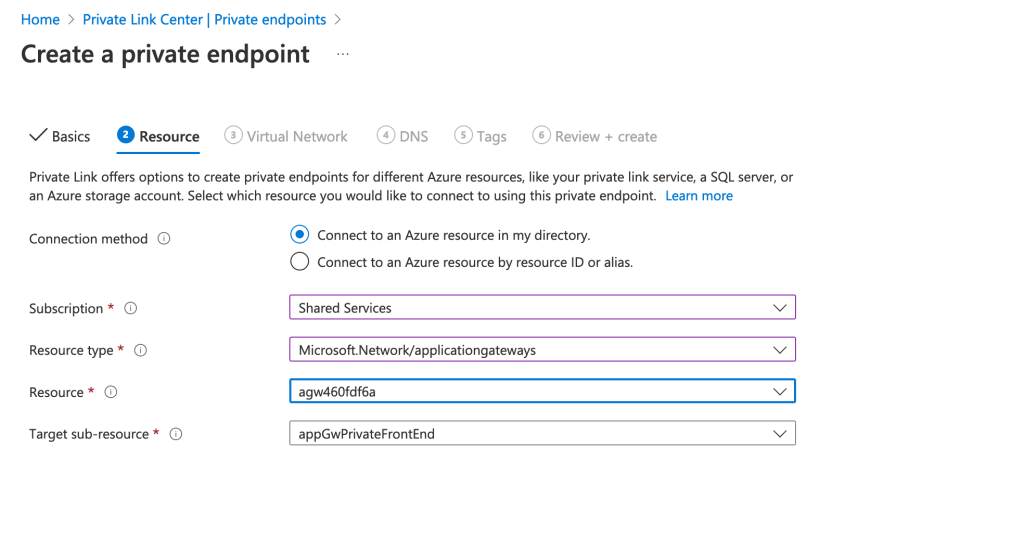
On the resource screen you will need to provide the resource id of the Application Gateway and the listener name. This is additional information you would need to pass to the consumer of any Application Gateway Private Link enabled service.

Private Endpoint Creation – Resource

Bouncing back to the provider tenant, I navigated back to the Application Gateway resource and the Private Link menu item under the Private endpoint connections section. Private Endpoint creation for Private Link services across tenant work via request and approval process. Here I was able to approve the association of the consumer’s Private Endpoint with the Private Link service in the provider tenant.

Approval of Private Endpoint association

Once approved, I bounced back to the consumer tenant and grabbed the IP address assigned to the Private Endpoint that was created. I then SSH’d into the Ubuntu VM and created a DNS entry in the host file of the VM for the service I was consuming. In this scenario, I had created a listener on the Application Gateway which handles all requests from *.jogcloud.com. Once the DNS record was created, I then used curl to issue a request to the application. Success!

Successful access of application from consumer

The application spits back the client IP and X-Forwarded-For header of the HTTP request. Ignore the client IP of 169.254.129.1, that is appearing due to the load balancer component of the App Service. Focus instead on the X-Forwarded-For. Notice that the first value in the header is the NATd IP from the subnet that was dedicated to the Private Link service. The next IP in line is the private IP address of the Azure Firewall instance. As I mentioned earlier, the Application Gateway is configured to send incoming traffic through the Azure Firewall instance for additional inspection before passing on to the App Service instance. The Azure Firewall is configured for NAT to ensure traffic symmetry in this scenario.

What I want you to take away from the above is that the Private Link service is NATing the traffic, so unless the consumer has a forward web proxy on the other end appending to the X-Forwarded-For header (or potentially other headers to aid with identification), troubleshooting a user’s connection will take careful correlation of requests across App Gateway, Azure Firewall, and the underlining application logs. In the below image, you can see I used curl to add a value to the X-Forwarded-For header which was carried on through the request.

Request with X-Forwarded-For value added by consumer

What I love about this integration is it’s very simple to setup and it allows a whole bunch of additional security controls to be introduced into the flow such as the Application Gateway WAF or a firewall’s IDS/IPS features.

Here are some key takeaways for you to ponder on over this holiday break:

  • For HTTP/HTTPS traffic, the Application Gateway Private Link pattern allows for the introduction of additional security controls into the network flow beyond what you’d get with a Private Link service fronted by an Azure Standard Load Balancer
  • Setup for the consumer is very simple. All you need to do is provide them with the resource id of the application gateway and the listener name. They can then use the native Private Endpoint creation experience to setup access to your service.
  • Don’t forget the importance of ensuring the customer trusts the certificate the Application Gateway is providing and can reach applicable CRL/OCSP endpoints if you’re using them. Best bet is to use a trusted 3rd party certificate authority.
  • DNS DNS DNS. The customer will need to manage the relevant DNS records on their end. You will want to ensure they know which FQDNs you are including within your certificate so the records they create match those FQDNs. If there is a mismatch, any secure session setup will fail.

With that said, feel free to give the feature a try. You can use the lab I’ve posted on GitHub and the steps I’ve outlined in this blog to experiment with the service yourself.

Have a happy holiday!