Microsoft Foundry – The Evolution (Revisited)

Microsoft Foundry – The Evolution (Revisited)

Hi folks! In the past I did a series on the Azure OpenAI Service and Microsoft Foundry Hubs (FKA AI Foundry Hubs FKA AI Studio). Instead of going through and updating all those posts and losing the historical content and context (I don’t know about you, but I love have the historical context of a service) I’m instead going to preserve it as is and spin up a new series on the latest iteration of Microsoft Foundry. I’ll likely keep much of the general framework of the older series because it seemed to work. One additional piece I’ll be included in this series is some of the quirks of the service I’ve run into to potentially save you pain from having to troubleshoot it. For this first post, I’m going to start this off explaining how the service has involved. As always, my persona focus here is my fellow folks in the central IT and infrastructure space.

The history

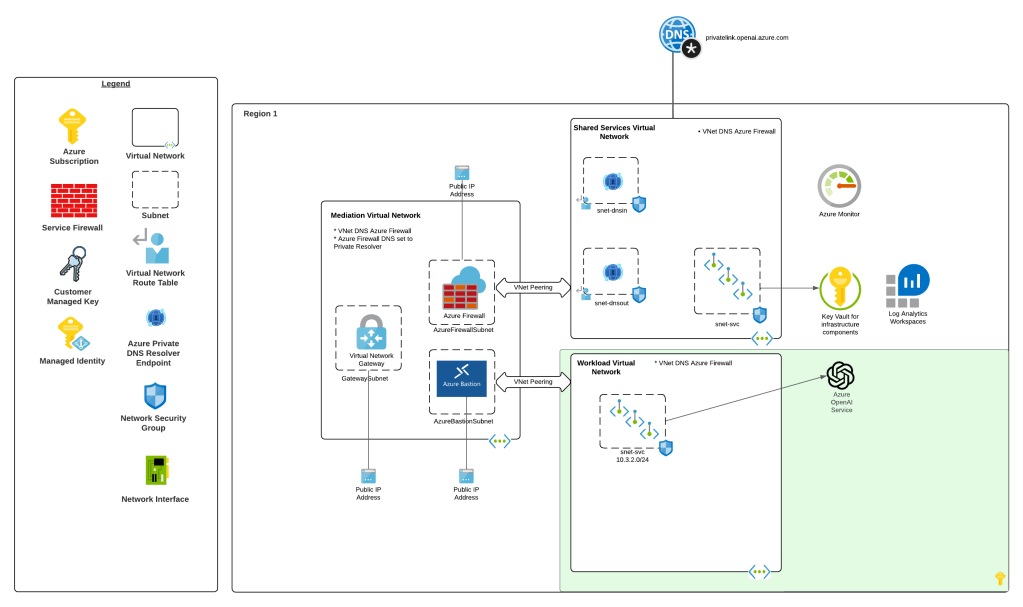
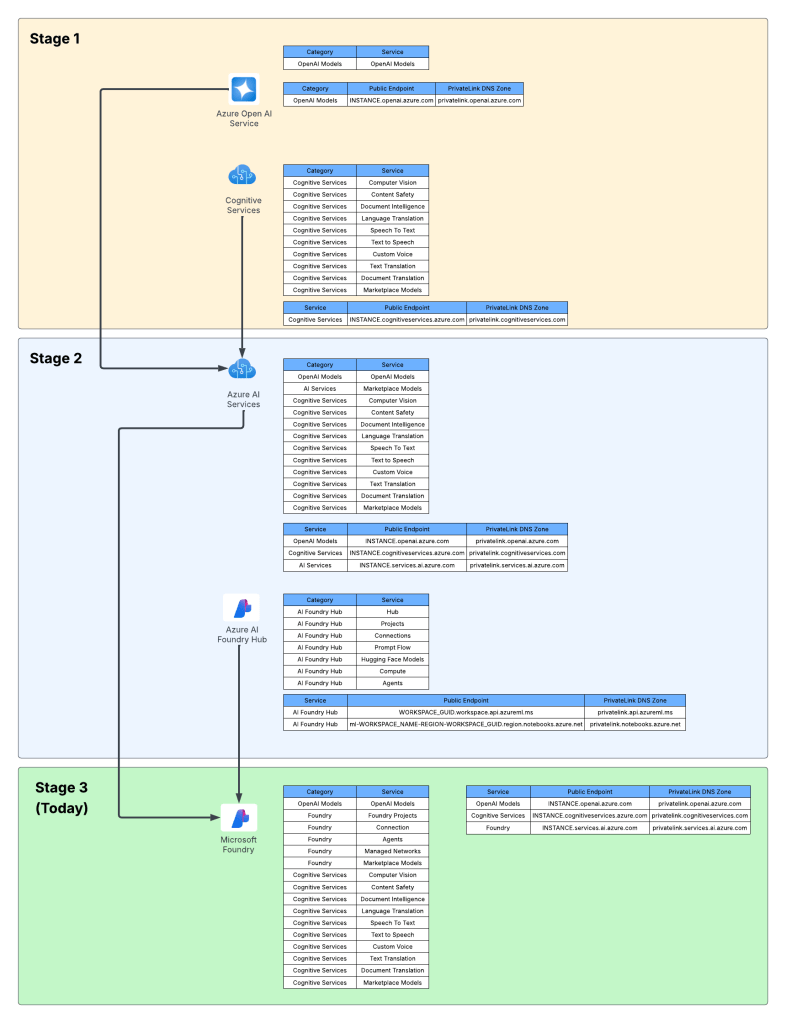
Way back in 2023 the hype behind generative AI really started go insane. Microsoft managed to negotiate rights to host OpenAI’s models in Azure and introduced the Azure OpenAI Service. The demand across customers was insane where every business unit (BU) wanted it yesterday. Microsoft initially offered the service within the Cognitive Services framework under the Cognitive Services resource provider. This mean it inherited many of the controls native to Cognitive Services which included Private Endpoints, a limited set of outbound controls, support for API key and Entra ID authentication, and support for Azure RBAC for authorization. Getting the deployed was pretty straightforward with the hold-ups to deployment being more concerns about LLM security in general. Deployment typically looked like the architecture below.

Azure OpenAI Service

As folks started to build their AI applications, they tapped into other services under the Cognitive Services umbrella like Content Safety, Speech-to-Text, and the like. These services fit in nicely as they also fell under the Cognitive Services umbrella and had a similar architecture as the above, requiring deployment of the resource and the typical private endpoint and authentication/authorization (authN/authZ) configuration.

I like to think of this as stage 1 of the Microsoft’s AI offerings.

Microsoft then wanted to offer more models, including models they have built such and Phi and third-party models such as Mistral. This drove them to create a new resource called an AI Service resource. This resource fell under the Cognitive Services resource provider, and again inherited similar architectures as above. Beyond hosting third-party models, it also included and endpoint to consume OpenAI models and some of the pool of Cognitive Services. This is where we begin to see the collapse of Microsoft’s AI Services under a single top-level resource.

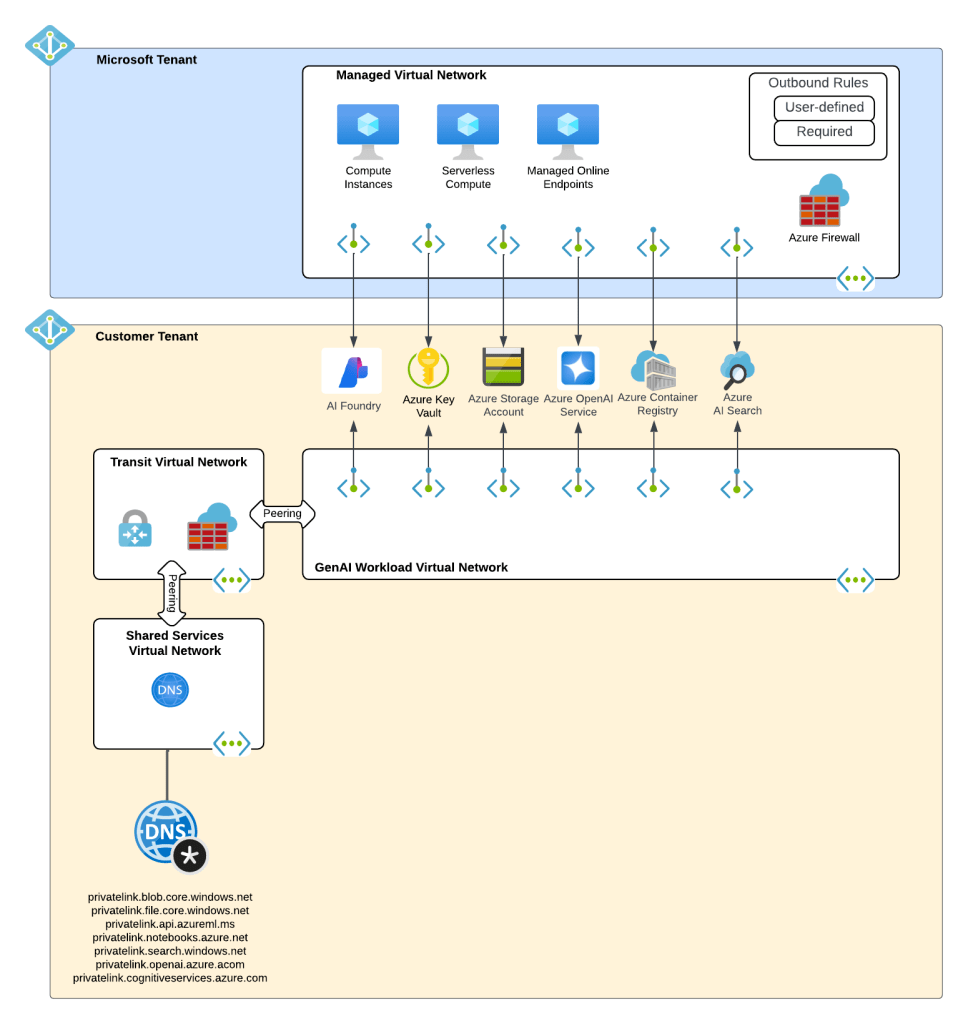
What about building AI apps though? This is where Foundry Hubs (FKA AI Studio) were introduced. The intent of Foundry Hubs were to be the one stop shop for developers to create their AI Apps. Here developers could experiment with LLMs using the playgrounds, build AI apps with Prompt Flow, build agents, or deploy 3rd party LLMs for Hugging Face. Foundry Hubs were a light overlay on top of the Azure Machine Learning (AML) service utilizing a new feature of AML built specifically for Foundry called AML Hubs. Foundry Hubs inherited a number of capabilities of AML such as its managed compute (to host 3rd party models and run prompt flows) and its managed virtual network (to host the managed compute).

Microsoft Foundry Hubs

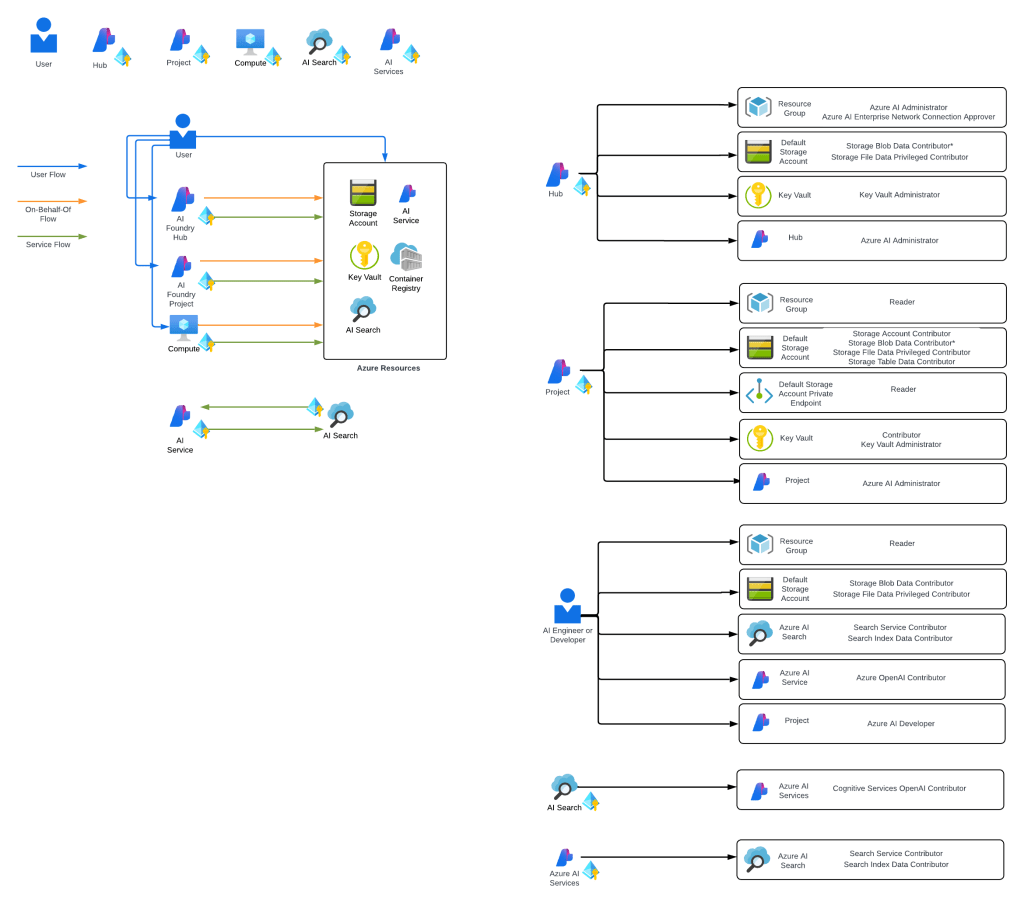
While this worked, anyone who has built a secure AML deployment knows that shit ain’t easy. Getting the service working requires extensive knowledge of how its identity and networking configuration. This was a pain point for many customers in my experience. Many struggled to get it up and running due to the complexity.

Example of complexity of Microsoft Foundry IAM model

I think of the combination of AI Services and Microsoft Foundry Hubs as stage 2 of Microsoft’s journey.

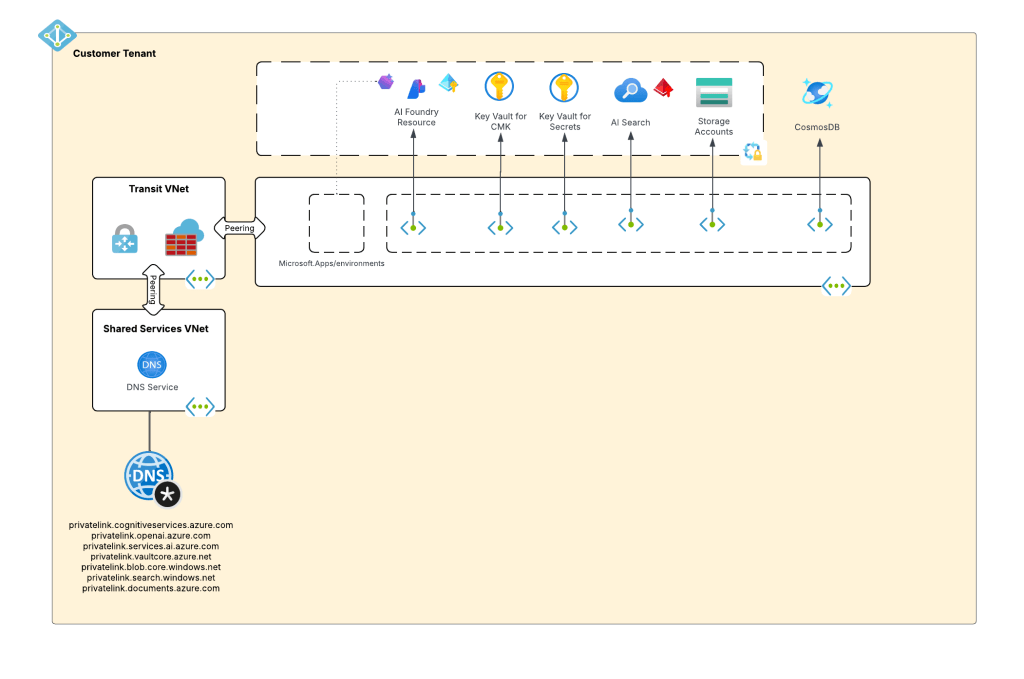
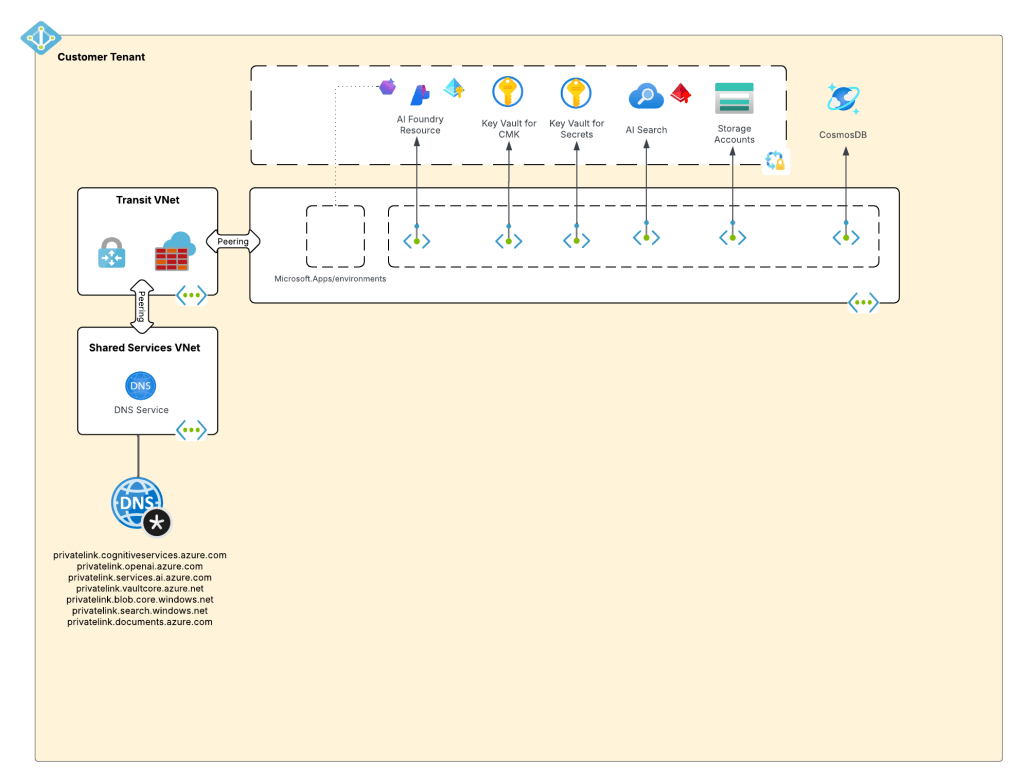
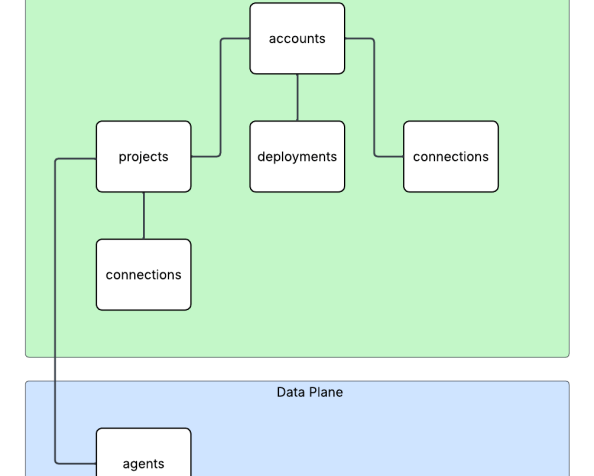
Ok, shit was complicated, I ain’t gonna lie. Given this complexity and feedback from the customers, Microsoft got ambitious and decided to further consolidate and simplify. This introduced the concept of a new top-level resource called Microsoft Foundry Accounts. In public documentation and conversation this may be referred to as Foundry Projects or Foundry Resources. Since this is my blog I’m going to use my term which is Microsoft Foundry Accounts. With Microsoft Foundry accounts, Microsoft collapsed the AI Services and Foundry Hubs into a single top level resource. Not only did they consolidate these two resources, they also shifted Foundry Hubs from the Azure Machine Learning resource provider into the Cognitive Services resource provider. This move consolidated the Cognitive Services resource provider as the “AI” resource provider in my brain. It resulted in a new architecture which often looks something like the below.

Microsoft Foundry Accounts common architecture

This is what I like to refer to as stage 3, which is the current stage we are in with Microsoft’s AI offerings. We will continue to see this stage evolve which more features build and integrated into the Microsoft Foundry Account. I wouldn’t be surprised at all to see other services collapse into it as just another endpoint to a the singular resource.

Why do you care?

You might be asking, “Matt, why the hell do I care about this?” The reason you should care is because there are many customers who jumped into these products at different stages. I run across a ton of customers still playing in Foundry Hubs with only a vague understanding that Foundry Hubs are an earlier stage and they should begin transitioning to stage 3. This evolution is also helpful to understand because it gives an idea of the direction Microsoft is taking its generative AI services, which is key to how you should be planning you future of these services within Azure.

I’ll dive into far more detail in future posts about stage 3. I’ll share some of my learnings (and my many pains), some reference architectures that I’ve seen work, how I’ve seen customers successfully secure and scale usage of Foundry Accounts.

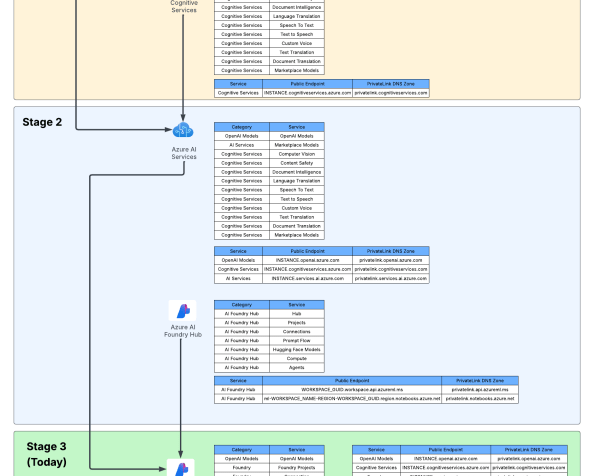
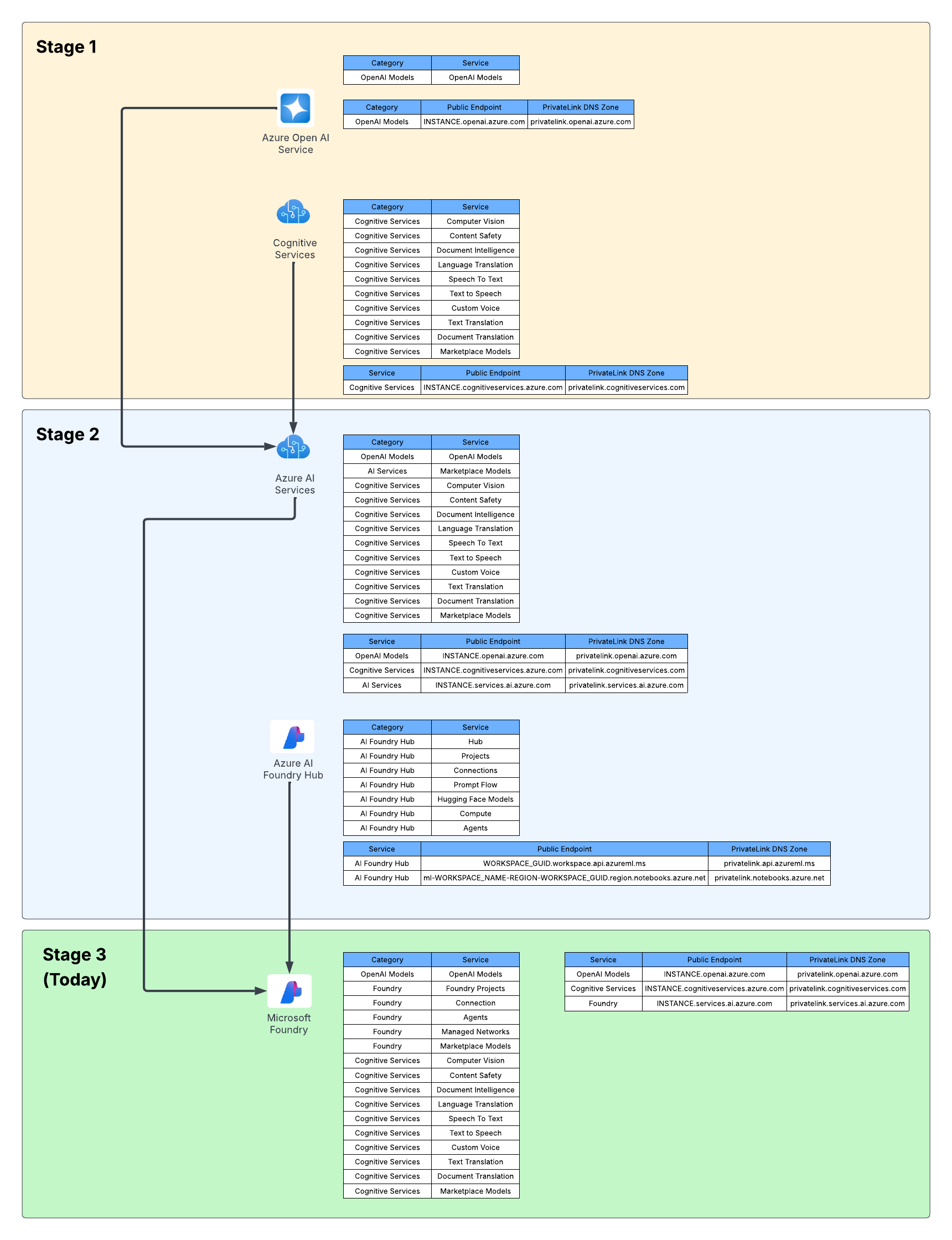
For now, I leave you with this evolution diagram I like to share with customers. For me, it really helps land the stages and the evolution, what is old and what is new, and what services I need to think about focusing on and which I should think about migrating off of.

Foundry evolution

Well folks, that wraps it up. Your takeaways today are:

  1. Assess which stage your implementation of generative AI is right now in Azure.
  2. Begin plans to migrate to stage 3 if you haven’t already. Know that there will be gaps in functionality with Foundry Hubs and Foundry Accounts. A good example is no more prompt flow. There are others, but many will eventually land in Foundry project.

See you next post!

Network Security Perimeters – NSPs for Troubleshooting

Network Security Perimeters – NSPs for Troubleshooting

This is part of my series on Network Security Perimeters:

  1. Network Security Perimeters – The Problem They Solve
  2. Network Security Perimeters – NSP Components
  3. Network Security Perimeters – NSPs in Action – Key Vault Example
  4. Network Security Perimeters – NSPs in Action – AI Workload Example
  5. Network Security Perimeters – NSPs for Troubleshooting

Hello folks! The past 3 months have been completely INSANE with customer work, building demos, experimentation and learning. It’s been awesome, but goddamn has it been grueling. I’m back to finally close out my series on Network Security Perimeters. In my past posts I’ve covered NSPs from an conceptional level, the components that make them up, and two separate examples. Today I’m going to cover my favorite use case for NSPs, and this is using them for troubleshooting.

The Setup

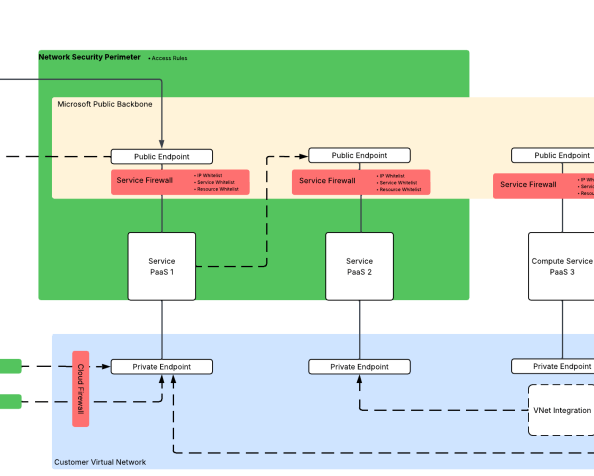
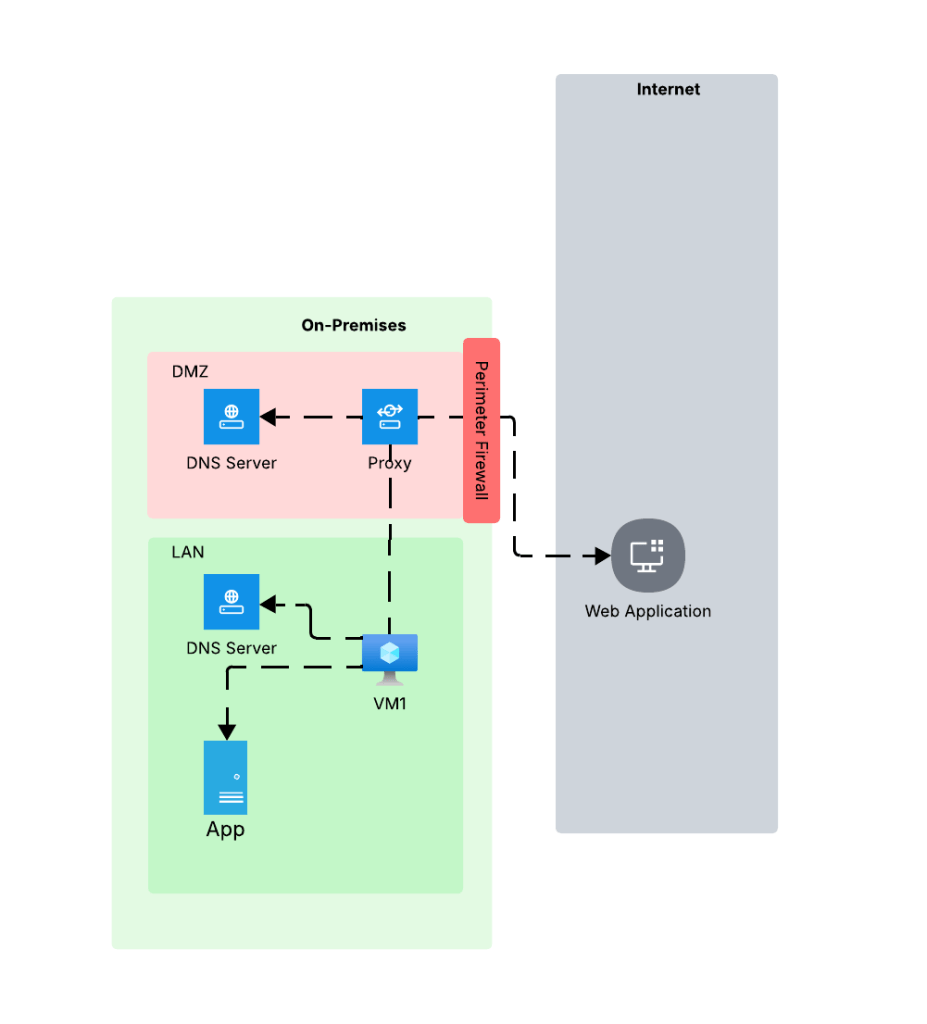
At a very high level most enterprises have an architecture similar what you see below. In this architecture network boundaries are setup around endpoints and services. These boundaries are erected to separate hardware and services based on the data stored in that environment, the security controls enforced in that environment, whether that environment has devices connected to the Internet, what type of trust level the humans and non-humans running in those environments have, and other similar variables. For the purposes of this post, we’re gonna keep it simple and stick to LAN (trusted) and DMZ (untrusted). DMZ is where devices connected to the Internet live and LAN is where devices restricted to the private network live.

Very basic network architecture

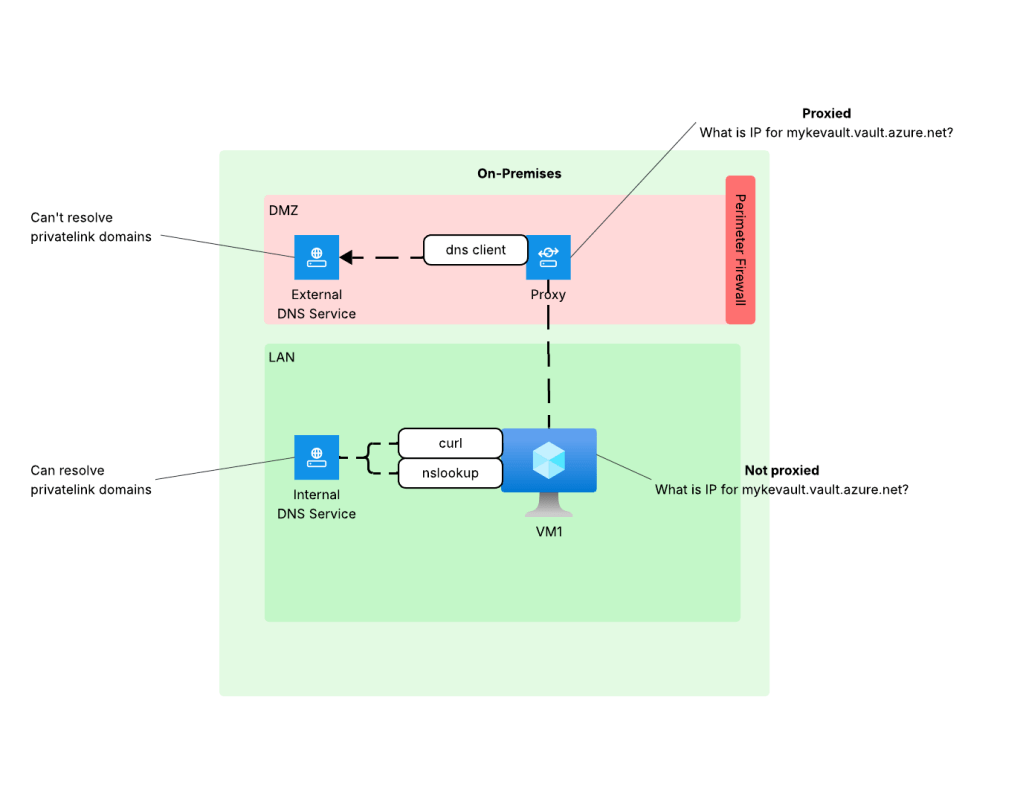
Environments like these typically restrict access to the Internet through a firewall or appliance/service that is performing a forward web proxy function. This allows enterprises to control what traffic leaves their private network through traditional layer 5-tuple means, deep packet inspection to inspect and control traffic at layer 7, and control access to specific websites based on the user or endpoint identity. Within the LAN there is typically a private DNS service that provides name resolution for internal domains. The DMZ has either separate dedicated DNS infrastructure for DNS caching and limited conditional fowarding or it utilizes some third-party hosted DNS service like a CloudFlare. The key takeaway from the DNS resolution piece is the machines within the LAN and DMZ use different DNS services and typically the DMZ is limited or completely incapable of resolving domains hosted on the internal DNS servers.

You’re likely thinking, “Cool Matt, thanks for the cloud 101. WTF is your point?” The place where this type of setup really bites customers is when consuming Private Endpoints. I can’t tell you how many times over the years I’ve been asked to help a customer struggling with Private Endpoints only to find out the problem is DNS related to this infrastructure. The solution is typically a simple proxy bypass, but getting to that resolution often takes hours of troubleshooting. I’m going to show you how NSPs can make troubleshooting this problem way easier.

The Problem

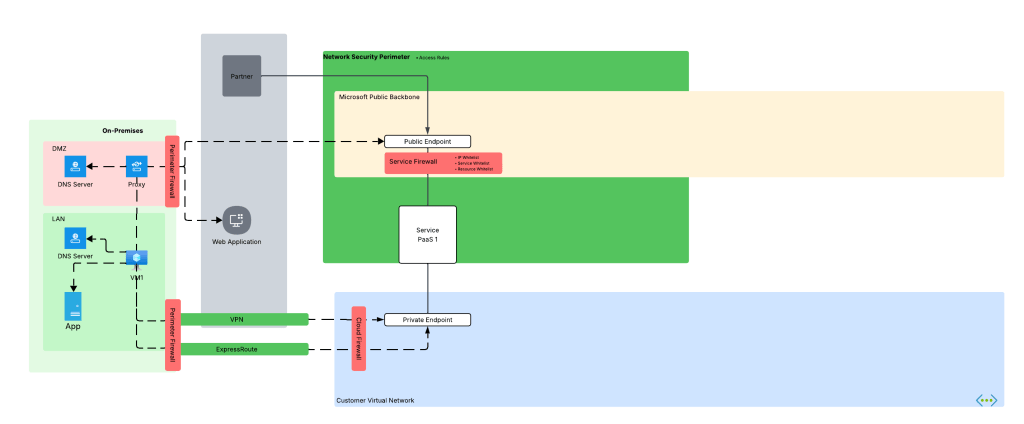
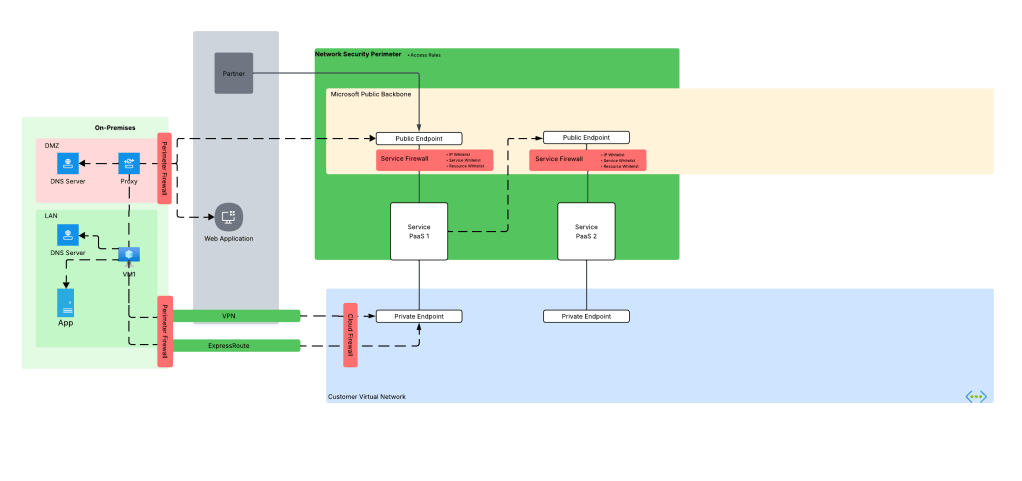
Before we dive into the NSP piece, let’s look at how the problem described above manifests. Take an organization that uses a high level architecture to integrate with Azure such as pictured below.

Same architecture as above but now with Azure connectivity

Here we have an organization that has connectivity with Azure configure through both an ExpressRoute with S2S VPN as fallback (I hate this fallback method, but that’s a blog for another day). In the ideal world, VM1 hits Service PaaS 1 on that Private Endpoint with the traffic being sent through the VPN or ExpressRoute connection. To do that, the DNS server in the LAN must properly resolve to the private IP address of the Private Endpoint deployed for Service PaaS 1 (check out my series on DNS if you’re unfamiliar with how that works). Let’s assume the enterprise has properly configured DNS so VM1 resolves to the correct IP address.

Now it’s Monday morning and you are the team that manages Azure. You get a call from a user complaining they can’t connect to the Private Endpoint for their Azure Storage account for blob access and gives you the typical “Azure is broken!”. You hop on a call with the user and ask the user to do some nslookups from their endpoint which return the correct private IP address. You even have the user run a curl against the FQDN and still you get back the correct IP address.

This is typically the scenario that at some point gets escalated beyond support and someone from the account team says, “Hey Matt, can you look at this?” I’ll hop on a call, get a lowdown of what the customer is doing, double-check what the customer checked, maybe take a glance at routing and Network Security Groups and then jump to what is almost always the problem in these scenarios. The next question out of my mouth is, “Do you have a proxy?”

So why does this matter? This question is important whenever we consider HTTP/HTTPS traffic because it is almost always sent through through an appliance or service that is performing the architectural function of a forward web proxy before it egresses to the Internet as I covered earlier. This could be a service hosted within the organization’s boundry or it could be a third-party service like a ZScaler. Where it’s hosted isn’t super important (but can play a role in DNS), the key thing to understand is the enterprise using one and is the application being used to access the Azure PaaS service using it.

When HTTP/HTTPS traffic is configured to be proxied, the connection from the endpoint is made to the proxy service. The proxy service examines the endpoint’s request, executes any controls configured, and initiates a connection to the outbound service. This last piece is what we care about because to make a connection, the proxy service needs to do its own DNS query which means it will use the DNS server configured in the proxy. This is typically the problem because as I covered earlier, this DNS service doesn’t typically have resolution to internal domains, which would include resolution to the privatelink domains used by Azure PaaS services.

DNS resolution when using proxy

When you did curl (without specifying proxy settings) or nslookup the machine was hitting the internal DNS service which does have the ability to resolve privatelink domains giving you the false sense that everything looks good from a DNS perspective. The resolution to this problem is to work with the proxy team to put in the appropriate proxy bypass so the endpoint will connect directly to the Azure PaaS (thus using its own DNS service).

All of this sounds simple, right? The reality is getting to the point of identifying the issue was the proxy tends to take hours, if not days, and tons of people from a wide array of teams across the enterprise. This means a lot of money spent diagnosing and resolving the issue.

What if there was an easier way? In comes NSPs.

NSPs to the rescue!

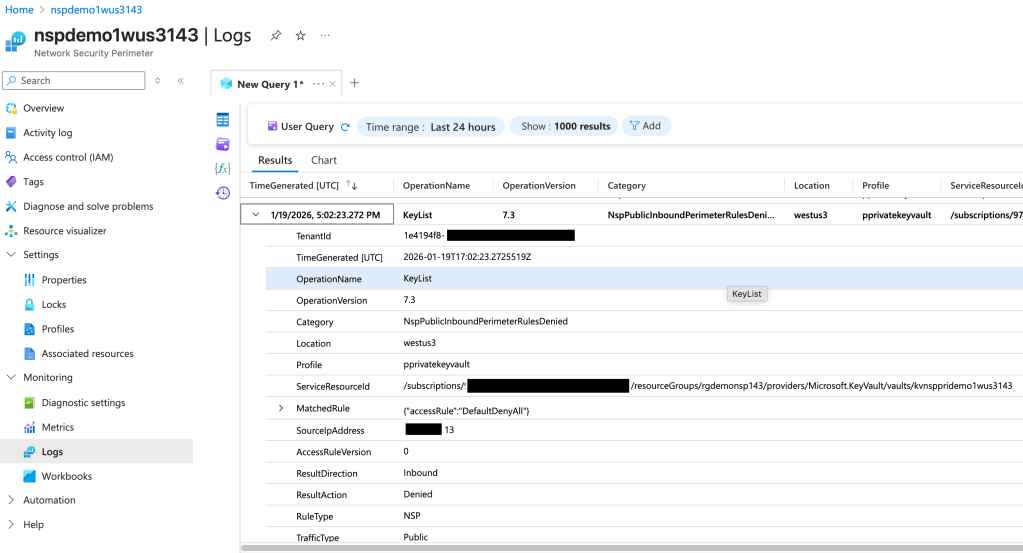
If you were a good Azure citizen, you would have wrapped this service in an NSP (assuming that service has been onboarded by Microsoft to NSPs) and turned on logging as I covered in my prior posts. If you had done that, you could have leveraged the NSP logs (the NSPAccessLogs table) to identify incoming traffic being blocked by the NSP. Below is an example of what the log entry looks like.

NSP Log Sample

In the above log entry I get detail as to the operation the user attempted to perform (in this instance listing the Keys in a Key Vault), the effect of the NSP (traffic is denied), and the category of traffic (Public). If we go back to the troubleshooting steps from earlier, I may have been able to identify this problem WAY earlier and with far less people involved even if the Azure resource platform logs obfuscated the full IP address or didn’t list it at all. I can’t stress the value this presents, especially having a standardized log format. The amount of hours my customers could have saved by enabling and using these logs makes me sad.

Even more uses!

Beyond troubleshooting the proxy problem, there are any scenarios where this comes in super handy. Another such example is PaaS to PaaS traffic. Often times the documentation around when a PaaS talks to another PaaS is not clear. It may not be obvious that one PaaS is trying to communicate with another over the Microsoft public backbone. This is another area NSPs can help because this traffic can also be logged and used for troubleshooting

Troubleshooting PaaS to PaaS

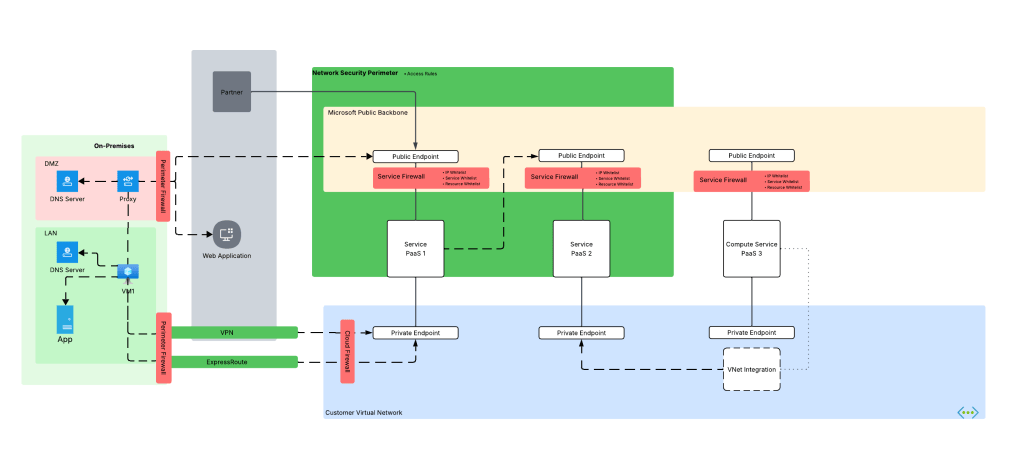
We’re not done yet! Some Azure compute services can integrate into a customer virtual network using a combination of Private Endpoints for inbound traffic and regional VNet integration for outbound access (traffic initiated by the PaaS and destined for customer endpoints or endpoints in the public IP space). A good example is Azure App Services or the new API Management v2 SKUs. Often times, I’ll work with customers who think they enabled this correctly but only actually enabled Private Endpoints and missed configuring regional Vnet integration causing outbound traffic to leave the Microsoft public backbone and hit the PaaS over public IPs or misconfigured DNS for the virtual network the PaaS service has been integrated with. NSP logs can help here as well.

NSPs helping to diagnose regional VNet integration issues

Summing it up

Here are the key takeways for you for this post:

  1. Enable NSPs wherever they are supported. If you’re not comfortable enforcing them, at least turn them on for the logging.
  2. Don’t forget NSPs capture both the inbound AND outbound traffic. You’d be amazed how many Azure PaaS services (service based) can make outbound network calls that you probably aren’t tracking or controlling.
  3. Like platform logs, NSP logs are not simply a security tool. Don’t lock them away from operations behind a SIEM. Make them available to both security and operations so everyone can benefit.
  4. Remember that enforcing NSPs WILL block the associated resources from delivering their logs to a Log Analytics Workspace, Storage Account, or Event Hub. If you’re using a centralized Log Analytics Workspace model, you’ll want to leave your NSPs in transition mode for now.

NSPs are more than just a tool to block and get visibility into incoming and outbound traffic for security purposes, but also an important tool in your toolbox to help with day-to-day operational headaches. If you’re not using NSPs for supported services today, you should be. There is absolutely zero reason not to do it, and your late night troubleshooting sessions will only consume 1 Mountain Dew vs 10!

That’s it for me. Off to snowblow!

Network Security Perimeters – NSPs in Action – AI Workload Example

Network Security Perimeters – NSPs in Action – AI Workload Example

This is part of my series on Network Security Perimeters:

  1. Network Security Perimeters – The Problem They Solve
  2. Network Security Perimeters – NSP Components
  3. Network Security Perimeters – NSPs in Action – Key Vault Example
  4. Network Security Perimeters – NSPs in Action – AI Workload Example
  5. Network Security Perimeters – NSPs for Troubleshooting

UPDATE 2/23/2026 – NSP support for Microsoft Foundry resources is generally available!

Hello again! Today I’ll be covering another NSP (Network Security Perimeters) use case, this time focused on AI (gotta drive traffic, am I right?). This will be the fourth entry in my NSP series. If you haven’t read at least the first and second post, you’ll want to do that before jumping into this one because, unlike my essays back in college, I won’t be padding the page count by repeating myself. Let’s get to it!

Use Case Background

Over the past year I’ve worked with peers helping a number of customers get a quick and simple RAG (retrieval augmented generation) workload into PoC (proof-of-concept). The goal of these PoCs were often to validate that the LLMs (large language models) could provide some level of business value when supplementing them with corporate data through a RAG-based pattern. Common use cases included things like building a chatbot for support staff which was supplemented with support’s KB (knowledge base) or chatbot for a company’s GRC (governance risk and compliance) team which was supplemented with corporate security policies and controls. You get the gist of it.

In the Azure realm this pattern is often accomplished using three core services. These services include the Azure OpenAI Service (now more typically AI Foundry), AI Search, and Azure Storage. In this pattern AI Search acts as the as the search index and optional vector database, Azure Storage stores the data in blob storage before it’s chunked and placed inside AI Search, and Azure OpenAI or AI Foundry hosts the LLM. Usage of this pattern requires the data be chunked (think chopped up into smaller parts before it’s stored as a record in a database while still maintaining the important context of the data). There are many options for chunking which are far beyond the scope of this post (and can be better explained by much smarter people), but in Azure there are three services (that I’m aware of anyway) that can help with chunking vs doing it manually. These include:

  1. Azure AI Document Intelligence’s layout model and chunking features
  2. Azure OpenAI / AI Foundry’s chat with your data
  3. Azure AI Search’s skillsets and built-in vectorization

Of these three options, the most simple (and point and click) options are options 2 and 3. Since many of these customers had limited Azure experience and very limited time, these options tended to serve for initial PoCs that then graduated to more complex chunking strategies such as the use of option 1.

The customer base that was asking for these PoCs fell into one or more of the these categories:

  1. Limited staff, resources, and time
  2. Limited Azure knowledge
  3. Limited Azure presence (no hybrid connectivity, no DNS infrastructure setup for support of Private Endpoints

All of these customers had minimum set of security requirements that included basic network security controls.

RAG prior to NSPs

While there are a few different ways to plumb these services together, these PoCs would typically have the services establish network flows as pictured below. There are variations to this pattern where the consumer may be going through some basic ChatBot app, but in many cases consumers would interact direct with the Azure OpenAI / AI Foundry Chat Playground (again, quick and dirty).

Network flows with minimalist RAG pattern

As you can see above, there is a lot of talk between the PaaS. Let’s tackle that before we get into human access. PaaS communication almost exclusively happens through the Microsoft public backbone (some services have special features as I’ll talk about in a minute). This means control of that inbound traffic is going to be done through the PaaS service firewall and trusted Azure service exception for Azure OpenAI / AI Foundry, AI Search, and Azure Storage (optionally using resource exception for storage). If you’re using the AI Search Standard or above SKU you get access to the Shared Private Access feature which allows you to inject a managed Private Endpoint (this is a Private Endpoint that gets provisioned into a Microsoft-managed virtual network allowing connectivity to a resource in your subscription) into a Microsoft-managed virtual network where AI Search compute runs giving it the ability to reach the resource using a Private Endpoint. While cool, this is more cost and complexity.

Outbound access controls are limited in this pattern. There are some data exfiltration controls that can be used for Azure OpenAI / AI Foundry which are inherited from the Cognitive Services framework which I describe in detail in this post. AI Search and Azure Storage don’t provide any native outbound network controls that I’m aware of. This lack of outbound network controls was a sore point for customers in these patterns.

For inbound network flows from human actors (or potentially non-human if there is an app between the consumer and the Azure OpenAI / AI Foundry service) you were limited to the service firewall’s IP whitelist feature. Typically, you would whitelist the IP addresses of forward web proxy in use by the company or another IP address where company traffic would egress to the Internet.

RAG design network controls prior to NSPs

Did this work? Yeah it did, but oh boy, it was never simple to approved by organizational security teams. While IP whitelisting is pretty straightforward to explain to a new-to-Azure customer, the same can’t be said for the trusted services exception, shared private access, and resource exceptions. The lack of outbound network controls for AI Search and Storage went over like a lead balloon every single time. Lastly, the lack of consistent log schema and sometimes subpar network-based logging (I’m looking at you AI Search) and complete lack of outbound network traffic logs made the conversations even more difficult.

Could NSPs make this easier? Most definitely!

RAG with NSPs

NSPs remove every single one of the pain points described above. With an NSP you get:

  1. One tool for controlling both inbound and outbound network controls (kinda)
  2. Standardized log schema for network flows
  3. Logging of outbound network calls

We go from the mess above to the much more simple design pictured below.

The design using NSPs

In this new design we create a Network Security Perimeter with a single profile. In this profile there is an access rule which allows customer egress IP addresses for human users or non-human (in case users interact with an app which interacts with LLM). Each resource is associated to that profile within the NSP which allows non-human traffic between PaaS services since it’s all within the same NSP. No additional rules are required which prevents the PaaS services from accepting or initiating any network flows outside of what the access rules and communication with each other within the NSP.

In this design you control your inbound IP access with a single access rule and you get a standard manner to manage outbound access. No more worries about whether the product group baked in an outbound network control, every service in the NSP gets one. Logging? Hell yeah we got your logging for both inbound and outbound in a standard schema.

Once it’s setup you get you can monitor both inbound and outbound network calls using the NSPAccessLogs. It’s a great way to understand under the hood how these patterns work because the NSP logs surface the source resource, destination resource, and the operation being performed as seen below.

NSP logs surfacing operations

One thing to note, at least in East US 2 where I did my testing, outbound calls that are actually allowed since all resources are within the NSP falsley record as hitting the DenyAll rule. Looking back at my notes, this has been an issue since back in March 2025 so maybe that’s just the way it records or the issue hasn’t yet been remediated.

The other thing to note is when I initially set this all up I got an error in both AI Foundry’s chunking/loading method and AI Search’s. The error complains that an additional header of xms_az_nwperimid was passed and the consuming app wouldn’t allow it. Oddly enough, a second attempt didn’t hit the same error. If you run into this error, try again and open a support ticket so whatever feature on the backend is throwing that error can be cleaned up.

Summing it up

So yeah… NSPs make PaaS to PaaS flows like this way easier for all customers. It especially makes implementing basic network security controls far more simple for customers new to Azure that may not have a mature platform landing zone sitting around.

Here are your takeaways for today:

  1. NSPs give you standard inbound/outbound network controls for PaaS and standardized log schema.
  2. NSPs are especially beneficial to new customers who need to execute quickly with basic network security controls.
  3. Take note as of the date of this blog Azure OpenAI Service support for NSPs in public preview. You will need to enable the preview flag on the subscription before you go mucking with it in a POC environment. Do not use it in production until it’s generally available. Instructions are in the link.
  4. I did basic testing for this post testing ingestion, searching, and submitting prompts that reference the extra data source property. Ensure you do your own more robust testing before you go counting on this working for every one of your scenarios.
  5. If you want to muck around with it yourself, you can use the code in this repo to deploy a similar lab as I’ve built above. Remember to enable the preview flag and wait a good day before attempting to deploy the code.

Well folks, that wraps up this post. In my final post on NSPs, I’ll cover a use case for NSPs to help assist with troubleshooting common connectivity issues.

Thanks!

Network Security Perimeters – NSPs in Action – Key Vault Example

This is part of my series on Network Security Perimeters:

  1. Network Security Perimeters – The Problem They Solve
  2. Network Security Perimeters – NSP Components
  3. Network Security Perimeters – NSPs in Action – Key Vault Example
  4. Network Security Perimeters – NSPs in Action – AI Workload Example
  5. Network Security Perimeters – NSPs for Troubleshooting

Welcome back to my third post in my NSP (Network Security Perimeter) series. In this post I’m going to start covering some practical use cases for NSPs and demonstrating how they work. I was going to group these use cases in a single post, but it would have been insanely long (and I’m lazy). Instead, I’ll be covering one per post. These use cases are likely scenarios you’ve run into and do a good job demonstrating the actual functionality.

A Quick Review

In my first post I broke PaaS services into compute-based PaaS and service-based PaaS. NSPs are focused on solving problems for service-based PaaS. These problems include a lack of outbound network controls to mitigate data exfiltration, inconsistent offerings for inbound network controls across PaaS services, scalability with inbound IP whitelisting, difficulty configuring and managing these controls at scale, and inconsistent quality of logs across services for simple fields you’d expect in a log like calling inbound IP address.

Compute-based PaaS vs Service-based PaaS

My second post walked through the components that make up a Network Security Perimeter and their relationships to each other. I walked through each of the key components including the Network Security Perimeter, profiles, access policies, and resource associations. If you haven’t read that post, you need to read it before you tackle this one. My focus in this post will be where those resources are used and will assume you grasp their function and relationships.

Network Security Perimeter components and their relationships

With that refresher out of the way, let’s get to the good stuff.

Use Case 1: Securing Azure Key Vaults

Azure Key Vault is Microsoft’s native PaaS offering for secure key, secret, and certificate storage. Secrets sometimes need to be accessed by Microsoft SaaS (software-as-a-service) and compute-based PaaS that do not support virtual network injection or a managed virtual network concept, such as some use cases for PowerBI. Vaults are used by 3rd-party products outside of Azure or from another CSP (cloud service provider). There are also use cases where a customer may be new to Azure and doesn’t yet have the necessary hybrid connectivity and Private DNS configuration to support the usage of Private Endpoints. In these scenarios, Private Endpoints are not an option and the traffic needs to come in the public endpoint of the vault. Here is our use case for NSPs.

Services accessing Key Vault for secrets

Historically, folks would try to solve this with IP whitelisting on the Key Vault service firewall. As I covered in my first post, this is a localized configuration to the resource and can be mucked with by the resource owner unless permissions are properly scoped or an Azure Policy is used to enforce a specific configuration. This makes it difficult to put network control in the hands of security while leaving the rest of the configuration of the resource to the resource owner. Another issue that sometimes pops up with this pattern is hitting the maximum of 400 prefixes for the service firewall rules.

NSPs provide us with a few advantages here:

  1. Network security can be controlled by the NSP and that NSP can be controlled by the security team while leaving the rest of the resource configuration to the resource owner.
  2. You can allow more than 400 inbound IP rules (up to 500 in my testing). Sometimes a few extra IP prefixes is all you needed back with the service firewall.

In this type of use case, we could do something like the below. Here we have a single Network Security Perimeter for our two categories of Key Vaults for a product line. Category 1 Key Vaults need to be accessed by 3rd-party SaaS and applications that do not have the necessary network path to use Private Endpoints. Category 2 are Key Vaults used by internally facing application within Azure and those Key Vaults need to be restricted to a Private Endpoint.

Public Key Vault

For this scenario we can build something like in the image above where we have a single NSP with two profiles. One profile will be used by our “public” Key Vaults. This profile will be associated with an access rule that allows a set of trusted IP addresses from a 3rd-party SaaS solution. The other profile will have no associated access rules, thus blocking all access to the Key Vault over the public endpoint. Both resource associations will be set to enforced to ensure the the NSP rules override the local service firewall rules.

Let’s take a look at this in action.

For this scenario, I have an NSP design setup exactly as above. The access rule applied to my public vault has the IP address of my machine as seen below:

Profile access rule for publicly-facing Key Vault

At this point my vault isn’t associated with the NSP yet and it has been configured to allow all public network access. Attempts at accessing the vault from a random public IP shows successful as would be expected.

Successful retrieval of secret from untrusted IP address prior to NSP association

Next I associate the vault to the NSP and set it to enforced mode. By default it will be configured in Transition mode (see my second post for detail on this) which means it will log whether the traffic would be allowed or denied but it won’t block the traffic. Since I want the NSP to override the local service firewall, I’m going to set it to enforced.

When trying to pull the secret from the vault using a machine with the trusted public IP listed in the access rule associated to the profile, I’m capable of getting the secret.

Successful call from trusted IP listed in NSP profile access rule

If I attempt to access the secret from an untrusted IP, even with the service firewall on the vault configured to allow all public network access, I’m rejected with the message below.

Denied call from an untrusted IP due to NSP

Review of the logs (NSPAccessLogs table) shows that the successful call was due to the access rule I put in place and the denied call triggered DefaultDenyAll rule.

Now what about my private vault? Let’s take a look at that one next.

Private Key Vault

For this scenario I’m going to use the second profile in the NSP. This profile doesn’t have any associated access rules which effectively blocks all traffic to the public endpoint originating from outside the NSP. My goal is to make this vault accessible only from a private endpoint.

First, I associate the resource to the NSP profile and configure it in enforced mode.

Private Key Vault associated to profile in enforced mode

This is another vault where I’ve configured the service firewall to allow all public network access. Attempting to access the resource throws the message indicating the NSP is blocking access.

Denied call from a public IP when NSP denies all public access

I’ve created a Private Endpoint for this vault as well. As I covered earlier in this series, NSPs are focused on public access and do not limit Private Endpoint access, so that means it doesn’t log access from a Private Endpoint, right? Wrong! A neat feature of NSP wrapped resources is those the NSPs will allow the traffic and log it as seen below.

NSP log entry showing access through Private Endpoint

In the above log entry you’ll see the traffic is labeled as private indicating it’s traffic being allowed through the DefaultAllowAll rule and the TrafficType set to Private because it’s coming in through a Private Endpoint. Interestingly enough, you also get the operation that was being performed in the request. I could have sworn these logs used to include the specific Private Endpoint resource ID the traffic ingressed from, but perhaps I imagined that or it was removed when the service graduated to GA (generally available).

Summing it up

In this post I gave an overview of a simple use case that many folks may have today. You could easily sub out Key Vault for any of the other supported PaaS that has a similar public endpoint access model and the setup will be the same. Here are some key takeaways:

  1. NSPs allow you to enforce public access network controls regardless how the resource owner configures the service firewall on the resource.
  2. Profiles seem to support a maximum of 500 IP prefixes for inbound and 500 for outbound. This is more than the 400 available in the service firewall. This is based on my testing and no idea if it’s a soft or hard limit.
  3. NSPs provide a standardized log format for network access. No more looking at 30 different log schemas across different resources, half of which don’t contain network information or someone drank too much tequila and decided to mask an octet of the IP. Additionally, they will log network access attempts through Private Endpoints.

In my next post I’ll cover a use where we have two resources in the same NSP that communicate with each other.

See you next post!