Hello again fellow geeks!
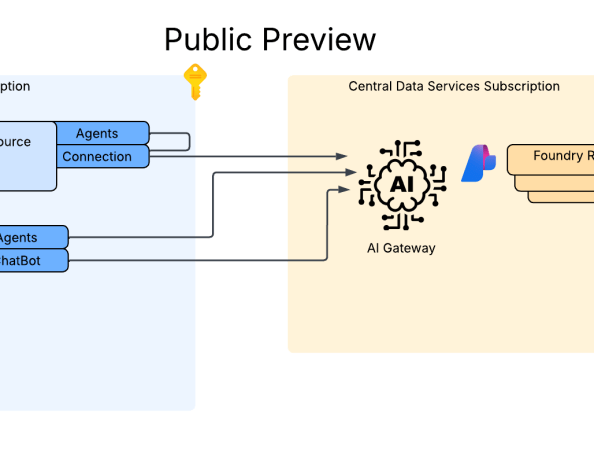
Today I’m going to continue my series on Microsoft Foundry by covering a really cool new feature that dropped into public preview recently. This new feature allows you to connect Foundry to a first or third-party AI Gateway (BYO AI Gateway is a more appropriate explanation of this feature). This AI Gateway could be API Management or it could be a third-party solution. Yes folks, this means agents build in Foundry Agent Service (which I will be referring to as Foundry-native agents) can be pushed through your AI Gateway where you can incorporate additional governance and visibility vs hitting models directly deployed in the same Foundry resource. Before I dive into the details, let me clear up some confusion that has been popping up in my customer base.
Microsoft Foundry Resources vs Microsoft Foundry Hubs (FKA AI Foundry Hubs FKA AI Studio Hubs)
In my last past post, I walked through some of the history of Foundry and how it got to where it is today. If you want the full gory details, read the post. For this post, I’m going to provide a very abridged version of that post. When I refer to a Foundry Resource (which I will also refer to as Foundry account and you’ll see the docs sometimes referred to as Foundry Projects) I’m referring to the new top-level Azure resource that sits under the Cognitive Services resource provider. This resource inherits the basic framework you’d see in a Cognitive Services account with additional capabilities to supports child logical containers called projects, which are largely used to support the Foundry Agent Service. This is what I refer to as Stage 3 for Foundry and should be the resource you create today for any use cases you would have historically built an Azure OpenAI Service resource or Foundry Hub resource.
Foundry Hubs, which I refer to as Stage 2 for Foundry, are top-level resources under the Machine Learning resource provider. The service was essentially a light overlay on top of AML (Azure Machine Learning) workspaces and came with all the complexity that AML came with. While Foundry Hubs support the Agent Service in preview, the product isn’t going to see any further development to my understanding. You shouldn’t be created new Foundry Hubs right now and you should be preparing migration to understand what you won’t get with the new Foundry resource (basically no Prompt Flow (going bye bye) and no Hugging Face models (yet)). You should instead be focusing on Foundry resources.
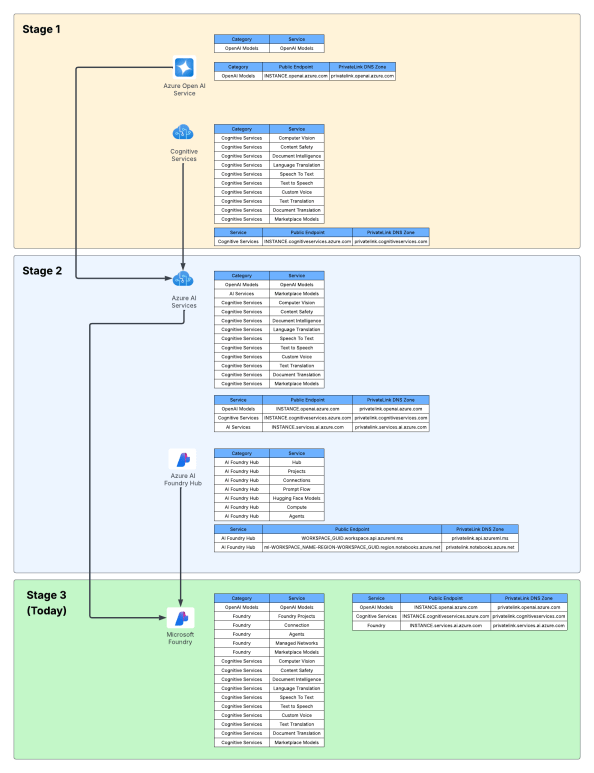
Awesome, we should be level set now that all the functionality I’m talking about is Stage 3 Foundry resource capabilities.
What’s an AI Gateway again?
Next you might be asking, “WTF is an AI Gateway”. Every vendor has an explanation, and since I work for Microsoft today, I’m gonna direct you to their overview. With my corporate duty fulfilled, I’ll give you the generic explanation. An AI Gateway is an architectural component that you place between an application or agent and the models they consume to establish governance, visibility, and operational improvements. Now you’re likely saying, “WTF Matt, that sounds like ivory tower shit.” To break it down even further, it’s simply a rebranded API Gateway with additional functionality and features catered around the challenges that get introduced when consuming AI models.
An AI Gateway typically provides some of the core features you see below.
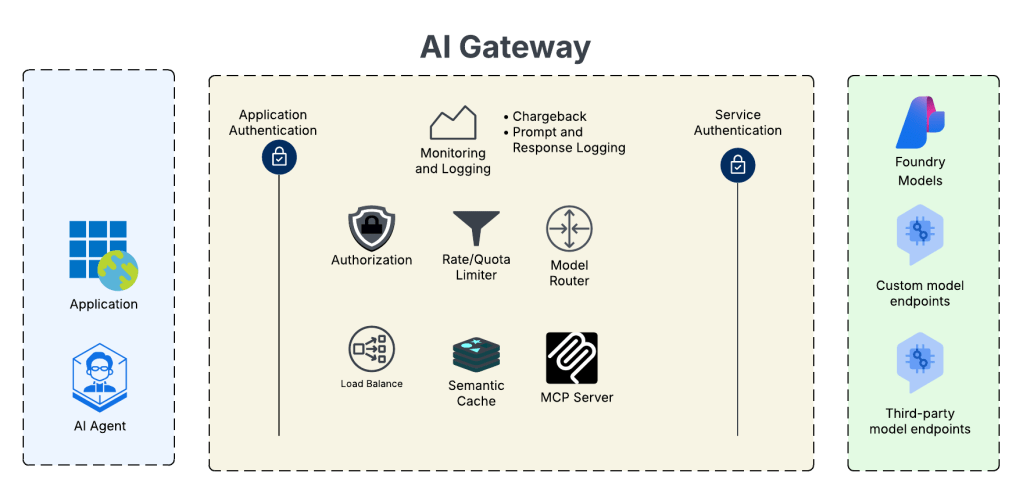
In the above image we see the AI Gateway sitting between the applications and agents and the models they want to use. By sitting it in between we can do a ton of cool stuff. This includes swapping authentication contexts, doing fine grained authorization, load balancing across multiple instances of a model to maximize TPM, caching responses to reduce costs and improve speeds, control how many tokens a specific app/agent can consume, routing requests to specific models based upon cost or speed, using the gateway as an MCP Server to front tools both internal and external to your environment, or getting more visibility into who is consuming what and how much they’re consuming for chargeback. As you can see, it does lots of very cool shit you’ll likely want and need to start offering models at a enterprise level akin to other centralized services you may be providing like authentication services, DNS, and the like (yeah it will be that core to your BUs moving forwared).
The problem this feature solves
Historically, the Foundry Agent Service was built such that Foundry-native agents could only consume models in the same Foundry resource (yeah yeah, I’m aware of the external OpenAI Service connection, but that didn’t solve this problem and wasn’t build to solve it). This presented an issue when an enterprise wanted to insert an AI Gateway between these agents and the AI Gateway. For agents running outside Foundry on-premises, in AWS, or in a customer-deployed AKS (Azure Kubernetes Service) cluster, this wasn’t a problem, but that scenario forces you to manage the compute and (today at least) you don’t get access to some of the Foundry agent tools such as Grounding For Bing Search. The managed compute and access to these tools has made the Foundry Agent Service appealing, but the lack of support for inserting an AI Gateway into the flow was one of the many (and oh boy there are others which I won’t get into today) limitations that pushed customers the external agent direction vs Foundry-native agents.
What’s a bit confusing is Microsoft introduced a feature called AI Gateway in Microsoft Foundry back at Ignite in November 2025. I like to refer to this as a (kinda) “managed AI Gateway”. I don’t have a ton of data points on it, because I’ve only played with it a small bit and none of my customer base is using it. While the pitches may read the same, the architecture differs. The managed AI Gateway has a tighter coupling with the Foundry resource vs the BYO AI Gateway feature. A good example is the Foundry resource and APIM it provisions (it uses this as the AI Gateway) need to be in the same subscription. I’m sure the managed AI Gateway offerings has its use cases, but I like the more decoupled approach of the BYO AI Gateway. This is a feature to watch though, when it becomes a more “managed” (aka APIM doesn’t get deployed to customer sub) that you can swap on with a toggle and get some of the basic controls (like token limits via agent or project quotas) it will become very appealing to customers with basic requirements for a small (hopefully) up-charge.
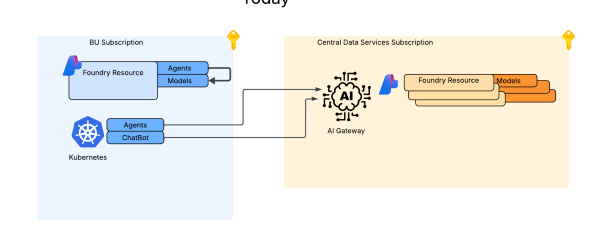
I’m a fan of the more decoupled approach the BYO AI Gateway takes because I can completely separate the Foundry resources which hold the agents from the Foundry resources that have model deployments. These Foundry resources can be placed in subscriptions subscriptions to create separate security and policy blast radius and be managed by completely separate teams. For me, this makes a lot more sense because I’m a huge believer in generative AI models becomes a core service Central IT needs to provide to the enterprise. With this pattern you can establish that level of separation and centralized control.
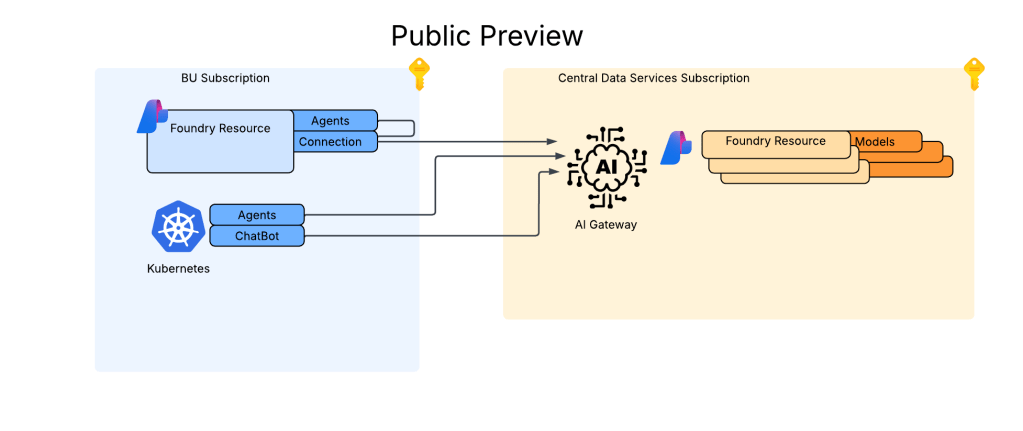
In the image above you can see I now have my Foundry resource deployments for my BUs which aren’t deployed with any model deployments. All models are deployed to my Central IT-managed Foundry resources which sit behind an AI Gateway. This gives me a TON of power to insert the governance, visibility, and operational improvements I mentioned above.
Another added benefit of the BYO AI Gateway is I’m not limited to API Management like I am with the managed AI Gateway offering. I can use whatever product I want to use as an AI Gateway like a Kong, LiteLLM, Apigee, or even custom built gateway.
Wrapping It Up
I was originally going to make one super mega post which had this overview and all the in-the-weeds stuff. I figured that would simply be too much (for you and me) so instead I’ll be breaking this into two posts. This post got you familiar with why this feature is so important to complex enterprises. You should be planning your larger strategy to consider this feature if you are proof-of-concepting and designing for eventual support of the Foundry Agent Service.
In my next post I’m going to dive deep in the weeds walking through how this thing works behind the scenes and how to set it up. Many painful nights were spent getting this thing spun up when it was in Private Preview and the documentation for the feature is still a bit scarce, so I’m hoping that deep dive will get you mucking with this feature sooner rather than later. Expect that post later this week (a little added motivation for me to get it done!).
Thanks folks!
 Journey Of The Geek